





Every high-performing location page follows one rule: it needs a genuinely unique page per service area, with crawlable name, address, and phone number, an above-the-fold call-to-action, and LocalBusiness JSON-LD schema baked in. WWS – Web Development + SEO has built this exact structure for Chicago-area contractors and service businesses for years, and it holds up whether you serve one neighborhood or twenty. What follows is the audit checklist and build sequence to do it right.
TL;DR:
- Effective location pages must include a unique, specific intro, a crawlable address, and a local testimonial to stand out in Google rankings.
- Consistent URL patterns and optimized metadata, including service-oriented titles and localized descriptions, are essential for proper indexing and ranking signals.
- Creating three sentences of exclusive, detailed content per location prevents Google’s thin content penalties and improves visitor engagement.
- Proper schema implementation, original photos, and local reviews build trust and improve local search visibility significantly.
- Building multiple location pages requires mandatory fields to ensure uniqueness and prevent doorway-page issues, with higher-volume markets needing more in-depth content.
Table of Contents
- What Makes a Local Landing Page Design Actually Work?
- URL, Metadata, Headings, and Canonical Strategy
- Writing Hyper-Local Content That Passes Google’s Helpful-Content Test
- Trust Signals: Schema, Maps, Photos, and Reviews
- Designing the Page for Conversion, Not Just Traffic
- Mobile Speed and Core Web Vitals for Local Pages
- Local Social Proof That Actually Reads as Local
- Scaling Location Pages Without Losing Indexability
- What a WWS-Built Location Page Looks Like in Practice
- When Should You Build These Pages Yourself vs. Hire an Agency?
- Let WWS Build Your Local Landing Pages the Right Way
- Sources
- FAQ
What Makes a Local Landing Page Design Actually Work?
A location page earns rankings and calls when it passes two tests at once: Google’s helpful-content bar and a real visitor’s five-second scan. Miss either one and the page becomes what search engines call a doorway page, thin, templated, and unranked.
Here’s a scannable audit you can run on any existing page or hand to a designer as a build spec.
- Address visible in the first viewport. If a visitor has to scroll to find your street address or phone number, that’s a fail.
- Unique intro of at least three sentences tied specifically to that location, not a swapped city name in a generic paragraph.
- Click-to-call button that works on mobile with a single tap, not a phone number buried in body text.
- One primary CTA, repeated no more than twice on the page (top and bottom), never competing with three different offers.
- LocalBusiness JSON-LD present and validated, not just a mention of the address in plain text.
- Embedded map with a correct pin, not a generic city-center marker.
- At least one local testimonial or case reference specific to that service area.
- Page load under 2.5 seconds for Largest Contentful Paint on a mid-range mobile connection.
- No verbatim duplication above roughly 30% with your other location pages, a threshold Fokal’s guidance on local landing pages uses to flag risk before Google does.
Run this list against three of your existing pages before you build a fourth. Most businesses find the failure isn’t design, it’s the intro paragraph doing the same job on every page with a different city name dropped in.
URL, Metadata, Headings, and Canonical Strategy
Search engines read your URL structure as a signal of how your business is organized geographically. Get this wrong early and you’ll be untangling redirects for years.
- Pick one URL pattern and never mix it. The two accepted structures are
/service/location/and/locations/city/, a pattern Web Tonic’s multi-location SEO guide confirms holds up for internal linking and Google Business Profile connections. Pick whichever matches how you think about your business (service-first or geography-first) and apply it to every page. - Write the title tag as service plus location plus differentiator. “Roof Repair in Naperville, IL, Same-Day Estimates” beats “Naperville Roofing” because it answers what and where and why-you.
- Match the meta description to search intent, roughly 155 characters naming the service, the neighborhood, and a call to action like “Get a free quote.”
- Place your H1 as service plus location, exactly once, above the fold, matching the title tag’s core phrase without repeating it word for word.
- Set canonical tags to self-reference each location page. Never canonicalize a city page back to your homepage, that tells Google the page isn’t worth indexing on its own.
- Add every location page to your XML sitemap and confirm it returns a 200 status, not a redirect chain.
Check indexability with a quick site search (site:yourdomain.com "location name") a week after publishing. If the page doesn’t appear, check for a stray noindex tag or a canonical pointing elsewhere before you assume the content is the problem.
Writing Hyper-Local Content That Passes Google’s Helpful-Content Test
The single biggest reason location pages fail isn’t design, it’s duplicate-feeling copy. Search Engine Journal’s reporting on ranking for multiple locations warns that swapping only a city name across otherwise identical pages reads as thin content to Google, and it reads as lazy to a visitor who’s comparing you against a competitor down the street.
Apply the three-sentence rule: every location page needs at least three sentences that could not be copied onto any other page in your site without becoming false. “We’ve repaired roofs in Aurora since 2019, including the storm damage surge after the 2024 hailstorms that hit the west suburbs hard” passes. “We provide quality roofing services in Aurora” does not.
Break each page into content zones and customize deliberately:
- Intro paragraph: neighborhood name, a specific landmark or corridor, and how long you’ve served the area.
- Services at this location: which services actually get requested most in that ZIP code, not your full master list.
- Team note: which technician or crew lead typically covers that territory.
- Local case reference: one real job, described in enough detail to feel specific.
- FAQs: questions unique to that market (permit rules, HOA quirks, seasonal timing).
You can safely centralize hours, phone routing, and review widgets through a shared data feed. The visible narrative copy is what needs to stay unique, not the underlying business data.
Pro Tip: Pull three location-specific details from your own job notes or invoices before you write a single sentence of copy. A technician’s note that says “tight alley access off the north side” is a better hook than anything you’ll invent at a desk.
Trust Signals: Schema, Maps, Photos, and Reviews
Structured data is the part of the page users never see and search engines read first. A properly implemented LocalBusiness JSON-LD block should include the business name, a full PostalAddress, telephone number, openingHours, and geo coordinates, ideally to five decimal places for genuine clarity, according to guidance from schema.org’s validator documentation. Run every page through the validator before publishing, not after a client complains rankings haven’t moved.
Beyond schema, four elements build the visitor’s confidence:
- An embedded map with an accurate pin, plus a short line of human directions (“entrance is on the alley side, not the storefront”).
- Original photography: exterior shot, interior or work-in-progress shot, a team photo, and at least one recent completed job specific to that area.
- Descriptive alt text on every image tied to the location, not generic filenames.
- Location-specific reviews, rotated or filtered so the same three testimonials don’t appear on every page in your network.
Ahrefs’ analysis of location page elements identifies conversion elements, maps, original photos, and social proof as the core drivers of local page performance, and Wharton’s research on social proof as a trust signal backs why humanized proof, real names, real neighborhoods, moves visitors from browsing to calling faster than generic claims do.
Designing the Page for Conversion, Not Just Traffic
Above-the-fold layout decides whether a visitor stays or bounces, and Optimizely’s definition of above-the-fold content makes the case plainly: local searchers arrive with time-sensitive intent and abandon pages that make them hunt for contact info.
For mobile, put the H1, a one-line value proposition, a click-to-call button, and your primary CTA all within the first screen, no scrolling required. Desktop has more room, but the same four elements should still sit above the fold.

CTA copy should be direct and local. “Call Now” outperforms vague phrasing, and localized variants work even better: “Get a Quote in Skokie” or “Book Your Naperville Inspection.” Generic buttons like “Submit” or “Learn More” waste the highest-intent real estate on the page.
Form design follows one rule: ask only for what you need to make the first call. Name, phone, and ZIP code are enough for step one. Save service details, budget range, or timeline questions for a second step after you already have contact info, a pattern known as progressive profiling.
- Keep the form to three fields maximum on the first screen.
- Place your strongest review or trust badge directly beside or below the CTA, not buried in a footer.
- Never place a phone number that isn’t tap-to-call on mobile.
Mobile Speed and Core Web Vitals for Local Pages
Local searches happen overwhelmingly on phones, often from a job site, a parking lot, or a kitchen table, which makes speed a conversion issue as much as a ranking one.
- Track Largest Contentful Paint (LCP). Keep it under 2.5 seconds; anything slower and mobile visitors start abandoning before your CTA even renders.
- Keep Cumulative Layout Shift (CLS) under 0.1. A button that jumps as ads or widgets load causes mis-taps and lost trust.
- Watch Interaction to Next Paint (INP). Slow response to a tap on your call button undoes everything else you built.
- Triage the usual culprits: compress hero images, defer third-party review widgets and chat scripts until after initial load, and inline your critical CSS instead of loading a full stylesheet upfront.
- Design mobile UX around the thumb: larger click-to-call buttons, a trimmed header, and tap targets at least 44 pixels wide.
- Check both lab and field data. Google’s PageSpeed Insights gives you a lab score instantly, but the field data tab, real user results, tells you what’s actually happening for visitors on average connections.
Local Social Proof That Actually Reads as Local
Generic five-star badges don’t move skeptical local searchers the way specific, attributable proof does. A testimonial that reads “Maria, Bolingbrook, kitchen remodel” carries more weight than an unattributed quote sitting in a rotating carousel.
Structure your proof collection around three sources:
- Testimonials with name, neighborhood, and service type, gathered right after job completion while details are fresh.
- Project photo galleries with captions naming the street, subdivision, or neighborhood, not just “recent project.”
- Local partnerships and sponsorships, a Little League team, a chamber of commerce membership, a staff bio noting someone grew up two towns over.
Avoid running the identical review set across every location page. Filter your review platform by location tag, or rotate testimonials on a schedule so a visitor comparing your Elgin page to your Wheaton page doesn’t spot the same three quotes twice.
Scaling Location Pages Without Losing Indexability
Building ten location pages at once tempts a shortcut: a template with the city name as the only variable. That shortcut is exactly what triggers doorway-page suppression.
Build a CMS data model that forces uniqueness by making certain fields mandatory before a page can publish, a local case reference, a team note, at least three location-specific FAQs. If those fields are empty, the page doesn’t go live.
- Use a locations index page linking out to every service area, and link back from each location page to that index.
- Cross-link service pages to relevant location pages, and location pages to two or three geographically nearby locations.
- Prioritize by revenue and traffic potential first. Build your highest-value markets at 800-plus words, and treat smaller secondary markets with a leaner 500-word target, a tiered approach Web Tonic’s scaling framework recommends for growing multi-location sites without burning out your content team.
- Before publishing, confirm schema validates, the sitemap includes the new URL, your Google Business Profile links to the specific page (not the homepage), and call tracking is live.
If you want a broader framework for the citation and ranking side of this work, our local SEO best practices guide walks through the ranking signals that support everything a location page does on-page.
What a WWS-Built Location Page Looks Like in Practice
WWS – Web Development + SEO builds these pages in-house, meaning the same certified team handles design, copywriting, schema, and tracking setup rather than routing work through outside contractors. Every team member holds active Google and Meta certifications, and the checklist above reflects what actually gets audited before a page ships to a client.
A typical location page build runs through discovery (service area, competitors, existing GBP data), unique content drafting, schema implementation, and a mobile speed pass, usually landing in the two-to-four-week range depending on how many locations are in scope.
- Confirm NAP consistency between the page, your GBP listing, and any citation directories.
- Verify the page passes the schema validator before launch, not after.
- Request a mobile PageSpeed test on the live URL, not a staging environment.
Pro Tip: Ask any agency you’re vetting to show you a live client location page and run it through the schema validator on the call. If they hesitate, that’s your answer.
When Should You Build These Pages Yourself vs. Hire an Agency?
Building location pages in-house makes sense when you’re managing two or three service areas and already have a developer or a comfortable grip on your CMS. The content work, gathering local details, writing unique intros, is the real bottleneck, not the code.
Past four or five locations, the math changes. Maintaining unique copy, validated schema, and speed benchmarks across a dozen pages becomes a part-time job in itself, and most in-house teams don’t have the bandwidth to keep it current. That’s the trade-off: DIY buys you control and lower upfront cost, an agency buys you speed and consistent measurement across every page.
If you decide to bring in help, ask for a sample audit against the checklist above before signing anything. A team that can’t walk through NAP consistency and Core Web Vitals in the first conversation probably can’t execute on them either.
— Online Marketing Experts
Let WWS Build Your Local Landing Pages the Right Way
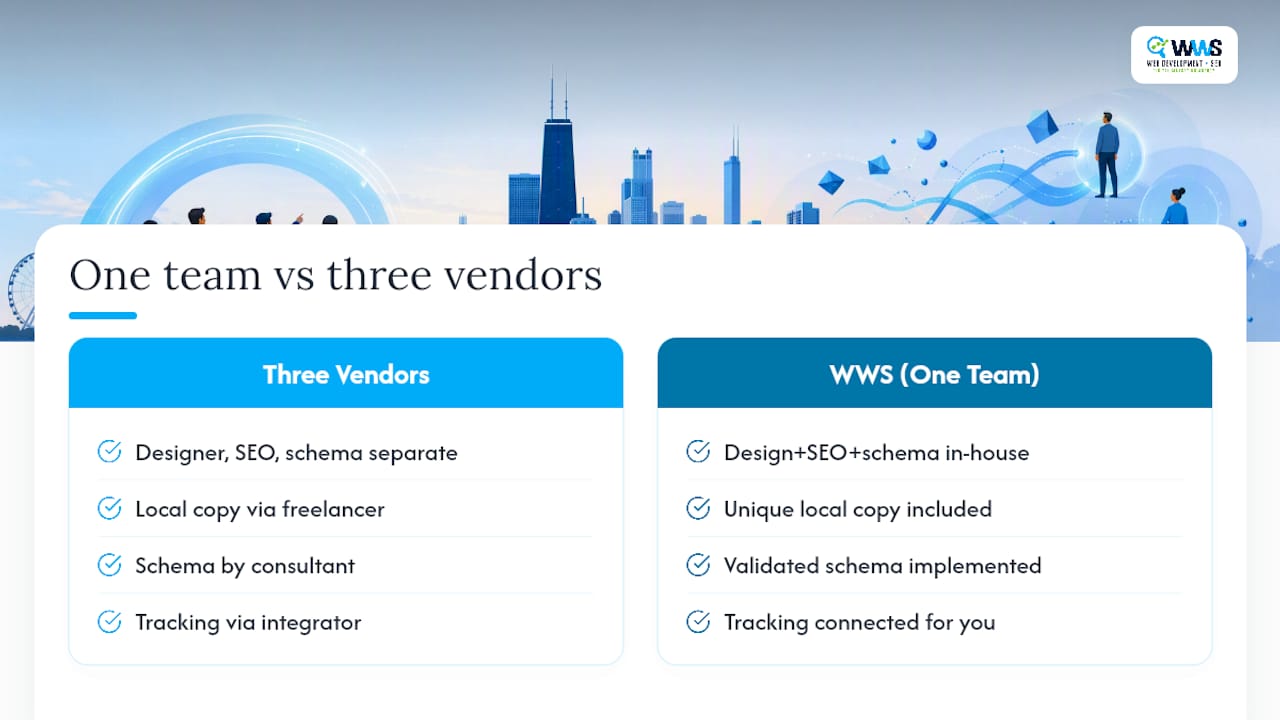
WWS – Web Development + SEO is the in-house alternative to piecing together a designer, an SEO freelancer, and a schema consultant separately, one certified team builds your location pages, writes the unique local copy, implements validated schema, and connects tracking, all under one roof instead of three invoices.

For Chicago-area contractors, restaurants, and service businesses, that means a location page that’s ready to rank and ready to convert on day one, not a template waiting for a second round of fixes. Our website design services cover exactly the build process outlined above, and our local SEO services handle the ongoing optimization once your pages are live. With over 200 client partnerships across Des Plaines and the greater Chicago Area, we’ve run this checklist enough times to know where pages usually break.
Ready to see where your current pages stand? Request a free audit from WWS and get a location-by-location breakdown against this exact checklist, then decide what to fix first.
Sources
Run your own pages through schema.org’s validator before launch, and benchmark speed with Google’s PageSpeed Insights for both lab and field data. For structural guidance beyond this guide, Neil Patel’s breakdown of local landing page structure and Ahrefs’ six elements of local visibility are both worth bookmarking. Our own local SEO checklist pairs well with the audit list above, and the JSON-LD schema generator from Baby Love Growth speeds up the structured-data step considerably.
FAQ
How much does it cost to design a landing page?
A single custom local landing page typically runs a few hundred to a few thousand dollars depending on design complexity, schema implementation, and whether copy is written from scratch; agencies building multiple location pages under one contract often price per page or as a bundled project.
How much should a landing page cost from a freelancer?
Freelance pricing varies widely based on experience and scope, but a page missing schema, unique local copy, or speed optimization is underpriced no matter what it costs, those elements are what make the page actually rank and convert.
Can I do local SEO myself?
Yes, especially with one or two locations. The main challenge is bandwidth: writing genuinely unique content, validating schema, and monitoring Core Web Vitals across multiple pages becomes time-consuming as your location count grows, which is when many businesses bring in a team like WWS – Web Development + SEO to manage it.
How many location pages should I build first?
Start with the locations already generating Google Business Profile traffic or representing your highest revenue potential, rather than building every service area at once.
Do I need a different page for every neighborhood I serve?
Only if each neighborhood has enough distinct local detail, case history, or search volume to support a genuinely unique page; thin variations on the same content risk doorway-page penalties instead of rankings.