





A technical SEO audit examines everything that affects whether Google can crawl, index, and rank your site: crawlability, site speed, mobile behavior, structured data, and security. Start today by running a full site crawl and opening Google Search Console side by side. That first pass will surface a list of issues you can sort by severity, then work down one fix at a time.
TL;DR:
- Indexing blockers like noindex tags and robots.txt errors must be fixed first, as they prevent crawling and ranking.
- Duplicate content, canonicalization issues, and sitemap errors also impact indexability and should be prioritized accordingly.
- Core Web Vitals, especially on high-traffic pages, are crucial for performance improvements and ranking boosts over time.
- Verifying each fix with re-crawling and Search Console data ensures improvements are effective and long-lasting.
- Most small business sites face common issues such as leftover noindex tags or outdated sitemaps, which are typically straightforward to resolve.
Table of Contents
- What Does a Technical SEO Audit Actually Cover?
- Which Tools Do You Actually Need for an Audit?
- The Step-by-Step Technical SEO Audit Workflow
- How Should You Prioritize Fixes and Track Results?
- How Do You Confirm a Fix Actually Worked?
- When Should You Bring in a Developer or Agency?
- What Does a Real Technical Audit Report Look Like?
- How Do You Explain Audit Results to Non-Technical Stakeholders?
- What Mistakes Derail Most Technical SEO Audits?
- Publisher Perspective: What We See Break on Small Business Sites
- How WWS – Web Development + SEO Can Run Your Technical Audit
- Useful Resources for Ongoing Technical SEO Work
- Sources
- FAQ
What Does a Technical SEO Audit Actually Cover?
Every technical SEO audit checklist circles the same core territory, even if the tools and terminology differ from one agency to the next. Working through these eight areas in order gives you full coverage without missing the checks that most often tank rankings.
- Crawlability and indexability — robots.txt directives, XML sitemap accuracy, and Google’s index coverage report
- Site architecture and internal linking — click depth, orphan pages, and how link equity flows between templates
- Duplicate content and canonicalization — near-identical pages fighting each other for the same query
- Performance and Core Web Vitals — load speed, interactivity, and visual stability under real conditions
- Mobile usability — responsive layouts, tap target sizing, and viewport configuration
- Structured data and schema validation — markup accuracy against Schema standards
- HTTPS, redirects, and status codes — security signals plus server log review for crawl waste
- AI and agent readability — clean HTML, accessible content, and accurate schema for AI retrieval
That last item is newer than the rest but no longer optional. As AI search tools crawl and summarize sites the way Google once did exclusively, the same clean markup that helps traditional rankings now determines whether an AI engine can parse your content at all.
Which Tools Do You Actually Need for an Audit?
You don’t need a dozen subscriptions to run a competent technical SEO audit.
- Google Search Console: free, and non-negotiable. Index coverage, URL Inspection, and the Core Web Vitals report all live here.
- Screaming Frog or a cloud-based site-audit crawler: for pulling every URL, status code, and metadata tag across the full site in one pass.
- PageSpeed Insights and Lighthouse: lab data for diagnosing why a page is slow, paired with CrUX field data for how real visitors actually experience it.
- Rich Results Test: confirms your structured data is eligible for enhanced search features, cross-checked against Schema.
- Server log analysis: reveals which pages Googlebot actually visits, useful once a site passes a few thousand URLs.
- Enterprise or continuous monitoring platforms: worth the cost once you’re managing multiple domains or a site that changes daily.
The Step-by-Step Technical SEO Audit Workflow
An audit checklist tells you what to check. A workflow tells you what to do about it, in what order, and how to prove the fix worked. Here’s the six-step process that turns a pile of crawl data into an actual improvement in rankings.
- Set scope. Decide whether you’re auditing the whole domain or a specific template, subfolder, or set of high-value landing pages. Name an owner responsible for tracking fixes to completion.
- Run the crawl and pull data. Combine a full-site crawl with Google Search Console exports, CrUX field metrics, and Lighthouse lab reports so you have both the “what” and the “why” for every issue.
- Diagnose common failure modes. Look for robots.txt lines accidentally blocking whole directories, redirect chains three or four hops deep, canonical tags pointing at the wrong URL, and JavaScript-rendered content that never shows up in the rendered HTML Google actually sees.
- Prioritize by impact times effort. A single misconfigured noindex tag on your top landing page outranks a dozen minor metadata tweaks. Treat anything blocking indexing as urgent, always.
- Implement fixes. Write clear developer handoff notes: exact file, exact line, expected before/after behavior. Test structural or template-level changes in staging before pushing live.
- Verify. Re-crawl the site, run URL Inspection on the specific pages you fixed, and watch field metrics over the following weeks to confirm the change stuck.
Pro Tip: Keep a running spreadsheet of every issue found, its priority score, who owns the fix, and the date it was verified. Six months later, that log is the difference between guessing whether your audit worked and proving it did.
Skipping the diagnosis step is the single most common shortcut that backfires. Site owners often jump straight from “here’s a list of 200 errors” to fixing whatever looks easiest, instead of asking which errors are actually stopping pages from ranking at all.
How Should You Prioritize Fixes and Track Results?
Not every item on a crawl report deserves the same urgency. A sensible priority order runs from indexing blockers down to cosmetic details:
- Indexing blockers (noindex tags, robots.txt errors, broken canonical chains) come first, always.
- Duplicate content and index bloat follow, since they dilute ranking signals across near-identical pages.
- Core Web Vitals failures come next, particularly on high-traffic templates.
- Mobile usability issues and outdated metadata round out the list.
Google’s own guidance frames this as “indexing first”: fix anything preventing crawl or indexing before touching performance or copy. Track progress with indexed page count, organic clicks and impressions, sessions on repaired landing pages, the Core Web Vitals distribution in Search Console, and the trend line on crawl errors.
A realistic roadmap looks like this: by day 30, indexing blockers and canonical errors are resolved. By day 90, Core Web Vitals scores show measurable improvement on your top templates. By day 180, organic sessions on the pages you touched should be trending up against their pre-audit baseline.
How Do You Confirm a Fix Actually Worked?
Marking an issue “resolved” in a spreadsheet means nothing until you’ve proven it in the data. Three checks confirm a fix held:
- Re-run the crawl and compare it directly against the previous report to confirm the specific error is gone, not just reduced.
- Use URL Inspection in Search Console on each fixed page to check Google’s own rendered version and indexing status.
- Watch Core Web Vitals field data over two to four weeks, since lab scores can look great while real users still experience a slow page.
Set up automated alerts for sudden spikes in 404s or drops in index coverage. For cadence, run full audits quarterly on stable sites, monthly on sites that publish or change frequently, and immediately after any major platform migration or redesign.
When Should You Bring in a Developer or Agency?
Some fixes are a five-minute edit. Others, like server configuration changes, template-level performance rewrites, JavaScript rendering fixes, or canonicalization logic baked into your CMS, need developer hands. WWS – Web Development + SEO handles this in-house as a certified Google and Meta Partner backed by over 200 client partnerships. A scoped engagement should spell out deliverables, a timeline, and a verification step before anyone calls the work done.
What Does a Real Technical Audit Report Look Like?
A useful technical SEO audit report never opens with a raw list of 400 errors dumped from a crawler. It opens with a summary: how many URLs were crawled, how many critical issues were found, and what the top three priorities are. Everything after that supports those priorities with evidence.
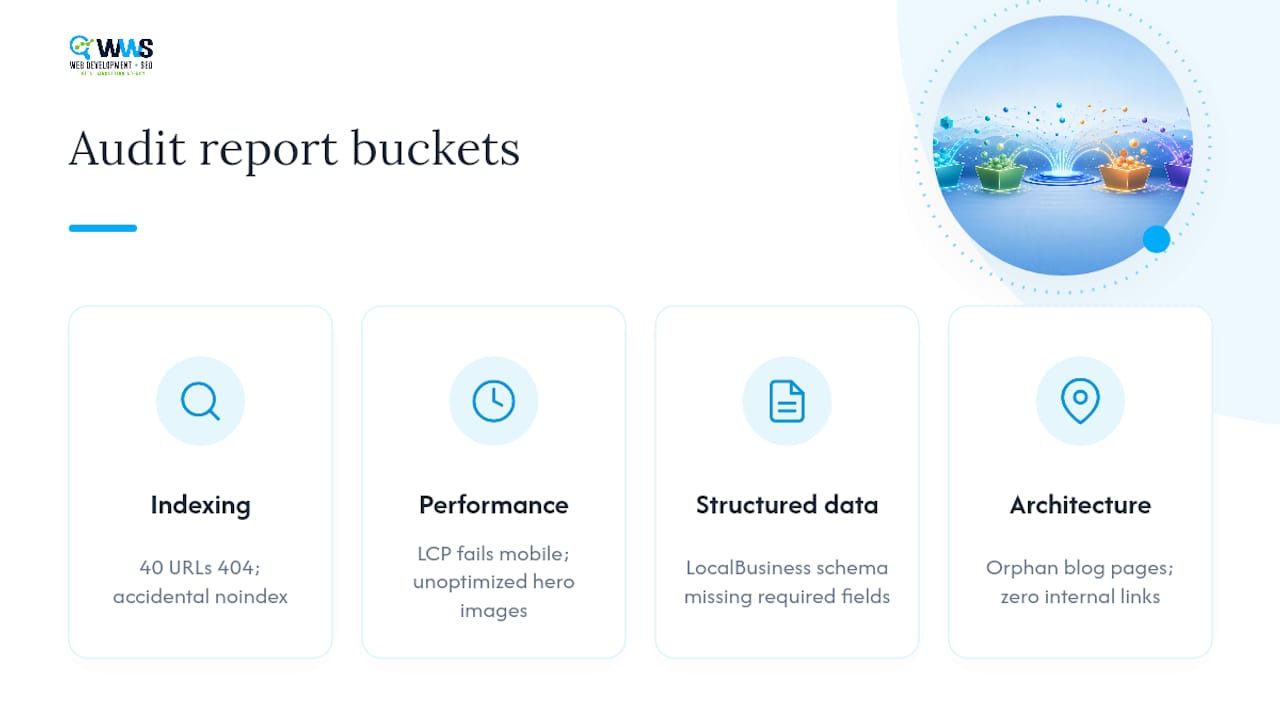
A typical report for a mid-size local service site might group findings into four buckets. The first covers indexing: maybe 40 URLs return a 404, a dozen pages carry an accidental noindex tag left over from a staging environment, and the sitemap still references pages deleted eight months ago. The second covers performance: Largest Contentful Paint failing on mobile for the homepage and top service pages, usually traced to unoptimized hero images or a render-blocking script. The third covers structured data: LocalBusiness schema present but missing required fields, so it fails validation in the Rich Results Test. The fourth covers architecture: orphan blog pages with zero internal links pointing at them, invisible to both crawlers and readers browsing the site.
Each finding in a solid report carries three things: the specific URL or template affected, the exact technical cause, and a recommended fix with priority level attached. That structure is what separates an audit a developer can act on from a wall of red flags that just creates anxiety without direction.
Sample reports built this way tend to run 15 to 30 pages for a small business site, weighted heavily toward the issues doing the most ranking damage rather than trying to document every minor warning a crawler surfaces.
How Do You Explain Audit Results to Non-Technical Stakeholders?
A business owner doesn’t care that your canonical tags are misconfigured. They care that their phone isn’t ringing as much as it used to, and they want to know what fixing that costs and how long it takes. Translate every technical finding into that language before the conversation starts.
Instead of “the site has render-blocking JavaScript delaying Largest Contentful Paint by 2.1 seconds,” say “your homepage takes noticeably longer to load on phones than it should, and that’s likely costing you visitors before the page even finishes appearing.” Instead of “43 URLs return 404 status codes,” say “43 pages that used to work now show an error, which means anyone clicking an old link, an old bookmark, or a Google result pointing there hits a dead end.”
Pair each translated finding with a business consequence and a rough timeline for the fix. A simple three-column format works well in a stakeholder-facing summary: the issue in plain language, why it matters to the business, and when it gets resolved. Save the technical detail (the specific line in robots.txt, the exact redirect chain) for the developer handoff document, not the meeting with the owner.
What Mistakes Derail Most Technical SEO Audits?
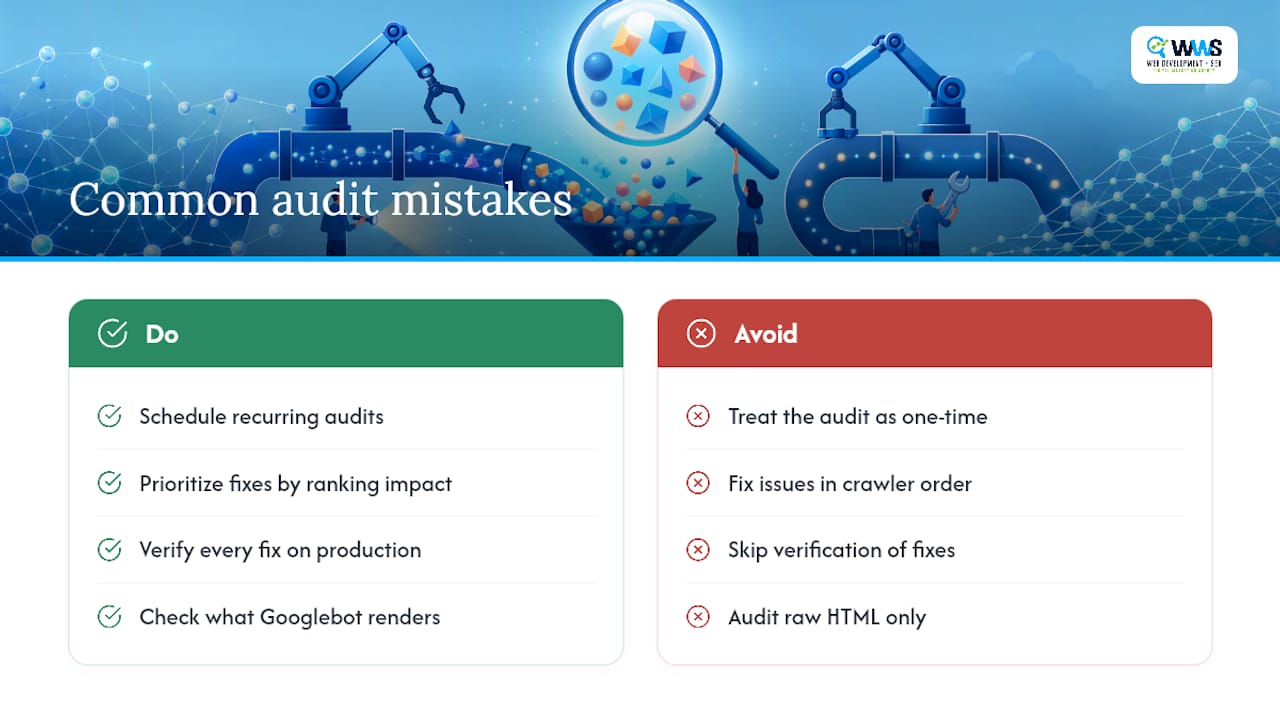
The most common pitfall is treating the audit as a one-time event instead of a cycle. A site passes its audit in January, nobody looks again until the following January, and by then a plugin update or CMS migration has quietly created 200 duplicate URLs nobody noticed.
A second frequent mistake is fixing issues in whatever order the crawler happens to list them, rather than by actual ranking impact. Teams spend a week cleaning up minor title tag duplication while a robots.txt line is blocking an entire product category from being indexed at all.
A third pitfall: skipping the verification step entirely. A developer pushes a fix, everyone assumes it worked, and three months later the same issue shows up in the next audit because the change never actually deployed to production or got reverted during a later update.
A fourth, more subtle problem is auditing rendered HTML instead of what Googlebot actually sees. Many modern sites rely on JavaScript frameworks that render content client-side, and a crawler checking the raw source will miss content that never appears until a script runs, leading auditors to falsely flag pages as thin or empty.
Avoiding these traps mostly comes down to discipline: schedule recurring audits, prioritize by impact before touching anything, verify every fix against real data, and always check what a crawler actually renders versus what a script promises to render later.
Publisher Perspective: What We See Break on Small Business Sites
The recurring pattern isn’t exotic. It’s an accidental noindex tag left from a redesign, plugin-generated duplicate pages, or a sitemap nobody updated after a CMS switch. The fix is rarely glamorous. It’s usually just someone finally checking.
— Online Marketing Experts
How WWS – Web Development + SEO Can Run Your Technical Audit
WWS – Web Development + SEO is the alternative to piecing together a DIY crawl report and hoping you interpreted it correctly. As a certified Google and Meta Partner serving the Des Plaines and greater Chicago area, our in-house team turns a raw technical audit into a prioritized action list, developer-level fixes, and ongoing monitored validation, without handing any piece of the work to an outside contractor.

You get an outcome, not just a report: indexing blockers cleared, templates stabilized, and Core Web Vitals improvements verified with real field data. With over 200 client partnerships behind us, we’ve seen the same duplicate-page and noindex mistakes on enough local business sites to know exactly where to look first. If your site needs a proper technical SEO review rather than another generic crawl export, request a scoped audit and we’ll show you the priority list before we ever touch code.
Useful Resources for Ongoing Technical SEO Work
- Schema
- Semrush’s step-by-step technical SEO audit guide
- DebugBear’s Core Web Vitals and technical checklist
- Internal linking strategies that support crawl efficiency
Sources
- How to Perform a Technical SEO Audit: A 10-Step Guide (2024)
- The technical SEO checklist for search engines and AI search
- Technical SEO Checklist: The Complete Guide For 2026 | DebugBear
- Schema
FAQ
What Is a Technical SEO Audit?
It’s a systematic review of the technical factors that affect whether a site can be crawled, indexed, and ranked, including crawlability, site speed, mobile usability, and structured data.
How Long Does a Full Technical SEO Audit Take?
A small business site typically takes a few days to a week for a thorough audit, while larger or more complex sites can take several weeks depending on how many templates and URLs need review.
How Often Should You Run a Technical SEO Audit?
Run a full audit quarterly on stable sites, monthly on sites with frequent content or structural changes, and immediately after any major redesign or migration.
What’s the First Thing to Fix After an Audit?
Fix anything blocking crawling or indexing first, such as robots.txt errors, accidental noindex tags, or broken canonical tags, before addressing performance or metadata issues.
Can Small Businesses Do a Technical SEO Audit Themselves?
Basic checks using Google Search Console and a free crawler are doable in-house, but developer-level fixes like server configuration or template rendering issues usually need a specialist, which is where an agency like WWS – Web Development + SEO fits in.