





Service page SEO means building a single page around one commercial-intent keyword until it ranks and converts the traffic it earns. The single best first step: pick one target keyword and one search intent, then rebuild the page so it is the most complete, most trustworthy answer to that exact query. Everything else, from schema to CTA placement, follows from that decision.
Two numbers back this up. Industry guides consistently recommend a service page carry several hundred words of unique, job-level detail rather than generic brochure copy. And a well-built page follows a repeatable structure: service definition, process, proof, and a clear call-to-action.
Before touching a word of copy, confirm the page has:
- One primary keyword tied to a single, clear search intent
- A hero section that names the service, the audience, and the next step
- At least one proof element (review, case study, or credential) above the fold or close to it
- A single dominant call-to-action, not three competing ones
Pro Tip: If your service page tries to rank for “plumber,” “emergency plumbing,” and “drain cleaning” all at once, it will likely rank poorly for all three. Split it into three focused pages instead.
Key Takeaways
Service page SEO succeeds when one focused keyword, a complete anatomy of scope-process-proof-CTA, and fast mobile performance work together to turn search traffic into qualified leads.
| Point | Details |
|---|---|
| Pick one keyword | Choose a single commercial-intent keyword with realistic difficulty rather than splitting focus across several. |
| Build the full anatomy | Include scope, process, proof, and CTA blocks so the page both ranks and converts. |
| Add specific schema | Use Service and the most specific LocalBusiness subtype available, plus honest FAQPage markup. |
| Fix mobile friction first | Prioritize Core Web Vitals and one-click contact forms since mobile traffic dominates most local searches. |
| Get expert help when stuck | WWS – Web Development + SEO audits and rebuilds service pages in-house as a certified Google and Meta Partner. |
Table of Contents
- Service Page SEO Starts With the Right Page Anatomy
- How to Map Keywords and Intent to One Service Page
- On-Page SEO Checklist: Title, Headings, URL, and Schema
- Technical and Mobile Factors That Affect Rankings
- Turning Traffic Into Leads: Proof, Pricing, and Links
- Service Area Pages: When They Help and When They Hurt
- How a Certified Local Agency Approaches Service Page Audits
- Get a Service Page Built to Rank and Convert
- Sources
- FAQ
Service Page SEO Starts With the Right Page Anatomy
A service page has one job: to convince a specific searcher, in seconds, that this business solves their exact problem. Every block on the page either builds that case or gets in the way.
Start with the hero. Your H1 should state the service and, ideally, the audience or location it serves, with a visible CTA above the fold. “Kitchen Remodeling for Chicago Homeowners” tells a visitor more in five words than “Our Services” ever will.
Below that, lay out the page in this order:
- Service scope — what’s included, who it’s for, and what’s explicitly excluded. Ambiguity here creates unqualified leads.
- Process — a step-by-step walkthrough of what happens after someone contacts you. Timelines reduce anxiety and phone-tag.
- Proof — testimonials, case studies, licenses, or certifications placed where a skeptical visitor would look for reassurance.
- Pricing guidance — even a range or “starting from” figure filters out mismatched leads before they ever call.
- FAQ and contact points — questions that pre-answer objections, followed by a final, unmissable way to reach you.
This structure matches what Search Engine Land recommends for pages built to rank and convert simultaneously. Skip the proof section and you’ll likely still rank; you just won’t get the call. Skip the process section and visitors bounce because they don’t know what happens next. Neither failure shows up in a rankings report, but both show up in your lead numbers.
Pricing deserves a specific note. Business owners often avoid mentioning cost because “it depends.” That instinct kills conversion quality. A published range, even a wide one, filters out shoppers who were never going to afford your service. It’s a qualifying tool disguised as transparency.
How to Map Keywords and Intent to One Service Page
Every service page should answer one question: what is the searcher actually trying to do when they type this phrase?
Start by sorting candidate keywords into three buckets:
- Transactional/commercial (“hire a roofer near me,” “roof repair cost”) — the searcher wants to buy or contact soon
- Informational (“how long does a roof last”) — the searcher is researching, not ready to hire
- Local/navigational (“[your city] roofing company”) — the searcher already knows what they want and is comparing providers
A service page should target the first and third buckets. Informational queries belong on blog content that links into your service page, not on the page itself.
Next, pick one primary keyword. For small and medium businesses, chasing a broad, high-competition head term rarely pays off fast. Prioritizing a phrase with lower to moderate keyword difficulty that still carries commercial intent produces faster, more durable wins than competing for a term every competitor in the metro area is also targeting.
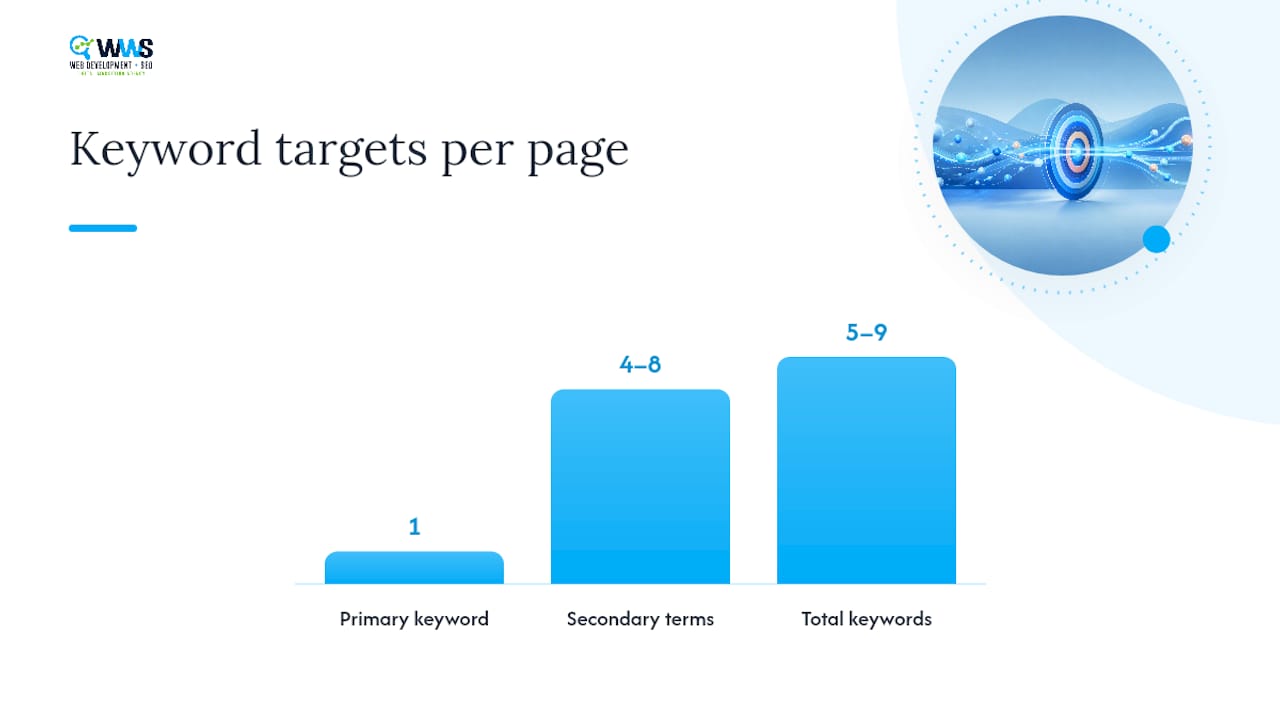
Once you’ve chosen it, build out 4 to 8 secondary terms: service variations, “near me” phrasing, and related job types. Then check two sources before finalizing anything. Google Search Console shows which queries already bring traffic to the page, sometimes revealing intent you hadn’t planned for. A keyword tool confirms whether your chosen phrase has enough monthly demand to justify the effort.
Pro Tip: Before creating a new page, search your own site for the keyword. If another page already ranks for it, you risk cannibalization. Either merge the content into one stronger page or clearly differentiate the two by service type or audience.
For a broader primer on how intent shapes keyword choice sitewide, this SEO starter guide walks through the mechanics in more depth.
On-Page SEO Checklist: Title, Headings, URL, and Schema
Placement matters as much as the keyword itself. Search engines and readers both scan pages in predictable patterns, and missing the right spot costs you visibility even when the content is strong.
Run through this SEO Best Practices Checklist for Agencies’ Growth for every service page:
- Title tag: primary keyword near the front, under 60 characters
- H1: matches or closely mirrors the title, states service and audience
- First 100 words: keyword appears naturally, ideally in the opening sentence
- URL: short, keyword-included, no unnecessary parameters (
/kitchen-remodeling, not/services/page-id-4471) - At least one H2: written as a question or outcome statement a real searcher would type
- Meta description: 150 to 160 characters, keyword near the front, one specific benefit stated plainly
Heading strategy trips up more service pages than any other element. Instead of “Our Process,” write “How Long Does a Kitchen Remodel Take?” Instead of “Why Choose Us,” write “What Makes Our Remodeling Team Different?” Question-style H2s tend to match how people actually search, and they double as ready-made FAQ content.
Structured data is where most small business sites fall short entirely. Add Service schema to describe what you offer, and if the business has a physical presence or service area, layer in LocalBusiness schema, too. Use the most specific LocalBusiness subtype available, such as Electrician or Plumber, rather than the generic LocalBusiness type. If the business legitimately covers multiple trades, multiple types can coexist on the same page. Add FAQPage schema only for real questions that you’re genuinely answering. Validate every schema block with Google’s Rich Results Test before publishing.

Finally, images. Real photos of completed work, with descriptive alt text and captions, outperform stock photography on trust signals every time. A visitor deciding between two contractors will notice which one shows actual job sites.
Technical and Mobile Factors That Affect Rankings
Mobile devices generate the majority of traffic to most local service sites, and in some markets the mobile share of web traffic in the United States reaches well past half of all visits. A service page that loads slowly or renders awkwardly on a phone loses leads before the copy even gets read.
Prioritize these checks in order:
- Core Web Vitals: aim for Largest Contentful Paint under 2.5 seconds, Cumulative Layout Shift under 0.1, and fast Time to First Byte
- Mobile-first testing: view the page on an actual phone, not just a browser’s device emulator
- One-click contact: phone numbers should be tap-to-call; forms should be short and pre-filled where possible
- Crawl hygiene: confirm the page isn’t accidentally set to noindex, has a correct canonical tag, and appears in your sitemap
- Image compression and lazy loading: heavy, uncompressed images are still the most common cause of slow service pages
Form friction quietly kills more leads than weak copy does. A five-field form with a required dropdown menu will lose visitors that a name-phone-message form would have captured. Test the shortest form that still gives you enough information to follow up.
Turning Traffic Into Leads: Proof, Pricing, and Links
Ranking gets someone to the page. Conversion elements decide whether they call. The two systems have to work together, not compete for space.

Place testimonials or a short case excerpt directly beside or just below your CTA, not buried in a separate section visitors may never scroll to. Reviews remain one of the strongest trust signals for local service decisions, and proximity to the action button is what makes them count. Link out to a full case study for visitors who want more depth, but don’t require that click before someone can find your phone number.
Pricing cues work as a filter, not a sales pitch. A tiered package list, a “starting from” figure, or an honest range does more to qualify a lead than any amount of persuasive copy. Vague pricing pages tend to generate more tire-kicker calls, not fewer.
Internal linking ties the whole site together. Structure it as homepage → service category hub → individual service page, so both visitors and crawlers understand where each page fits. From the service page itself, link out to relevant blog posts and case studies that reinforce expertise, and consider practical lead-capture tactics for the forms and CTAs themselves.
Pro Tip: Match your CTA type to the intent. Emergency services (burst pipes, lockouts, storm damage) need a phone number in giant text at the top of the page. Planned work (kitchen remodels, landscaping projects) converts better with a quote form, since these buyers are comparing options and not ready to call immediately.
Service Area Pages: When They Help and When They Hurt
A service area page makes sense when your business genuinely serves multiple distinct towns or neighborhoods and each one has real local demand worth targeting. It backfires when it’s just your main service page copied ten times with the city name swapped.
That kind of mass duplication risks doorway-page problems that search engines actively discount, and it rarely converts anyway since visitors notice generic filler immediately.
Build genuine service area pages instead:
- Include a local landmark, neighborhood name, or specific project completed in that area
- Add a short case study or testimonial from a customer in that location, if one exists
- Write a local FAQ addressing questions specific to that market (permitting rules, typical home styles, local regulations)
- Link each service area page from your Google Business Profile and location-specific navigation, not just the sitemap
Skip creating a page for a town where you have no real proof or presence yet. One strong page beats five thin ones.
Measuring What’s Working: Tools and Testing Cadence
Track five numbers monthly: impressions, clicks, average position, and click-through rate in Google Search Console, plus phone clicks and form completions in GA4.
- Set a baseline in Search Console before making changes, so improvement is measurable.
- Run Lighthouse or a speed testing tool to catch technical regressions after any redesign.
- Test one variable at a time: CTA wording, hero headline, or proof placement, never all three simultaneously.
- Give ranking changes at least three to four weeks before judging results; Google’s index needs time to reflect updates.
- Treat a jump in average position without a matching rise in leads as a signal to revisit your CTA and proof placement, not your keyword.
How a Certified Local Agency Approaches Service Page Audits
WWS – Web Development + SEO builds and audits service pages in-house as a Google and Meta Partner, which keeps copy, schema, and design changes moving through one team instead of three. The most common gaps we find in existing client pages: vague service scope, proof buried below the fold, and mobile forms that ask for too much too soon.
…
Get a Service Page Built to Rank and Convert
A DIY audit gets you most of the way there, but rebuilding a page from scratch, wiring up schema correctly, and testing CTA placement against real lead data takes hours most owners don’t have between running the actual business. WWS – Web Development + SEO handles that work in-house, from copy to code to schema validation, so nothing gets lost in translation between a freelancer and a developer.

As a certified Google and Meta Partner with over 200 completed client projects across the Chicago area, our team builds and audits service pages for contractors, medical providers, and restaurants who need the page working while they’re busy working the job. If your current service page isn’t pulling its weight, request a website SEO audit or take a look at our website design services to see what a rebuilt page could look like for your business.
Sources
- Share of website traffic coming from mobile devices in the United States
- How to create service pages that rank and convert
- Service area pages: Boost local SEO across locations
- Fonzy
FAQ
What are service pages in SEO?
A service page is a dedicated page targeting one specific service and one commercial search intent, built to rank in search results and convert that traffic into leads through clear proof, process details, and a CTA.
How do I rank a service page?
Target one focused keyword with real commercial intent, build out 600 to 1,000 words of unique detail covering scope and process, add proper schema markup, and back it with genuine proof like reviews or case studies placed near your call-to-action.
What are the 4 types of SEO?
The four commonly recognized categories are on-page SEO (content and HTML elements), technical SEO (site speed and crawlability), off-page SEO (links and reputation), and local SEO (Google Business Profile and location signals), all of which apply to a single service page.
What is the 80/20 rule for SEO?
Should I hire an agency or build my service page myself?
Business owners with time and basic web skills can follow this framework directly; those who want it audited, built, and validated correctly the first time often turn to a certified team like WWS – Web Development + SEO to handle schema, copy, and design together.