





Yes, you can track calls from a Google Business Profile, but only if you use tracking that meets Google’s identity rules for phone numbers and you account for the July 31, 2024 removal of GBP call history. The safest first move is to use Google Ads native call forwarding for paid calls, then layer a compliant local tracking number for organic listing calls. Since GBP no longer surfaces call history natively, plan your reporting around CRM matchback and campaign-specific numbers instead.
TL;DR:
- Tracking calls from Google Business Profiles requires compliance with Google’s phone number rules, emphasizing control over the primary and additional numbers.
- Since call and chat history were removed on July 31, 2024, businesses must rely on CRM integration and campaign-specific numbers for organic call attribution.
- Using Google Ads native call reporting remains the most reliable option for paid calls, while a static, CRM-connected tracking number is recommended for organic listings.
- Keeping the primary business number under direct control and documenting all tracking shifts reduces the risk of automated Google edits that could harm local SEO.
- Regular manual or agency-managed monitoring helps prevent unauthorized number changes that might disconnect call attribution and impact local search rankings.
Table of Contents
- What Changed in Google Business Profile Call Reporting
- Is a Tracking Number on Your GBP Allowed Under Google’s Rules
- Step-by-Step: Set Up Call Tracking on Your GBP Listing
- Measuring Call Attribution Now That GBP History Is Gone
- How an In-House Agency Handles GBP Call Tracking Safely
- Comparing Call Tracking Options for Google Business Profile Use
- Data Privacy and Compliance When Tracking Calls on GBP
- Does Call Tracking Affect Local SEO Beyond the NAP Match
- Perspective: Balancing Accuracy Against Compliance Risk
- Get GBP Call Tracking Set Up Without the Compliance Guesswork
- Sources
- FAQ
What Changed in Google Business Profile Call Reporting
Google removed the call and chat history feature from Business Profile, along with the BUSINESS_CONVERSATIONS metric, as of July 31, 2024. Businesses could export historical data through Google Takeout, but only for a limited window after the change. For local businesses that relied on GBP’s built-in logs to see who called from their listing, that visibility is gone.
This shift matters because organic call attribution can no longer lean on native reporting inside the profile dashboard. A few consequences follow directly:
- Business owners can no longer pull call counts or duration straight from GBP.
- The Business Conversations metric disappeared from Insights entirely.
- Historical call data is only retrievable through Takeout, and that window has closed for most accounts.
Independent tracking, whether a dedicated number, a CRM integration, or server-side logging, has become the only reliable way to measure organic call volume from a profile.
Is a Tracking Number on Your GBP Allowed Under Google’s Rules
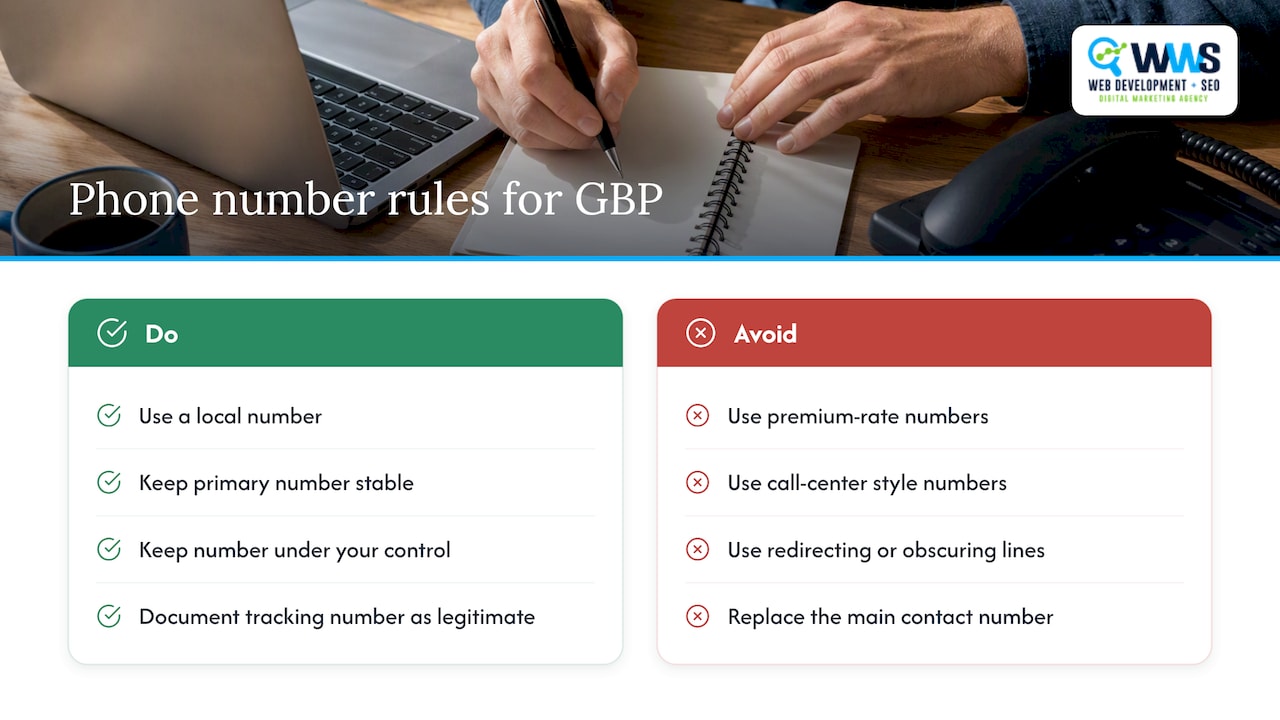
Google’s guidelines state that the phone number on a Business Profile must connect directly to the individual business location and stay under the business’s direct control, and premium-rate numbers are explicitly disallowed. A profile can carry one primary number plus up to two additional numbers, and local numbers are preferred over toll-free or redirecting lines that obscure the actual business.
A profile allows a primary phone number and additional numbers as permitted by Google’s Business Profile guidelines, which means there is room for a tracking line without replacing your main contact number.
The red line is control. If Google’s systems detect a number that behaves like it belongs to a call center, a lead-gen network, or a number Google associates with a different business elsewhere, the profile can get an automated correction. Google pulls business information from multiple sources and will overwrite fields it judges inconsistent, so a tracking number that looks disconnected from your actual location invites an unwanted edit. Keeping your primary number stable and documenting any additional tracking number as a legitimate contact line for that same business reduces this risk substantially.
Step-by-Step: Set Up Call Tracking on Your GBP Listing
Before touching any settings, confirm you have owner or manager access to the profile, write down your current primary number and any existing additional numbers, and note today’s date in case you need to reference “before” settings later.
- Verify profile ownership in Google Business Profile Manager and confirm you can edit contact fields without waiting on a third party.
- Choose a compliant tracking number, ideally a local direct inward dial (DID) number that you control directly rather than a shared or premium-rate line.
- Configure forwarding so the tracking number routes to your actual business phone, and set call recording disclosures according to your state’s consent rules.
- Add the number to GBP as an additional contact rather than replacing your primary number, keeping the original line intact and visible.
- Run test calls from different devices, confirm the call reaches your team, and check that the number displays correctly on your live listing.
- Connect the tracking number to your CRM with source tagging, using UTM parameters on any digital ad tied to that number and a webhook or integration that logs each inbound call automatically.
- Monitor the profile weekly for the first month to catch any automated Google edit before it becomes permanent.
Pro Tip: Keep a single internal spreadsheet listing every phone number tied to your business online, including the primary GBP number, tracking numbers, and any legacy numbers on directories, so you can spot an unauthorized change fast.
Measuring Call Attribution Now That GBP History Is Gone
For paid search, Google Ads call reporting still supplies a forwarding number and reports call duration and caller area code, making it the most reliable attribution source for ad-driven calls. Google Ads conversion tracking for calls is a separate, native capability from organic GBP tracking, and it should be your first stop before adding any third-party layer.
For organic listing calls, the practical path looks like this:
- Assign a dedicated forwarding number to your GBP listing and route it into your CRM.
- Use campaign-specific landing pages or numbers when you promote the listing through other channels.
- Fall back on a sample matchback, comparing a batch of ten recent calls against CRM entries to confirm source tagging is accurate.
- Export call logs from your tracking provider on a schedule rather than relying on GBP’s dashboard.
Call tracking services typically bill through a subscription, a per-minute rate, or a flat per-line fee, based on vendor and agency setup guides for GBP tracking, and most local businesses land on one of those three pricing shapes depending on call volume.
How an In-House Agency Handles GBP Call Tracking Safely
An agency-managed setup follows a consistent workflow: verify the profile, select a compliant number, configure forwarding, tag calls into a CRM, and report weekly against a documented baseline. WWS runs this process for clients through Google Business Profile optimization paired with local SEO oversight, so tracking changes never happen in isolation from the rest of the listing.
Safeguards matter as much as setup:
- Keep the primary number under direct business control at all times.
- Document every tracking number change with a date and reason.
- Monitor for automated Google edits that could override a documented number.
Clients typically receive call logs, scored leads, sample dashboard metrics, and a short evidence checklist covering the setup’s compliance points.
Pro Tip: If your team lacks the bandwidth to check the profile weekly for unauthorized edits, that alone is a strong signal to hand tracking setup to an agency rather than run it DIY.
DIY tracking works fine for a single-location business with light call volume. Multi-location operators or anyone running several campaigns at once usually benefit from a managed setup that can catch conflicts before they cost a lead.
Comparing Call Tracking Options for Google Business Profile Use
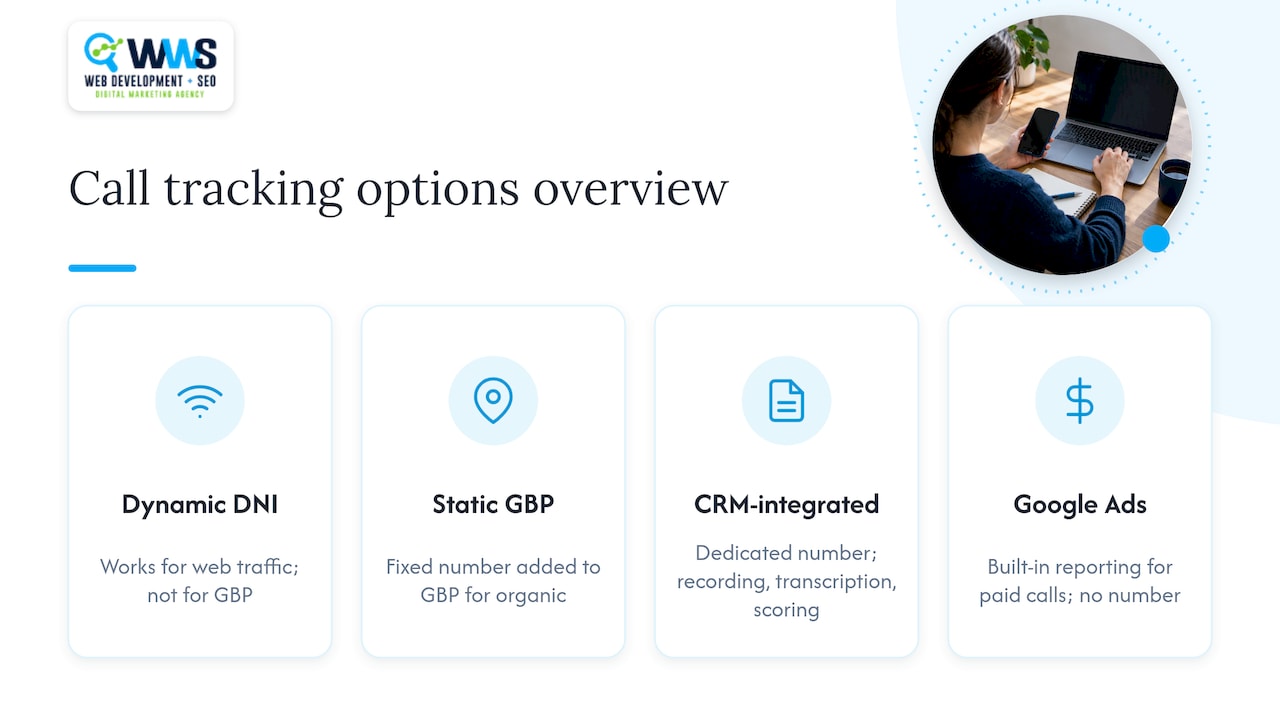
Local businesses generally choose between three approaches when adding call tracking to a GBP listing. Dynamic number insertion services swap numbers on your own website based on traffic source, which works well for web-based attribution but does not apply directly to the static number shown on your GBP listing. Static tracking numbers, added as an additional contact on the profile, are the most common fit for organic GBP attribution because they stay fixed and are easy to document.
CRM-integrated tracking platforms combine a dedicated number with call recording, transcription, and lead scoring inside the same system your sales team already uses. This approach adds setup time but removes the manual work of matching call logs to leads by hand.
Google Ads’ own call reporting remains the strongest option for paid calls specifically, since it is built into the platform that generates those calls and requires no separate number to purchase or maintain.
For most local businesses, the practical choice is Google Ads native tracking for paid campaigns, paired with a static, CRM-connected number for the organic GBP listing. That combination covers both channels without introducing more numbers than the business can reasonably document and monitor.
Data Privacy and Compliance When Tracking Calls on GBP
Call recording laws vary by state, and some require consent from both parties before a call is recorded. Any tracking setup that records calls needs a disclosure at the start of the call, and the business should confirm its provider supports the consent format required where its customers are located.
Beyond recording consent, the tracking number itself needs to stay tied to the actual business rather than routed through a third party that obscures ownership, which lines up with Google’s own requirement that a listed number connect directly to that business location. Storing call recordings and transcripts inside a CRM also means applying the same data retention and access controls you’d use for any other customer record, since a recorded call often contains personal details a customer shared verbally.
Businesses that operate across multiple states should check whether any jurisdiction they serve has stricter consent requirements than their home state, since call tracking platforms typically apply settings account-wide rather than per call.
Does Call Tracking Affect Local SEO Beyond the NAP Match
Name, address, and phone consistency (NAP) gets most of the attention in local SEO discussions, but call tracking touches ranking signals beyond that match. A tracking number that generates real engagement, meaning calls that connect and last more than a few seconds, feeds into the kind of user behavior signals that support a listing’s visibility over time.
The bigger risk isn’t ranking loss from a well-documented tracking number. It’s an automated Google edit that swaps your primary number for one it finds elsewhere, breaking the consistency you built across directories, your website, and citations. That kind of unplanned change is far more damaging to local visibility than the presence of a compliant additional number.
Keeping your local SEO best practices aligned with your call tracking setup, meaning consistent numbers across every citation source, protects the ranking foundation while still letting you measure where calls originate.
Perspective: Balancing Accuracy Against Compliance Risk
More tracking layers mean sharper attribution, but each additional number or integration is one more thing Google’s automated systems can flag or a customer can find inconsistent across the web. That trade-off is the real decision local businesses face, not whether tracking is allowed.
The conservative default: use Google Ads native tracking for every paid call, and add one documented, static tracking number for organic GBP calls rather than experimenting with multiple numbers across channels. Move to agency-managed tracking once call volume or location count makes weekly manual monitoring impractical, since that’s the point where a missed automated edit starts costing real leads.
— Online Marketing Experts
Get GBP Call Tracking Set Up Without the Compliance Guesswork
Setting up tracking correctly the first time saves you from chasing down an automated Google edit later or losing a documented number a customer already saved. WWS handles Google Business Profile optimization, local SEO, and call-tracking setup entirely in-house, so the same certified team that configures your listing also builds the reporting behind it.

- We run the verification, number selection, and CRM tagging as one connected setup, not separate handoffs.
- Our audit checks your current profile for existing conflicts before we add anything new.
- You get an evidence checklist documenting every change, so you have a record if Google’s systems ever flag a field.
WWS – Web Development + SEO is your premier local business marketing expert solution serving Des Plaines, IL, and the greater Chicago Area. As an official Google and Meta Partner, our team consists exclusively of Google and Facebook certified experts dedicated to growing local service businesses. From contractors to restaurants, we combine custom web development with aggressive SEO and GEO strategies to turn your online presence into a lead-generating engine. With over 200 successful client partnerships, we don’t just build websites, we drive real calls, consistent leads, and year-round revenue for Chicago-area businesses.
Book a Google Business Profile optimization consultation and get your tracking setup reviewed before you add a single number.
FAQ
How Long Does GBP Verification Take?
Verification timing depends on the method Google offers for your business, ranging from an instant confirmation to a mailed postcard that can take about a week or more to arrive. Video or phone verification, when available, tends to resolve faster than postcard verification.
How Do You Check That Call Tracking Is Working?
Run a test call from an outside line to your tracking number and confirm it reaches your business phone and logs correctly in your CRM. Since GBP no longer shows call history natively, your tracking provider’s dashboard or your CRM’s call log is the only place to verify this now.
How Much Does Call Tracking Cost?
Pricing typically follows a subscription fee, a per-minute rate, or a flat charge per tracking line, based on common vendor pricing structures. The right structure depends on your call volume and whether you need features like recording or transcription included.
Can Google Track a Phone Number’s Location?
Google’s own systems primarily use the phone number to confirm it matches the business location listed on the profile, as outlined in its phone number guidelines. Google may also send automated calls or texts to confirm business details, and businesses can review or adjust settings related to those automated contacts.