





Yes, add LocalBusiness JSON-LD to define your business and FAQPage JSON-LD wherever real customer questions already appear on the page. Use JSON-LD as your format, start with your homepage or main location page, then validate every script with Validator before you move to the next page.
TL;DR:
- Use one LocalBusiness entry per physical address on the homepage and location pages, with the business name, address, phone number, and opening hours.
- Add FAQPage markup only to pages with genuine, visible customer questions, and make each answer match the page text word for word.
- Structured data can clarify business details and support rich result eligibility, but local rankings still depend on relevance, distance, and prominence.
- Check syntax with Schema.org Validator, confirm feature eligibility in the Rich Results Test, and revalidate after template or content changes.
- Format opening hours as hh:mm:ss and provide geographic coordinates to at least five decimal places when those fields are included.
Table of Contents
- What FAQPage and LocalBusiness schema are and why JSON-LD
- Why these schema types matter for local SEO and map visibility
- Which pages to add LocalBusiness and FAQ schema to
- Step-by-step implementation with copyable JSON-LD examples
- Validate and monitor: tools and a QA checklist
- Common mistakes and Google policy constraints to avoid
- Practitioner perspective: how we implement schema for local clients
- Our take on getting schema right the first time
- How we implement and manage FAQ and LocalBusiness schema for you
- FAQ
- Sources
What FAQPage and LocalBusiness schema are and why JSON-LD
LocalBusiness and FAQPage are structured data types from the schema.org vocabulary. They give search engines a machine-readable description of your business and your published Q/A content, instead of leaving Google to guess at meaning from plain text.
Google’s documentation on how structured data works lists required and recommended properties for each type and recommends JSON-LD as the preferred format, mainly because it sits in a single script block, separate from your visible HTML, and can be generated dynamically by your content management system.
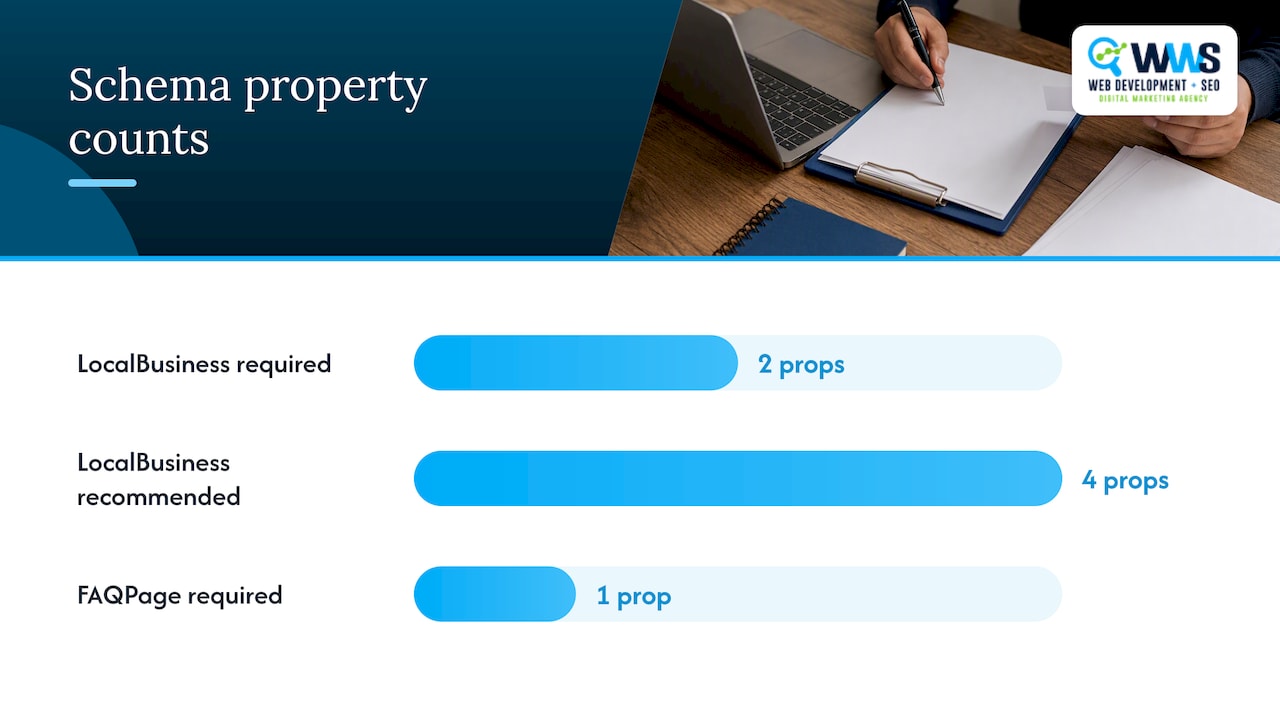
For LocalBusiness, the required properties are name and address. Recommended properties, including telephone, url, openingHoursSpecification, and geo coordinates, improve your odds of qualifying for enhanced display features.
FAQPage works differently: it uses a mainEntity array of Question and Answer pairs, where each answer must match what a visitor actually reads on the page.
- LocalBusiness needs name and address at minimum, with telephone and hours as strong additions.
- FAQPage needs a mainEntity array built from real, visible Question and Answer pairs.
- JSON-LD keeps markup separate from page content, which makes updates and automation easier.
Why these schema types matter for local SEO and map visibility
Structured data gives search engines a clearer way to parse your business attributes, like hours, address, and phone number, and that clarity can make your listing eligible for enhanced displays in search results. It does not replace the ranking factors that actually move the needle in local search.
Google Business Profile Help describes three local ranking factors: relevance, distance, and prominence, and recommends keeping your business information accurate and complete. Schema supports that accuracy on your website; it does not substitute for it on your profile.
- Structured data helps Google parse attributes like hours, address, and services correctly.
- Relevance, distance, and prominence remain the core local ranking factors schema cannot replace.
- Accurate markup supports eligibility for rich results, but it never guarantees a map pack position.
Which pages to add LocalBusiness and FAQ schema to
Placement matters as much as the code itself. A common mistake is piling every schema type onto the homepage and calling it done, which wastes the specificity Google’s guidelines reward.
- Add LocalBusiness JSON-LD to your homepage and to each dedicated location page, one instance per physical address, following the structure in Google’s LocalBusiness documentation.
- Add FAQPage JSON-LD only where genuine, visible Q/A content already lives, such as service pages, pricing pages, or a help section; our guide to service page schema walks through developer-ready examples for that context.
- Skip marking up hidden accordions, promotional blurbs disguised as questions, or any content a visitor cannot actually see and read on the page.
- Keep your questions tied to real customer intents, pricing, service area, scheduling, rather than invented queries chosen purely for keywords.
Step-by-step implementation with copyable JSON-LD examples
A LocalBusiness script needs the required fields plus the extensions that make it genuinely useful. Here’s a minimal, editable structure:
{
  "@context": "https://schema.org",
  "@type": "LocalBusiness",
  "name": "Your Business Name",
  "address": {
    "@type": "PostalAddress",
    "streetAddress": "123 Main St",
    "addressLocality": "Your City",
    "addressRegion": "IL",
    "postalCode": "60016"
  },
  "telephone": "+1-555-555-5555",
  "url": "https://example.com",
  "priceRange": "$$",
  "geo": {
    "@type": "GeoCoordinates",
    "latitude": 42.03318,
    "longitude": -87.88384
  },
  "openingHoursSpecification": {
    "@type": "OpeningHoursSpecification",
    "dayOfWeek": ["Monday","Tuesday","Wednesday","Thursday","Friday"],
    "opens": "09:00:00",
    "closes": "17:00:00"
  }
}
Google’s LocalBusiness guide notes that geo coordinates should carry at least five decimal places and that opening hours should follow hh:mm:ss formatting, both reflected above.
An FAQPage script stays simpler:
{
  "@context": "https://schema.org",
  "@type": "FAQPage",
  "mainEntity": [{
    "@type": "Question",
    "name": "Do you offer free estimates?",
    "acceptedAnswer": {
      "@type": "Answer",
      "text": "Yes, we provide free, no-obligation estimates for all service requests."
    }
  }]
}
The table below shows where each script type typically lives in common content management setups.
| CMS or platform | Typical injection point |
|---|---|
| WordPress | Theme header via a plugin or child theme functions file |
| Shopify | theme.liquid or a dedicated template section |
| Custom-built sites | Server-side template partial, rendered per page |
| Webflow | Page-specific custom code embed |
Pro Tip: When your FAQ content updates dynamically from a database, generate the JSON-LD at render time instead of hard-coding it, so cached pages never show stale answers.
Validate and monitor: tools and a QA checklist
Before anything goes live, run your markup through validator.schema.org for syntax errors, then through the Rich Results Test to confirm the page qualifies for the enhanced features you’re targeting. Both tools serve different purposes, and skipping either one leaves gaps in your QA process, according to validator.schema.org.
- Confirm every marked-up answer matches the visible text on the page, word for word.
- Check that required properties (name, address for LocalBusiness; question and answer pairs for FAQPage) are all present.
- Verify time formats and geo coordinates match Google’s expected structure.
- Keep your canonical URL consistent with the page the schema describes.
Once live, check Search Console’s structured data reports periodically, and revalidate after any template change or content update, since a single broken field can quietly drop a page from rich results.
Common mistakes and Google policy constraints to avoid
Google’s general structured data guidelines state plainly that marked-up content must be visible to users on the page, and that structured data cannot be used to mislead or violate spam policies. Violating that principle is the fastest way to lose rich result eligibility, sometimes without any visible warning.
- Never mark up content that is hidden, collapsed by default and never expanded, or absent from the page entirely.
- Keep your JSON-LD answer text identical to what a visitor reads, not a keyword-stuffed rewrite.
- Avoid using FAQPage for promotional copy dressed up as questions; Google treats this as a policy issue, not a style choice.
- Double-check that required properties and formats, especially times and geo coordinates, match the documented specs before publishing.
Practitioner perspective: how we implement schema for local clients
As a certified Google and Meta Partner handling every service in-house, our team follows a consistent workflow for local clients: audit the existing site for gaps, implement LocalBusiness on the homepage and location pages, add targeted FAQPage markup where genuine Q/A content exists, then run it through validator tools before anything ships. With over 200 client partnerships behind that process, we treat ongoing monitoring, not just the initial build, as part of the job. Our handoff checklist always includes a validation screenshot and a note on when the next review is due.
Our take on getting schema right the first time
The conventional advice on this topic tends to treat schema as a checkbox: copy a template, paste your business name, publish. That approach misses the part that actually determines whether markup helps or hurts you, which is whether it matches what a visitor sees on the page.

We’d argue the real skill here isn’t writing JSON-LD syntax, which is mechanical and easy to template. It’s choosing which five or six questions on a service page reflect genuine customer intent, and resisting the urge to pad an FAQPage script with keyword variations nobody actually asks.
Prioritize LocalBusiness accuracy before you touch FAQ schema at all. A business listing with a wrong phone number or missing hours undercuts everything else you build on top of it. Once that foundation is solid, add FAQ markup gradually, page by page, validating each one rather than batch-publishing across a site and hoping nothing breaks.
— Online Marketing Experts
How we implement and manage FAQ and LocalBusiness schema for you
Getting schema right across a multi-location site or a growing service business takes time most owners don’t have between running the business itself. We handle that work as part of our Local SEO and Website SEO services, combining technical implementation with Google Business Profile optimization so your listing and your site tell the same accurate story.

A typical engagement starts with an audit of your current markup, moves into LocalBusiness and FAQPage implementation across the right pages, and continues with validation and monthly monitoring so nothing quietly breaks after a template update.
- We audit your site and Google Business Profile for structured data gaps and inconsistencies.
- We implement LocalBusiness and FAQPage JSON-LD on the pages that match real customer intent.
- We validate every script and monitor Search Console reporting on an ongoing basis.
If you’d rather hand this off than manage it in-house, reach out through our Local SEO page and we’ll walk you through what an audit would look like for your site.
FAQ
Is FAQ schema still relevant?
Yes, FAQ schema remains a valid structured data type under Google’s documentation, provided the questions and answers are genuinely visible on the page. Its relevance depends on matching real customer intent rather than padding content for keywords.
Are FAQ pages good for SEO?
FAQ pages can help SEO when they answer real customer questions clearly, since they give search engines additional context about your services. Pairing genuine FAQ content with properly implemented FAQPage markup, validated through validator.schema.org, supports that benefit rather than guaranteeing it.
Is FAQ schema deprecated?
FAQ schema is not deprecated; Google’s structured data guidelines still document it as a supported type. What has tightened is enforcement around visible content and policy compliance, not the schema type itself.
What is the 80/20 rule in SEO?
Definitions vary across sources, but a common version holds that a small share of pages or keywords drives most of a site’s organic traffic, so prioritizing high-intent pages, like primary service and location pages, tends to matter more than spreading effort evenly across every page.
How do I check if my schema is working correctly?
Run your markup through validator.schema.org for syntax errors, then check the Rich Results Test for feature eligibility, and monitor Search Console’s structured data reports for ongoing errors.