


Start with your Google Business Profile, then make sure your site has an HTML menu, clear reservation or ordering links, and fast mobile pages. These moves matter because diners check before they visit: 60% of diners research a restaurant’s website before choosing where to eat. Below, we walk through each fix in priority order, so you know what to do first.
TL;DR:
- Each core page needs its own title, meta description, and H1 targeting one local phrase; keep titles between 50 and 60 characters.
- Choose the most specific Google Business Profile category, add accurate attributes and holiday hours, then review suggested edits, reviews, photos, and insights weekly.
- Keep mobile pages around 1 to 1.5 MB, compress images, and remove unused plugins before assigning developer work such as script deferral or CDN setup.
- Match your restaurant name, address, and phone number exactly across Google, Yelp, TripAdvisor, and directories; a few genuine local links beat hundreds of poor ones.
Table of Contents
- How should you set up titles, headings and navigation?
- What do you need to manage in your Google Business Profile?
- How do you publish menus and reservation flows that search engines can read?
- Which speed and mobile fixes matter most?
- How do you plan local keywords, FAQs and voice search content?
- How do reviews, citations and backlinks build authority?
- How do you keep food photos appetizing without slowing the site?
- What should you measure, and how often?
- Our rollout plan for busy owners
- How we help restaurants get found and booked
- FAQ
- Sources
How should you set up titles, headings and navigation?
On-page SEO is the set of edits you make to the pages themselves. For a restaurant, key pages include Home, Menu, Reservations, About and Contact. Each one needs its own title tag, meta description and H1, and each should target one main phrase.
The simplest formula comes from a merchant guide to restaurant SEO: pair your cuisine or dish with your city or neighborhood. A Menu page titled “Neapolitan Pizza Menu in Wicker Park | Your Restaurant” tells both diners and search engines exactly what the page offers. Keep the H1 close to the title, and write the meta description like a short invitation: what you serve, where you are, and what to do next.
Navigation should be as plain as your host stand. Menu and Reservations belong in the top nav and on mobile without extra taps. Our restaurant website features article shows how those two links tie directly to revenue.
Here is a quick page-level checklist:
- Titles: keep them between 50 and 60 characters, lead with the dish or cuisine, and end with your name.
- Meta descriptions: one or two sentences with the neighborhood and a clear action such as “reserve a table.”
- URLs: short and readable, like /menu or /reservations, not /page-id-482.
- Headings: one H1 per page, with H2s for sections like lunch, dinner and drinks.
- Menu text: publish it as HTML, not as an image or PDF. OpenTable recommends keeping menu text crawlable so search engines can read it.
- Schema basics: add Restaurant markup with name, address, phone and menu URL so search engines can confirm who you are.
Pro Tip: Open your site on your phone and try to reach the menu and reservation page with one tap each. If either takes two, fix your navigation before anything else.
Do not let a pretty design hide your essential text inside images. If a guest cannot select and copy your hours, a crawler may struggle to read them too.
What do you need to manage in your Google Business Profile?
Your Google Business Profile (GBP) is what appears in the Local Pack and on Maps, so it often decides whether a nearby diner sees you or a competitor. Google’s own guidance for restaurant profiles is the best place to confirm each field, and our Google Business Profile optimization page covers how we handle the ongoing work.
Primary categories carry real weight. Google’s help documentation explains that your primary category affects visibility for related searches. Pick the most specific one that fits, such as “Pizza restaurant” rather than a generic “Restaurant,” then add secondary categories for what else you do.
Work through the profile in this order:
- Claim and verify the profile so you control the information.
- Choose the most specific primary category, then add secondary categories.
- Enter exact hours, including holiday changes.
- Add your menu inside GBP and match it to the menu on your site.
- Add reservation and ordering links.
- Upload fresh photos of food, interior and exterior.
Next, use attributes to match how people search. Outdoor seating, delivery, takeout, dine-in, wheelchair accessibility and accepted payment types all help your listing appear for specific queries. Fill in every one that is true, and update them when something changes.
Then build a weekly routine:
- Check the profile for suggested edits from users.
- Respond to new reviews, good and bad.
- Add a few new photos.
- Review the Searches, Menu clicks and Bookings numbers in your profile insights.
Those insight numbers tell you what to adjust. If searches are healthy but menu clicks are low, your menu link or menu content needs work. If clicks are strong but bookings lag, look at the reservation flow. For a deeper walkthrough, see our Google Business Profile SEO guide.
How do you publish menus and reservation flows that search engines can read?
A PDF menu looks fine to a guest and tells a search engine almost nothing. An HTML menu gives crawlers real text to read: dish names, ingredients, prices and descriptions. It also loads faster on a phone and is far easier to mark up with schema. The merchant SEO guide and OpenTable’s SEO tips both point in this direction.
Follow this checklist when you publish:
- Put the full menu on its own page as plain text, organized by section.
- Add MenuItem and Restaurant schema so signature dishes and prices can surface in results.
- Place a reservation or order button at the top of mobile pages, or send guests to a dedicated Reservations page.
- If you use a booking or ordering widget, embed it near the top, not buried under a long scroll.
- Keep the menu on your site and the menu in your GBP identical. Mismatched prices frustrate guests and weaken trust.
- Write short, useful descriptions that mention allergens, portion sizes and your signature dishes.
Good microcopy sells. “Wood-fired margherita, served fresh with a salad” beats “Margherita pizza.” Flag gluten-free, vegan or nut-containing dishes clearly, since those are exactly the details diners search for.
Pro Tip: Update the site menu first, then copy the same changes into GBP the same day. A regular check keeps the two in sync.
For more on which site features pay off, read our restaurant local SEO fixes article.
Which speed and mobile fixes matter most?
Most diners find you on a phone, often while standing on a sidewalk deciding where to eat. A slow page loses them. Google’s Core Web Vitals give you targets to aim for, and Web show that performance work can improve conversions. A common target is a fast Largest Contentful Paint (LCP), which you can test for free in PageSpeed Insights.
Per web.dev, improving Core Web Vitals has a measurable business impact, including better conversion rates after performance work. Faster pages are a revenue lever, not just a technical score.
The usual causes of slow restaurant sites are predictable: oversized hero images and galleries, third-party reservation or ordering scripts, and too many tracking tags. Work through the fixes in this order:
- Compress every image before upload.
- Use responsive images (srcset) so phones download smaller files.
- Lazy-load images below the first screen.
- Remove render-blocking scripts and unused plugins.
- Turn on browser caching and use a CDN.
- Audit your tracking tags and delete the ones nobody reads.
A simple performance budget helps. Web.dev’s guidance on cross-team speed work suggests targets around 1 MB of page weight, and for restaurant sites we suggest keeping pages in the 1 to 1.5 MB range. Sharing that number with your designer, developer and marketing lead keeps everyone from adding “just one more” heavy element.
For prioritizing, sort fixes into quick wins you can finish this week (image compression, removing a plugin) and developer projects (script deferral, CDN setup). Do the quick wins first. If you want a speed-focused rebuild, our website design and hosting team handles it in-house.
Pro Tip: Run PageSpeed Insights on your Menu page, not just the homepage. That is the page diners actually use.
How do you plan local keywords, FAQs and voice search content?
Start with the local keyword formula: cuisine or dish plus city or neighborhood. Give each page one primary phrase, so your pizza page targets “wood-fired pizza in Evanston” and your brunch page targets something different. Two pages chasing the same phrase compete with each other.
Know when a landing page makes sense and when a blog post does:
- Landing pages: signature dishes, brunch, private dining, catering. These are evergreen and tied to a clear diner need.
- Blog posts: events, seasonal menu launches, chef stories, neighborhood news. These are timely and shareable.
- FAQ sections: short, conversational questions such as “Do you take walk-ins on Saturday?” or “Is there parking nearby?”
FAQ blocks serve double duty. They answer the questions diners ask by voice (“Where can I get gluten-free pasta near me?”) and give search engines clean, snippet-ready answers. Write them the way a host would answer at the door: short and direct.
Use Google Search Console to see which queries already bring people to your site. If “outdoor dining” appears with decent impressions but few clicks, expand that page, tighten its title and add a photo. Our local SEO checklist walks through this kind of review step by step.
Finally, keep content fresh. Update menus when dishes change, post events before they happen, and retire pages for seasonal items that are gone. Stale pages tell search engines, and guests, that nobody is watching the store. Social posts can feed this too: share the same event or seasonal dish on social media and link back to the matching page so the activity points to your site.
Pro Tip: Keep a running list of the questions guests ask at the host stand and by phone. Each one is a ready-made FAQ entry.
How do reviews, citations and backlinks build authority?
Authority is how search engines judge whether to trust you, and for restaurants it comes mostly from reviews, consistent listings and local links. Reviews matter in part because small gains add up: Restaurant Dive reports that even minor rating improvements can lift revenue.
Build a repeatable review flow so you are not relying on luck:
- Print a short link or QR code on receipts that goes straight to your Google review form.
- Send a polite SMS or email follow-up to guests who booked online.
- Train staff to mention it when a guest compliments a dish.
- Reply to every review within a few days, thanking guests and addressing problems calmly.
Next, keep your citations consistent. Your name, address and phone number (NAP) should match exactly across Google, Yelp, TripAdvisor and local directories. A quick audit of those sources catches mismatches, such as an old phone number or “St.” versus “Street.”
For backlinks, aim for realistic local wins:
- Pitch local food writers and bloggers when you launch a dish or event.
- Sponsor a neighborhood event and ask for a link on the organizer’s site.
- Publish link-worthy content like menu stories or chef bios.
- Check your backlinks in Google Search Console, and use the Disavow tool only for clearly spammy links.
Restraint wins here. A few genuine local links beat hundreds of low-quality ones.
How do you keep food photos appetizing without slowing the site?
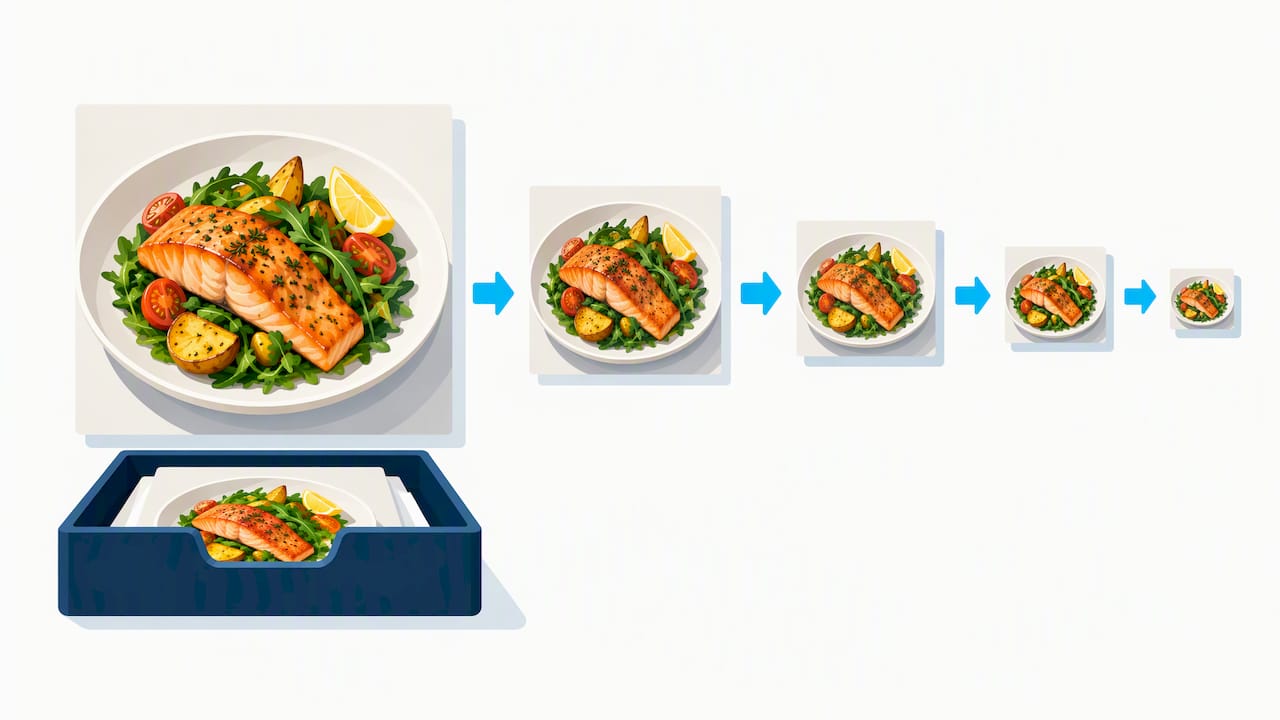
Photos sell dinner, but heavy files cost you visitors. The goal is images that look delicious and load quickly.
- File names and alt text: use descriptive names like “wood-fired-margherita-pizza.jpg” and write alt text that describes the dish naturally, without stuffing keywords.
- Modern formats: use WebP or AVIF where possible, with responsive srcset so phones get smaller versions.
- Galleries: avoid loading dozens of full-size photos on high-traffic pages. Use compressed thumbnails and a lightweight lightbox that loads the large image only on click.
- Video: keep clips short, host them on a fast platform, and add captions or transcripts so the content works without sound.
Both OpenTable and the merchant SEO guide stress mobile-friendly media for good reason. A beautiful photo that takes too long to appear is a photo nobody sees.
Pro Tip: Shoot at high quality, then export a web version. Keep the original in storage, and upload only the compressed copy.
What should you measure, and how often?
You do not need an expensive dashboard. Three free tools cover almost everything: Google Search Console for query data, PageSpeed Insights for speed audits, and your GBP insights for local behavior. Google’s profile guidance and the web.dev Core Web Vitals research explain what these numbers mean.
Track these metrics:
- Organic clicks and impressions in Search Console
- GBP searches, menu clicks and bookings
- LCP and CLS (layout shift) scores
- Reservation or order conversions from the website
Match each to a rhythm. Check GBP weekly, review Search Console and speed audits monthly, and look at content and links quarterly. When a list of fixes piles up, sort them on a simple grid of impact versus effort. High impact and low effort goes first, such as fixing a broken reservation link. Low impact and high effort waits.
Our rollout plan for busy owners
You run a restaurant, not a marketing department, so we sequence the work around your time. Start by claiming and verifying your profile, publishing the HTML menu and fixing the top mobile buttons. Next, compress images, remove a slow plugin and set a performance budget. Then build pages for signature dishes, start a review campaign and begin local outreach. Assign each task to whoever has the time: you, your manager or us. The order matters more than the speed.
— Online Marketing Experts
How we help restaurants get found and booked
WWS – Web Development + SEO is a Google and Meta Partner, and we handle everything in-house, so one team owns your results from design to rankings. For restaurants, we offer:
- Website SEO and Local SEO
- Google Business Profile optimization
- Reservation and ordering integration
- Site speed optimization
- Website design and hosting
Our Local SEO work puts your restaurant in front of nearby diners when they search. Current pricing details are on our website. Contact us for a restaurant-specific SEO review and we will show you the first fixes worth making.
FAQ
How do I do SEO for my restaurant?
Start with your Google Business Profile, then publish an HTML menu and make your site fast on mobile. After that, give each page one local keyword, such as a dish plus your neighborhood. Our website SEO service covers these steps.
What is the 30/30/30 rule for restaurants?
We found no official source for a “30/30/30 rule” in restaurant SEO, and definitions vary by author. Some versions of the idea split marketing effort across channels, but treat it as a rule of thumb, not a standard. Focus on GBP, website and reviews instead.
What is the 80/20 rule in SEO?
It is the idea that a small share of your efforts produces most of your results. For restaurants, high-impact efforts often include your Google Business Profile, your menu page and your site speed. Fix those first before chasing smaller tasks.
Can ChatGPT do SEO?
ChatGPT can help draft titles, FAQ answers and menu descriptions, but it cannot verify your Google Business Profile, fix your site speed or manage your reviews. Treat it as a writing aid, then check results in Search Console. For deeper keyword and structured data training, see the Local SEO Academy from BabyLoveGrowth.
Sources
- Restaurantdive
- Get started with a Business Profile for your restaurant – Google Business Profile Help
- Web
- SEO for Restaurants in 2026: Ultimate Guide to Ranking #1
- Understanding SEO: Using organic search to appear on the front page