





A winback email campaign is a short, automated sequence that targets customers who stopped opening, clicking, or buying, and it works because it isolates one specific reason for their silence and answers it directly. Skip the generic “we miss you” blast. Here’s the plan that actually moves the reactivation needle:
- Segment first. Split lapsed contacts by inactivity window and by why they likely went quiet (price, missing feature, billing failure, or simple neglect).
- Send a tailored 2 to 4 email sequence. Each email gets one job: reconnect, remind of value, then make a final offer or ask for opt-out.
- Measure and clean. Track reactivation rate and second-churn rate, then remove anyone who doesn’t respond after your final attempt.
If you want the one-line version: include contacts inactive for 60 to 90 days, run three emails over roughly two weeks, and watch your reactivation rate and unsubscribe rate as your two primary signals of success.
Key Takeaways
A winback email campaign recovers revenue and protects deliverability by segmenting lapsed contacts by their actual reason for leaving and sending a short, trigger-based sequence instead of one generic message.
| Point | Details |
|---|---|
| Segment before you write | Rank dormant contacts by RFM and by churn reason before building any email copy. |
| Keep sequences short | Run 2 to 4 emails spaced 4 to 10 days apart, each with one clear objective. |
| Automate stop conditions | Halt the sequence on open or click, and suppress recent purchasers and billing-recovery contacts. |
| Track second-churn rate | A high reactivation rate paired with high second-churn signals a mismatched offer, often an overused discount. |
| Get expert setup when needed | Wizerunekwsieci builds the segmentation, automation, and measurement dashboard so in-house teams can run the campaign without rebuilding it from scratch. |
Table of Contents
- What Is a Winback Email Campaign, and What Should It Achieve?
- When Should You Send a Winback Email?
- Who Should You Target, and How Do You Rank Them?
- What Belongs in Every Win-Back Email?
- Ready-to-Send Sequences: Three Flows You Can Copy
- How Do You Automate a Winback Sequence?
- What Metrics and Benchmarks Should You Track?
- Best Practices for Testing, Tone, and Sunsetting Contacts
- What’s the Real Reason Customers Come Back, and What Keeps Them?
- Five Win-Back Emails That Actually Worked, and Why
- What Actually Moves the Needle in Winback Campaigns?
- How Wizerunekwsieci Builds Winback Campaigns That Stick
- Frequently Asked Questions
- Sources
What Is a Winback Email Campaign, and What Should It Achieve?
A winback campaign, also called a re-engagement campaign or reactivation sequence, is a targeted set of emails sent to subscribers or customers who have gone quiet after a period of activity. It is not a single email. It is a structured sequence with a defined start point (the inactivity trigger), a defined end point (reactivation, unsubscribe, or removal), and a measurable goal at each step.
The campaign has three jobs, and confusing them is the most common reason winback programs underperform. First, it recovers revenue by nudging dormant buyers back toward a purchase or renewal. Second, it protects your sender reputation. Email providers like Gmail and Outlook penalize senders whose lists are full of people who never open anything, so a winback sequence acts as a filter that either revives an address or clears it out. Third, it cleans your list. Anyone who doesn’t respond to a well-built sequence should be suppressed or removed, which keeps your active-list metrics honest going forward.
It’s worth separating winback from two adjacent tactics people often lump together. Billing recovery, sometimes called dunning, targets customers whose payment failed. That’s an involuntary churn problem, not a re-engagement problem, and it needs a different message entirely (fix your card, not “we miss you”). Ongoing retention programs, meanwhile, target active customers to prevent future churn. Winback only kicks in once someone has already gone dark. Mixing these into one generic flow is why so many “we miss you” emails land flat: they’re solving the wrong problem for the audience receiving them.
When Should You Send a Winback Email?
The right inactivity window depends on how often a customer would naturally interact with you if everything were fine. A weekly newsletter reader who goes quiet for 30 days is a different signal than an ecommerce shopper who hasn’t ordered in 30 days, because most consumers don’t buy monthly.
Here’s how to pick a defensible window instead of guessing:
- Map your natural engagement cadence. If your average customer opens emails weekly, 45 to 60 days without an open is a strong inactivity signal. If your average customer purchases every 90 days, don’t flag them as lapsed until they pass that mark plus a grace period.
- Match the window to your business model. Newsletters and content publishers often use a 60 to 90 day no-open or no-click window, which lines up with beehiiv’s guidance on building segments like “no opens in 60 days” or “no clicks in 90 days.” Ecommerce brands typically trigger off 60 to 120 days since last purchase, adjusted for typical repurchase cycles. SaaS products usually trigger off product login gaps of 14 to 30 days for engagement-based plans, or off a cancellation event for subscription churn.
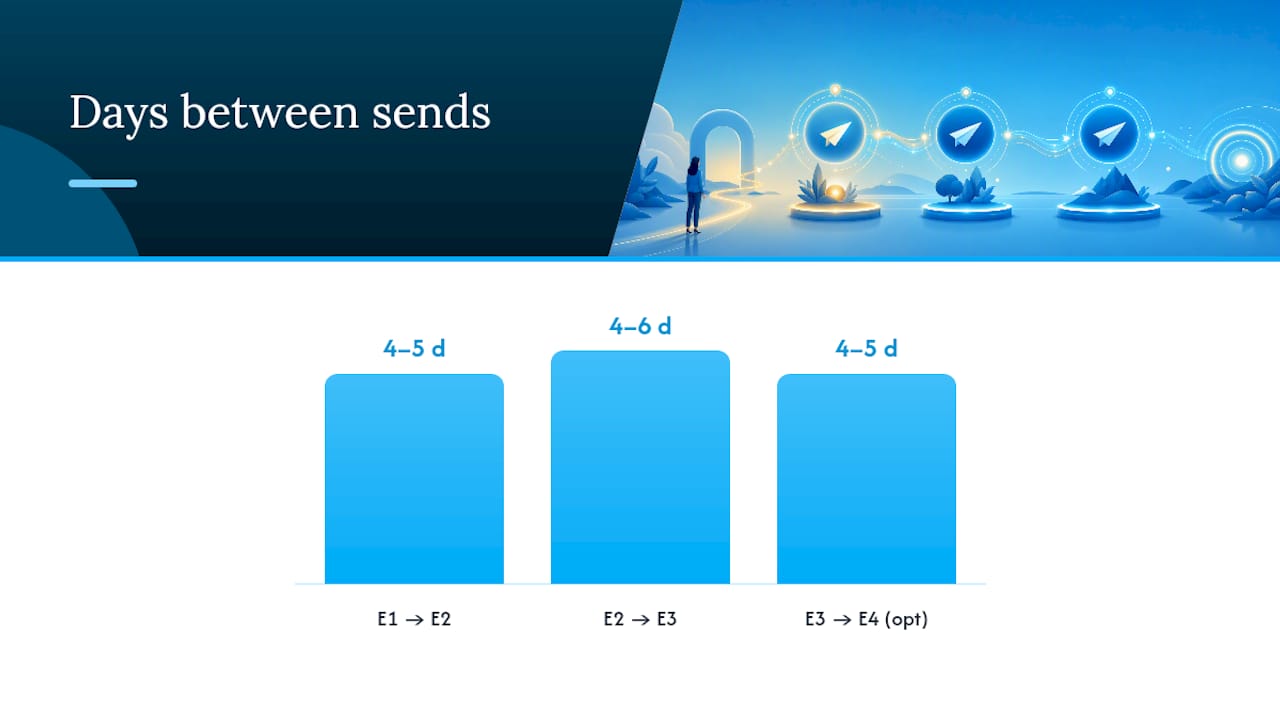
- Pick your cadence and stick to it. A 2-email flow (day 0 and day 5) suits low-stakes newsletter reactivation. A 3-email flow (day 0, day 4, day 9) suits most ecommerce and SaaS use cases, giving room for a value email before a final offer. A 4-email flow (day 0, day 3, day 7, day 14) works for higher-value subscriptions where a slower, more deliberate sequence justifies the extra touch, especially when ChurnDefense’s approach of timing outreach to real triggers, not just calendar days, gives you a reason to extend the window.
Spacing matters as much as count. Crowding three emails into 48 hours reads as desperate and spikes unsubscribes. Spreading them too thin loses momentum. Five to nine days between the first and second email is the sweet spot for most consumer sequences.
Who Should You Target, and How Do You Rank Them?
Not every lapsed contact deserves the same effort, and treating them equally wastes your best offers on people who were never going to come back. Rank your dormant list before you write a single subject line.

Start with RFM segmentation: recency (how long since their last action), frequency (how often they engaged when active), and monetary value (what they’ve spent or would spend). A customer who bought five times last year and went quiet for 60 days is a very different priority than someone who bought once, two years ago, and never opened another email. The first deserves a personal, high-effort sequence. The second may deserve a single low-cost email before you let them go.
Layer in engagement type next. Someone who opened emails but never clicked has a different problem than someone who clicked but never converted. Opens without clicks usually signal weak subject-line or offer relevance. Clicks without conversion usually signal a friction point on your site or in your checkout, which a landing page fix can resolve faster than any email copy change.
Priority ranking, in practice, usually looks like this:
- High-LTV recent churners. These customers know your product, liked it enough to pay repeatedly, and left recently enough that the reason is still fresh. They get your best, most personalized sequence.
- Voluntary churners with a stated reason. If you have exit-survey or cancellation-flow data, use it. Chargebee recommends referencing the customer’s specific objection rather than sending a generic message, and that single move consistently outperforms blanket “we miss you” copy.
- Involuntary churners. These are billing failures, not disengagement. Route them to a dunning flow, not a winback sequence, per ChurnDefense’s separation of voluntary and involuntary churn paths.
- Partial engagers and long-dormant contacts. Give these a lighter-touch, lower-cost sequence, or skip straight to a one-and-done reactivation email before sunsetting them.
Pro Tip: If your cancellation flow doesn’t capture a reason today, add one dropdown question before you build anything else. A single data point (price, missing feature, switched to a competitor, no longer needed) lets you split one generic winback email into three sharply targeted ones, and that split is usually worth more than any subject-line test you’ll run this quarter.
What Belongs in Every Win-Back Email?
The best winback emails share a structure, even when the tone or offer changes. Get these six elements right and the rest is polish.
- Subject line that names the gap, not the guilt. “We haven’t seen you in a while” underperforms “Your [product/category] picks are waiting” or “Still interested in [specific item/feature]?” Specificity beats sentiment almost every time.
- Preview text that adds information, not repetition. Never restate the subject line. Use the preview to add the offer, the timeframe, or the next step.
- An opening line that acknowledges the gap without guilt-tripping. “It’s been a while since your last visit” works. “We noticed you’ve been ignoring us” does not.
- A clear value reminder, incentive, or update, chosen deliberately. Use a value reminder (what they’re missing) for recently lapsed, engaged customers. Use an incentive (discount, extended trial, bonus feature) only when price or perceived value was the actual reason they left. Use a product update (“we fixed the thing you complained about”) when you have documented feedback tying their exit to a specific gap.
- One CTA, not three. Winback emails with a single, obvious next step convert better than emails that ask readers to browse, follow, and buy all at once.
- Personalization anchored to real behavior. Reference the last product viewed, the feature they used most, or the plan they were on. Generic personalization (“Hi [First Name]”) does almost nothing for reactivation; behavioral personalization does the heavy lifting.
A short template snippet for a value-first opener: “Last time you were here, you were checking out [product/feature]. It’s still one of our most-used tools, and we’ve added a couple of things since you left. Take another look?” For an incentive-based follow-up to a price-sensitive churner: *“You mentioned cost was a factor.”
Ready-to-Send Sequences: Three Flows You Can Copy
Three sequence patterns cover most re-engagement needs, and each one has a distinct objective per email rather than three variations on the same pitch. Pipedrive’s stepwise framework of reconnect, then value or offer, then last chance, maps cleanly onto all three.
Value-first sequence (best for engaged-but-quiet subscribers): Email 1 reconnects with a soft check-in and one piece of genuine value, no ask. Email 2 highlights what’s new or what they’re missing, with a single clear CTA. Email 3 is the last-chance email, asking directly: stay subscribed, or we’ll assume you’d rather not hear from us.
Offer-first sequence (best for price-sensitive churners with a documented reason): Email 1 acknowledges why they left and leads with the fix. Email 2 follows up on the offer with urgency (an expiration date works better than vague “limited time” language). Email 3 is a plain-text, low-pressure final note, often the highest-performing email in the sequence because it feels human rather than automated.
Product-update sequence (best for feature-gap churners): Email 1 announces the specific fix or feature tied to their stated objection. Email 2 shows the feature in action, ideally with a short walkthrough or screenshot. Email 3 invites them back with a frictionless one-click reactivation link, following Recurly’s guidance on making the return path as easy as the exit was.
| Days from trigger | Objective | Stop condition | |
|---|---|---|---|
| Email 1 (Reconnect) | Day 0 | Re-establish contact, remind of value or acknowledge the reason for leaving | Stop if opened AND clicked |
| Email 2 (Value or offer) | Day 4-5 | Present the incentive, update, or deeper value case | Stop if converted or clicked through |
| Email 3 (Last chance) | Day 9-10 | Ask for a decision: reactivate or opt out | Send regardless, then suppress non-responders |
| Optional Email 4 (Goodbye) | Day 14 | Confirm removal, offer one final low-friction path back | End of sequence |
How Do You Automate a Winback Sequence?
Automation is what turns a good winback template into a system that runs without daily babysitting. Get the triggers and stop conditions right, and the sequence takes care of itself.
- Set your trigger events correctly. Use inactivity-window triggers (no open in 60 days, no purchase in 90 days) for voluntary disengagement. Use a cancellation event trigger for subscription churn. Keep failed-payment triggers on a completely separate dunning flow, since ChurnDefense’s separation of involuntary and voluntary churn paths prevents you from sending a “come back” message to someone whose card simply expired.
- Build stop-on-engagement logic. The moment a recipient opens or clicks, most practitioner guidance, including beehiiv’s re-engagement framework, recommends halting the sequence and tagging them as reactivated rather than continuing to send scheduled emails.
- Branch by segment, not just by action. A recent high-LTV churner who opens but doesn’t click should get a different follow-up than a long-dormant contact who does the same. Build separate branches rather than one flow with generic conditions.
- Suppress the wrong audiences automatically. Exclude anyone who purchased in the last 14 days, anyone already inside a billing recovery flow, and anyone who explicitly opted out or requested no contact. This is a compliance issue as much as a courtesy.
- Route your highest-value accounts to a human. For SaaS or high-ticket contexts, set a threshold (by LTV or contract value) above which the automated sequence pauses and triggers a task for a customer success manager or account rep to reach out personally. Automation handles volume; people handle your biggest accounts.
Pro Tip: Tag every reactivated contact with the sequence and email number that won them back. Six months from now, when you’re deciding which sequence to invest more budget into, that tag is the difference between a guess and a decision backed by real conversion data.
What Metrics and Benchmarks Should You Track?
Five metrics tell you whether a winback campaign is working, and each one answers a different question.
Open rate (opens ÷ delivered emails) tells you whether your subject lines are earning attention from an audience that already tuned you out once. Click rate (clicks ÷ delivered emails) tells you whether the offer or content inside is compelling enough to act on. Reactivation rate (reactivated contacts ÷ total contacts in the sequence) is your headline number: the percentage of lapsed contacts who came back to purchase, log in, or resubscribe. Unsubscribe rate during the sequence tells you if your messaging feels pushy or mistimed. Second-churn rate, tracked over the 60 to 90 days after reactivation, tells you whether the people you won back are sticking around or churning again almost immediately.
That last metric gets skipped constantly, and it’s the one that separates a genuinely effective program from a vanity-metric win. Pipedrive and ChurnDefense both emphasize tracking reactivated revenue and second-churn rate rather than raw winback counts, because a high reactivation number paired with a high second-churn rate usually means you bought back attention with a discount instead of solving the actual problem.
| Metric | What it measures | Realistic range to expect |
|---|---|---|
| Open rate | Subject line and sender reputation strength | Varies widely by list health and window chosen |
| Click rate | Offer and content relevance | Lower than active-list click rates; treat any click as a strong signal |
| Reactivation rate | Percentage who return to purchase or re-engage | Small in absolute terms; even modest reactivation can be profitable given near-zero acquisition cost |
| Unsubscribe rate | Messaging fit and pressure level | Expect higher than standard campaigns; this is part of list cleaning, not failure |
| Second-churn rate | Durability of the reactivation | The most important number to minimize over time |
On deliverability: running regular re-engagement campaigns and removing non-responders afterward measurably improves list health and open rates, because email providers weight engagement history heavily when deciding whether your next campaign lands in the inbox or the spam folder. A bloated list of ignored addresses drags down every campaign you send after it, not just the winback sequence itself.
Best Practices for Testing, Tone, and Sunsetting Contacts
A few disciplined habits separate winback programs that improve over time from ones that stagnate after the first launch.
- Test one variable at a time. Subject line, CTA wording, offer type, and send time each deserve their own isolated test rather than a redesigned email tested against the old one wholesale.
- Test send time by segment, not globally. A B2B audience often responds better to Tuesday or Wednesday mornings; a consumer audience often responds better to evenings or weekends. Don’t assume one rule fits both.
- Lead with empathy, not guilt. “We noticed you’ve been away” beats “You’ve been ignoring us” every time. Desperation language (excessive urgency, all-caps offers, multiple exclamation points) tends to suppress conversion in this specific context, even though it can work in standard promotional email.
- Reserve discounts for price-sensitive churners specifically. Sending a blanket discount to everyone, including people who left because a feature was missing, treats a business problem as a pricing problem and inflates your second-churn rate later.
- Follow basic compliance rules as a baseline, not an afterthought. Under laws like CAN-SPAM in the United States and GDPR where it applies, every winback email needs a working unsubscribe link and honest sender identification, and contacts who’ve opted out must stay out of future sequences entirely.
- Set a firm sunset rule. After three to four unanswered attempts across 60 to 90 days, remove the contact from your active list rather than continuing to email indefinitely. Move them to a suppressed or archived list, not a permanent recycling loop back into the same sequence.
What’s the Real Reason Customers Come Back, and What Keeps Them?
The instinct in most winback planning is to lead with a discount, because it’s the fastest lever to pull and it’s easy to measure. It’s also frequently the wrong move, and the data on second-churn rates backs that up. When someone leaves because a feature was missing or a competitor solved a specific problem better, a discount doesn’t fix any of that. It just delays the same exit by a billing cycle or two.
ChurnDefense’s research on SaaS reactivation makes a case worth internalizing: track second-churn rate for every cohort you win back, because a high second-churn rate is a direct signal of a mismatched offer, most commonly a discount thrown at a capability gap. A separate analysis from Rework’s resources on win-back campaigns makes the same point from a different angle, advising that price-based incentives should go only to customers who explicitly cited pricing as their reason for leaving, specifically to prevent a discount-churn loop where customers cycle in and out chasing deals rather than staying for the product.
The practical fix is to log the actual reason at the point of cancellation, whether through a simple dropdown, a one-line exit survey question, or a support ticket tag, and store it against the contact record. Then trigger a targeted re-approach when something changes that speaks to that specific reason: the product team ships the requested feature, pricing shifts, or a competitor’s product gets a wave of negative press. A recent churner who left because a feature was missing, re-approached the week that feature ships, converts at a fundamentally different rate than the same person hit with a generic 20% off coupon six months later.
Five Win-Back Emails That Actually Worked, and Why
Real examples make the abstract advice concrete. Here are five distinct approaches, each solving a different reactivation problem.
- The feature-fix follow-up. A software company logs a churn reason (missing integration), builds that integration, and emails only the customers who cited it. It worked because the message wasn’t a sale, it was an answer to a specific complaint. Replicate this when you have documented churn reasons tied to product gaps.
- The pause-and-return offer. Instead of a hard cancel, a subscription service offers a pause option, then follows up when the pause period ends with a simple one-click resume. It worked because it removed the emotional weight of “coming back” entirely; the customer never fully left. Recurly’s data shows pause options convert a meaningful share of would-be cancellations into retained accounts. Replicate this at the cancellation flow stage, before churn even happens.
- The plain-text human check-in. A brand sends a short, unstyled email from a real team member’s name, asking directly why the customer stopped engaging, with no CTA button at all. It worked because it broke the pattern of obviously automated marketing email. Replicate this as your final “last chance” touch, not your opener.
- The value-reminder digest. A content publisher sends lapsed subscribers a roundup of their three best-performing pieces from the past quarter, with zero sales pitch. It worked because it re-established relevance before asking for anything. Replicate this for engaged-but-quiet audiences where the relationship never really soured.
- The honest goodbye email. A brand’s final sequence email states plainly that this is the last message unless the customer clicks to stay subscribed, framed as respect for their inbox rather than a threat. It worked because it converts indifference into a decision, and a meaningful share of recipients click just to avoid losing something passively. Replicate this as your list-cleaning mechanism at the end of every sequence.
Use the offer and pause approaches for price-sensitive or subscription-based audiences, the feature-fix and value-reminder approaches for engaged users who drifted, and the human check-in for your highest-value accounts regardless of segment.
What Actually Moves the Needle in Winback Campaigns?
Most winback advice online treats every lapsed customer as the same problem with the same solution: send a discount, hope for the best, move on. That approach produces a number that looks good in a monthly report and falls apart the moment you check second-churn rate three months later.
The uncomfortable truth is that a winback campaign is only as good as the segmentation behind it, and segmentation is the unglamorous, often-skipped part of the process. Teams love writing clever subject lines and debating CTA button colors. Far fewer teams build a real system for capturing why someone left in the first place, which is the one input that actually predicts whether a reactivation will stick.
The other underestimated piece is timing based on triggers rather than calendars. A fixed “day 60 after last purchase” email is easier to build, but it ignores the fact that the best moment to re-approach a customer is often tied to something that changed, not a date on a calendar. If your product team just shipped the exact feature a customer complained about when they left, that’s a far stronger trigger than an arbitrary 90-day mark.
None of this argues against automation or templates. It argues for building the segmentation and trigger logic first, then layering templates on top, instead of the reverse. Teams that get this sequencing backward end up with beautifully designed emails that nobody responds to, because the email was never the problem. The targeting was.
Small teams without a dedicated CRM analyst or dedicated email strategist often struggle to get this right in-house, not because the concepts are complex, but because building and maintaining trigger-based segmentation takes ongoing attention that easily falls off the priority list once the campaign launches. That’s usually the point where bringing in outside help for the setup, even if the team runs it day-to-day afterward, pays for itself in avoided second-churn.
How Wizerunekwsieci Builds Winback Campaigns That Stick
If you’ve read this far, you already know the hard part of a winback campaign isn’t writing the emails, it’s building the segmentation, triggers, and measurement underneath them, and that’s exactly the setup work most in-house marketing teams don’t have the bandwidth to maintain long-term. Wizerunekwsieci builds that infrastructure once, correctly, so your reactivated revenue doesn’t quietly leak back out through a high second-churn rate six months later.
Wizerunekwsieci’s marketing campaigns service covers the full winback build: segmentation by churn reason and RFM, automation setup with proper stop-on-open and stop-on-click logic, subject line and body copy tailored to each cohort, and a measurement dashboard that tracks reactivation rate and second-churn rate side by side, not just one flattering number. For local service businesses and small to medium companies, that dashboard and delivery pairing also connects cleanly with SEO and website work already keeping reactivated customers converting once they land back on the site. If your winback links point to a landing page that needs a refresh, Wizerunekwsieci’s lead generation website options cover exactly that gap. Reach out to Wizerunekwsieci to get a segmentation and sequence audit built around your actual churn data.
Frequently Asked Questions
How long should a winback email campaign run before I give up on a contact?
Most sequences run 2 to 4 emails across 10 to 14 days. After the final email, if there’s no open or click, suppress the contact rather than restarting the sequence from scratch a few weeks later.
What’s a good subject line for a winback email?
Specific subject lines that name a product, feature, or benefit outperform vague sentiment (“We miss you”). Try referencing what they last viewed or a fix tied to their stated reason for leaving.
Should every winback email include a discount?
No. Reserve discounts for customers who explicitly cited price as their reason for leaving. For everyone else, a value reminder or product update tends to convert better and carries a lower second-churn risk.
What tools can I use to build a winback email campaign?
Platforms like Klaviyo, Braze, HubSpot, Mailchimp, and Campaign Monitor all support segmentation and conditional automation for winback flows. Publishers often use beehiiv for engagement-based segments, and you can find real-world formatting examples on sites like Really Good Emails.
Is a winback campaign the same as a re-engagement email?
Yes, “winback,” “reactivation,” and “re-engagement” campaign are used interchangeably in most marketing contexts, all referring to a sequence aimed at lapsed or inactive contacts.
Do CAN-SPAM and GDPR rules apply to winback emails?
Yes. Every winback email needs a working unsubscribe link and accurate sender information, and anyone who has already opted out must be excluded from future sequences. This is general guidance, not legal advice, so confirm current requirements with a qualified professional or the official FTC and GDPR guidance for your situation.
Sources
A handful of sources back most of the tactics in this playbook, and each one is worth bookmarking for a different reason. For segmentation and personalization based on cancellation feedback, Chargebee’s winback strategy guide is the clearest reference. For engagement-window segments and automation logic, beehiiv’s re-engagement campaign breakdown covers the practical build steps. For sequence structure and per-email goal setting, Pipedrive’s step-by-step guide lays out the reconnect, offer, last-chance framework in detail. For separating voluntary from involuntary churn and tracking second-churn rate, ChurnDefense’s SaaS-focused strategy piece goes deepest. For subscription-specific tactics like pause-before-cancel, Recurly’s winback strategy article is the strongest source. And for the deliverability case behind running these campaigns at all, Martech’s piece on winback programs explains why a clean, engaged list outperforms a large, ignored one every time.
- 6 Strategies for Customer Winback and Reduce Churn — Chargebee
- Re-engagement campaigns — beehiiv
- Re-engagement email: step-by-step guide — Pipedrive
- Customer win-back strategy: Reactivating churned SaaS accounts — ChurnDefense
- Customer winback strategies for subscriptions — Recurly