





Service Area Pages: The Local SEO Fix for Non-Storefront Businesses
Boost your local SEO with dedicated service area pages that improve visibility for non-storefront businesses. Enhance your search rankings today!
 By WWS Team
13 min read
By WWS Team
13 min read
In this article14 sections
- Key Takeaways
- What Are Service Area Pages and How Do They Differ From Location Pages?
- Why Service Area Pages Matter for Local SEO and Conversion
- Page-Level Must-Haves: A Practical Checklist
- How Do You Avoid Doorway Pages and Duplicate-Content Penalties?
- Setting Up Schema and Google Business Profile for Service-Area Businesses
- Organizing Service Area Pages at Scale
- How Do You Measure and Improve Service Area Page Performance?
- Why This Guide Reflects What Actually Works
- What the Conventional Advice Gets Wrong
- Get Your Service Area Pages Built Right the First Time
- Sources
- FAQ
- Recommended
A service area page is a dedicated landing page built for one city or region a business serves without a physical storefront there and it works when it has four things: unique local content, a clear phone number and call-to-action, service-area schema matched to Google Business Profile settings, and an internal link pointing to it from your main navigation or sitemap. Plumbers, HVAC contractors, mobile detailers, roofers, cleaning crews, and any business that drives to the customer instead of the other way around needs these pages to show up for searches like “furnace repair Naperville” or “roof leak Aurora.”
The math is simple: Google can’t rank you for a city you never mention, and it definitely won’t rank a page that looks identical to nine other pages with the city name swapped out.
Before you build a single page, check these boxes:
- Every priority city gets its own page, not a shared paragraph on a general “areas we serve” page
- Each page has at least one paragraph of content unique to that location (a landmark, a common local problem, a code requirement)
- A phone number, booking link, or contact form sits above the fold
- Your Google Business Profile service-area setting matches what the page claims
If you’re missing more than one of those, keep reading. You’ll fix it by the end of this guide.
Key Takeaways
Service area pages work when each one pairs unique local content with clear contact options and schema that matches your Google Business Profile settings exactly.
| Point | Details |
|---|---|
| Define SAP vs location page | Build a service area page if you travel to customers; build a location page only for a real, visitable address. |
| Write unique local content | Include one paragraph per page naming a neighborhood, landmark, or code detail specific to that city. |
| Match schema to GBP | Use LocalBusiness or Service schema with serviceArea populated, matching your Google Business Profile settings exactly. |
| Prioritize depth over volume | Build pages only for cities with real job history, and group lower-volume towns into regional pages instead. |
| Get it built by specialists | WWS – Web Development + SEO’s in-house certified team builds and optimizes service area pages as part of local SEO and web design projects. |
What Are Service Area Pages and How Do They Differ From Location Pages?
Service area pages (SAPs) are landing pages that represent a location a business travels to serve rather than a place where customers walk in the door. A plumbing company based in Des Plaines might run SAPs for Skokie, Evanston, and Arlington Heights even though it has one office and no branch locations in any of those towns. Search Engine Land’s guide to service area pages frames these as landing pages built specifically to capture demand in a city, not to describe an address in that city.
Location pages are a different animal. They describe a physical, visitable address, typically with a Google Business Profile pin, staffed hours, and directions. A dentist with three offices across Chicago needs three location pages. A mobile dog groomer covering the same three neighborhoods needs three service area pages instead.
Three things separate them:
- Address visibility. Location pages show a real, walk-in address. SAPs should not, unless the business also has a storefront in that specific city.
- User intent. Location page visitors often want directions. SAP visitors want to know if you cover their zip code and how fast you can show up.
- Content focus. Location pages emphasize the building and staff. SAPs emphasize the service, the local problem it solves, and proof you’ve worked in that area before.
Run this quick test: if customers physically visit the business at that address, build a location page. If your team drives to them, build a service area page.
Why Service Area Pages Matter for Local SEO and Conversion
Search engines can’t guess where you work if your site never says so. A service area page directly answers the query pattern searchers actually type, things like “emergency plumber Joliet” or “AC repair Schaumburg,” and gives Google a specific, indexable page to rank instead of forcing your homepage to compete for every city at once. Without that page, you’re invisible for that city’s searches regardless of how good your work is.

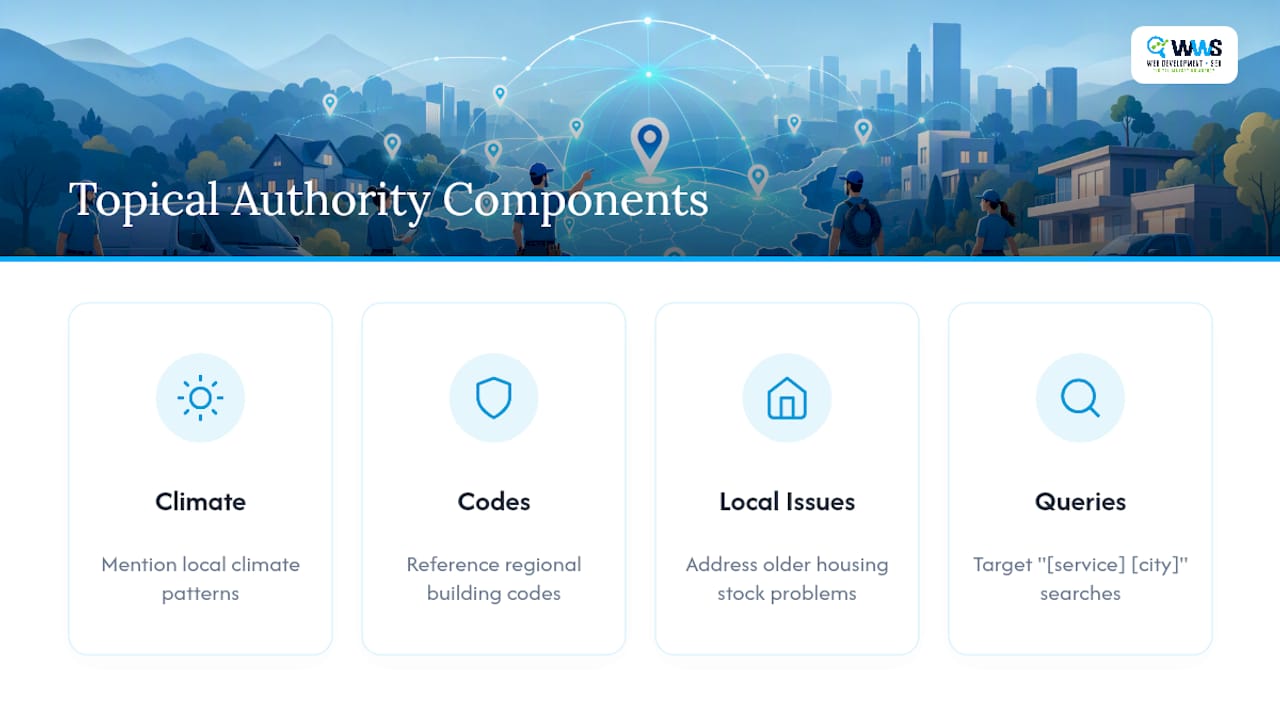
The stronger SAPs go further than naming the city. They build what search professionals call topical authority: layering in region-specific detail like local climate patterns, building codes, or the specific problems that show up in older housing stock in a particular suburb. A guide to building topical authority for local businesses points out that pages addressing a region’s actual conditions consistently outperform generic pages that only differ by a city name in the header.
The payoff shows up in three places: more qualified organic traffic from people already searching for your exact service in their exact town, more inbound calls because the page answers their question before they dial, and more booked jobs because the visitor already trusts you cover their area before they ever pick up the phone.
Pro Tip: Pull your Google Search Console query report and search for “[your service] [city name]” combinations. If people are already searching those phrases and you have no page targeting them, that’s your build list, not a hypothetical one.
Page-Level Must-Haves: A Practical Checklist
Every service area page needs the same core skeleton, whether you’re a one-truck HVAC operation or a 12-crew cleaning company. Build these in order:
- URL and title tag. Use a clean pattern like
/service-city(for example,/hvac-repair-naperville), and write the title tag as “[Service] in [City], [State] | [Business Name].” - H1 and meta description. The H1 should read naturally, not just restate the title tag word for word. Keep the meta description under 155 characters and mention the city by name.
- Opening content block. Write two to three sentences that name the neighborhood, a nearby landmark, or a service detail specific to that town, not boilerplate that could apply anywhere.
Once the SEO skeleton is in place, add the elements that actually convert a visitor into a phone call:
- Click-to-call phone number visible without scrolling on mobile
- A booking link or quote request form, not just an email address buried in the footer
- A localized call-to-action (“Serving Aurora Homeowners Since 2018” beats “Contact Us”)
- Business hours or response-time expectations if relevant to the service
Trust signals separate a page that ranks from a page that ranks and converts:
- A testimonial from a customer in that specific city, not a generic five-star quote
- One or two photos from a completed job in that service area
- Mentions of specific neighborhoods within the broader city
- A short FAQ section answering questions unique to that market
Finally, none of this matters if the page is orphaned. Link to every service area page from your main navigation, a footer “areas we serve” menu, or an HTML sitemap, and submit it in your XML sitemap. A page with zero internal links is a page Google may never find, no matter how well it’s written. Pairing a strong page with a fast, mobile-friendly build matters here too. Local business website design that loads quickly on a phone keeps that click-to-call button usable the moment someone taps it.
How Do You Avoid Doorway Pages and Duplicate-Content Penalties?
The fastest way to waste a week of work is generating twenty city pages that are the same 200 words with the city name changed each time. Google flags these as doorway pages, and they tend to sit outside the top results, if they get indexed at all. BrightLocal’s research on service area page SEO makes the same point from a different angle: near-duplicate pages that only swap a city name get treated as low-value, and that judgment drags down the rest of the site’s credibility with it.
Real uniqueness comes from specifics, not synonyms:
- A short case study or before/after from an actual job in that city
- Mentions of neighborhoods, subdivisions, or landmarks locals actually recognize
- FAQs that differ by market (well water questions in one suburb, older-home wiring questions in another)
- A CTA that varies in wording and offer, not just in the city name it references
Pro Tip: If you can’t write three genuinely different sentences about why a city needs its own page, it probably doesn’t need one yet. Fold it into a regional page until you have real jobs and photos from that market.
A rough rule of thumb: build a dedicated page only where you have real search volume or completed work to reference. Everywhere else, group towns into a regional page until the data justifies splitting them out.
Setting Up Schema and Google Business Profile for Service-Area Businesses
Structured data tells Google what your page means, not just what it says. Use Schema markup, or the more specific Service type, and populate the serviceArea property with each city or region you cover. A complete guide to organization schema walks through the broader implementation if you’re setting this up site-wide rather than page by page. Include your business name, phone number, and service type in the same markup block so the signals reinforce each other rather than living in isolation.
Google Business Profile needs matching settings, not just matching intent. Google’s own guidance for service-area businesses allows you to define a service area instead of a single address, and it explicitly discourages listing an address customers never visit. If your team works from a home office or a warehouse with no public counter, hide the address and define the service area instead.
- Set your GBP service area to match the cities you’ve actually built pages for, not an aspirational wish list
- Link your GBP profile directly to the most relevant SAP for a searcher’s location rather than routing everyone to the homepage
- If you show a coverage map, use a radius or polygon overlay rather than a pinned address that implies a storefront that doesn’t exist
Search Engine Land notes that linking listings directly to the matching city page, instead of a generic homepage, measurably improves the experience for someone who just searched a location-specific term.
Organizing Service Area Pages at Scale
A handful of pages is easy to manage by memory. Fifteen or fifty cities need a system, or you’ll end up with orphaned pages, broken internal links, and duplicate URLs nobody remembers building.

Standardize your URL and title pattern before you write page one: /[service]-[city] for the URL, and “[Service] in [City], [State] | [Business Name]” for the title tag. Consistency here makes the whole program easier to audit later and gives visitors a predictable pattern as they navigate between cities.
Linking strategy matters as much as the pages themselves:
- Feature your top three to five priority cities directly in the main navigation menu
- Build a dedicated HTML “Service Areas” page that links to every city page, especially once you pass ten or more
- Submit every SAP to your XML sitemap so search engines don’t have to discover them by chance
For dense metro coverage, resist the urge to build a page for every single suburb. A practical rule of thumb is to prioritize cities within roughly a two-hour drive of your base, and for anything beyond your top markets, group coverage by county or region instead of splitting hairs between towns eight minutes apart. Cluster tight neighborhood pairs, use a county-level page for lower-volume areas, and reserve individual city pages for the markets where you have real job history to back them up.
How Do You Measure and Improve Service Area Page Performance?
Track four numbers per page, not just overall site traffic. Search impressions and clicks for “[service] in [city]” queries tell you whether Google is even showing the page. Click-to-call events, booking form submissions, and tracked phone calls tell you whether the people who land there actually convert.
- Set up Google Search Console filtered by URL path to watch impressions and clicks per city page.
- Add GA4 event tracking on your phone number and booking form so a click registers as a conversion, not just a page view.
- Use a rank tracker to monitor position for your target “service + city” phrases weekly or monthly.
- Add call tracking if phone volume is high enough to justify a dedicated number per region.
Change one variable per page, then wait. BrightLocal’s research is blunt about this: SAPs are not a quick hack, they take unique content and real monitoring to produce lasting lead growth. Give a change eight to twelve weeks before you judge it, then move to the next page on your list.
Why This Guide Reflects What Actually Works
This guide comes from Online Marketing Experts at WWS – Web Development + SEO and an official Google and Meta Partner, based in Des Plaines, IL. Every recommendation here reflects patterns that hold up across the more than 200 local client partnerships the in-house team has built websites and SEO programs for.
The team behind this guide includes certified specialists across:
- Website builds engineered specifically for service-area businesses, not repurposed templates
- Google Business Profile setup and ongoing management for SABs
- Local SEO execution, including schema implementation and city-page content strategy
The businesses that see the fastest lift from service area pages aren’t the ones with the most pages. They’re the ones with the most specific pages, built for cities where they actually have jobs, reviews, and photos to prove it.
Case studies and specific performance metrics from recent client work are available on request through a consultation, where the numbers can be matched to a business’s actual market and service mix.
What the Conventional Advice Gets Wrong
Most guides on this topic tell you to “create a page for every city you serve” and stop there. That advice alone produces the exact doorway-page problem Google has been warning about for over a decade. Volume without depth is the single most common mistake we see when a business owner tries to DIY this program: fifty thin pages that all rank nowhere, instead of ten strong ones that actually pull calls.
The judgment this research actually supports is narrower and less exciting than “build more pages.” Build fewer pages, but make each one earn its spot with a real testimonial, a real photo, and a paragraph that could only apply to that city.
If you’re prioritizing, start with the cities where you already have completed jobs and happy customers. That’s where you have real content to work with, and real proof to put on the page. Expansion cities without a service history yet can wait, or get folded into a regional page until you’ve got something specific to say about them.
— Online Marketing Experts
Get Your Service Area Pages Built Right the First Time
Building service area pages that actually rank takes more than swapping city names into a template, and most local businesses don’t have the in-house time to write unique content, configure schema, and manage a Google Business Profile for every market at once. WWS – Web Development + SEO handles all three under one roof, so nothing gets lost between a web developer, an SEO freelancer, and whoever manages your GBP listing.

As a certified Google and Meta Partner with over 200 local client partnerships across the Chicago area, WWS – Web Development + SEO’s in-house team builds each service area page with the schema, GBP alignment, and local content depth this guide covers, not a copy-paste template with the city name changed. If your current site has one thin “areas we serve” page trying to rank for a dozen cities at once, that’s costing you calls right now.
Start with a local SEO audit to see exactly which priority cities you’re missing, or explore a full website design build that includes service area pages from day one.
Sources
- Service area pages: Boost local SEO across locations
- How to Do Service Area Page SEO for Local Search Visibility
- Google Business Profile guidance for service-area businesses
- An update on doorway pages
FAQ
What Are Service Area Pages?
Service area pages are landing pages built for a specific city or region a business travels to serve, designed to rank for searches like “[service] in [city]” without implying a storefront exists there.
What Should a Service Page Include?
A strong service area page needs a unique local content paragraph, a visible phone number or booking link, service-area schema matching your Google Business Profile, and at least one internal link pointing to it.
What Is an Example of a Service Area?
A plumbing company based in one city might define its service area as several surrounding suburbs it regularly dispatches technicians to, even without a branch office in any of them, similar to the multi-county coverage pattern some regional contractors publish on their own service area pages.
Recommended
A Des Plaines, IL team helping local service businesses get found, get called and get booked since 2005: local SEO, Google Ads, conversion-focused websites and AI search optimization.
Meet the teamKeep reading
All articles
GA4 for Local Business: Setup, Key Events and Reports
Set up GA4 for a local business: create the property, track calls, forms and direction clicks as key events, verify them and read the reports that matter.
Local Advertising on Google for Small Businesses Ready to Grow
Master local advertising on Google with expert strategies for Local Services Ads, Maps, and Performance Max to attract nearby customers and grow your business.
6 Local SEO Examples Proving Proximity Is Power for Local Brands
See how 6 local SEO examples prove proximity drives revenue for trade services, multi-location brands, and local businesses in Chicago.