





Conversion rate optimization (CRO) is the systematic process of increasing the share of website visitors who complete a desired action, whether that’s calling your business, filling out a form, or making a purchase. The single highest-leverage starting fix is almost never a redesign. It’s clarifying your hero message, tightening your calls to action, and cutting unnecessary form fields. Testing comes later. Fixing what’s obviously broken comes first.
TL;DR:
- Doubling your conversion rate can have the same revenue impact as doubling your traffic, often at a lower cost.
- Start with clarity improvements like simple hero messages and minimal forms before testing or redesigning.
- Focus on fixing obvious barriers such as unclear CTAs, misplaced social proof, and slow mobile load times.
- A/B testing requires sufficient traffic, clear hypotheses, and careful segmenting to avoid unreliable results and ensure meaningful insights.
- Prioritize speed improvements with simple fixes like image compression and deferred scripts, as slow-loading pages lose visitors early.
Table of Contents
- What Is Conversion Rate Optimization and Why Does the Math Matter?
- Where Should You Start Fixing Your Website First?
- How Do You Run A/B Tests That Actually Mean Something?
- Which Page Elements Have the Biggest Impact on Conversions?
- Does Site Speed Really Affect Conversion Rates?
- What Metrics Should You Track to Run CRO Continuously?
- What Tools and Workflows Support an Ongoing CRO Program?
- How Do Local Businesses Apply CRO in Practice?
- How Is AI Search Changing CRO Priorities?
- How WWS Turns CRO Into Real Leads for Chicago-Area Businesses
- Sources
- FAQ
What Is Conversion Rate Optimization and Why Does the Math Matter?
Conversion rate is calculated with one formula: divide the number of conversions by the number of total visitors, then multiply by 100. If your landing page gets a certain number of visits in a month and a portion of those visitors submit a quote request, your conversion rate is the percentage of those visitors who convert. That number sounds small until you realize it’s the multiplier sitting on top of every dollar you spend on traffic.
Here’s the part most business owners get backward. They assume the fix for weak lead flow is more traffic. Sometimes it is. But doubling your conversion rate has the exact same revenue effect as doubling your traffic, and it usually costs far less. If you spend a fixed amount on ads to drive visitors at a certain conversion rate, improving that conversion rate through better page copy and cleaner forms doubles your leads from the same ad spend.
Benchmarks vary widely by industry and device, so don’t chase a generic “good” number. Statista’s conversion rate data by industry and device shows that sectors like retail typically convert differently than lead-generation businesses such as home services or legal, and desktop traffic often outperforms mobile traffic by a meaningful margin across most categories.
What this means for your benchmarking:
- Compare your rate against your own historical baseline first, not an industry average you found in a blog post.
- Segment by device before you panic about a low overall number. A site that converts well on desktop but poorly on mobile has a mobile problem, not a CRO problem.
- Treat conversion rate as a diagnostic, not a scoreboard. A rate that holds steady while your traffic quality changes tells you something different than a rate that drops after a redesign.
The business case for CRO is simple: it’s the only major lever that improves the return on every other marketing dollar you already spend. Better SEO rankings and more ad clicks send more people to a leaky bucket if the bucket itself hasn’t been fixed.
Where Should You Start Fixing Your Website First?
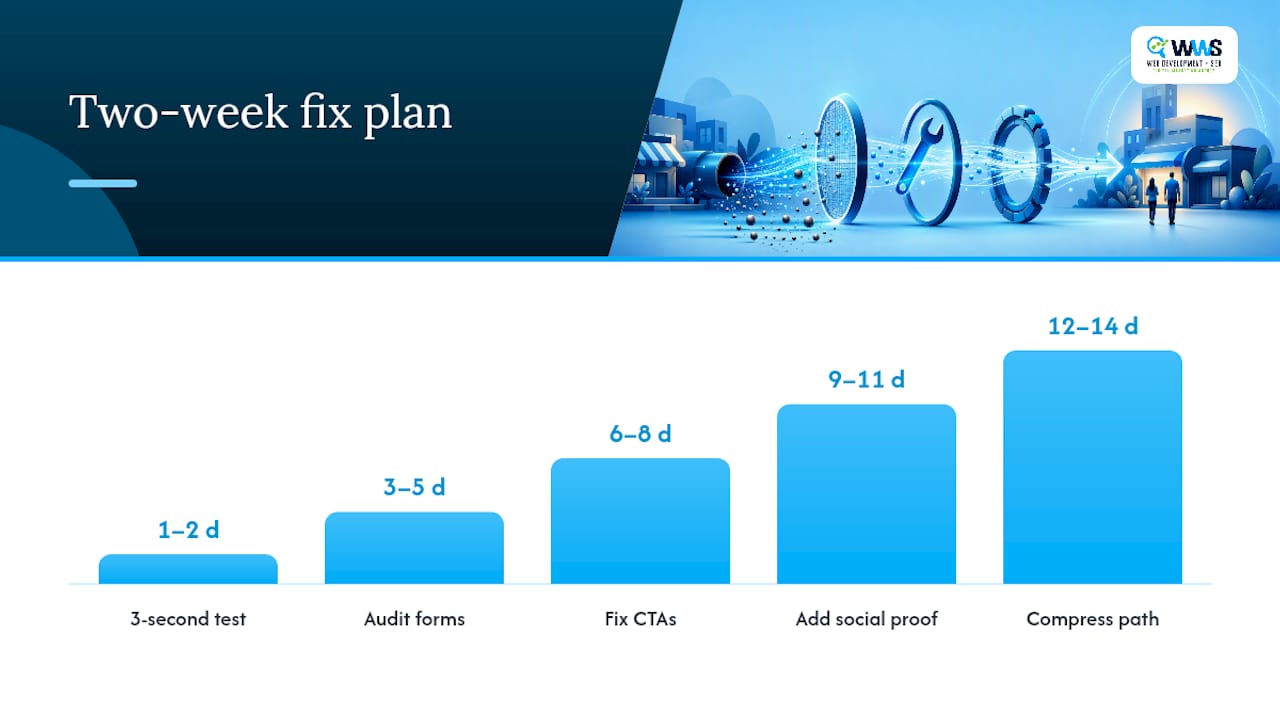
Start with clarity, not creativity. Most sites lose visitors not because the design is ugly but because the visitor can’t tell within a few seconds what the business does, who it’s for, or what to do next. Here’s a sequence you can run in roughly two weeks without hiring anyone or touching your codebase in a major way.
- Day 1 to 2: Run the three-second test. Show your homepage to five people who’ve never seen it and give them three seconds. Ask what the business does and what they’d click next. A clear hero message that names the customer, the problem, and the outcome is consistently one of the highest-return fixes available, because visitors genuinely decide whether to keep reading in that short a window.
- Day 3 to 5: Audit every form on the site. Count the fields. For each one, ask whether you actually need it to make the first contact, or whether it can wait until after the lead comes in. A form with fewer fields typically converts better than a longer one.
- Day 6 to 8: Fix CTA specificity. Replace vague buttons like “Submit” or “Learn More” with language tied to the outcome: “Get My Free Quote” or “Call Now for Same-Day Service.”
- Day 9 to 11: Place social proof where decisions happen. Reviews and trust badges do more work sitting next to a form than buried in a testimonials page nobody visits.
- Day 12 to 14: Compress the path to conversion. Count the clicks between a visitor landing on the page and completing the action. Every unnecessary click is a chance for them to leave.
Run a mobile tap test alongside this sequence. Open your own site on a phone, one-handed, and try to complete your primary conversion action. If your thumb has to stretch or you have to zoom in to hit a button, so does every visitor doing the same thing on a delivery truck or a job site.
Direct changes beat A/B testing when the fix addresses something objectively broken: a confusing headline, a form field nobody wants to fill out, a CTA that doesn’t say what happens next. Save formal testing for changes where the right answer genuinely isn’t obvious. Prioritizing friction and clarity fixes ahead of cosmetic testing tends to compound faster than waiting on a slow-moving experiment to prove what a five-person user test could tell you in an afternoon.
Pro Tip: Screen-record yourself trying to convert on your own site using only your thumb and no zooming. Watch it back. You’ll spot more friction in five minutes than a week of staring at analytics.
How Do You Run A/B Tests That Actually Mean Something?
A/B testing earns its place after the obvious fixes are done, not before. The mistake most small business sites make is jumping into a test with traffic volume that will never reach statistical significance, then declaring a “winner” that’s really just noise.
Every test needs a hypothesis before it needs a tool. A workable template looks like this: “If we [change X], then [metric Y] will improve, because [reason grounded in user behavior].” That last clause matters. A hypothesis without a reason is a guess dressed up as a strategy.
Once you have a backlog of hypotheses, prioritize with a simple framework: impact times confidence, divided by effort. A change with high expected impact, strong confidence based on user research, and low implementation effort should jump to the front of the queue. A test that might move the needle a little but takes three weeks of developer time belongs at the bottom.
Traffic thresholds matter more than most CRO guides admit. If your landing page gets a few hundred visits a month, a split test will take months to reach a reliable conclusion. For lower-traffic sites, A/B testing often makes more sense as a second-year tool, once the obvious friction points are already fixed and traffic volume has grown enough to produce a trustworthy read.
Signs you have enough traffic to test responsibly:
- Your landing page gets at least a few thousand visits a month, giving each variant enough volume to reach a meaningful sample size within a few weeks.
- You can wait out a full purchase or decision cycle, including weekday and weekend behavior, before calling a result.
- You’re testing one variable at a time, not a full-page redesign that makes it impossible to know which change moved the number.
Reading results well matters as much as running the test. Statistical significance tells you the result probably isn’t random, but it doesn’t tell you the result matters for revenue. A variant that lifts conversion rate but drags down average order value can still be a net loss. That’s why revenue per visitor, not raw conversion rate, should be the metric that decides a test’s fate.
Segment before you conclude anything. A test that shows no overall lift might be masking a strong win on mobile and a loss on desktop. Segmenting conversion data by source and device prevents the kind of averaged-out result that leads teams to kill a change that was actually working for most of their audience. A structured loop of research, hypothesis, test, and iteration, the same cycle used across proven CRO frameworks, keeps a program moving instead of stalling after one inconclusive test.
Which Page Elements Have the Biggest Impact on Conversions?
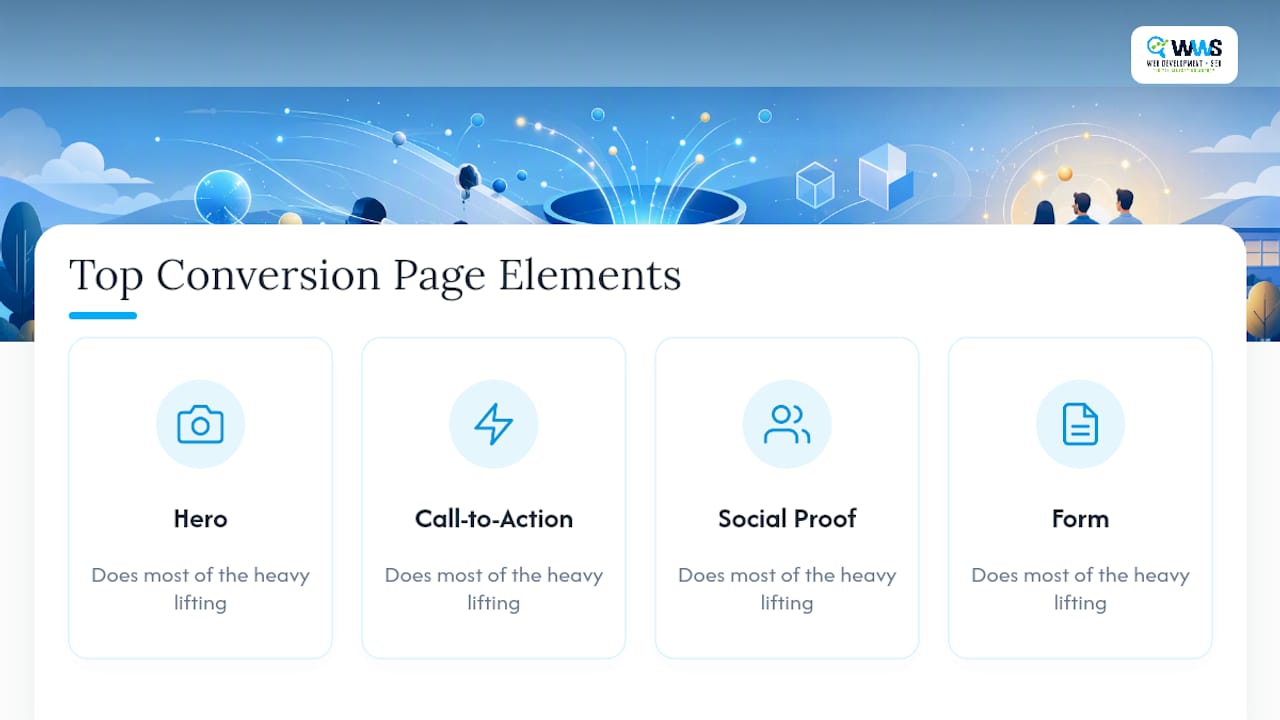
Four elements do most of the heavy lifting on any page built to convert: the hero, the call to action, the social proof, and the form. Get those right and the rest of the page can be fairly plain.
Hero copy and the three-second test
Your hero section needs to answer three questions before a visitor scrolls: who is this for, what problem does it solve, and what happens next. A formula that works across most local service businesses: “[Outcome] for [customer type] in [timeframe or condition].” A roofer’s hero might read “Same-Day Roof Repair Quotes for Chicago-Area Homeowners” instead of a generic “Welcome to Our Company” banner. Run the three-second test again after any hero rewrite. If testers still can’t say what you do, the copy isn’t done.
CTA wording and placement
Test buttons that name the outcome instead of the action. “Get My Free Estimate” consistently reads as more concrete than “Submit,” because it tells the visitor what they receive, not just what they’re doing to your form. Placement matters as much as wording. A CTA above the fold catches the visitor who’s ready now; a second CTA after your proof points catches the one who needed convincing first. Landing pages built around clear, repeated CTAs tend to outperform pages that bury the ask at the very bottom.
Social proof placement
Reviews, star ratings, and client logos work best sitting directly next to the decision point, not isolated on a separate page. A star rating beside your form headline does more than the same rating buried in a footer. If you have Google reviews, pull the actual count and score onto the page instead of a vague “highly rated” claim.
Form design that reduces friction
Every field you remove is a small increase in completion rate. Ask for name, phone, and the one detail you truly need to follow up, and save everything else for the actual conversation. Staged forms, where you ask one or two questions first and reveal the rest after a small commitment, often outperform a single long form because they lower the perceived effort of getting started. Smart defaults, like pre-selecting the most common service type, remove a decision the visitor didn’t want to make.
Mobile-first adjustments
More than half of local search traffic arrives on a phone, and a form that works fine on a laptop can quietly fail on a six-inch screen. Tap targets need enough space that a thumb doesn’t miss. One-handed flows, where a visitor never has to use two hands to complete an action, convert better for anyone browsing on the go. And for service businesses, a visible, tappable “click to call” button often out converts a contact form entirely, because a homeowner with a leaking pipe wants a phone call, not a follow-up email three hours later.
Pro Tip: If your primary conversion action is a phone call, put the number as a tap-to-dial link in the header, not just the footer. Visitors shouldn’t have to hunt for the fastest way to reach you.
Matching the page to the traffic source matters just as much as the elements on the page itself. A visitor arriving from a paid lead ad expecting a specific offer needs to land somewhere that continues that exact promise, not a generic homepage that makes them start over.
Does Site Speed Really Affect Conversion Rates?
Yes, and the effect shows up faster than most owners expect. Core Web Vitals metrics like Largest Contentful Paint and interaction latency correlate directly with conversion performance, because a slow-loading page loses visitors before they ever see your carefully rewritten hero copy. Speed isn’t a technical afterthought. It’s the gate every other CRO fix has to pass through first.
The good news is that most speed fixes don’t require a rebuild:
- Compress images before upload instead of relying on the browser to shrink oversized files on the fly.
- Lazy load anything below the fold so the page doesn’t waste load time rendering content nobody sees yet.
- Defer non-critical scripts, especially chat widgets and marketing pixels that load before the content the visitor actually came for.
- Remove unused third-party tags. Old tracking snippets and abandoned tools pile up on most sites over a couple of years and quietly slow every page down.
- Test on real mobile connections, not just office WiFi, since a 4G connection on a job site behaves very differently than a fiber line at a desk.
A quick statistical reality check: speed problems compound. A page that’s slow to load, slow to become interactive, and prone to layout shifts as images pop in doesn’t lose a fixed percentage of visitors. It loses more at each stage, and those losses stack before the visitor ever reaches your form.
Measuring this doesn’t require a developer budget. Google’s PageSpeed Insights gives a free field-data snapshot of real user experience, and pairing it with a monitoring tool that tracks Core Web Vitals over time catches regressions before they quietly erode conversion for weeks.
What Metrics Should You Track to Run CRO Continuously?
Two numbers should sit at the top of every CRO dashboard: conversion rate and revenue per visitor. Revenue per visitor matters more than raw conversion rate because it accounts for the value of what’s actually converting. A page that converts at a lower rate but pulls in higher-value leads can outperform a page with a flashier conversion number.
Supporting metrics fill in the why behind those two headline numbers:
- Average order value (AOV) or average job value, to catch cases where a “winning” test actually shrank deal size.
- Add-to-cart or quote-request rate, which shows where visitors are engaging before they commit.
- Form completion rate specifically, separate from overall conversion, to isolate whether a drop is happening at the form itself or earlier on the page.
None of these numbers mean much as a single blended average. Segmenting by device, traffic source, campaign, and new versus returning visitors exposes patterns a blended number hides completely. A campaign that looks mediocre overall might be converting extremely well on one channel and dragging the average down elsewhere.
A simple cadence works better than an elaborate reporting system: check core metrics weekly, review segment breakdowns monthly, and do a deeper attribution review quarterly to catch slow-moving trends a weekly glance would miss. On attribution, be honest about its limits. Last-click models overcredit whatever channel happened to close the deal and undercredit the content or ad that built the initial interest. Treat attribution as directional guidance, not gospel.
What Tools and Workflows Support an Ongoing CRO Program?
A workable CRO program needs four tool categories, and small teams can run all of them without a dedicated analytics department:
- Analytics to track traffic, behavior, and conversion events across the funnel.
- Heatmaps and session replay to see where visitors hesitate, scroll past, or abandon a form midway through.
- A/B testing platforms for the hypotheses that genuinely need a controlled test rather than an obvious fix.
- On-page feedback or chat tools that capture the “why” behind a drop-off directly from visitors willing to tell you.
A simple weekly and monthly workflow keeps a small team from letting CRO slide once the initial excitement fades. Weekly, someone reviews the dashboard for anomalies and logs any friction points spotted in session replays. Monthly, the team reviews test results, updates the hypothesis backlog, and picks the next one or two changes to ship. One person should own the backlog so priorities don’t quietly reset every time someone has a new idea.
Escalating to an agency or a managed CRO partner makes sense once the obvious fixes are done, testing volume outpaces internal bandwidth, or the technical lift (page speed, tracking implementation, form logic) exceeds what your team can build in-house. At that point, the return on outside help usually outpaces the cost of a slow do-it-yourself process. Reducing bounce and improving lead capture is a good gut check for whether your current setup still has quick wins left, or whether you’ve genuinely hit the point of diminishing returns without more structured help.
How Do Local Businesses Apply CRO in Practice?
WWS – Web Development + SEO is a Google and Meta Partner, and every strategist on the team is Google and Facebook certified. That matters for CRO specifically because conversion work touches paid ad landing pages, organic search pages, and Google Business Profile listings all at once. A team that only understands one channel will optimize a page for the wrong kind of visitor.
Across more than 200 client partnerships with contractors, restaurants, and local service providers, the pattern repeats often enough to trust: the biggest early gains rarely come from a full redesign. They come from fixing a confusing hero, cutting a form from nine fields to four, and putting a phone number where a thumb can actually reach it. One home services client saw form completions climb noticeably after cutting field count and adding a visible review score above the fold, without touching the page’s overall design.
A four-step diagnostic checklist you can run today:
- Load your homepage on your phone and time how long it takes you to find the phone number or main CTA.
- Count the form fields on your primary conversion page and cut anything that isn’t needed for a first contact.
- Check your PageSpeed Insights score and note whether mobile lags meaningfully behind desktop.
- Pull your last 90 days of conversion data segmented by device to see whether your problem is design, speed, or targeting.
Pro Tip: Run this checklist before you spend another dollar on ads. A campaign sending traffic to a page with a broken conversion path is paying to lose money, no matter how good the targeting is.
How Is AI Search Changing CRO Priorities?
AI Overviews and conversational search are quietly reducing how many high-intent clicks reach a business’s actual website. When an AI answer satisfies a searcher’s question directly, that click never happens, which means the visitors who do arrive are increasingly the ones with a real decision left to make.
That shift raises the value of every visit you still get. Revenue per visitor becomes a more important number than raw traffic volume, because the traffic pool is shrinking toward higher-intent visitors who need less convincing but more trust. Practically, that means aligning page intent tightly to the source a visitor came from and stacking trust signals right at the moment of decision, rather than scattering them across the site. Treating CRO as central to holding revenue steady as click volume shifts is a reasonable response to a search landscape that keeps sending you fewer, but more qualified, visitors.
A short monitoring checklist for 2026: track organic click-through rate against impressions monthly, watch for a shrinking but higher-converting visitor pool, and treat any drop in raw traffic alongside a rising conversion rate as a sign the strategy is working, not failing.
— Online Marketing Experts
How WWS Turns CRO Into Real Leads for Chicago-Area Businesses
Most local businesses don’t need another agency pitching a full website teardown. They need someone to fix the leaks first. WWS – Web Development + SEO runs CRO the same way outlined in this guide: audit the obvious friction, prioritize the fixes with the biggest payoff, implement them fast, and measure before scaling further. Because design, development, and SEO all sit under one in-house team, a hero rewrite, a form fix, and a page speed cleanup happen together instead of getting stuck in three different vendor queues.

An engagement typically starts with a conversion audit of your existing site, covering hero clarity, form friction, mobile usability, and page speed. From there, we build a prioritized roadmap, implement the highest-impact changes, and set up the tracking to measure what actually moved. If your site needs more than a fix, our website design services build conversion-focused pages from the ground up, tuned for the same local Chicago-area search traffic our local SEO and Google Business Profile work is already driving to your door. With over 200 completed client partnerships across contractors, restaurants, and service businesses in the greater Chicago area, we know which fixes tend to pay off fastest for a business like yours. Reach out for a conversion audit and see which fixes on your own site are costing you leads right now.
Sources
- Conversion rate optimization (CRO) strategy for 2026
- Global conversion rate by industry and device (Statista)
- How to increase your website conversion rate (without redesigning the whole site) | ClaraConverts
- CRO Best Practices: 16 Techniques That Convert (2026)
FAQ
How Do You Optimize Conversion Rates?
Start with clarity fixes: a hero message naming the customer, problem, and outcome, a form with only essential fields, and specific CTA wording. Only move to formal A/B testing once you have enough traffic to reach statistical significance and the obvious friction is already gone.
What Are the Main Elements of Conversion Rate Optimization?
The core elements are hero messaging, calls to action, social proof placement, form design, page speed, and mobile usability. Fixing these six areas covers most of the conversion loss on a typical local business website.
Is Conversion Rate Optimization Worth It?
Yes. Improving conversion rate raises the return on every dollar spent on traffic, since a higher rate turns the same visitors into more leads without added ad spend. For most local businesses, fixing existing friction is cheaper than buying more clicks.
What Is the Difference Between CRO and SEO?
SEO focuses on getting visitors to your site through search visibility, while CRO focuses on what happens once they arrive. The two work together: SEO drives qualified traffic, and CRO makes sure that traffic actually converts into calls and leads.
When Should I Use A/B Testing Instead of Direct Fixes?
Use direct fixes for anything objectively broken, like confusing copy or a bloated form. Save A/B testing for changes where the right answer isn’t obvious and your site gets enough monthly traffic to reach a reliable result within a few weeks.