


Small Business Web Page Design 101: From Blank Screen to Beautiful Site
Learn small business web page design from blank screen to launch: mobile-first layouts, conversion tips, SEO, costs, and timelines for 2026.
 By WWS Team
9 min read
In this article7 sections
- How to Design a Small Business Web Page That Wins Customers
- Core Principles of Small Business Web Page Design
- Planning Your Website Structure and Content Strategy
- Optimizing for Search Visibility and Local Discoverability
- Development Approaches: Investment and Timeline Realities
- Frequently Asked Questions About Web Design for Small Businesses
- Conclusion
How to Design a Small Business Web Page That Wins Customers
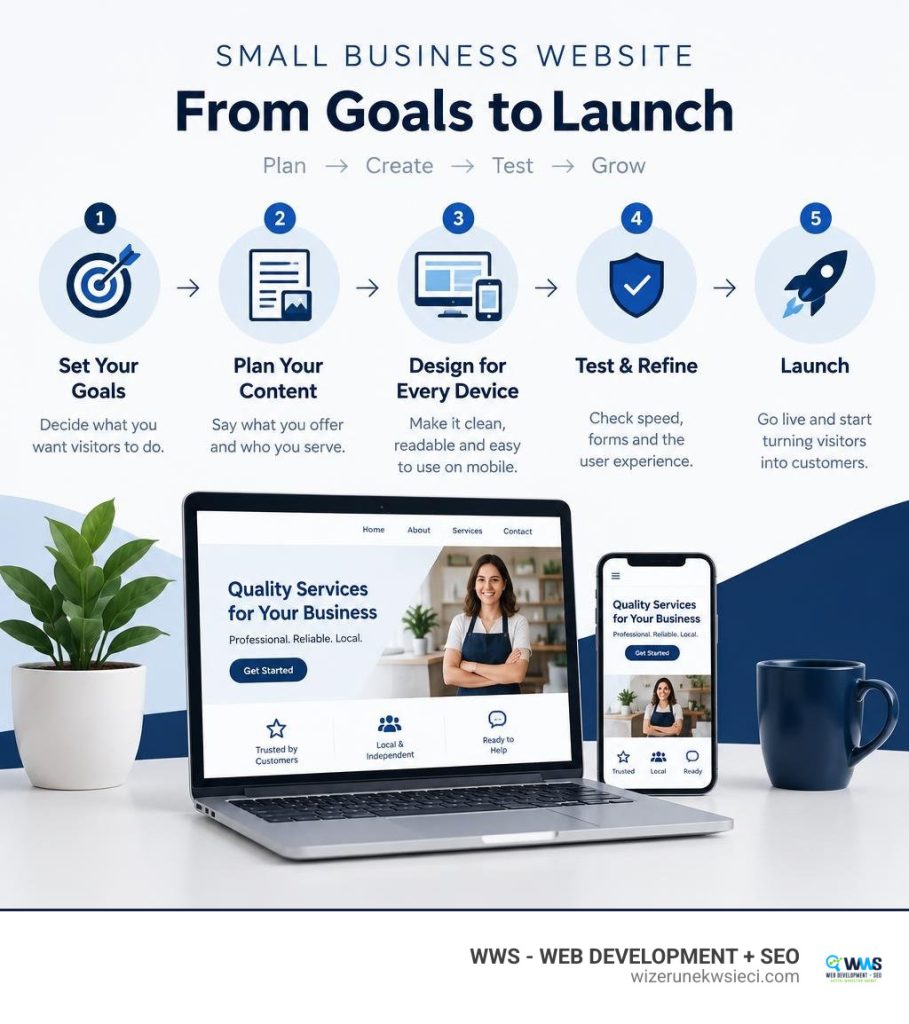
Effective small business web page design starts with one goal: make it easy for the right visitor to call, book, or buy. To build a page around that goal:
- Say what you offer and who you serve at the top.
- Make the page easy to read and use on a phone.
- Show real proof, such as customer reviews and project photos.
- Add a clear next step, then test the page’s speed and contact forms.
I’m Tomasz Lasota, founder of Wizerunek w Sieci / WWS – Web Development + SEO in Des Plaines. For more than 22 years, I’ve helped businesses across the Chicago area and the U.S. connect small business web page design with search visibility and customer inquiries.
Explore more about small business web page design:
Core Principles of Small Business Web Page Design
When a potential client lands on your website, you have mere seconds to capture their attention and prove you can solve their problem. Think of your website as your primary digital storefront: if the entryway is cluttered, the lighting is dim, and no one is around to assist, visitors will immediately turn around and walk away. In digital terms, that means bouncing straight back to the search results to find a competitor in your area.

To keep visitors engaged and guide them toward contacting you, professional web architecture relies on four fundamental pillars:
- Visual Hierarchy: Guide the visitor’s eyes naturally from your primary value proposition to supporting details and ultimately to the action you want them to take. Use scale, contrast, and strategic white space rather than overcrowding every pixel with graphics.
- Page Performance: Speed is not just a technical metric; it is customer service. If a page takes more than three seconds to load, 53% of users abandon it entirely. Every fraction of a second shaved off your loading time preserves revenue.
- Typography and Readability: Select clean, high-contrast font combinations that ensure effortless reading across screens of all sizes. Maintain comfortable line spacing and distinct heading levels (H1, H2, H3) to allow easy scanning.
- Action-Driven Layouts: An attractive site must also generate leads. By applying proven conversion rate optimization strategies, every layout choice actively nudges the prospect toward booking an appointment, submitting an estimate request, or calling your office.
Beyond visual appeal, your site must be usable for every member of your community. Following a comprehensive website accessibility checklist guarantees that individuals using screen readers or keyboard navigation can interact with your business without barriers. To review how these foundational standards compare across leading modern platforms, you can examine industry-curated small business website examples that balance visual refinement with technical compliance.
Mobile-First Small Business Web Page Design Best Practices
Global mobile traffic now accounts for roughly 70% of all internet usage, and for local service providers, that figure is frequently even higher. When an emergency plumbing issue arises or a client searches for a nearby service provider from their car, they are using a smartphone. If your site requires pinch-to-zoom navigation, you are turning away potential customers.
Designing mobile-first means building the mobile experience as the primary foundation rather than treating it as an afterthought.
- Thumb-Friendly Touch Targets: Buttons and navigation links must be large enough (at least 48×48 pixels) to be tapped easily without misclicks.
- Sticky Contact Bars: Keep your phone number or appointment button fixed at the top or bottom of the mobile viewport, making it accessible from any point on the page.
- Streamlined Navigation: Replace bulky multi-level desktop menus with clean, collapsible slide-out menus that keep options clear and manageable.
- Core Web Vitals Optimization: Ensure your largest content paint (LCP) loads swiftly and visual elements do not shift unexpectedly while loading on mobile cellular networks.
Conversion Architecture and Trust Signals
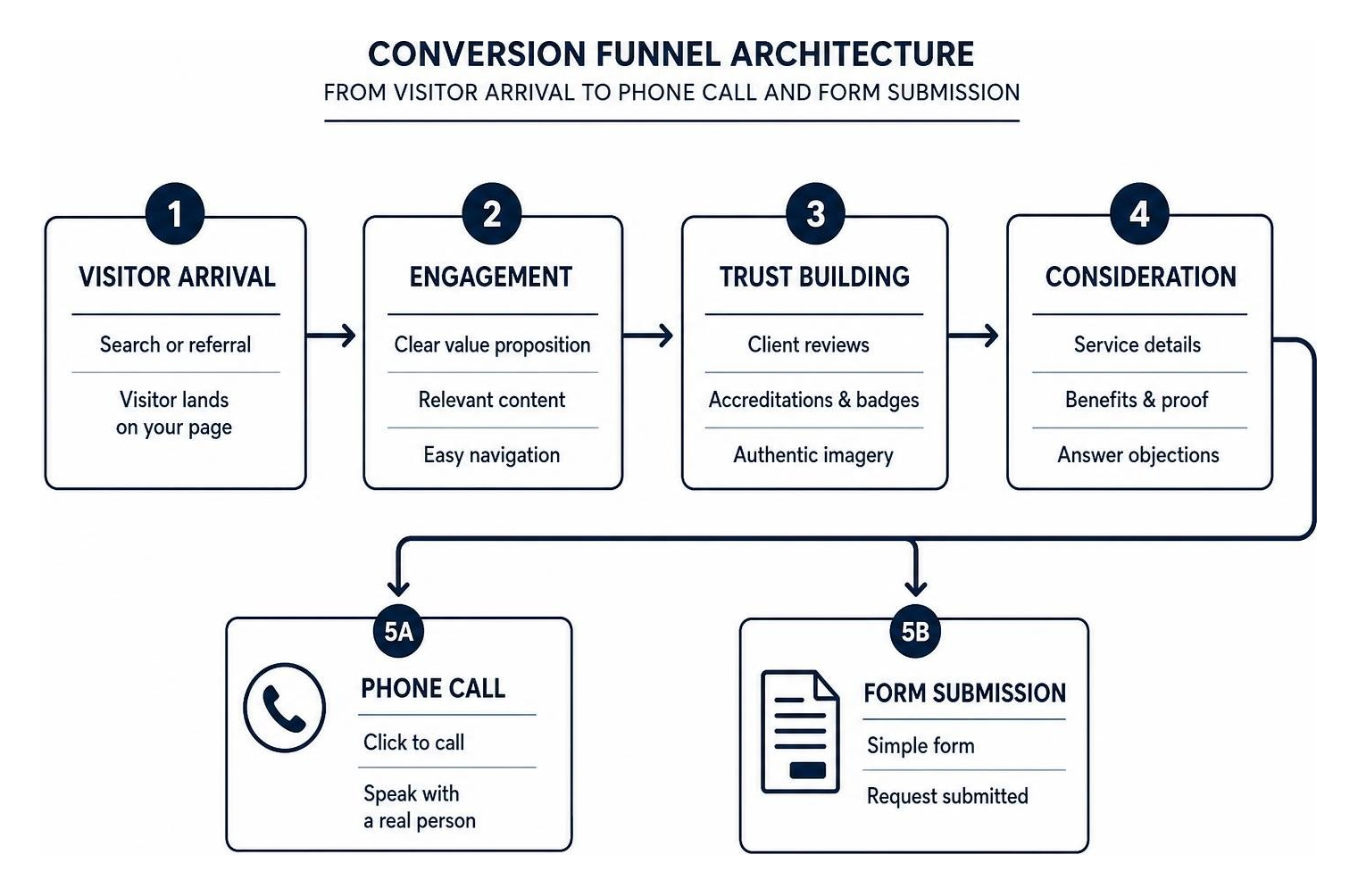
A well-crafted website does not merely display information; it eliminates hesitation. When clients discover your company online, they seek assurance that you are reliable, capable, and legitimate before sharing their contact details.
Integrating trust signals directly into your conversion path provides that peace of mind:
- Verified Client Reviews: Showcase real testimonials featuring client names, project locations, and star ratings across key service pages.
- Accreditation and Badges: Prominently display trade licenses, professional associations, and security certificates near your primary contact forms.
- Authentic Imagery: Replace generic stock photography with crisp, high-resolution photographs of your actual team, service vehicles, and completed work.
- Strategic Calls to Action: Use action-oriented phrases such as “Schedule Your Consultation” or “Request a Free Quote” rather than generic labels. Studying effective call to action examples demonstrates how subtle shifts in wording and placement directly impact inquiry rates.
Planning Your Website Structure and Content Strategy
Before beginning visual styling or layout work, a successful commercial website requires a strategic architecture. A logical site structure allows human visitors to find what they need in two to three clicks while enabling search engine crawlers to understand and index your service offerings.
Carefully mapped service page design ensures each distinct offering has a dedicated URL with detailed service descriptions, pricing transparently framed around value, and tailored FAQs. If you serve multiple communities across Cook County, DuPage County, or Lake County, implementing structured local landing page design helps you capture regional search demand across neighboring suburbs without creating duplicate content.
Essential Pages Every Commercial Site Needs
Every high-performing commercial website relies on a core group of well-executed pages:
- The Homepage: Delivers an unmistakable value proposition above the fold, highlights your primary services, displays social proof, and establishes your local presence.
- Dedicated Service Pages: Explains how your solutions work, who they are designed for, what benefits they provide, and how to get started.
- The About Us Page: Humanizes your company by sharing your background, professional experience, team culture, and community involvement.
- Service Area Pages: Outlines your operational footprint, helping local clients understand exactly where you provide on-site services.
- Contact and Booking: Provides clear contact channels including your address, direct phone number, interactive map, and seamless website booking integration for real-time scheduling.
Integrating AI Tools into Small Business Web Page Design
Modern website production leverages artificial intelligence and intelligent automation to refine workflows, optimize page speed, and produce clean code. AI-assisted development tools help development teams analyze layout accessibility, accelerate custom prototyping, and test varied layout variations across multiple device viewports.
However, artificial intelligence cannot replace hands-on local business strategy, genuine brand voice, or tailored technical architecture. While automated systems offer inspiration, looking at curated small business website examples reveals that the top-performing sites still rely on customized styling, authentic customer stories, and purposeful code crafted by experienced professionals.
Optimizing for Search Visibility and Local Discoverability
A visually impressive website cannot generate revenue if your target customers never discover it. True digital visibility requires integrating technical search engine optimization directly into the site’s foundational code rather than treating it as an afterthought.
Effective SEO web design ensures your visual elements, navigational menus, and page layouts align with search engine indexing requirements. This process begins by establishing a clean URL structure for SEO that utilizes clear descriptive slugs (such as /services/commercial-roofing/) rather than confusing query parameters.
Technical Performance and Speed Optimization
Search engines prioritize websites that load quickly and deliver clean, stable page interactions. Minimizing technical bloat protects both your search positions and user retention rates:
- Next-Gen Image Formats: Convert standard media into modern WebP formats and use responsive image srcset tags to serve appropriate dimensions for mobile screens.
- Code Minification: Strip out unused JavaScript libraries, optimize CSS style sheets, and eliminate redundant external tracking scripts.
- Server Caching and Modern Hosting: Deploy robust server-side caching solutions on optimized web infrastructure to deliver pages instantly.
- Preventing Layout Shifts: Specify explicit image dimensions and container sizes in your code to stop page elements from jumping as assets finish loading.
Local Search Signals and NAP Consistency
To secure high placement within local search results and map displays, your on-page data must align precisely with your broader digital presence. Maintaining complete consistency across your business Name, Address, and Phone Number (NAP) between your website footer, contact pages, and Google Business Profile is critical.
Integrating JSON-LD local business schema markup directly into your site’s header communicates your exact service area, operational hours, accepted payment methods, and physical coordinates directly to search engine algorithms. For an in-depth breakdown of connecting your website architecture with local visibility, read our detailed guide on eliminating digital ghost towns through local web design.
Development Approaches: Investment and Timeline Realities
When planning a website upgrade or initial launch, business owners generally navigate three paths: template builders, large corporate agencies, or specialized local web development partners. Understanding the balance between technical capability, timeline expectations, and budget helps you make the right long-term investment for your company.

While basic do-it-yourself software allows simple pages to be assembled quickly, growing businesses frequently encounter limitations regarding technical SEO customization, specialized integrations, and speed optimization. Conversely, large national design firms often charge substantial fees while delegating day-to-day communication to junior account managers.
Working with an agile, high-touch agency offers the ideal balance: you receive enterprise-grade custom engineering, strategic local SEO focus, and dedicated personal communication directly with experienced developers.
| Project Scope | Typical Timeline | Core Deliverables | Ideal Business Fit |
|---|---|---|---|
| Standard Professional Site | 2–4 Weeks | Custom mobile-first responsive design, 5–8 core pages, local SEO foundation, contact forms. | Local service contractors, boutique shops, and emerging practices establishing authority. |
| Comprehensive Commercial Build | 4–8 Weeks | Advanced custom architecture, 10–25 pages, local area landing pages, custom booking, CRM integrations. | Established service firms, multi-location practices, and growing commercial companies. |
| Full Custom Enterprise / Redesign | 8–12+ Weeks | Fully tailored backend, custom client portals, complex e-commerce catalog, complete data migration. | Companies undergoing full rebranding, expanding nationally, or modernizing outdated infrastructure. |
To understand how design scope, third-party software connections, and ongoing technical maintenance shape overall project budgets, review our transparent breakdown of website redesign cost considerations.
Frequently Asked Questions About Web Design for Small Businesses
How much does a professional commercial website cost in 2026?
A professionally designed commercial website generally ranges from $1,000 for straightforward custom setups to $10,000 or more for comprehensive, feature-rich web platforms. Total investment depends on several technical factors: the total number of specialized pages required, custom API integrations (such as client booking portals or inventory management), e-commerce capabilities, and advanced on-page SEO engineering.
How long does it take to design and launch a business website?
A standard, well-structured business website typically takes between two and four weeks to design, develop, test, and launch. More extensive websites involving multi-location landing pages, advanced interactive features, or custom application workflows can take six to twelve weeks. Establishing clear project goals, preparing text content, and gathering brand assets early in the process helps ensure a smooth, timely launch.
Can business owners manage and update their site after launch?
Yes. Professional custom websites are engineered with intuitive, user-friendly administrative dashboards that allow your team to easily update service offerings, publish fresh blog articles, upload recent project photos, and adjust operating hours without touching any code. Your development partner should also provide personalized training and ongoing technical support to keep your site secure and updated.
Conclusion
A well-crafted digital presence is the engine of your modern business growth. Investing in purposeful web architecture, high-speed performance, and clear conversion paths turns passive online searchers into long-term clients who call, book, and buy from your business with confidence.
At Wizerunek w Sieci (WWS – Web Development + SEO), founded by Tomasz Lasota and based in Des Plaines, IL (636 S River Rd #218), we combine technical engineering with attentive, personalized service. Serving small and mid-sized businesses across Chicago, Cook County, the Northwest Suburbs, and across the United States, our bilingual team (English & Polish) takes immense pride in supporting local business communities and the vibrant Polish-American community (Polonia Chicago).
Whether you need a brand-new digital foundation or want to modernize an existing platform, we build custom digital solutions designed to grow your revenue. Explore our tailored website design solutions today or call (773) 814-2992 to request your free, comprehensive website audit at wizerunekwsieci.com.
A Des Plaines, IL team helping local service businesses get found, get called and get booked since 2005: local SEO, Google Ads, conversion-focused websites and AI search optimization.
Meet the teamKeep reading
All articles
Small Business App Cost: What to Budget in 2026
What a small business should budget for an app: build, store fees, maintenance at 15-20% a year, and how features change the price, plus how to scope it.

Mobile Friendly Dental Website Design for Modern Practices
Discover how a mobile friendly dental website boosts patient bookings, local SEO, and trust—expert design tips from WWS Chicago.

Homepage Design Best Practices for Local Businesses
Homepage design best practices for local service businesses: what to put above the fold, how it differs from a landing page, speed targets and a checklist.