





Good URL structure follows Google Search Central guidance and RFC/IETF URI syntax, and we at WWS – Web Development + SEO apply both on every build. Make URLs crawlable and readable: descriptive, lowercase slugs with hyphens, few parameters, shallow nesting. URLs are an indirect signal, so consistency matters most. When you change one, redirect it and canonicalize it.
TL;DR:
- Fragments only point to positions within a page, so content after a fragment cannot rank independently; give it its own path.
- Use query parameters for sorting, filtering, or pagination, but canonicalize variants that show the same content to one preferred URL.
- Slash and no slash addresses can act as separate URLs, so enforce one convention through redirects, canonicals, internal links, and sitemap entries.
- Before a migration, map every old address to its destination, use direct 301 redirects, update internal links and sitemaps, then monitor Search Console.
Table of Contents
- What are the parts of a URL, and which ones matter for indexing?
- Which crawlability rules should every URL follow?
- How do you write readable, SEO-friendly slugs?
- When are query parameters and fragments safe to use?
- Should URLs end with a trailing slash?
- How do hierarchy and depth affect crawlability and AI retrieval?
- How do you change URLs without losing rankings?
- What is a quick URL-structure checklist you can use today?
- How should URLs handle multiple languages and regions?
- Does URL length matter for SEO and user experience?
- How do you optimize URLs for mobile SEO?
- When should you fix URLs yourself, and when should you call an agency?
- How does our team help with URL structure and technical SEO?
- FAQ
- Sources
What are the parts of a URL, and which ones matter for indexing?
RFC 3986 defines the generic URI syntax and names five main components. Knowing them tells you where a change helps and where it only creates risk.
- Scheme: the protocol, such as
https. It tells browsers and crawlers how to fetch the page, and secure pages should always use the HTTPS version. - Authority (host): the domain, such as
example.com, plus any subdomain. It identifies the site, so mixingwwwand non-wwwversions splits your signals. - Path: the folders and slug after the host, such as
/services/roof-repair. This is the part you control most and the part readers actually see in search results. - Query: everything after the
?, such as?sort=price. Crawlers read it as part of the address, so every new combination can become a separate URL. - Fragment: the part after the
#. It points to a spot inside a page, and it is not sent to the server as part of the request, so it cannot give crawlers a different page.
The takeaway: scheme, host, path and query are parsed and can create indexable addresses. The fragment is a browser-side pointer. If a page needs its own ranking potential, it needs its own path, not a fragment.
Which crawlability rules should every URL follow?
Start with the standard. The IETF syntax (STD 66) sets which characters are valid and how special ones must be written. Google’s URL structure documentation builds its guidance on that foundation: URLs should be crawlable, readable, and free of avoidable clutter. Google also treats URL structure as a supporting signal, not a primary ranking factor, so the goal is to remove friction, not to chase a trick.
- Percent-encode special characters the same way every time, so one page never exists under two spellings.
- Keep content reachable through real links with real URLs. Navigation that works only through JavaScript, or that swaps content behind a fragment, hides pages from crawlers.
- Keep session IDs, admin IDs and tracking strings out of public URLs.
- Keep parameters to the minimum that your site truly needs.
- Avoid special characters and spaces in paths, since they invite encoding errors.
Pro Tip: Crawl your own site once and sort the list of URLs alphabetically. Odd characters, session strings and near-duplicate paths stand out immediately, and you can fix them in one pass.
How do you write readable, SEO-friendly slugs?
A slug is the last segment of the path, and it works best when a person can guess the page’s topic from it alone. Google recommends hyphens to separate words and discourages underscores, because underscores are typically used to join concepts in programming contexts. Keep every character lowercase, since uppercase and lowercase versions can be treated as different addresses on many servers.
- Separate words with hyphens:
/roof-repair/, not/roof_repair/or/RoofRepair/. - Use one clear phrase per segment.
/services/roof-repair/beats/best-cheap-roof-repair-roofing-contractor-roofer/. - Favor clarity over exact-match keywords. Google describes the ranking benefit of keywords in a URL as tiny, so a slug that reads naturally always wins.
- Leave out dates, campaign codes and version numbers unless the page is inherently tied to them, like an annual report.
- Choose slugs you can live with for years. Every rename forces a redirect, and every redirect adds work.
Pro Tip: Read the slug aloud. If it sounds like something you would say to a customer on the phone, it is probably right. If it sounds like a database row, rewrite it.
When are query parameters and fragments safe to use?
Parameters are fine when they change how a page is displayed, not what the page is. Sorting a product list or filtering by size can sit in a query string. A page with its own topic, intent and audience belongs on a clean path.
- Reserve parameters for behavior such as sort, filter and pagination, and limit how many combinations your site can generate.
- When parameters create many variants of the same content, point them all to one preferred version with a canonical tag. Search Console’s parameter handling can support that, but the canonical tag should carry the main weight.
- Percent-encode unsafe characters consistently.
- Never rely on a fragment to swap user-facing content. Crawlers treat the part after the
#as a position on the page, so content that appears only through fragments stays invisible as separate pages.
Example: /shoes?sort=price and /shoes?sort=popular show the same products in a different order. Both should canonicalize to /shoes.
Should URLs end with a trailing slash?
Either convention is acceptable. What hurts is using both. Ahrefs explains that trailing slashes historically marked directories and that the slash and no-slash versions of an address are treated as distinct URLs. Left alone, one page can answer on two addresses, and links and signals split between them.
- Choose one convention per resource type, for example a slash on category pages and none on files.
- Enforce it with 301 redirects, canonical tags, internal links and sitemap entries that all use the same form.
- Check how your analytics and hreflang annotations reference the URL, because a mismatch there reintroduces duplicates.
Pro Tip: Test both versions of your key pages in a browser. If both load without a redirect, you have a duplicate problem waiting for a crawler to find it.
How do hierarchy and depth affect crawlability and AI retrieval?
Search Engine Journal’s practitioner guide on designing URLs for AI retrieval argues that a URL gives AI retrieval systems immediate context before they read a word of the page. A path like /services/roof-repair/ tells a system what the page covers. A path like /p?id=4812 tells it nothing.
- Prefer a shallow hierarchy of domain, category, page. Deeper paths add crawl distance and noise.
- Make each segment descriptive and aligned with your site’s taxonomy, so the path mirrors how you would explain the page to a customer.
- Avoid admin clutter and ID numbers in public URLs.
- Audit your most valuable pages first. These are the canonical URLs you most want search engines and AI tools to cite, so their addresses deserve the cleanest structure.
Practitioner guidance recommends no more than about three levels, domain, category and page, to support both crawlability and semantic clarity for AI systems, according to Search Engine Journal. Treat that as a design target, not a hard limit. A short path that stays descriptive beats a deep one that mirrors an old folder tree.
For a wider view of how architecture decisions shape crawling, this site architecture guide covers the same ground from another angle.
How do you change URLs without losing rankings?
Most URL damage happens during the change, not before it. A careful sequence protects the link equity your pages have earned.
- Map every old URL to its new one in a spreadsheet before anything launches.
- Set up 301 redirects for permanent moves, pointing each old address straight to its final destination so no chains form.
- Update internal links, XML sitemaps and canonical tags to the new addresses.
- Test with a staged crawl to catch broken redirects and orphaned pages.
- Launch, then watch traffic and index coverage in Search Console, and fix errors fast or roll back if needed.
Pro Tip: Keep the old-to-new redirect map after launch. When a page breaks months later, that file tells you in seconds what the address used to be.
Our technical SEO audit workflow walks through the crawl and indexing checks that belong in step four.
What is a quick URL-structure checklist you can use today?
Run through this list on your most important pages first, ranked by traffic, conversions and the links they have earned.
- Hyphens between words, lowercase everywhere.
- Descriptive slugs that match the page topic.
- Shallow depth of about three levels.
- One canonical version for every duplicate.
- One slash policy, enforced by redirects.
- 301 redirects for every moved page.
- Few parameters, and canonicals for the rest.
| Check | What to look for | Where to look |
|---|---|---|
| Crawl | Odd characters, duplicate paths, redirect chains | A crawler such as Screaming Frog |
| Canonicals | Each page points to its preferred version | Page source or crawl export |
| robots.txt | No accidental blocks on key sections | The file at your domain root |
| Index coverage | Pages excluded, duplicated or erroring | Search Console |
Our guide to making a website SEO-friendly pairs well with this list when you are planning a full site.
How should URLs handle multiple languages and regions?
A site that serves several languages or countries needs a URL pattern that makes the audience obvious to both people and crawlers. The common options are separate country domains, subdomains, and language or region folders inside one domain. Folders such as /es/ or /en-ca/ are often the easiest to maintain, because they sit under one host and share its authority, but any of the three can work if you apply it the same way everywhere.
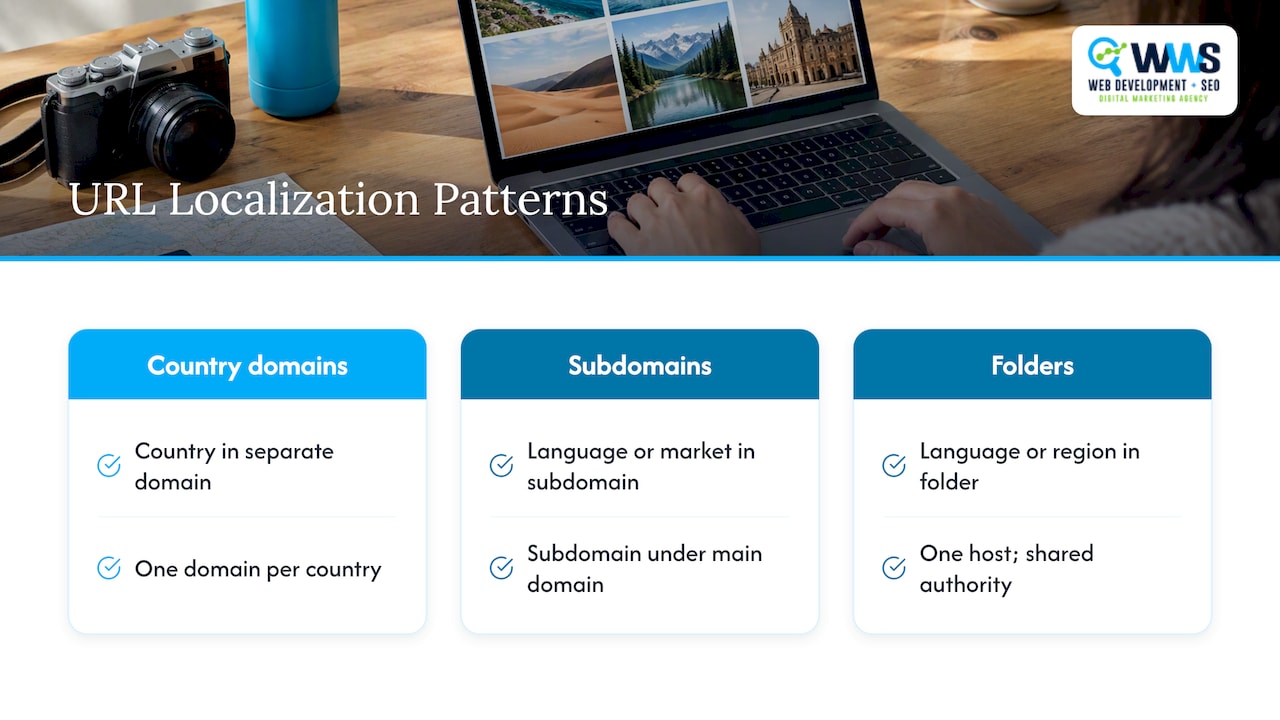
Whatever you choose, treat each language version as its own set of real, crawlable addresses. A language switch driven only by a cookie, a script or a fragment gives crawlers nothing to index. Each version needs its own path, and the versions should reference each other with hreflang annotations so search engines understand they are alternates of one page, not duplicates.
Keep the slugs readable for the audience of each version. A Spanish page can carry a Spanish slug, with the characters percent-encoded consistently where the standard requires it. Mixing languages inside one path, such as an English folder with a Spanish slug, confuses readers and makes the structure harder to audit.
Be strict about consistency in the details covered earlier. If one language folder uses a trailing slash and another does not, or if canonicals point to a different language version than the hreflang cluster expects, you recreate the duplicate problem across borders. Pick the folder pattern, the slash policy and the slug rules once, document them, and apply them to every market you enter.
Does URL length matter for SEO and user experience?
Length is a usability question more than a ranking one. Google’s guidance asks for readable, simple URLs, and nothing in it describes a character count that unlocks better rankings. The real cost of a long URL shows up elsewhere: it gets truncated in search results, it is awkward to read aloud or copy, and it tends to signal a bloated structure with too many levels or too many stuffed keywords.
A practical rule is to include only the words that identify the page. /services/roof-repair/ says everything a visitor needs. /services/our-professional-residential-roof-repair-and-replacement-services-in-the-area/ repeats itself, hides the useful words at the start behind filler, and invites typos when someone shares it.
Length also interacts with the earlier rules. Deep nesting, long parameter strings and keyword repetition all make a URL longer, and each of those is a problem for its own reasons. Fixing the cause usually fixes the length. Flatten the hierarchy, remove the parameters that do not change content, and trim slugs to one clear phrase.
Do not shorten URLs that already rank for the sake of shortening them. A rename means a redirect, and a redirect carries a small risk for no guaranteed gain. Apply the short, clean pattern to new pages and to older pages only when you are already touching them for a stronger reason, such as a migration or a canonical cleanup.
How do you optimize URLs for mobile SEO?
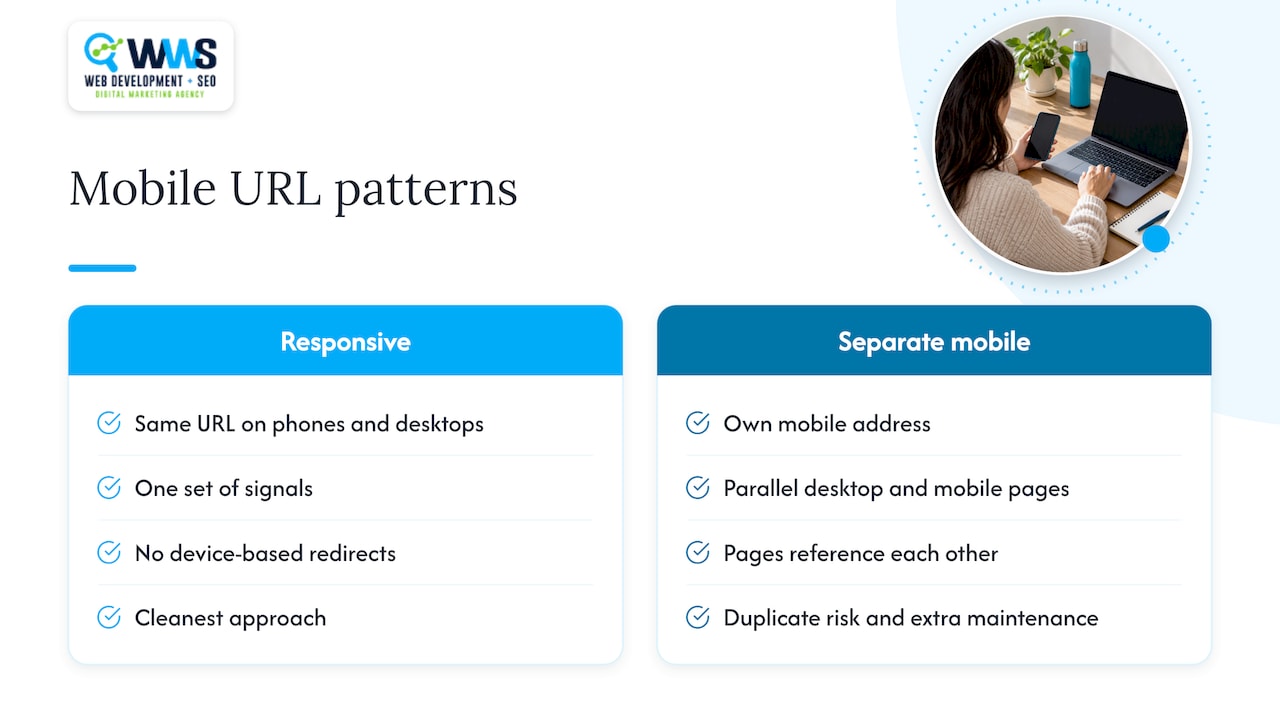
Google crawls the mobile version of your site, so what matters is that your mobile pages are reachable and consistent. The cleanest approach is responsive design, where phones and desktops get the same address. One page on one URL means one set of signals and no redirects based on device.
If a site still serves a separate mobile version on its own address, the desktop and mobile pages must reference each other, and the structure must stay parallel so every desktop page has a matching mobile page. That setup adds duplicate-URL risk and extra maintenance, which is why most sites are better off with a single responsive address.
Short, readable URLs also help on small screens, where long addresses wrap or cut off in browsers and messaging apps. Visitors share links from phones constantly, and a clean path such as /services/roof-repair/ survives a text message intact, while a string of parameters does not.
Keep your redirects light for mobile users. A redirect chain adds delay on a slower connection, so point each old address directly at its final destination. Avoid redirecting phone visitors to a generic home page when the page they asked for exists, since that breaks the path they were following.
Finally, check the mobile experience in Search Console after any URL change. Confirm that the pages Google indexes on mobile match the addresses in your sitemap, and that your canonical tags and internal links use the same version you want ranking. For structure ideas on page types that depend heavily on phone traffic, see our notes on local landing page design.
When should you fix URLs yourself, and when should you call an agency?
Small, high-impact problems are worth fixing in-house: uppercase letters, underscores, a missing redirect, an inconsistent slash. Large migrations and sites carrying years of canonical and redirect debt deserve more care, because one wrong mapping can drop pages from the index. Protect your rankings with a phased approach: audit, plan, implement, monitor. Our team handles audits and migrations in-house, so the person who plans the redirects is the person who tests them.
— Online Marketing Experts
How does our team help with URL structure and technical SEO?
WWS – Web Development + SEO is your premier local business marketing expert solution serving Des Plaines, IL, and the greater Chicago Area. As an official Google and Meta Partner, our team consists exclusively of Google and Facebook certified experts dedicated to growing local service businesses. From contractors to restaurants, we combine custom web development with aggressive SEO and GEO strategies to turn your online presence into a lead-generating engine. With over 200 successful client partnerships, we don’t just build websites—we drive real calls, consistent leads, and year-round revenue for Chicago-area businesses.
We handle website development, technical SEO, URL audits and migrations under one roof, with no outsourcing. If your URLs need a clean-up, request a URL audit through our Website SEO service and we will tell you what to fix first.

FAQ
What are the five main parts of a URL?
A URL has a scheme, an authority or host, a path, a query and a fragment, as defined in RFC 3986. These components help identify the address and its parts. The fragment only points to a spot inside a page.
What is a URL in SEO?
A URL is the web address of a page, and in SEO it also gives users and crawlers a clue about the page’s topic. Google treats URL structure as a supporting signal, not a primary ranking factor, according to its documentation. Clear, consistent URLs make pages easier to crawl and share.
Can you give an example of a good URL structure?
A strong example is https://example.com/services/roof-repair/. It uses HTTPS, a clean host, a shallow path of category then page, lowercase letters and a hyphen between words. It has no parameters or ID numbers, and a visitor can guess the topic from the address alone.
Should I use a trailing slash or not?
Either works, as long as you use one convention and enforce it. The slash and no-slash versions count as separate URLs, so pick one and apply it with 301 redirects, canonical tags, internal links and sitemap entries. Ahrefs covers the details.
Sources
- URL Structure Best Practices for Google Search
- How To Design URL Structures For AI Retrieval, Not Just Rankings