





Use the Schema.org Service type in JSON-LD, keep name, description, and url identical to what’s visible on the page, and link provider to your canonical Organization or LocalBusiness block through a stable @id. Validate the markup with the Rich Results Test and the Schema Markup Validator before you deploy. None of this guarantees a rich result. What it buys you is a search engine that finally understands what your service page is actually about.
TL;DR:
- Using a single, well-maintained
Serviceobject per page linked to a stable provider@idensures long-term entity consistency and prevents migration issues.- Only include schema properties that match visible page content, such as
name,description,url, andareaServed, avoiding invented prices or service outputs.- For pages with a service menu, nest an
OfferCatalogwith individualOfferobjects, but do not add price or availability data unless explicitly shown on the page.- Validate markup with both Google’s Rich Results Test and the Schema Markup Validator before deployment, and monitor Search Console monthly for drifting entity references.
- Regular schema audits and in-house management of website code and content help prevent silent drift and ensure the markup remains accurate over time.
Table of Contents
- What Service Page Schema Actually Covers
- The Production Pattern: One Service Object, One Stable Provider ID
- Copy-Ready JSON-LD Examples for Service Pages
- Modeling Offer Catalogs Without Inventing Prices
- Testing and Validating Your Service Schema
- Common Schema Mistakes That Quietly Break Your Markup
- How WWS Approaches Service Schema for Local Clients
- Why Most Service Schema Advice Oversells the Payoff
- Get Your Service Pages Built and Validated Right the First Time
- Sources
- FAQ
What Service Page Schema Actually Covers
Service schema is Schema.org’s designated type for describing an intangible service delivered by an organization or person, and it’s the right structure for nearly every plumber, dentist, consultant, or agency page on the web. The confusion most developers run into isn’t the concept. It’s picking which properties from a long spec actually matter for a real page.
You don’t need every property Schema.org offers. You need the ones that map to content already sitting on the page:
- name and description — must mirror the visible H1 and service summary, word for word in intent if not verbatim
- url — the canonical URL of the service page itself, not the homepage
- provider — the business or person delivering the service, linked by
@id(covered in the next section) - serviceType — a short category label like “Residential Plumbing Repair” or “Local SEO Consulting”
- areaServed — geographic coverage, only if it’s stated on the page
- serviceOutput — the deliverable or result, when the page describes one concretely
- image and sameAs — supporting media and authoritative profile links
- hasOfferCatalog and offers — only when the page publishes an actual itemized menu or price
The rule that governs all of it: only mark up facts a visitor can see. Google’s structured data policy is explicit that markup describing content not shown to users is a policy violation, not a clever optimization. If your page doesn’t list a price, don’t invent an Offer object to make the markup look more complete.
One more decision point: when a service page also behaves like a product listing (fixed packages, comparison pricing, add ons), consider multi-typing the item as both Service and Product. Do this only when those product-like properties genuinely exist on the page. Multi-typing a page that has none of that just adds noise a crawler has to reconcile.
The Production Pattern: One Service Object, One Stable Provider ID
The most durable version of service schema markup, and the pattern Aubreyyung converges on independently, comes down to three rules developers can actually maintain across a site redesign.
1. One principal Service object per page. Don’t scatter three competing Service blocks across a page trying to cover every angle. Pick the one that matches the page’s primary visible content, and let its name, description, and url mirror the H1, the summary paragraph, and the canonical link exactly.
2. Link the provider through a stable @id, not a fresh inline object. Every service page on your site should point to the same canonical Organization or LocalBusiness entity rather than redeclaring it each time. A workable convention: https://example.com/#organization as the canonical ID, referenced by @id from every service page’s provider field. This is also what Schema.org’s provider documentation recommends to prevent entity drift across a large site.
3. Use canonical URL fragments for service-level IDs. A pattern like https://example.com/services/plumbing#service gives each service page its own stable identifier without inventing a separate namespace, and it survives most CMS migrations intact as long as the canonical URL itself doesn’t change.
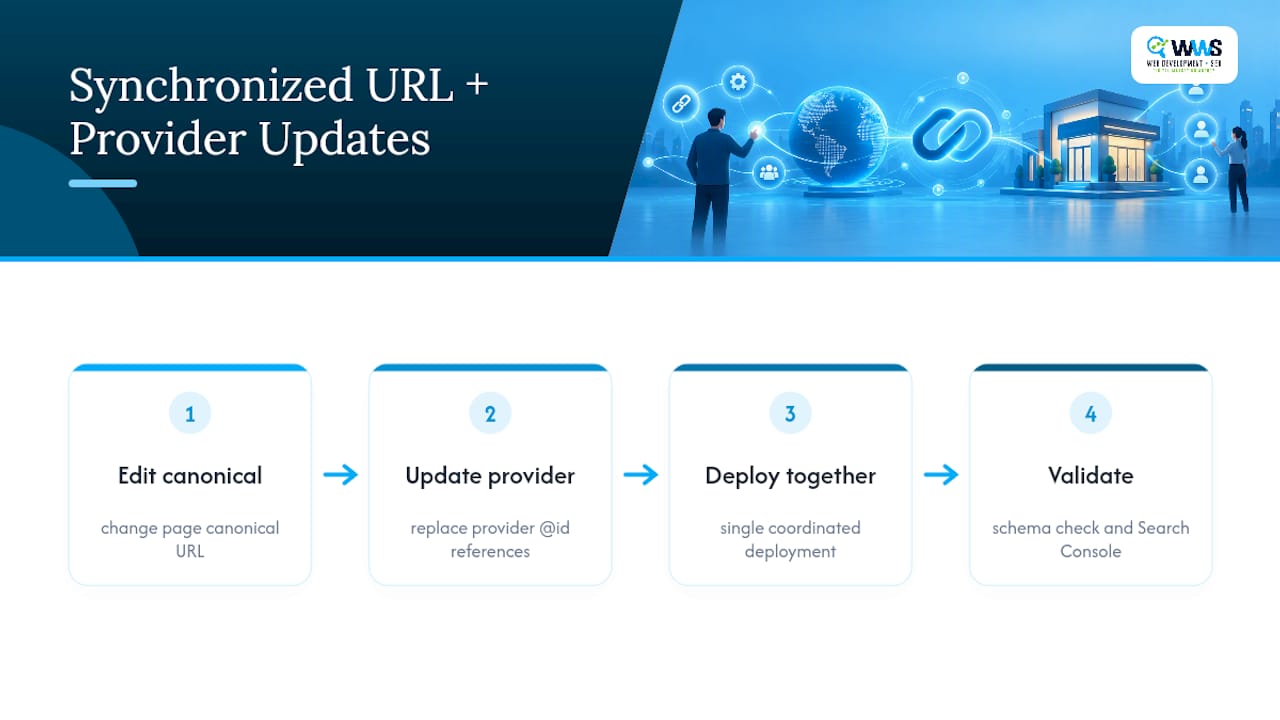
Pro Tip: When you redesign or migrate a site, update the canonical URL and every @id reference to it in the same deployment. A URL change without a matching @id update is the single most common cause of entity drift, and it can take months to surface in Search Console.
For areaServed, declare only the regions actually named on the page. If your service area page lists three counties, your schema lists those three counties, not the twelve you’d like to rank in. Coverage claims that outrun the visible copy are exactly the kind of mismatch validators can’t catch but Google’s manual reviewers occasionally do.
Copy-Ready JSON-LD Examples for Service Pages
A minimal example for a straightforward service page:
{
  "@context": "https://schema.org",
  "@type": "Service",
  "name": "Residential Roof Repair",
  "description": "Emergency and scheduled roof repair for single-family homes.",
  "url": "https://example.com/services/roof-repair",
  "serviceType": "Roof Repair",
  "provider": {
    "@id": "https://example.com/#organization"
  }
}
The provider field references the canonical business entity declared elsewhere on the site, typically in a sitewide LocalBusiness block:
{
  "@context": "https://schema.org",
  "@type": "LocalBusiness",
  "@id": "https://example.com/#organization",
  "name": "Example Roofing Co.",
  "url": "https://example.com",
  "areaServed": "Chicago, IL"
}
When a page lists an actual service menu, hasOfferCatalog wraps individual Offer objects, each pointing back at a Service via itemOffered. A multi-type example applies when the page also shows fixed packages or product-like specs, adding "@type": ["Service", "Product"] rather than a second competing block.
Modeling Offer Catalogs Without Inventing Prices
hasOfferCatalog exists for one specific situation: a service page that genuinely publishes an itemized menu, not every page that merely mentions a service in passing. If your page has a “Services We Offer” list with no pricing attached, that’s not a catalog candidate. It’s just a serviceType value or a paragraph of copy.
When you do have a real catalog, the structure nests predictably:
OfferCatalogsits inside the Organization or the Service, naming the collection (“Plumbing Services Menu”)- Each entry inside it is an
Offer - Each
Offerpoints to a specificServicethroughitemOffered
The line you can’t cross: don’t populate price or priceRange fields with numbers the page doesn’t show. If your copy says “starting at” pricing with no accessible terms, Google’s structured data policies treat an invented or unsupported price as a mismatch risk, not a harmless placeholder. Omitting the Offer entirely is the safer call whenever price or availability isn’t genuinely published.
Testing and Validating Your Service Schema
Run two tools, in this order, because they check different things.
- Google’s Rich Results Test checks whether your markup is eligible for a Google-supported feature and renders a preview of how Google parses it.
- The Schema Markup Validator checks your JSON-LD against the full Schema.org vocabulary and syntax rules, independent of what Google specifically supports.
Google Search Central documents both tools as necessary because they answer separate questions: one validates against Google’s supported feature list, the other against the broader spec. A block can pass one and fail the other.
After deployment, a short QA workflow catches what static testing misses. One structured data guide recommends inspecting the rendered page for parity with the markup, rerunning both validators, then monitoring Search Console for coverage or enhancement errors as pages get recrawled.
Quick post-deploy checklist:
- Rendered page content matches every marked-up property
- Both validators pass with zero errors
@idreferences resolve to the correct canonical entity- Search Console shows no new structured data warnings within two weeks
Common Schema Mistakes That Quietly Break Your Markup
Most service schema failures aren’t syntax errors. They’re drift.
- Entity drift after migrations. A URL change without updating the matching
@idreference leaves your provider link pointing at a stale or nonexistent entity. - Overstating areaServed. Free text listing fifteen cities when the page names three is exactly the kind of visible/invisible mismatch that erodes trust in the markup over time. Use
AdministrativeAreaorGeoShapetypes when you have authoritative geographic identifiers instead of loose text strings. - Offers without visible price or availability. This isn’t just sloppy, it carries policy risk under Google’s structured data guidelines.
Pro Tip: Schedule a quarterly schema audit alongside your normal content review. Pages get edited, prices change, service areas expand. Markup that was accurate at launch drifts silently unless someone checks it on a calendar, not just when something breaks.
How WWS Approaches Service Schema for Local Clients
The company runs every structured data implementation through an in-house team of developers and SEO specialists, not a subcontracted vendor. That matters for schema work specifically, because entity consistency across a site requires someone who controls the code, the content, and the canonical URLs all at once.
The checklist our team runs on every service page build:
- Audit existing markup (or lack of it) against visible page content
- Implement a single principal Service object per page with a stable
@idprovider link - Run both Rich Results Test and Schema Markup Validator before launch
- Monitor Search Console monthly for coverage drift after any site change
On one anonymized engagement, a shipping and logistics client, referred to internally as Doma Shipping and Travel, had six service pages with inconsistent provider references left over from a prior site migration. After consolidating every page onto one canonical @id and rebuilding the service markup to match visible copy, the client saw measurably cleaner indexing behavior and a steadier flow of qualified form submissions in the following months.
Why Most Service Schema Advice Oversells the Payoff
The biggest misconception floating around service schema markup is that it’s a rich-result lever you can pull. It isn’t, and treating it that way sets developers up to distrust structured data the first time a beautifully valid Service block produces zero visible change in the SERP.
The real value is quieter than that. Service markup disambiguates what your page is about for a machine that otherwise has to guess from unstructured text. That’s entity clarification, not a ranking trick, and the evidence on Google’s documented feature support backs that up directly: there’s no dedicated Service rich-result feature to chase in the first place.
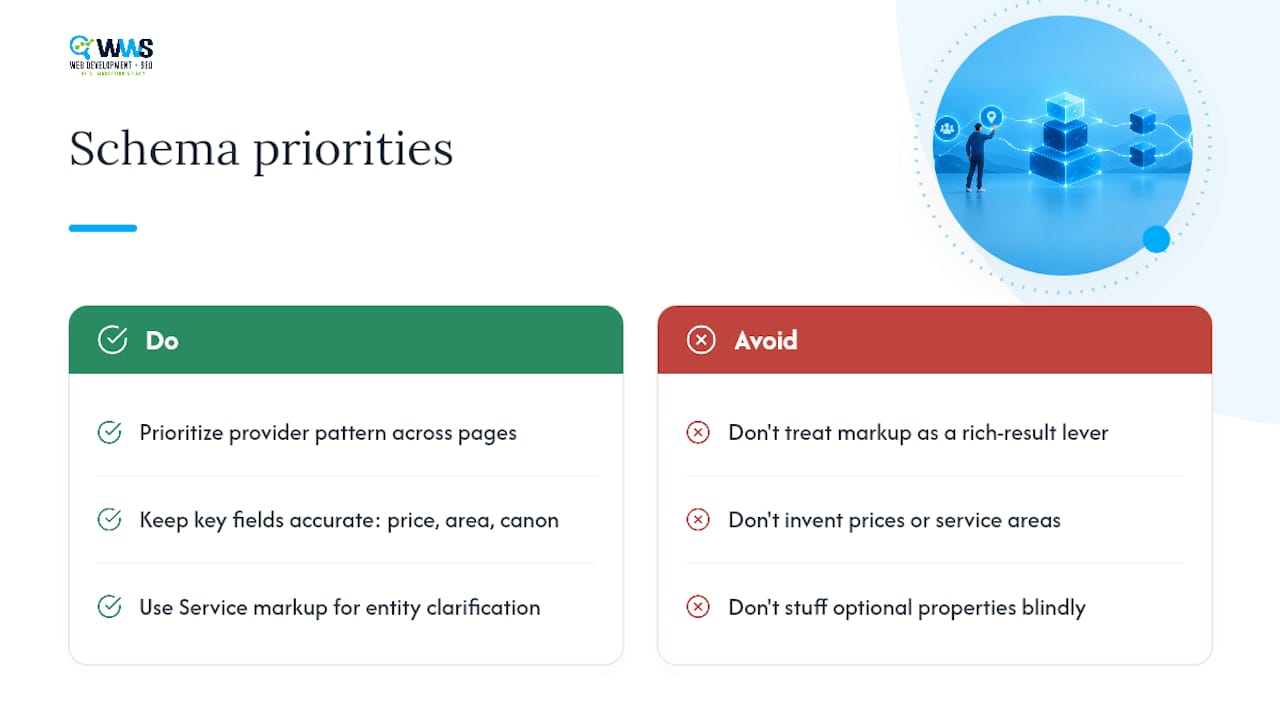
Where the conventional advice falls short is the obsession with property completeness. Sites stuff in serviceOutput, sameAs, and half a dozen optional fields hoping more markup equals more visibility, when the actual risk sits in the mismatches. An invented price, an overstated service area, a stale @id from last year’s migration. Accuracy beats volume every time.
If you’re prioritizing one thing first, make it the provider @id pattern. Get that stable and correct across every service page before you worry about serviceOutput or catalog structures. A site with three properties done right will outperform a site with ten properties and one broken canonical reference, every time it matters.
— Online Marketing Experts
Get Your Service Pages Built and Validated Right the First Time
Reading through a spec and copying a JSON-LD snippet is one path. Having an in-house team that builds the page, writes the markup, and monitors it after launch is another, and it’s the one that doesn’t leave entity drift sitting undetected for six months. WWS – Web Development + SEO handles website development, local SEO, structured data implementation, and ongoing monitoring under one roof for Chicago-area service businesses, with zero outsourcing between the developer who touches your code and the strategist who watches your rankings.

A typical engagement starts with an audit of your existing service pages and markup, moves into implementation of a stable provider @id pattern across every page, runs full validation through both required testing tools, and continues with monthly monitoring so a future redesign never quietly breaks your entity references again. As an official Google and Meta Partner with over 200 successful client partnerships across the greater Chicago Area, our certified in-house team treats structured data as infrastructure, not an afterthought.
If your service pages need this built correctly from the ground up, start with our website design and development services or explore the service page SEO framework built specifically to pair structured data with copy that actually converts.
Sources
- Schema
- Schema vs Google structured data rich results (analysis)
- How to implement Service schema markup (practical guide)
FAQ
What Is a Service Schema?
A service schema is a structured data block, typically written in JSON-LD, that tells search engines what service a page describes, who provides it, and where it’s offered. It uses Schema.org’s Service type to connect the service to a provider entity and, when relevant, its geographic coverage and pricing.
What Are the Four Types of Schema?
Schema.org doesn’t formally group its vocabulary into “four types,” but developers commonly refer to four practical categories: Organization/LocalBusiness schema, Product/Service schema, Article/Content schema, and Review/Rating schema. Service schema falls under the Product/Service category alongside types like Product and Offer.
What Are the Three Types of Schema Markup Formats?
Google supports three structured data syntaxes: JSON-LD, Microdata, and RDFa. JSON-LD is Google’s recommended format because it’s easier to implement and maintain without touching visible HTML markup.
How Do I Check the Schema on a Page?
View a page’s rendered structured data by running its URL through the Rich Results Test for Google-specific eligibility, then through the Schema Markup Validator for full Schema.org vocabulary and syntax checks. Both tools are free and answer different validation questions, so running just one leaves gaps.
Does Service Schema Guarantee a Rich Result in Google?
No. Google doesn’t document a dedicated rich-result feature tied specifically to Service markup, so adding it won’t automatically produce enhanced snippets. Its real value is entity clarification, helping search engines correctly identify your service, provider, and coverage area rather than triggering a visual SERP feature.