


Domain Rating 101: How to Use a Google Domain Rank Checker Like a Pro
Master domain rankings with our Google domain rank checker guide. Learn to track keywords, audit competitors, and boost organic visibility.
 By WWS Team
Updated
7 min read
In this article5 sections
What Is a Google Domain Rank Checker and How Does It Work?
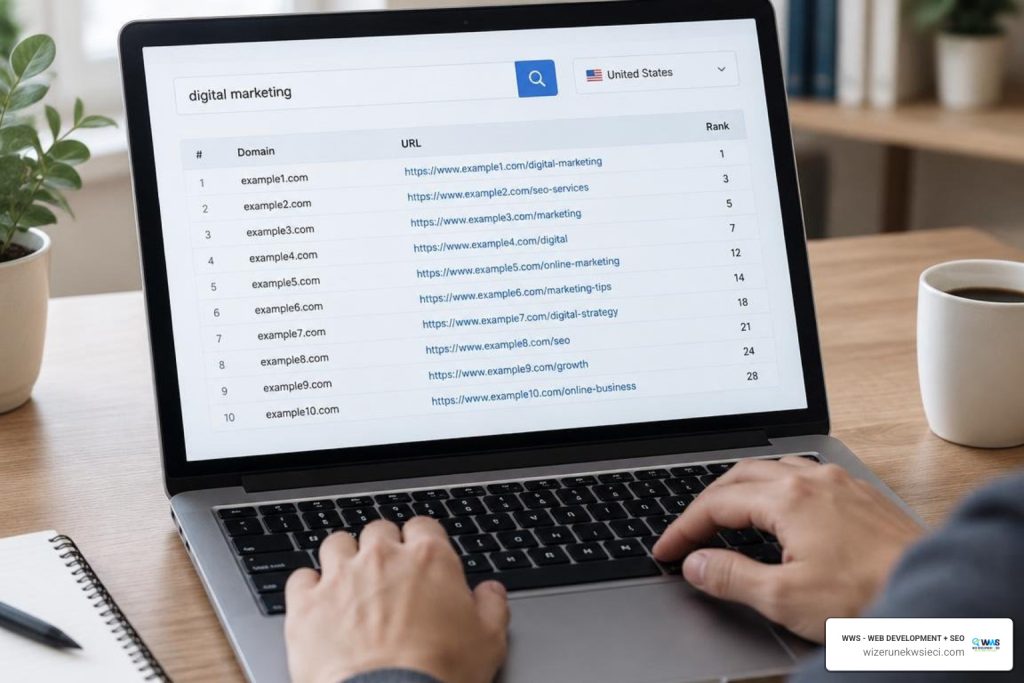
To use a Google domain rank checker effectively, enter your target domain or URL, submit your localized search queries, select your target country, and run the scan to track your exact ranking positions and indexed pages. A google domain rank checker is a specialized tool that scans search engine results pages (SERPs) for a specific query, identifies where your domain appears, and logs your exact ranking position alongside the specific URL Google displays, giving business owners an objective view of organic visibility.
Understanding how a checker operates starts with mastering search engine positioning. When you initiate a query through an online tracker, such as the Silent Dock Google Rank Checker or AltoRank, the system runs an automated, clean query through headless browsers (like desktop Chrome) or dedicated SERP APIs. The software scans up to 200 organic results (roughly 20 pages), filters out non-organic clutter, and isolates standard web listings.
By bypassing paid ads, sponsored product feeds, map packs, and localized history, the checker returns:
- Your exact organic position (from #1 to #200)
- The exact URL indexing for the phrase
- The meta page title Google displays
For small business owners balancing customer inquiries and daily operations, this neutral diagnostic tool replaces manual searching with verifiable data.
How Search Engines Evaluate Domain Authority and Ranking
To rank your pages, Google uses automated crawlers to discover content, follow internal and external links, and index pages based on quality and relevance. As outlined in the official Google Search Central guidelines, search algorithms prioritize pages that offer direct answers, clear organization, and a secure browsing experience.
While third-party tools calculate proprietary authority scores, Google evaluates domain trust organically using several foundational signals:
- Backlink Profile Quality: High-authority, relevant websites linking back to your pages.
- Topical Depth: Comprehensive, well-structured content that answers search intent completely.
- Technical Site Health: Fast load times, clean code, mobile responsiveness, and valid metadata.
- Brand Entity Signals: Clear business citations, verified reviews, and consistent local information.
With over 359 million domain names registered globally, standing out in Google’s index requires demonstrating real-world experience, authoritativeness, and trust across your entire website architecture.
Why Browser Results Differ from Live Checker Data
A common point of confusion for local business owners is discovering that their personal search results do not match what a rank tracker reports. If you type your service into Google and see your site at position #2, but a rank checker places you at position #8, your personal browsing profile is influencing what you see.
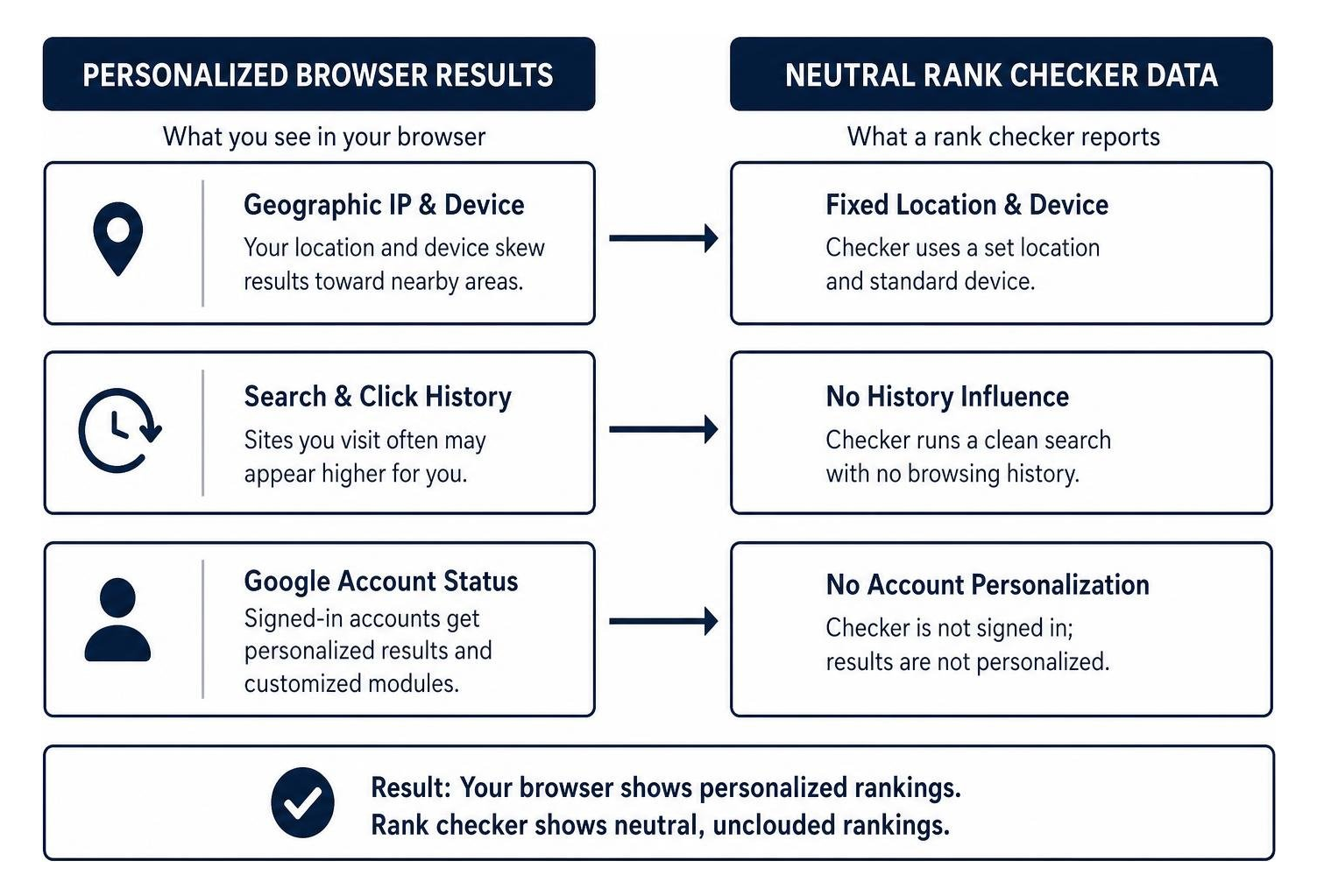
Personal search results are altered by:
- Geographic IP & Device: Proximity to a cell tower or local Wi-Fi router skews hyper-local results.
- Search & Click History: Google rewards websites you visit frequently by displaying them higher in your personal browser.
- Google Account Status: Signed-in profiles receive personalized suggestions and tailored SERP modules.
A dedicated rank checker strips away personalization filters, running an unpersonalized query from a standardized desktop profile to reveal what prospective customers across your target market actually see.
Step-by-Step Guide: How to Use a Google Domain Rank Checker Effectively
Using a rank checker efficiently allows you to spend less time digging through data and more time turning search visibility into real customer inquiries.
If you are tracking multiple pages, review our guide on finding your Google ranking of website pages to map out your site hierarchy before running bulk checks.
Step 1: Input Target Queries and Domain URLs into the Google Domain Rank Checker
Begin by selecting 1 to 3 primary search queries for each core service page on your website. Avoid running broad, unfocused lists that generate noisy metrics.
- Set Your Target Domain: Enter your root domain (e.g.,
yourbusiness.com) to track any page on your site that ranks, or enter an exact URL to check a specific landing page. - Define Your Target Market: Select the country where your customers search.
- Submit Localized Commercial Queries: Enter terms your buyers use when they need help, matching both general searches and high-intent local phrases.
Step 2: Interpret Keyword Positions and Beyond-Rank Metrics
Your rank number is only the starting point. To make strategic decisions, evaluate your position alongside core keyword metrics to prioritize which pages to optimize first:
- Search Volume: The average monthly search demand over a 12-month period.
- Keyword Difficulty (KD %): A calculated estimate of how hard it is to break into the top 10 results against entrenched competitors.
- Traffic Share (%): The estimated percentage of total organic traffic driven to your domain by a specific keyword.
- Cost Per Click (CPC): The average bid in paid advertising, signaling high commercial intent.
| Metric | What It Measures | Strategic Action for Small Businesses |
|---|---|---|
| Position 1–3 | Maximum visibility & high CTR | Defend rank with regular content refreshes and fresh reviews. |
| Position 4–10 | Bottom of page one | Refine meta titles and build internal links to push into top 3. |
| Position 11–20 | Striking distance (Page 2) | Expand topical depth and add semantic keywords for fast wins. |
| High KD % (>60%) | Entrenched competition | Pivot to long-tail, localized keyword variations. |
| High CPC Value | High-intent buying search | Optimize page call-to-actions to capture leads. |
Step 3: Audit Competitor Visibility and Identify Content Gaps
A domain rank checker is also an effective tool for competitive intelligence. Enter your competitors’ domains with your core target keywords to uncover valuable opportunities:
- Identify Ranking Gaps: Pinpoint valuable search terms where competitors appear in the top 5 but your domain is missing.
- Analyze Their URL Structure: Study which pages rank for your competitors - whether it is a specialized service page, a comprehensive resource guide, or a simple FAQ section.
- Benchmark SERP Features: Observe whether competitors occupy featured snippets or organic site links, showing you what content formats Google prefers for that query.
Advanced Optimization Strategies Based on Rank Checker Insights
Once you collect your ranking baseline, use those insights to adjust your on-page SEO and technical site architecture.

For a deeper dive into professional tool suites, explore our breakdown of professional website positioning tools and services.
Diagnosing Pages Ranked Outside the Top 100
If your domain fails to show up in the top 100 results for a priority keyword, investigate these common roadblocks:
- Indexation & Crawl Blocks: Check your robots.txt file and meta tags to verify that Google is not being blocked from crawling the page.
- Search Intent Mismatch: Ensure your page format matches what searchers want. If the top 10 results are educational guides, a short product pitch will not rank.
- Thin Content: Pages with superficial descriptions rarely satisfy modern search algorithms. Expand your page to thoroughly answer customer questions.
- Keyword Competition: If national corporate brands dominate a broad keyword, adjust your focus toward localized, long-tail phrases.
Turning Positions 11–20 into First-Page Wins with a Google Domain Rank Checker
Keywords sitting on page two (positions 11 through 20) are your best opportunities for rapid traffic growth. Google already recognizes your page as relevant; it just needs a few technical and editorial improvements to push onto page one:
- Refine Your Title Tags & Meta Descriptions: Make your headline compelling and clear to earn higher click-through rates.
- Strengthen Internal Link Architecture: Link directly to your page-two URL from high-performing pages and relevant blog posts using natural, descriptive anchor text.
- Incorporate Semantic Variations: Add related subtopics, questions, and terminology that visitors expect to see covered.
- Demonstrate E-E-A-T: Add clear author bylines, verified project photos, and industry credentials directly on the page to build trust with users and search algorithms.
Frequently Asked Questions About Domain Rank Tracking
How often should I monitor my domain rankings?
For most small and medium-sized businesses, checking rankings every two weeks or once a month is the sweet spot. Google’s algorithms experience daily minor fluctuations, and checking rankings multiple times a day creates unnecessary stress over normal volatility. Bi-weekly tracking provides clean trend lines, showing whether your optimization efforts are moving your site upward over time.
Does automated rank checking negatively impact SEO performance?
No. Automated rank checkers execute search queries through independent cloud servers, proxies, or public APIs - never by overloading your website directly. These requests occur entirely on Google’s public search infrastructure without affecting your site’s server resources, analytics data, or search engine standing.
What should I do if a different URL on my domain ranks instead of the target page?
When a secondary page (such as an old blog post) outranks your main service landing page, you are likely dealing with keyword cannibalization. To fix this:
- Add a direct internal link from the secondary page to your primary service page using your target keyword as the anchor text.
- Differentiate the content so each page targets a unique, distinct search intent.
- If the secondary page is outdated and serves no unique purpose, place a 301 redirect pointing it to the main service page.
Conclusion
Tracking your keyword positions with a Google domain rank checker provides clear, actionable data on your website’s visibility. Instead of guessing how your business appears to prospective customers, monitoring positions, indexing URLs, and search intent helps you make practical improvements that turn search traffic into phone calls, quote requests, and store visits.
At Wizerunek w Sieci (WWS - Web Development + SEO), we help businesses bridge the gap between high search rankings and measurable revenue growth. Located in Des Plaines, IL (636 S River Rd #218), we combine the strategic depth and advanced technical capabilities of a major agency with the dedicated attention and local insight of a neighborhood partner. Whether you are serving clients across the Chicago metropolitan area, Cook County, the Northwest Suburbs, or the Polish-American business community nationwide, our bilingual team builds custom digital marketing foundations designed to grow your business.
Ready to see where your website stands and turn search visibility into steady customer growth? Explore our custom website SEO solutions or contact WWS today for a free website audit.
A Des Plaines, IL team helping local service businesses get found, get called and get booked since 2005: local SEO, Google Ads, conversion-focused websites and AI search optimization.
Meet the teamKeep reading
All articles
Redirect Strategy for SEO: 301, 302 and Canonical Rules
A practical redirect strategy for SEO: when to use 301 vs 302, when a canonical tag is better, how to avoid chains and loops, and how to verify the result.
The Best Page Rank Checker Online Tools for Modern SEOs
Use a page rank checker online to audit link equity, track SERP positions, and boost organic visibility with modern SEO authority metrics.
The Best Page Rank Checker Online Tools for Modern SEOs
Use a page rank checker online to audit link equity, track SERP positions, and boost organic visibility with modern SEO authority metrics.