





Google Business Profile categories decide which local searches your listing can even compete for. The fix is straightforward: search the dashboard for the most specific primary category that matches what your business actually is, layer on 2 to 4 honest secondary categories, and confirm exact names using the official category tool or the API. Put a reminder on your calendar to review the list every six to twelve months, since Google adds new, more specific categories all the time.
TL;DR:
- Using the most specific primary category that accurately reflects your business and limiting secondary categories to two to four relevant options improves local search relevance and visibility.
- Regularly reviewing categories every six to twelve months ensures your profile stays aligned with new categories Google adds and reflects your current services.
- Choosing broader or unrelated categories can dilute your relevance signal, reducing your chances of appearing in targeted local searches.
- Implementing precise category selection is especially crucial across multiple locations, where manual updates and re-verification processes become more complex and time-consuming.
- Leveraging official tools, like Google’s category API and third-party resources, helps keep your categories accurate and up-to-date, preventing missed visibility opportunities.
Table of Contents
- What Are Google Business Categories, and Why Do They Matter?
- How Many Categories Can You Add: Primary vs. Additional?
- How Do You Choose the Best Primary and Secondary Categories?
- Where Can You Find the Full List of Google Categories?
- How Do You Add, Edit, or Remove Categories in Your Profile?
- How Do Categories Change What Your Profile Can Do?
- Which Resources Cover the Entire Category Taxonomy?
- Maintenance Checklist: How Often Should You Review Categories?
- Where Local Business Owners Get Categories Wrong
- Let WWS Manage Your Google Business Profile Categories
- Sources
- FAQ
What Are Google Business Categories, and Why Do They Matter?
Google Business Profile categories are entries in a fixed taxonomy, each one carrying a human-readable name (called a displayName) and a permanent behind-the-scenes identifier (a categoryId) that never changes even if the visible label gets updated. You cannot invent your own category, and that limitation is the point: Google needs a controlled vocabulary to match your business against local queries with any consistency.
Categories aren’t a cosmetic field you fill in once and forget. They feed directly into whether your profile shows up in the local pack, whether it appears on Maps for a given search, and which built-in features Google unlocks on your listing. A restaurant tagged correctly gets a menu link and online ordering options. A hotel gets a class rating and amenity icons. A hair salon or medical office can get a “Book” button that other business types never see. These aren’t design flourishes. They’re eligibility gates tied directly to the category you picked, according to Google’s own guidance on managing business categories.
Here’s the part most owners get backwards: specificity beats breadth almost every time. Google explicitly recommends picking “Nail salon” over the generic “Salon,” and that advice extends across every industry. A contractor who selects “General contractor” when “Kitchen remodeler” is available is leaving relevance signal on the table. Google’s matching system rewards the tighter fit because it tells the algorithm precisely who should see your listing, rather than lumping you into a crowded, generic bucket where you compete against far more businesses for the same clicks.
A few things worth understanding before you touch your profile:
- Every category maps to a stable
categoryId, even when its displayed name changes across languages or minor wording updates. - You select from Google’s existing list only. Custom or invented categories aren’t possible, per Google’s guidelines on representing your business.
- Category choice affects which profile features (menus, booking buttons, service lists) Google is willing to surface.
- The more specific option nearly always outperforms the generic one for qualified local traffic, a principle woven throughout Google Business Profile categories list guidance from practitioners and Google alike.
Getting this right isn’t a one-time task, either, which is why understanding why prioritize local SEO benefits for local businesses is essential. It’s foundational to your entire local SEO setup, because categories interact with everything else on your profile, from reviews to service listings.
How Many Categories Can You Add: Primary vs. Additional?
Google allows one primary category and several additional categories, according to Google Business Profile Help. But the number you’re allowed and the number you should use are two very different things.
Practitioner guidance, including analysis from BrightLocal, consistently points to one primary plus two to four secondary categories as the sweet spot in practice. That’s a fraction of the nine additional slots Google technically offers, and there’s a good reason for the restraint.
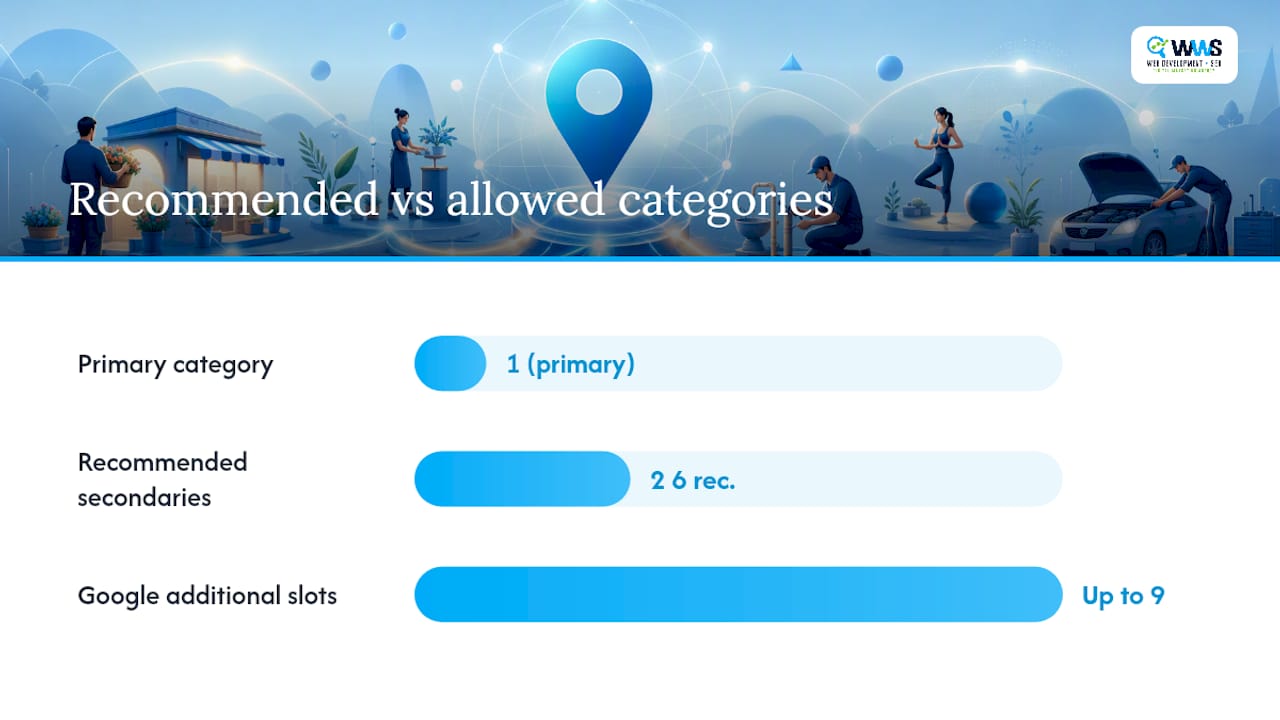
Your primary category carries the most ranking weight of any single signal in this taxonomy. It tells Google what your business fundamentally is, and that classification anchors every relevance calculation from there. Additional categories don’t carry that same weight. They exist to expand eligibility for adjacent searches, not to list every product or service you happen to offer.
This is where a lot of business listing categories strategies go wrong. Owners see nine open slots and feel compelled to fill them, tagging every conceivable offering. A bakery adds “Coffee shop,” “Wedding cake supplier,” “Wholesale bakery,” “Catering service,” and half a dozen more, hoping broader coverage means broader visibility. It usually backfires. Google’s own guidance is blunt on this point: categories should describe what the business is, not an exhaustive list of everything it does.
A few real-world patterns show how the balance should look:
- A restaurant: primary category “Italian restaurant,” secondaries limited to “Pizza restaurant” and “Wine bar” if those genuinely reflect the experience.
- A home services company: primary “Plumber,” secondaries such as “Water heater installation service” and “Drain cleaning service,” rather than every trade the company touches.
- A medical practice: primary “Family practice physician,” secondaries like “Pediatrician” only if a pediatrician is genuinely on staff.
The discipline here matters more than the category count. Four accurate, customer-searched categories will outperform nine loosely related ones, because irrelevant categories dilute the signal Google uses to decide who sees you.
How Do You Choose the Best Primary and Secondary Categories?
Picking categories well isn’t guesswork. It’s a repeatable process, and once you’ve run it once, you can apply it to every new listing you manage.
-
Identify your strongest customer-intent signal first. Before opening the dashboard, ask what a customer types into Google right before they call you. A roofer whose customers mostly search “roof repair near me” has a different primary category candidate than one whose customers search “roof replacement.” Write down the actual language customers use, not the language you use internally to describe your business.
-
Search the dashboard for the exact, most specific match. Open your Business Profile, go to the category field, and type in broad terms first to see what specific options surface. Google’s search returns matches based on the front of the category’s
displayName, so typing “plumb” will surface every plumbing-related category available in your region. Resist the urge to grab the first result. Scroll the full list and pick the tightest match to what you actually do. -
Add 2 to 4 secondary categories that reflect real services. These should represent genuine, frequently requested parts of your business, not a wish list. If you occasionally do a service but it’s not something customers search for by name, leave it off. Every secondary category is a small bet on relevance, and a bad bet dilutes your listing’s clarity.
-
Test the change and give it time to show results. Category updates don’t produce overnight ranking shifts. Track impressions and map-pack appearances in your Business Profile performance dashboard for four to eight weeks before deciding whether a change helped, hurt, or did nothing. Anything shorter than that window is likely noise.
Three decision rules keep this process honest over time. First, always default to specificity: if a narrower category exists and accurately describes you, use it over the generic parent category. Second, treat irrelevant categories as a liability, not a bonus. A category that doesn’t match a real customer search is doing nothing for you and may be quietly working against you. Third, log every change with a date and a short note about why you made it. Six months from now, when your visibility shifts, you’ll want to know whether it correlates with a category edit or something else entirely.
Pro Tip: Before changing your primary category, check what your closest three to five local competitors are using. You can see a business’s categories by viewing their profile on Google Maps and clicking into their business information. If everyone in your specific niche uses a category you haven’t considered, that’s a strong signal Google recognizes it as the standard classification for your type of business.
This process works whether you’re managing a single-location shop or coordinating category consistency across ten branches. The steps don’t change. What changes is how much time you have to run them manually, which is exactly where a lot of business owners eventually decide to hand the process to a local SEO specialist.
Where Can You Find the Full List of Google Categories?
Three different paths lead to the same taxonomy, and each one serves a different purpose depending on whether you’re editing one profile or managing dozens.
The dashboard search is the fastest route for a single business. Type a keyword into the category field inside your Business Profile settings, and Google surfaces every category whose displayName starts with that string. It’s built for humans, not automation, so it’s the right tool when you’re setting up one listing or doing a quick manual audit.
The Business Profile API, specifically the categories.list method, is built for scale. Developers and agencies query this endpoint with a regionCode and languageCode to pull the full, current taxonomy for a specific market, according to Google’s developer documentation. The response returns each category’s displayName alongside its categoryId, and that distinction matters more than it looks. displayName is what a human sees and can change slightly across localization updates. categoryId is permanent. Any agency or developer updating categories across multiple locations programmatically should always reference the categoryId, not the display text, to avoid mismatches when Google tweaks wording.
Third-party tools fill the gap between those two options: browsing the whole list without writing a single line of API code. One widely referenced resource, the GBP Category Finder, tracks more than 4,039 categories across the taxonomy, giving business owners a searchable way to browse everything Google offers without guessing at keywords in the dashboard.
A few things worth checking before you trust any third-party list:
- Confirm the tool states when it was last updated. Google adds new categories periodically, and a list from a year ago may already be missing options relevant to you.
- Cross-check any category you find against the dashboard itself. If it doesn’t appear there for your region, it may not be available where you operate.
- Prefer tools that cite Google’s own API structure (
displayNameandcategoryIdfields) over ones that list plain text with no technical grounding.
The taxonomy is genuinely massive. With thousands of entries tracked by third-party monitors, the odds that a highly specific category exists for your exact business type are far better than most owners assume, which is exactly why settling for a generic option is usually a missed opportunity rather than a necessity.
Manual dashboard edits work fine for a single location doing an occasional review. API lookups become worthwhile the moment you’re managing category consistency across multiple locations, need to detect newly added categories automatically, or want to batch-update listings without touching each one by hand.
How Do You Add, Edit, or Remove Categories in Your Profile?
The dashboard path is short, but a few steps determine whether the change goes smoothly or triggers unnecessary friction.
- Sign in and open your Business Profile. Navigate to the section Google labels “Business information” or “Edit profile,” depending on which interface version you’re using.
- Locate the “Business category” field. Your current primary category displays first, with any additional categories listed beneath it.
- Select or search for your primary category. Type keywords related to your core service, review the specific options that surface, and choose the tightest match rather than the first result.
- Add secondary categories individually. Each one requires its own search and selection, so resist bulk-adding anything that isn’t a genuine, customer-searched offering.
- Save the changes and monitor your profile status. Google occasionally flags category changes, particularly a primary category switch, for re-verification, according to Google Business Profile Help.
Re-verification friction is the part owners most often get caught off guard by. Switching your primary category, especially to one in a meaningfully different industry, can prompt Google to re-confirm your business address or identity before the change fully takes effect. Adding a secondary category rarely triggers this. Swapping your primary category, particularly right before a busy season, sometimes does. If you’re planning a significant category change, make it during a slower period so a verification delay doesn’t cost you visibility when it matters most.
Service-area businesses without a public storefront should pay close attention to how categories interact with their service-area settings, since some categories assume a walk-in customer experience that doesn’t apply. Businesses with genuinely independent departments, think a hospital with a separate pharmacy or a hardware store with an attached garden center, often need separate profiles entirely rather than trying to cram multiple distinct operations into one listing’s category list.
If the category you want genuinely doesn’t exist yet, the fallback is picking the closest available parent category and compensating with detailed services and attributes elsewhere on your profile. Custom categories aren’t an option, so precision inside the existing list is the only lever you have.
How Do Categories Change What Your Profile Can Do?
Category choice isn’t only about search matching. It’s a feature switch. Google ties specific profile capabilities directly to category selection, and the category resource documentation confirms that category objects can include serviceTypes and moreHoursTypes, fields that only populate for categories built to support them.
The clearest examples show up in hospitality and food service. Restaurants tagged correctly get menu links, online ordering integrations, and reservation buttons that generic “business” categories never unlock. Hotels get class ratings and amenity displays. Health and beauty categories, salons, spas, clinics, frequently unlock a “Book” button that sends customers straight into a scheduling flow instead of forcing them to call.
These features change customer behavior, not just profile appearance. A potential customer scanning search results is far more likely to tap a direct booking button than to call a number and wait on hold, and a menu link satisfies a diner’s question before they ever click through to your website. Category-linked features shorten the distance between a search and a conversion.
A short list of what tends to unlock by category type:
- Food service categories often unlock menu links, delivery and ordering integrations, and reservation buttons.
- Lodging categories can surface star or class ratings alongside amenity icons.
- Health, beauty, and personal-care categories frequently enable direct booking buttons.
- Service-based categories (plumbers, electricians, contractors) tend to support detailed
serviceTypeslistings that display specific offerings directly on the profile.
Attributes and services interact with your category selection rather than existing independently of it. A category sets the baseline of what’s possible, and the services or attributes you fill in afterward determine how much of that potential you actually use. Choosing “Restaurant” and then never adding a menu link wastes the unlock the category gave you in the first place.
Pro Tip: After changing a category, check your profile within 48 hours to confirm which new fields appeared. Google doesn’t always announce new feature availability, and the only reliable way to know a category unlocked something is to look for it directly on your live listing.
Which Resources Cover the Entire Category Taxonomy?
Three resources cover the full list, and each one has a specific use case worth understanding before you rely on it.
The dashboard category search remains the most accessible starting point for any business owner, since it requires no technical setup and reflects exactly what’s available for your specific profile and region. The developer categories.list endpoint is the authoritative, machine-readable source, and it’s the only option that guarantees you’re seeing the current taxonomy for a specific regionCode and languageCode combination, per Google’s own API documentation. Third-party searchable tools, like the a large-category tracker mentioned earlier, fill the gap for owners who want to browse the whole list visually without writing API calls.
When evaluating any list, whether official or third-party, run through this quick checklist:
- Does it state a last-updated date? Categories change periodically, so an undated list is a red flag.
- Does it distinguish
displayNamefromcategoryId? Lists that only show plain text without this technical grounding are more likely to be outdated scrapes. - Does it let you filter or confirm availability by region and language? A category available in one country’s taxonomy isn’t guaranteed to exist in another’s.
Regional and language availability trips up more businesses than most owners expect, particularly multi-location brands operating in different markets. The safest verification method is always the dashboard itself: if a category doesn’t surface there for your specific business location, treat that as the final word over any third-party list claiming otherwise.
Maintenance Checklist: How Often Should You Review Categories?
Categories aren’t a set-it-and-forget-it field. Google periodically adds new, more specific categories to the taxonomy, and a category that didn’t exist when you set up your profile two years ago might be a far better fit today.
A practical audit cadence works like this: review your full category selection every six to twelve months as a baseline, and trigger an immediate review any time your services change meaningfully, you expand into a new specialty, or you notice a sustained, unexplained drop in local visibility. Waiting a full year when something has clearly shifted in your business is a missed opportunity, not patience.
When you do make a change, follow a disciplined testing protocol:
- Change one variable at a time. If you’re testing a new primary category, don’t simultaneously overhaul your service listings or launch a review-generation push. Isolating variables is the only way to know what actually moved the needle.
- Measure for four to eight weeks minimum. Business Profile insights need time to accumulate enough impression and search-query data to be meaningful. Checking after three days tells you nothing useful.
- Log every change with a date and rationale. A simple spreadsheet noting “changed primary from X to Y on [date] because [reason]” turns guesswork into a record you can actually learn from months later.
- Compare impressions and map-pack appearances before and after. Your Business Profile performance data shows these metrics directly, and they’re the clearest signal of whether a category change helped.
Pro Tip: Keep a running document of every category change across all your locations if you manage more than one profile. Patterns that aren’t visible from a single listing often become obvious once you can compare five or ten side by side.
For businesses managing this across multiple locations, the workload compounds fast. An agency-managed approach typically handles category audits through the API directly, pulling current categoryId values for every location, cross-referencing them against what’s actually live, and pushing updates in bulk rather than clicking through each dashboard individually. That same workflow also manages the re-verification requests that sometimes follow a primary category change, and keeps a centralized change log so category history doesn’t live in five different people’s memories. It’s the kind of operational discipline that’s hard to replicate manually once you’re past two or three locations, and it’s exactly the gap WWS – Web Development + SEO fills for local business clients scaling their profile management.
Where Local Business Owners Get Categories Wrong
The most common mistake is not underuse. It’s overreach. Owners pick an overly broad primary category, thinking it casts a wider net, when in practice it just puts them in a bigger pool competing for the same clicks with less relevance. A close second: piling on secondary categories that have nothing to do with what customers actually search for, which muddies the signal Google uses to match intent.
The quick win here is almost embarrassingly simple. Swap a generic primary category for the most specific honest match, add no more than four secondary categories that reflect real, frequently requested services, and write down the date you made the change. Most single-location businesses can do this in under thirty minutes and see a meaningful shift in relevance within a couple of months.
Where this stops being a solo project is scale. Once you’re managing category consistency across multiple locations, dealing with re-verification triggers on a schedule you can’t control, or trying to keep pace with new categories Google adds throughout the year, the manual approach starts costing more in owner time than it would to have someone handle it systematically. That’s usually the signal it’s time to bring in outside help rather than a reason to abandon the process altogether.
— Online Marketing Experts
Let WWS Manage Your Google Business Profile Categories
Picking the right categories is the easy half of the job. Keeping them accurate across every location, monitoring for newly added, more specific options, and managing the re-verification steps that follow a primary category change. That’s the part that eats an owner’s week. WWS – Web Development + SEO is the alternative to guessing your way through a dashboard: our Google and Meta certified team runs category audits directly through the Business Profile API, tracks every categoryId change in a documented log, and reports back on exactly how impressions and map-pack visibility shift after each update.

We handle this as part of a broader Google Business Profile optimization engagement for Chicago-area contractors, restaurants, and service providers, meaning your category strategy isn’t isolated from your reviews, services, and photos. It’s managed as one system. With over 200 successful client partnerships across Des Plaines, and the greater Chicago area, our in-house team has already run this exact audit process across dozens of industries, from home services to medical practices. For businesses looking beyond categories toward a full digital presence, our website design services pair directly with profile optimization to make sure the traffic your listing earns actually converts once it lands. If your profile hasn’t been reviewed in the last six months, reach out to WWS – Web Development + SEO for a category audit and see exactly what’s leaving impressions on the table.
Sources
- Manage your business category – Google Business Profile Help
- Method: categories.list | Google Business Profile APIs | Google for Developers
- GBP Category Finder – Browse All 4,039 Google Business Profile Categories – Sunil Pratap Singh
- How to Choose Your Google Business Profile Category – BrightLocal
FAQ
What Is a Primary Category on Google Business Profile?
Your primary category is the single classification that tells Google what your business fundamentally is, and it carries the most weight of any category signal for local search matching. You can only choose one, and Google recommends picking the most specific option available rather than a broad, generic label.
How Many Categories Can a Google Business Profile Have?
Google allows one primary category plus up to nine additional categories, for ten total. In practice, most businesses see better results using one primary category with just two to four relevant secondary categories rather than filling every available slot.
Can I Create a Custom Google Business Category?
No. Google only allows selection from its existing predefined taxonomy, which contains more than 4,000 entries according to third-party trackers like the GBP Category Finder. If an exact match doesn’t exist, choose the closest available option and use services and attributes to fill in the specifics.
Does Changing My Category Affect My Ranking?
Yes. Your primary category is one of the strongest relevance signals Google uses to decide which local searches your listing is eligible to appear for, and switching to a more specific, accurate category can meaningfully change your visibility for related search terms within a few weeks.
Will Changing My Category Trigger Re-Verification?
Sometimes. Google may require you to re-verify your business, particularly your address or identity, after a primary category change, especially one that shifts you into a substantially different industry. Adding secondary categories rarely triggers this, according to Google’s official guidance.
How Often Should I Review My Business Categories?
Review your category selection every six to twelve months, and do it immediately if your services change or you notice an unexplained drop in local visibility. Google periodically adds new, more specific categories, so a list that was accurate two years ago may no longer represent your best available options.