


Google Reviews Strategy for Local Businesses: A Practical Plan
Build a Google reviews strategy that earns genuine reviews, stays within Google and FTC rules, and supports local SEO. Steps, scripts and metrics included.
 By WWS Team
12 min read
In this article14 sections
- TL;DR
- Why reviews belong in your local SEO plan
- Step 1: Fix the foundation before you ask
- Step 2: Build a request process, not a one-time push
- Step 3: Stay inside Google and FTC rules
- Step 4: Reply to every review
- Step 5: Measure what is working
- Step 6: Connect reviews to the rest of your local presence
- A 30-day launch plan
- Our perspective
- Let us build the system for you
- FAQ
- Sources
- Recommended
A good Google reviews strategy comes down to four habits: ask every happy customer at the right moment, make the ask take less than a minute, reply to every review, and never pay for or fake feedback. Done consistently, this builds the star rating and review volume that Google says can help your local ranking and that shoppers read before they call.
This guide is written for local service business owners: contractors, home service companies, dental and med spa practices, restaurants. It gives you a repeatable system, the wording to use, the rules to stay inside, and the numbers to track.
TL;DR
- Ask every customer after a completed job or visit, with a direct Google review link or QR code, not a vague “please review us.”
- Reply to every review, positive and negative, in a personal, professional tone, and move complaints to a phone call or email.
- Never offer discounts or gifts for reviews, never buy reviews, and never gate your requests to only happy customers.
- Track requests sent, reviews received, average rating and response rate every week.
- Reviews work best alongside a complete Google Business Profile and a sound local SEO foundation.
Why reviews belong in your local SEO plan
Reviews do two jobs at once. They influence where your business appears, and they influence whether a person who finds you picks up the phone.
On the ranking side, Google’s own guidance on improving your local ranking states that more reviews and positive ratings can improve your business’s local ranking. Local ranking is built on relevance, distance and prominence, and reviews feed prominence. You cannot control distance, but you can control the other two, and that is why reviews sit in the middle of any serious local SEO strategy.
On the conversion side, a profile with a strong rating and fresh, specific comments answers the question every searcher is silently asking: “Will this company show up and do the job right?” For a roofer in Chicago or a dentist in Naperville, that answer often decides which of three map pack listings gets the call.
This is why we treat reviews as part of the same system as your profile, your website and your citations, not as a separate reputation project. If you want to see how the profile side fits together, our guide to Google Business Profile optimization covers the fields, categories and photos that sit around your reviews.
Step 1: Fix the foundation before you ask
A review request only works if the customer can actually leave a review and finds the right business when they do.
- Claim and verify your profile. Reviews attach to your Google Business Profile. If it is unverified or duplicated, reviews can scatter across listings.
- Check your name, address and phone. Service-area businesses, such as an HVAC company that travels to customers around Schaumburg or Joliet, should confirm their service areas are set correctly. Our walkthrough on service area profile setup explains how.
- Find your direct review link. Google lets you share a link to your profile’s review form, and its guidance on getting more reviews recommends asking customers to use a link or QR code. Save this link on every staff phone.
- Open the link yourself. Test it on a phone, signed out and signed in, so you know what a customer sees.
This takes under an hour and removes the biggest source of friction: customers who want to help but cannot find where to click.
Step 2: Build a request process, not a one-time push
Most businesses that struggle with reviews do not have a customer problem. They have a process problem. Happy customers are plentiful; the ask is inconsistent.
Pick the moment
Ask when satisfaction is at its peak and the memory is fresh:
- Contractors and home services: right after the final walkthrough, when the customer sees the finished work.
- Dental and med spa practices: at checkout or within a few hours of the appointment.
- Restaurants: shortly after the meal, by a table card with a QR code, or in a same-day receipt message.
- Project businesses with long timelines (remodelers, roofers): at completion, not at the start or midpoint.
Pick the channel
The approach most often recommended for consistent results is sending a direct link by text or email right after the service, so the customer can respond in a few taps. Shopify’s guide to Google reviews describes this kind of frictionless, automated request as a dependable way to collect reviews steadily. In person, a QR code on a printed invoice, a door hanger, a truck-side card or the counter works well.
The common thread: one tap from the message to the review form. Every extra step costs you reviews.
We built a free Google reviews app for exactly this workflow, so your team is not copying links into texts by hand.
Write a short, personal message
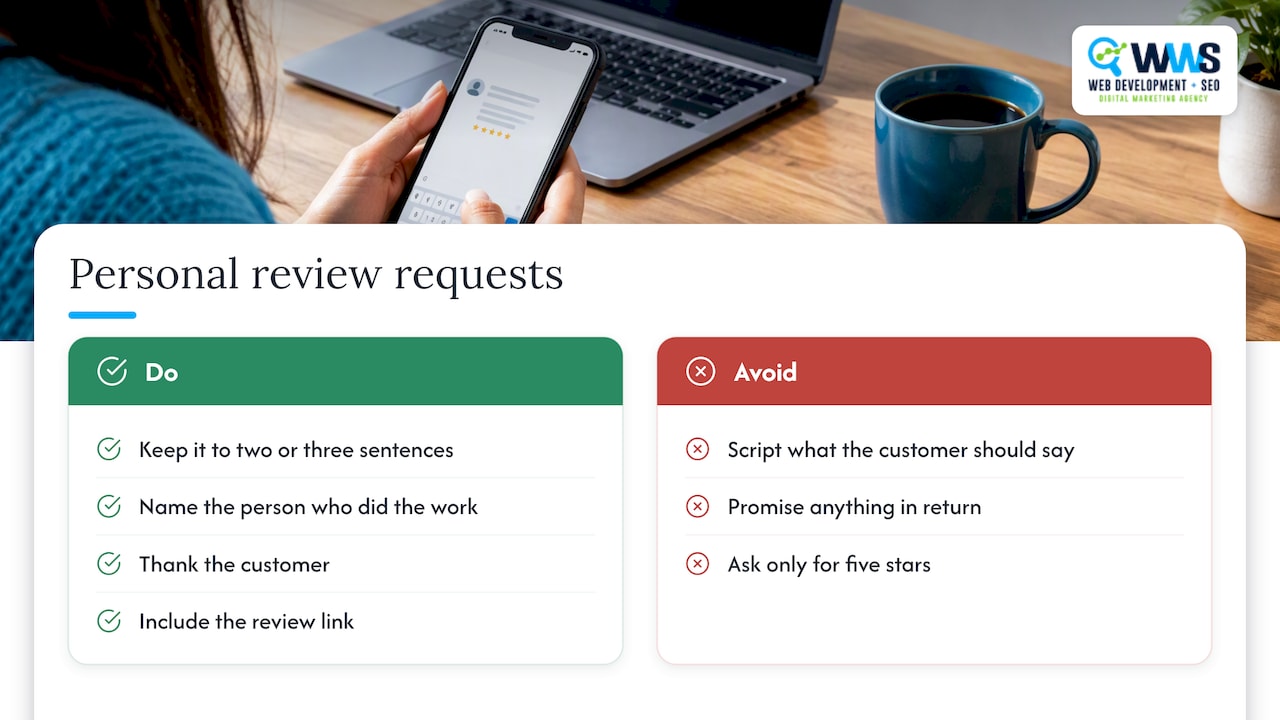
Keep the request to two or three sentences. Name the person who did the work, thank the customer, and give the link. Examples you can adapt:
Text after a job:
Hi Maria, this is Dave from [Company]. Thanks for letting us replace your water heater today. If you were happy with the work, a quick Google review helps our small team a lot: [link]
Email after an appointment:
Subject: How did we do?
Hi James, thank you for visiting us this morning. If you have a minute, we would value your honest feedback on Google: [link]. Either way, we appreciate you choosing us.
Printed card or invoice line:
Enjoyed working with us? Scan to share your experience on Google.
Notice what these do not do. They do not script what the customer should say, promise anything in return, or ask only for five stars. They ask for honest feedback.
Make it a habit for staff
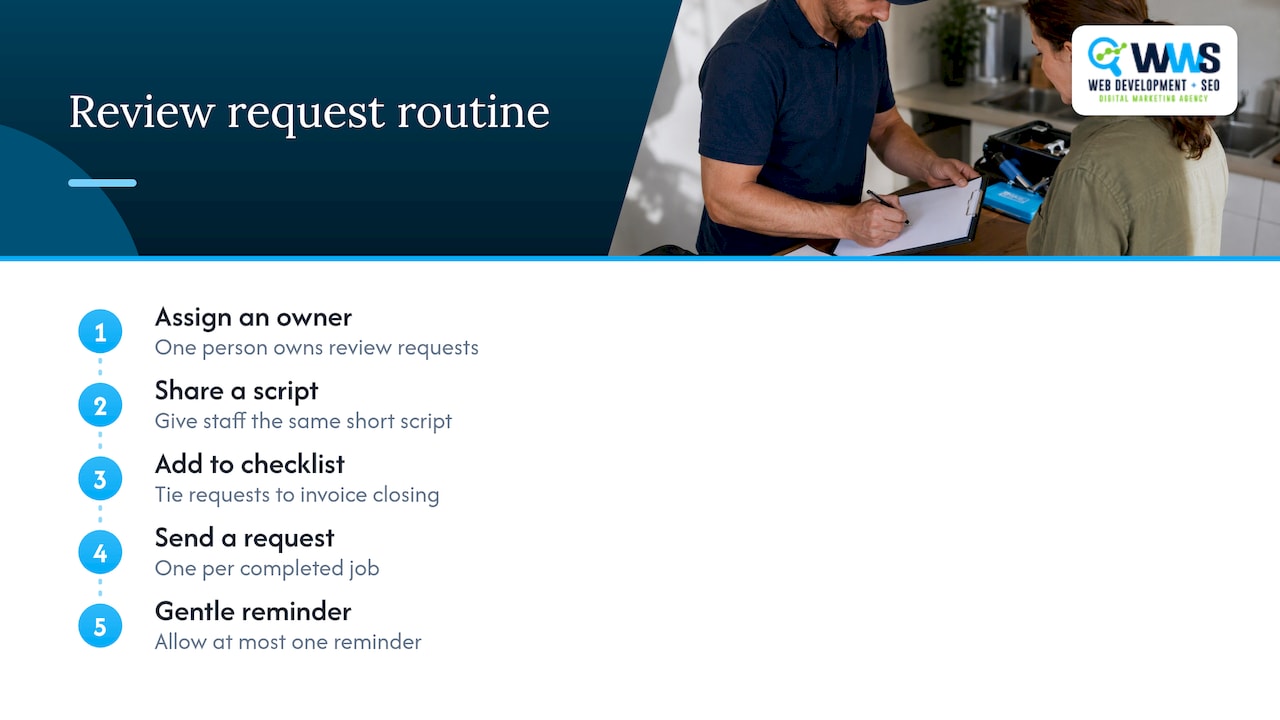
Assign one owner for review requests, give every technician or front-desk person the same short script, and add the request to your job-closing checklist. A request that depends on someone remembering will fade within a month; one tied to closing an invoice will not. Set a routine, such as one request per completed job and at most one gentle reminder, rather than quotas that push staff to pressure people.
Step 3: Stay inside Google and FTC rules
This is where well-meaning businesses get into trouble, and it is worth getting right the first time. Safe use of reviews protects the rating you are working to build.
What Google requires
Google’s guidance says reviews must reflect a genuine experience, and it prohibits offering incentives in exchange for posting, changing or removing a review. See its page on tips to get more reviews for the current wording. In practice:
- Do not give discounts, gift cards, raffle entries or free services for a review, even “for any rating.”
- Do not ask a customer to remove or change a review in exchange for a refund or credit.
- Do ask customers to use your Google link or QR code.
What the FTC says
The Federal Trade Commission’s guide, Soliciting and Paying for Online Reviews, adds several points that matter for small businesses:
- Do not solicit reviews from people who have not actually used your product or service.
- Do not selectively ask only the customers you expect to leave positive reviews.
- Do not ask family, friends or employees to review you without clearly disclosing the relationship.
The second point is the one many owners miss. A “review gating” setup that screens customers with a satisfaction question and only sends the happy ones to Google runs against that guidance. Send the same request to everyone you served, then handle unhappy feedback through your reply and a follow-up call.
Watch the agencies you hire
The same FTC guide warns that a business can be held responsible for fake positive reviews written for it, or fake negative reviews of competitors, by an SEO or reputation management company it hires. It also notes that platforms can suspend or remove accounts and listings. When you evaluate any marketing partner, ask directly how they generate reviews. The right answer is a process that helps real customers leave real feedback. Anything that sounds like “we can get you 50 reviews this month” is a red flag.
Step 4: Reply to every review
Replies are part of your strategy, not an afterthought. They show future customers how you behave when someone is watching, and Google’s guidance encourages businesses to respond to reviews.
Replying to positive reviews
- Respond within a day or two when you can.
- Use the reviewer’s name and mention something specific they said, such as the crew, the speed or the result.
- Keep it short and genuine. Avoid copy-pasted replies and avoid turning the reply into an advertisement.
Thank you, Maria. Dave and the crew were glad to get your hot water back the same day. We appreciate you trusting us with the job.
Replying to negative reviews
Google’s guidance says replies should be professional, polite, clear and helpful, and the same advice from Shopify points to apologizing where appropriate and offering to resolve things privately. A workable structure:
- Thank them for the feedback.
- Apologize for the specific disappointment, without arguing.
- State briefly what you will do, and give a direct phone number or email.
- Never share private customer details, such as job addresses, invoice amounts or health information, in a public reply.
We are sorry the visit did not go the way you expected, Mr. Allen. We would like to look into this properly. Please call our office at the number on our profile and ask for the owner.
Dental, med spa and other healthcare-related practices should be especially careful here. Do not confirm that someone was a patient or discuss their treatment publicly, and ask your compliance advisor or attorney about the specific rules that apply to your practice.
A useful reminder: Google’s guidance notes that a mix of positive and negative feedback can feel more trustworthy than a spotless record. One thoughtful reply to a critical review often does more for a reader’s trust than ten glowing ones.
Step 5: Measure what is working
Open your profile at least weekly. Shopify’s guide suggests checking for new reviews you have not yet answered, trends in feedback, recurring issues and staff members worth recognizing. Beyond that, a simple weekly scorecard keeps the program honest.
| Metric | How to calculate it | What it tells you |
|---|---|---|
| Requests sent | Count of texts, emails or cards delivered | Whether staff are actually asking |
| Request-to-review rate | New reviews divided by requests sent | How easy and well-timed your ask is |
| Average rating | Shown on your profile | Overall customer satisfaction |
| Response rate | Reviews replied to divided by reviews received | Whether you are keeping up |
| Review velocity | New reviews per month | Whether your profile looks active |
| Calls and direction requests | Profile performance data | Whether reviews are turning into leads |
The first one to fix is requests sent. If requests are low, nothing else will move. If requests are steady but few reviews arrive, shorten the path or change the timing. If reviews arrive but the rating dips, the signal is in the content: look for recurring themes such as scheduling, communication or cleanup, and fix them in operations.
You can also read review text for the keywords customers use naturally, such as “kitchen remodel,” “roof replacement” or “same-day repair.” These phrases are genuine language from your customers, and they tell you which services to highlight on your website and profile. Do not coach customers to include keywords; simply learn from what they write.
Step 6: Connect reviews to the rest of your local presence
Reviews perform best when everything around them is solid:
- A complete profile. Accurate categories, services, hours, photos and posts give reviews context. Our map pack guide shows how the profile elements work together.
- A website that converts. A reader who clicks from a review to your site should find clear services, proof and a visible phone number. For trades, our notes on contractor website design show what turns clicks into calls.
- Consistent business information. Matching name, address and phone across directories supports the same prominence signals that reviews contribute to.
- Reviews on your site. Show real customer feedback on service pages, with the customer’s permission and without editing the meaning.
If you want to see how these pieces fit into a full plan, the local SEO best practices guide is a good next read.
A 30-day launch plan
| Week | Focus | Actions |
|---|---|---|
| 1 | Foundation | Verify profile, copy review link, create QR code, test on a phone |
| 2 | Process | Write the text, email and printed scripts; name one owner; add the ask to the job-closing checklist |
| 3 | Rollout | Send requests to every customer served that week; reply to all existing reviews |
| 4 | Review | Calculate request-to-review rate and response rate; adjust timing and wording |
After the first month, the work is maintenance: ask every customer, reply to every review, check the scorecard weekly.
Our perspective
Most local businesses we meet are not short of happy customers. They are short of a system. When we work with contractors, dental practices and restaurants around Des Plaines and the greater Chicago area, the pattern is the same: the owner knows the work is good, but the Google profile does not show it.
We treat reviews as one part of a connected local presence. Our team handles web development, local SEO and Google Business Profile work in-house, so the review link, the profile, the website and the follow-up messages are designed together instead of passed between vendors. That is how we aim to turn a good reputation into phone calls.
Our advice is simple: make asking automatic, keep every request honest, and answer every review as if a future customer is reading it, because one is.
Online Marketing Experts
Let us build the system for you
If you would rather have your review requests, Google Business Profile and website working as one lead-generating system, that is what our team does. As an official Google and Meta Partner serving Chicago-area local service businesses, we set up the profile, the request workflow and the local SEO around it, and keep it managed.
See how our Local SEO service works, or contact WWS to talk through your market.
FAQ
How many Google reviews do I need?
There is no magic number. Google says more reviews and positive ratings can help your local ranking, so the practical goal is a steady flow of genuine reviews rather than a target total. Look at the businesses showing above you in the map pack for your service and area, and aim to match their rating while keeping your reviews recent.
Can I offer a discount for a Google review?
No. Google prohibits offering incentives in exchange for posting, changing or removing reviews, and the FTC also has guidance on paying for reviews. Instead, make the request personal and easy, and thank customers sincerely after they respond.
Should I only ask happy customers?
No. The FTC’s guidance says businesses should not selectively solicit only customers expected to leave positive reviews. Send the same request to everyone you served, then respond to any criticism with a professional reply and an offer to fix the problem by phone or email.
How should I handle a negative review?
Reply promptly, stay polite, apologize for the specific problem where appropriate, and invite the customer to continue the conversation privately. Do not share private details publicly. A calm, helpful reply shows future customers how you treat people when something goes wrong.
How often should I check my reviews?
At least weekly. Look for new reviews that still need a reply, patterns in what customers mention, and team members who deserve recognition. Add request-to-review rate and response rate to the same weekly check.
Sources
- Tips to improve your local ranking on Google, Google Business Profile Help
- Tips to get more reviews, Google Business Profile Help
- Soliciting and Paying for Online Reviews: A Guide for Marketers, Federal Trade Commission
- Google Reviews: How to Get More for Your Business, Shopify
Recommended
A Des Plaines, IL team helping local service businesses get found, get called and get booked since 2005: local SEO, Google Ads, conversion-focused websites and AI search optimization.
Meet the teamKeep reading
All articles
Duplicate Google Listings: How to Find, Merge, and Remove Them
Duplicate Google listings split your reviews and confuse customers. Learn how to find them, merge or remove them, and stop them from coming back.
Win the Map Pack in 1–4 Weeks: 7 GBP Fixes for Local Businesses
Boost your Map Pack ranking in 1–4 weeks with seven GBP fixes, review timing advice, and rank checks tied to calls. Action first steps local businesses...
Stop Missing Calls: Google Business Profile Setup for Service Areas
Claim, verify, and optimize your Google Business Profile for service areas: set the right service area, enable bookings, link GA4, and follow an agency...