





Lost in SERPs? Here’s How to Check Google Ranking of My Website Right Now
If you’ve ever wondered how to check google ranking of my website, here’s the fastest way to get started:
- Google Search Console (free) — Go to search.google.com/search-console, verify your site, and check the Performance report to see your keyword positions, clicks, and impressions.
- Free rank checker tools — Tools like SEO Review Tools or SE Ranking let you enter your domain and see where you rank for specific keywords, without logging into Google.
- Manual search (less reliable) — Open an incognito browser window, search your target keyword, and look for your site. Add
&pws=0to the Google URL to reduce personalization.
Most small business owners have no idea where their website actually shows up on Google. They assume it’s “out there” — but they’ve never confirmed it with real data.
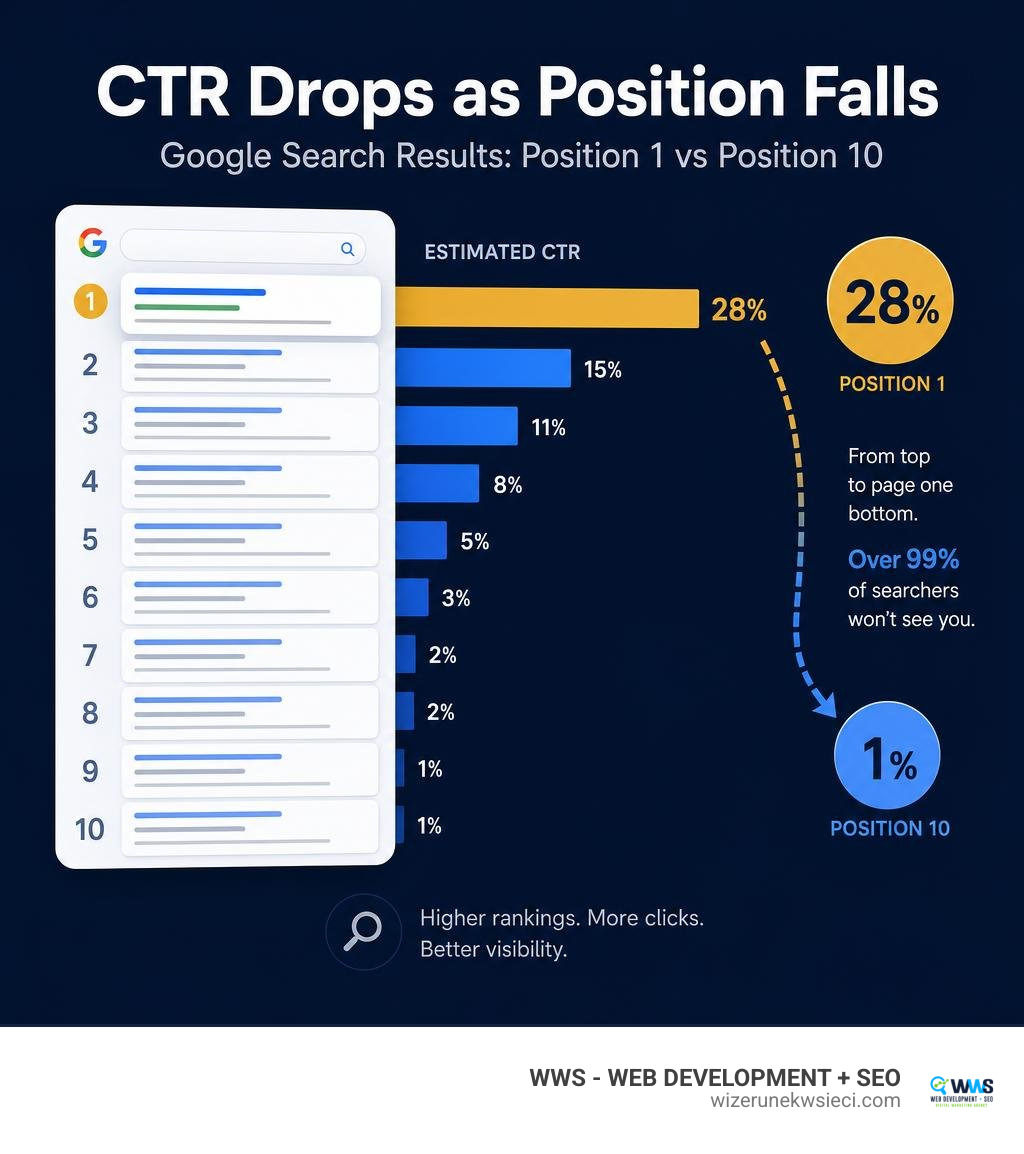
Here’s why that matters: the #1 result on Google gets around 28% of all clicks. By position 10, that number drops to roughly 1%. If you’re not on page one, the hard truth is that over 99% of searchers will never find you.
That’s not a guess. That’s how search works.
Knowing your ranking position isn’t just a vanity metric — it tells you whether your SEO efforts are paying off, which keywords are driving traffic, and where your competitors might be pulling ahead of you.
I’m Tomasz Lasota, founder of WWS — Web Development + SEO in Des Plaines, IL, and over my 22+ years in digital marketing I’ve helped hundreds of small business owners learn how to check google ranking of my website and turn that data into a real growth strategy. In this guide, I’ll walk you through exactly how to do it — step by step, no technical background required.
Discover more about check google ranking of my website:
Why You Need to Check Google Ranking of My Website
When you run a business in the Chicago metropolitan area, whether it’s an auto repair shop in Des Plaines, a medical clinic in Schaumburg, or a construction company serving the Polish-American community (Polonia Chicago), you are fighting for local visibility. If your target clients search for your services and you are buried on page three of the search engine ranking positions (SERPs), your website is essentially invisible.
Regularly checking your rankings is the key to understanding your organic search traffic and measuring the success of your search engine optimization.
To illustrate why your position on Google is a make-or-break factor for your business, look at the dramatic drop-off in click-through rate (CTR) as you move down the first page:
| Google SERP Position | Average Click-Through Rate (CTR) |
|---|---|
| Position 1 | ~28.0% |
| Position 2 | ~15.0% |
| Position 3 | ~11.0% |
| Position 4 | ~8.0% |
| Position 5 | ~6.0% |
| Position 6 | ~4.0% |
| Position 7 | ~3.0% |
| Position 8 | ~2.0% |
| Position 9 | ~1.5% |
| Position 10 | ~1.0% |
The math is brutal. If 1,000 people in Chicago search for “bilingual web developer near me” each month, the top spot gets 280 visitors. The tenth spot gets 10. Anyone on page two gets left with less than half a percent of the traffic.
By working with experienced teams like those at professional Chicago SEO agencies: Your Guide to Ranking Up, you can implement strategies that drag your site out of the search abyss and push it toward those top three high-converting positions.

How to Check Your Google Rankings for Free
To get an accurate, unbiased look at where your website stands, you need to use the right tools. If you simply type your keywords into Google on your personal phone, you will get highly personalized results. Google knows your search history, your physical location, and your brand preferences, which artificially inflates your site’s position in your personal view.
To bypass this bias, we rely on dedicated platforms and free SEO tools dashboards that pull clean, objective data based on the target search engine country, device type (taking mobile-first indexing into account), and specific geolocations.
Let’s look at the official and third-party tools you can use to check your positions without spending a dime. For official guidelines on how Google crawls and indexes your site, you can always consult the Google Search Central (formerly Webmasters) | Web SEO Resources .

Use Google Search Console to Check Google Ranking of My Website
Google Search Console (GSC) is the single most accurate tool for tracking your organic performance because the data comes directly from Google itself. It acts as a digital watchman for your online presence, showing you exactly how Google crawls, indexes, and ranks your pages.
To check your rankings in GSC:
- Log into your dashboard and navigate to the Performance tab.
- Check the box for Average Position alongside Clicks, Impressions, and CTR.
- Scroll down to the table to see a complete list of Queries (the actual keywords users type in) and your site’s average ranking position for each.
- You can filter the data by country, page, device, and date to see how your Website SEO performance evolves over time.
Additionally, GSC is where you handle crucial technical tasks like sitemap submission to ensure Google’s crawlers find your newest content quickly.
Leverage Free Tools to Check Google Ranking of My Website
If you want a quick snapshot of your rankings for specific keywords without going through the GSC verification process, third-party rank checkers are your best option. These tools query Google’s search engine directly from clean, non-personalized servers, allowing you to select your target country, city, and device type.
Here are the best free tools to check Google rankings for your site:
- SEO Review Tools: Their Free Rank Checker [Mobile / Desktop] – SEO Review Tools is an incredibly popular choice, with over 179,197 users registered for their free accounts. It lets you check both desktop and mobile rankings across different country versions of Google.
- Exploding Topics: The Google Rank Checker: Free Google Position Tracker is excellent for quick, clean checks that show where you rank for up to several keywords instantly.
- Seobility: The Free Website Ranking Checker | Google Keyword Rankings provides completely unbiased search results and lets you specify precise geolocations down to the city level.
- Sitechecker: Use the Website Ranking Checker | Get How Website Rank in Google to analyze your keyword standings and get a clear picture of your site’s current visibility.
For a detailed walkthrough on using these tools effectively, check out this How to Check Google Rankings (FREE Tools + Pro Tips) – YouTube video guide.
The Difference Between Manual Searches and Rank Trackers
Many small business owners in the Northwest Suburbs of Chicago tell us, “I checked my ranking manually by searching ‘dentist in Des Plaines’ and we were #1!”
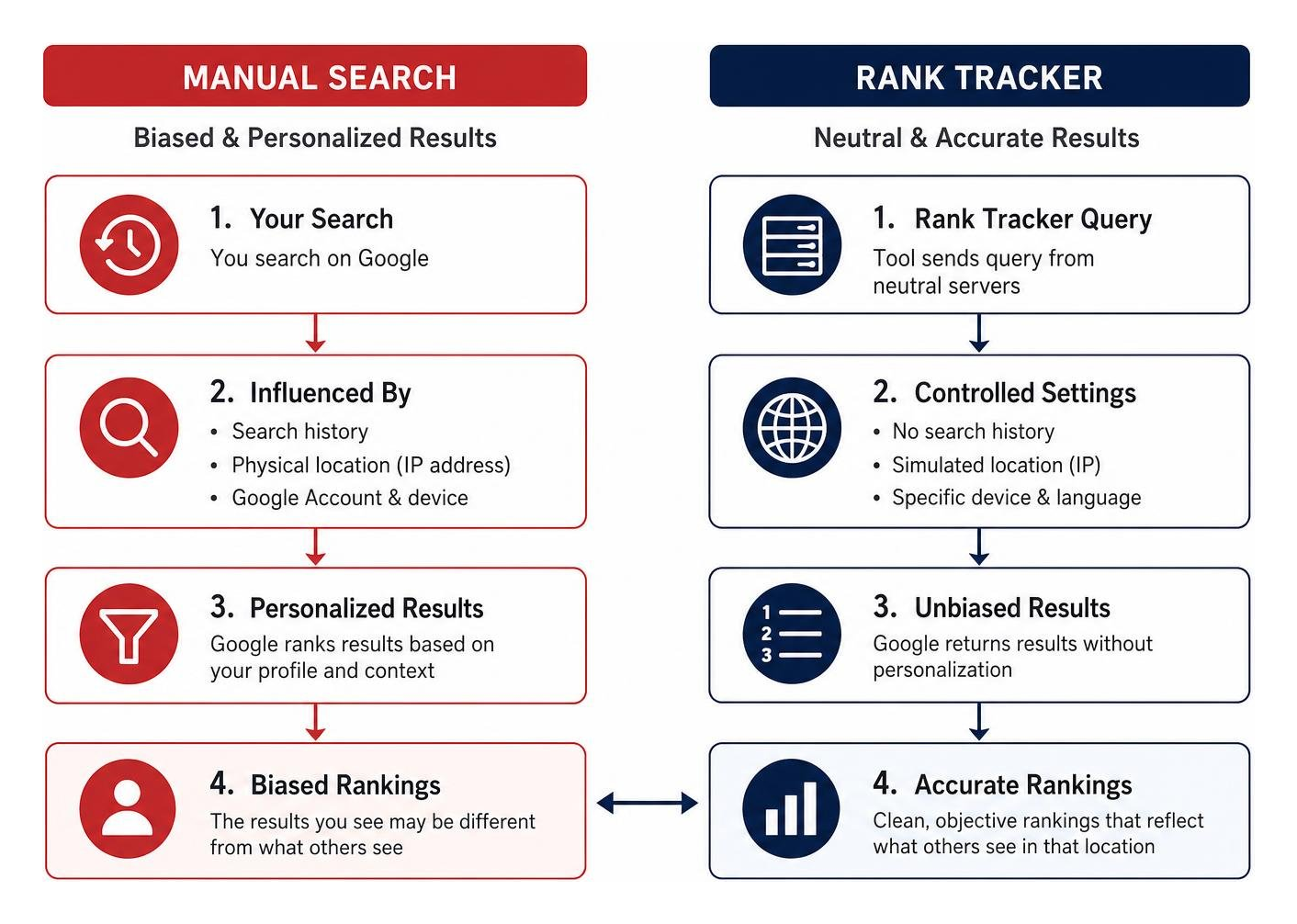
While manual searching feels intuitive, it is highly inaccurate due to search personalization. Google customizes what you see based on:
- Your search history: If you visit your own website frequently, Google assumes you love that site and will rank it higher just for you.
- Your physical location (IP address): If you search from your office, you will rank incredibly well for local terms. But a potential customer searching from five miles away in Niles or Park Ridge might see a completely different set of results.
- Your Google Account: Being logged into your Gmail account heavily influences your search results.
Automated rank trackers, on the other hand, query Google using neutral servers with no search history, simulated locations, and specific device configurations. This gives you the cold, hard, objective truth about your search visibility.
Understanding these nuances is why many local businesses opt for professional SEO Services Packages Chicago to get accurate tracking, deep keyword gap analysis, and tailored optimization strategies that drive real revenue.
Frequently Asked Questions About Website Rankings
How often should I check my website’s Google rankings?
Checking your rankings every single day is a recipe for unnecessary stress. Google’s search algorithms are constantly making micro-adjustments, meaning your position can fluctuate by a few spots daily.
For most small businesses, weekly monitoring is the sweet spot. It allows you to spot genuine trends and major algorithm updates without getting distracted by temporary daily fluctuations. If you notice a steady decline over three to four weeks, that is your cue to run a technical audit or refresh your content.
Can I check mobile vs. desktop Google rankings separately?
Yes, and you absolutely must. Google uses mobile-first indexing, meaning it primarily uses the mobile version of your content to rank your site. Because mobile searches often rely heavily on local proximity and page speed, your rankings on a smartphone can look vastly different from those on a desktop computer.
All high-quality rank checkers allow you to toggle between desktop search and mobile search to ensure your site performs flawlessly across all screens.
How do I check local Google rankings for my business?
Local SEO is a completely different ballgame. When local customers search for services, Google displays the “Local Pack” (the map section showing three local businesses) alongside standard organic results.
To check your local rankings:
- Use a rank tracker with precise geolocation features to simulate searches from specific zip codes or suburbs like Arlington Heights, IL, or Elk Grove Village, IL.
- Monitor your performance in Google Maps by keeping your business profile fully updated.
- For expert assistance in dominating local search results, you can explore our tailored Local SEO strategies and professional Google Business Profile Optimization services.
Conclusion: Turn Your Search Visibility Into Revenue
Checking your Google ranking is the first step toward online success, but knowing where you stand is only half the battle. The real goal is translating that search visibility into phone calls, walk-ins, and online inquiries that grow your business.
We have seen how professional optimization transforms companies. For example, when businesses align their technical SEO and structured data with Google’s best practices, the results are massive:
- Recruitment platforms like ZipRecruiter grew their conversion rates 4.5x after launching JobPosting structured data.
- Major portals like Saramin doubled their organic search traffic and saw a 93% increase in new sign-ups.
- Entertainment platforms like MX Player boosted organic traffic 3x, doubling video page views per user session.
At Wizerunek w Sieci (WWS), based in Des Plaines, IL, we specialize in helping small and medium-sized businesses across the Chicago metropolitan area master their SEO. We treat your business as if it were our own, offering meticulous attention to detail, bilingual capabilities (English and Polish), and deep knowledge of the local Chicagoland market.
Stop guessing where your website ranks. Let us help you claim the top spots on Google and build a high-performing digital asset that works for you 24/7.
Ready to dominate the search results? Get a free website audit and boost your rankings with WWS today to discuss your custom growth strategy!