





Your Business Is Invisible If You Don’t Know Where You Rank on Google
If you’ve ever wondered how to google check keyword ranking for your website, you’re not alone — and the answer matters more than most business owners realize.
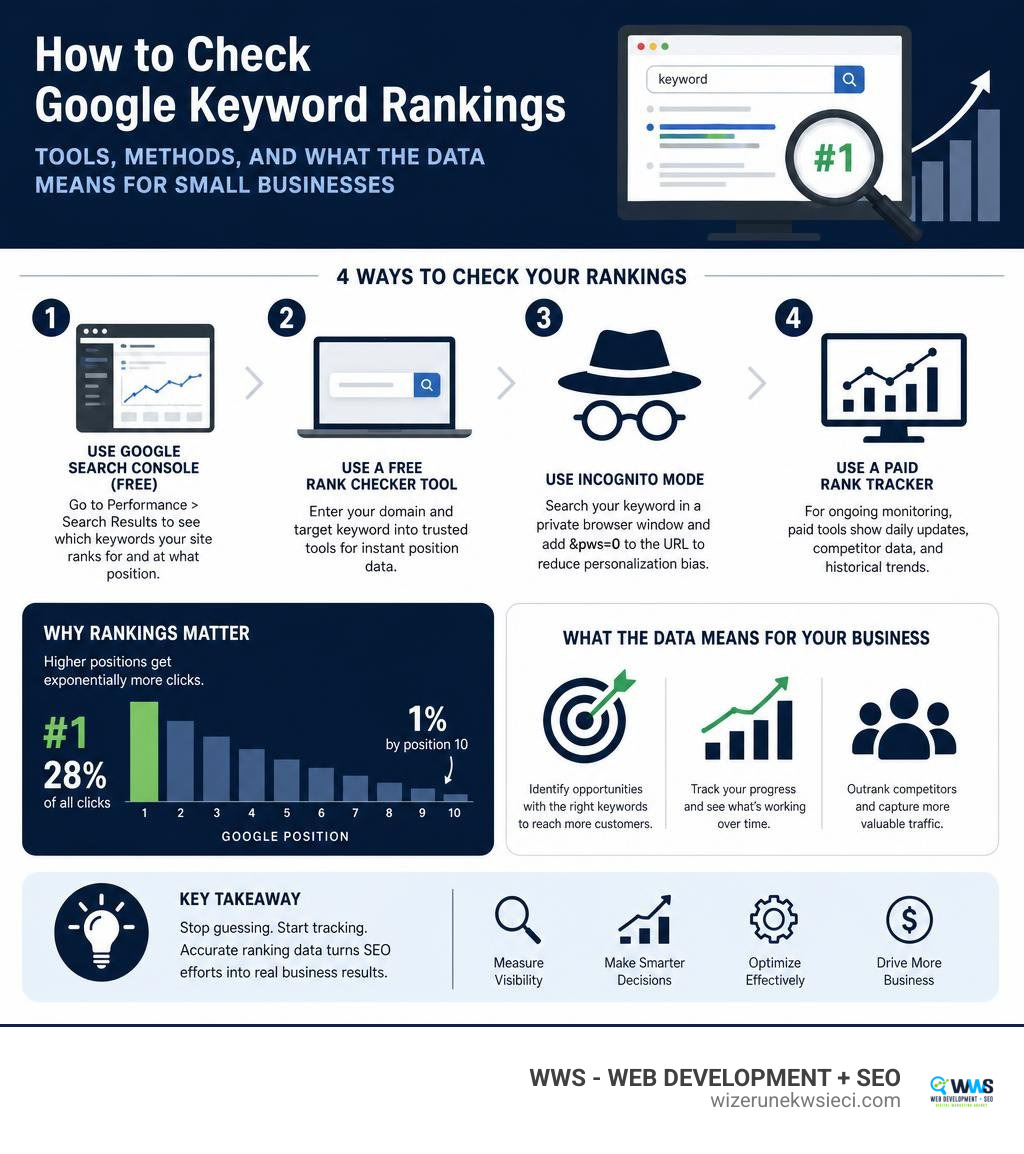
Here’s how to check your keyword ranking on Google right now:
- Use Google Search Console (free) — go to Performance > Search Results to see which keywords your site ranks for and at what position.
- Use a free rank checker tool — enter your domain and target keyword into tools like Semrush, Ahrefs, or SEO Review Tools for instant position data.
- Use incognito mode — search your keyword in a private browser window and add
&pws=0to the URL to reduce personalization bias. - Use a paid rank tracker — for ongoing monitoring, tools like Semrush Position Tracking or Ahrefs Rank Tracker show daily ranking updates, competitor data, and historical trends.
Quick tip: Never rely on a regular Google search to check your rankings. Google personalizes results based on your location, search history, and device — so what you see is not what your customers see.
Here’s why this matters in plain numbers.
The #1 result on Google earns roughly 28% of all clicks for a given keyword. By position 10, that drops to around 1%. That gap is the difference between a phone that rings and a website nobody visits.
Most small business owners — whether running a restaurant in Wicker Park, a law firm in Schaumburg, or a contractor service in the Chicago suburbs — have no idea where their site actually ranks. They think they’re visible. But without tracking, they’re just guessing.
This guide reviews the best tools available today to stop guessing and start knowing exactly where you stand in Google’s search results.
I’m Tomasz Lasota, founder of WWS — Web Development + SEO in Des Plaines, IL, and over 22 years of working in SEO for small and medium-sized businesses has shown me how google check keyword ranking data transforms vague marketing decisions into clear, revenue-driving action. I’ll walk you through the best rank checker tools available in July 2026 so you can choose the right one for your business.
Handy google check keyword ranking terms:
What is a Google Keyword Rank Checker and How Does It Work?
A Google keyword rank checker is a specialized SEO tool designed to find the exact position your website holds in search engine results pages (SERPs) for a specific search query. Instead of typing your target keywords into a browser and scrolling endlessly, these tools automate the process, scanning Google’s organic results to find your URL.
But why can’t you just type your keyword into Google and see where you rank? The short answer is personalization.
Google’s modern search algorithms, including advanced systems like RankBrain, customize search results for every single user. This means your search results are heavily influenced by:
- Your physical location (down to your specific neighborhood or street)
- Your past search history and browsing habits
- Whether you are signed into a Google account
- The device you are using (desktop, tablet, or smartphone)
If you own a local service business in Arlington Heights, IL, and you search your own business name or services repeatedly, Google will likely show your website higher in your personal results. However, a potential customer searching from a different device down the road in Elk Grove Village, IL, will see an entirely different page layout.
To bypass this personalization bias and see clean, objective data, professional keyword rank checkers simulate search queries from neutral servers. They fetch the raw search engine results page without any user history attached. This gives you the “clean” ranking that reflects what the average searcher actually sees.
For a visual walkthrough on how this works, you can watch this guide on How to See What Your Website Ranks for on Google – YouTube.

By querying search engines programmatically, these tools can also target specific geographic coordinates. This is a game-changer for local businesses. A rank checker can tell you exactly where you rank for a search query in Naperville, IL, compared to Mount Prospect, IL, allowing you to tailor your local marketing campaigns accordingly.
Why You Must Google Check Keyword Ranking for Your Business
Tracking where your website stands on Google is not about vanity; it is about survival in a competitive digital landscape. As we mentioned, click-through rates (CTR) drop off a cliff after the first few spots. If you are not in the top three positions, you are missing out on the vast majority of organic traffic.
When we look at real-world data, the business impact of improving search visibility is staggering:
- Saramin (a major recruitment platform) focused on organic traffic optimization and saw a 2x increase in organic search traffic, leading to a 93% increase in new sign-ups and a 9% conversion boost.
- MX Player boosted its organic traffic by over 3x simply by implementing structured data and following search best practices.
- ZipRecruiter grew its conversion rate by 4.5x after optimizing its pages for specific search features.
For small businesses in the Chicago metropolitan area, whether in Skokie, IL, Niles, IL, or Park Ridge, IL, tracking keyword rankings is the first step toward achieving these kinds of results. When you invest in professional Website SEO, keyword tracking acts as your compass. It tells you:
- Which pages are performing: If a blog post is sitting on page two (positions 11-20), it is a prime candidate for a quick content refresh to push it onto page one.
- Where competitors are winning: If a competitor in Rosemont, IL, suddenly jumps ahead of you for a high-value search term, you can analyze their page and adjust your strategy.
- The ROI of your marketing spend: Whether you are working with an agency or running campaigns yourself, watching your average ranking position climb over time proves that your efforts are working.
Without this data, you are flying blind. You might spend hours writing content that nobody searches for, or optimizing pages that already have top rankings, while neglecting the “quick win” opportunities that could bring in immediate phone calls and leads.
Comparing Your Options: Free vs. Paid Keyword Rank Checker Tools
When deciding how to track your rankings, you will find both free and paid tools on the market. Both have their place, but they serve very different needs.
Free rank checkers are excellent for quick, on-the-spot audits. If you want to see where your site ranks right now for a handful of terms, tools like the Free Website Ranking Checker | Google Keyword Rankings – Seobility or the Keyword Rank Checker – A Free online Google keyword position checker are perfect. They let you input your URL and a few keywords to get an instant position report.
However, free tools have significant limitations. They rarely save your history, meaning you cannot easily track rankings over time. They also cap your daily searches and do not offer advanced competitor benchmarking or deep integration with other metrics like search volume, keyword difficulty, or SERP features (such as Local Packs or Featured Snippets).
Paid rank trackers, on the other hand, are built for ongoing campaign management. They monitor your selected keywords daily, track your historical progress, and alert you to major drops or gains. They also let you track hundreds or thousands of keywords simultaneously across multiple locations.
Here is a quick comparison to help you choose:
| Feature | Free Rank Checkers | Paid Rank Tracking Platforms |
|---|---|---|
| Daily Auto-Updates | No (Manual checks only) | Yes (Automated tracking) |
| Historical Data | None | Unlimited (View trends over months/years) |
| Location Targeting | Broad (Country level) | Hyper-local (City, zip code, or neighborhood) |
| Competitor Tracking | Rare | Yes (Compare side-by-side with local competitors) |
| Keyword Limit | Low (Usually 5-10 per check) | High (Hundreds to thousands of keywords) |
| SERP Feature Tracking | No | Yes (Track Local Packs, AI Overviews, Snippets) |
If you are a growing business looking to dominate the search results in your local market, relying solely on free tools can hold you back. Partnering with a professional team that utilizes premium enterprise tracking software ensures you have the deep, actionable insights needed to win.
For businesses looking to make a serious impact locally, investing in professional Local SEO services is the most reliable path to consistent search visibility.
How to Google Check Keyword Ranking for Desktop vs. Mobile
One of the most common mistakes business owners make is assuming that search rankings are identical across all devices. In reality, Google serves different search results to mobile users than it does to desktop users.
Mobile search results are highly influenced by physical proximity. If someone searches for “web design near me” while walking down the street in Des Plaines, IL, Google uses their phone’s GPS to show businesses within a few blocks. If that same person performs the search from a desktop computer at an office in Schaumburg, IL, the results will shift based on that office’s IP address and location.
Furthermore, mobile screens are smaller, meaning SERP features like the Google Local 3-Pack, click-to-call buttons, and local map listings dominate the screen. Organic text listings are pushed much further down the page on mobile devices.

Why Mobile-First Indexing Changes How You Google Check Keyword Ranking
Google now uses mobile-first indexing for the entire web. This means Google’s algorithm primarily crawls and evaluates the mobile version of your website to determine its ranking, even for desktop searches.
If your website is slow on mobile devices, has hard-to-read text, or features elements that do not scale well on small screens, your overall rankings will suffer across all devices. When checking your keyword rankings, it is crucial to use a tool that allows you to toggle between desktop and mobile views. This helps you identify if a drop in traffic is due to a mobile-specific usability issue.
Tracking Keyword Rankings Over Time to Measure SEO Success
SEO is a long-term game. Rankings naturally fluctuate from day to day as Google tests new search layouts and updates its algorithms. Because of this volatility, looking at a single day’s ranking can be misleading.
Instead, you should look at historical trends. Are your target keywords moving from page three to page two, and eventually to the top of page one? Tracking these movements over weeks and months is the only way to measure the true health of your SEO campaign.
Before making major content updates or structural changes to your website, it is highly recommended to establish a baseline of your current rankings. You can learn more about this process in this detailed guide on How to Check Your Keyword Rankings Before Making SEO Changes.
What to Do When Your Keyword Rankings Drop or Fluctuations Occur
It is a scenario every business owner dreads: you log into your rank tracker and notice that a high-value keyword has dropped several positions overnight. Before you panic, search volatility is completely normal.
However, if you notice a sustained drop across multiple keywords, it is time to take a systematic, data-first approach to troubleshoot the issue.
Here is a step-by-step checklist to diagnose and fix a ranking drop:
- Confirm the Drop is Real: Check your Google Search Console data. Sometimes, third-party tools experience temporary tracking glitches or Google runs brief tests (often called “Google dance”) that resolve themselves within a few days.
- Check for Algorithm Updates: Google frequently rolls out core algorithm updates. Check reputable SEO news sources to see if an update occurred around the time your rankings dropped. If so, Google may have changed how it evaluates quality or search intent for your niche.
- Audit Your Technical SEO: A broken plugin, a slow page speed score, or an accidental “noindex” tag can pull your pages out of search results entirely. Ensure your site’s technical foundation is secure.
- Analyze the Competition: Look at the pages that replaced you in the top spots. Did they add more comprehensive content? Do they have a stronger backlink profile? Have they optimized their page layout for better user experience?
- Optimize Your Local Presence: For local service businesses, ranking drops are often linked to your local map listing. Ensuring your business information is accurate and fully optimized is critical. If you haven’t updated your local profile recently, read our guide on Google Business Profile Optimization to regain your local search footprint.
If you are a business owner in the Northwest Suburbs of Chicago, managing algorithm shifts and technical audits on your own can be incredibly time-consuming. From Naperville to Elk Grove Village, local companies trust professional teams to handle these complexities for them.
For specialized local support, businesses in Arlington Heights, Elk Grove Village, Des Plaines, and across the Chicagoland area turn to WWS. Our team understands the local market dynamics and helps you navigate algorithm updates, technical audits, and local search optimization to ensure your business continues to grow.
Frequently Asked Questions About Google Keyword Tracking
How often should I google check keyword ranking for my website?
For most small and medium-sized businesses, checking your keyword rankings once a week or once every two weeks is ideal.
Checking your rankings multiple times a day will only cause unnecessary stress, as minor daily fluctuations are a standard part of how search engines work. However, if you are running a major digital marketing campaign, launching a new website, or recovering from an algorithm update, monitoring your core keywords daily can help you spot trends and react quickly.
Why do my manual search results look different from rank checker tools?
Your manual search results look different because of personalization bias.
Google knows your search history, your physical location, your device type, and whether you are logged into your Google account. If you frequently visit your own website, Google’s algorithm will artificially boost your site in your personal search results.
Rank checker tools query Google using clean, non-personalized browsers from neutral servers, providing an unbiased view of where your website actually stands for the average user.
Can structured data help improve my keyword rankings?
Yes, structured data (also known as Schema markup) can indirectly improve your keyword rankings by making your website eligible for rich snippets in search results.
Rich snippets—such as star ratings, product prices, FAQ dropdowns, and event dates—make your search listing look much more appealing. This visual prominence increases your click-through rate (CTR). Because Google’s algorithm notices that searchers are clicking on your link more frequently than others, your organic rankings can improve over time.
Conclusion
At the end of the day, search engine optimization isn’t about guesswork, luck, or chasing mysterious algorithms. It is a data-driven science. If you want your business to be found by customers in Des Plaines, Chicago, or across the United States, you must know exactly where you stand in the search results.
By using the right keyword rank checker tools, you can identify your high-performing pages, uncover quick-win opportunities, and protect your business from sudden algorithm shifts.
At Wizerunek w Sieci (WWS), we believe in building beautiful, high-performing websites backed by meticulous, data-first SEO strategies. We treat your business as if it were our own, helping local service providers, small business owners, and the Polish-American community (Polonia Chicago) establish a dominant online presence.
Stop guessing where your website ranks. Let our experienced, bilingual team in Des Plaines, IL, do the heavy lifting for you.
Visit wizerunekwsieci.com today for a free, comprehensive website audit, explore our tailored SEO Services Packages Chicago, and discover how we can Boost Your Business with Expert SEO Chicago Services to make your business impossible to ignore.