





Why Your New Website Needs to Be Built for SEO From Day One
How to make a SEO-friendly website is one of the most important questions any business owner can ask before launching online — because a beautiful website that no one can find is just an expensive digital brochure.
Here is a quick answer to get you started:
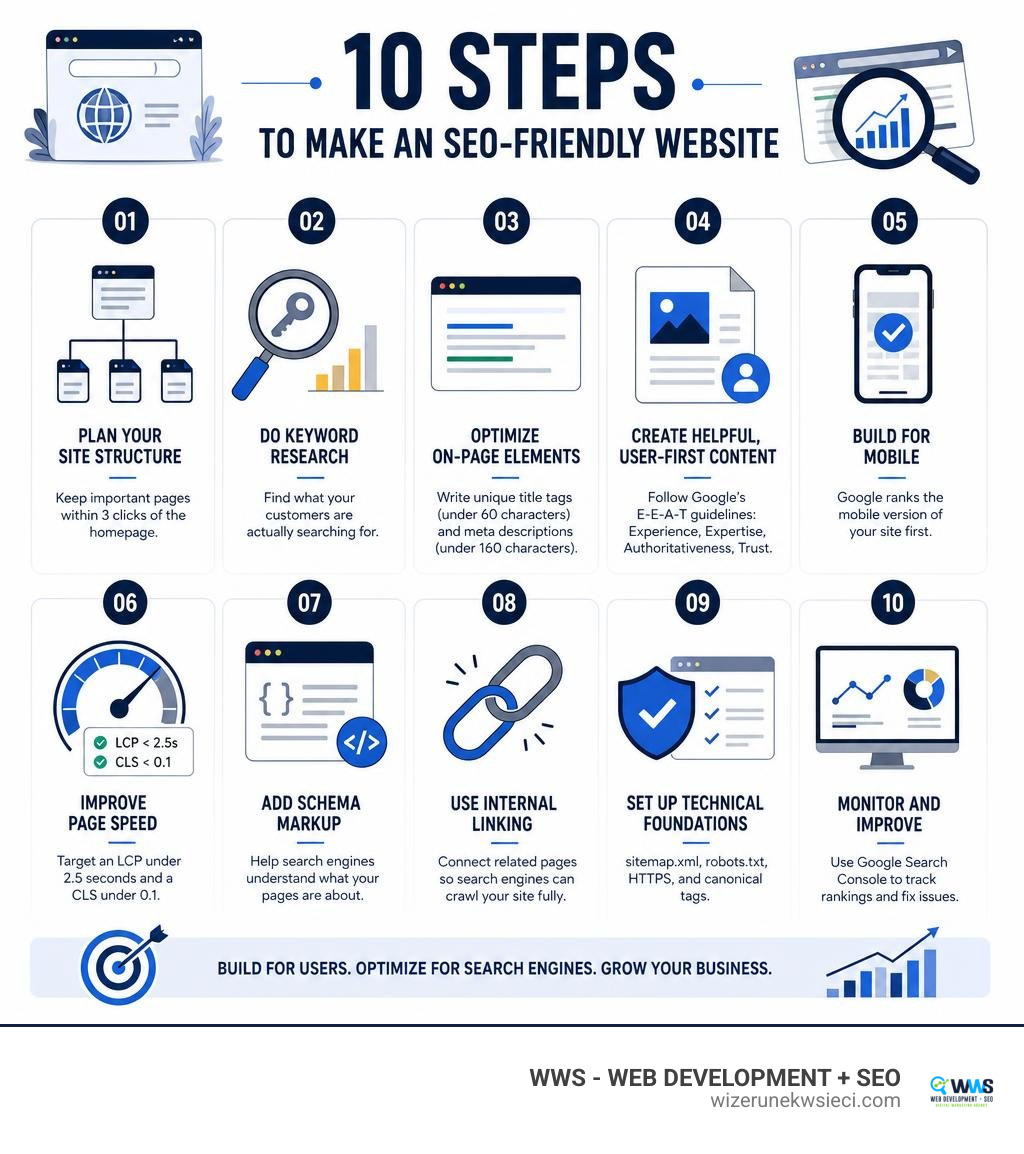
To make an SEO-friendly website, you need to:
- Plan your site structure — keep important pages within 3 clicks of the homepage
- Do keyword research — find what your customers are actually searching for
- Optimize on-page elements — write unique title tags (under 60 characters) and meta descriptions (under 160 characters)
- Create helpful, user-first content — follow Google’s E-E-A-T guidelines (Experience, Expertise, Authoritativeness, Trust)
- Build for mobile — Google ranks the mobile version of your site first
- Improve page speed — target an LCP under 2.5 seconds and a CLS under 0.1
- Add schema markup — help search engines understand what your pages are about
- Use internal linking — connect related pages so search engines can crawl your site fully
- Set up technical foundations — sitemap.xml, robots.txt, HTTPS, and canonical tags
- Monitor and improve — use Google Search Console to track rankings and fix issues
As Google puts it in their own SEO Starter Guide: “When you built your website, you likely created it with your users in mind, trying to make it easy for them to find and explore your content. One of those users is a search engine.”
That single idea is the foundation of everything in this guide.
SEO is not something you bolt on after your website is live. It needs to be woven into every decision — from how you name your URLs to how you structure your headings to how fast your pages load. Businesses that treat SEO as an afterthought spend months catching up. Businesses that build with SEO from the start get found faster, rank higher, and convert more visitors into real customers.
According to research, 68% of all online experiences begin with a search engine query — and the top search result gets roughly 32% of all clicks. If your website is not built to compete for those spots, you are handing potential customers directly to your competitors.
I’m Tomasz Lasota, founder of WWS — Web Development + SEO in Des Plaines, IL, and over 22 years of building and optimizing websites for small and medium-sized businesses across Chicago and the United States has shown me that knowing how to make a SEO-friendly website from the ground up is the single biggest competitive advantage a local business can have. In this guide, I’ll walk you through every step — clearly, without the jargon.
How to make seo-friendly website terms simplified:
Why Integrating SEO into Website Design is Essential for Small Businesses
A common mistake we see in the Chicagoland area is separating web design from search engine optimization. Many business owners hire a graphic designer to make a “pretty” site first, and then look for a specialist to “do the SEO” later. This approach is like building a custom home without plumbing and trying to fit the pipes in after the drywall is up. It is expensive, messy, and rarely works as well as it should.
True search engine optimization is deeply technical. It dictates how your website is built, how the code is structured, and how easily search engines can discover your pages. When you invest in professional Website Design, you are building a digital storefront. For that storefront to succeed, Google’s automated programs—called crawlers or bots—must be able to explore your site, understand your services, and save your pages in Google’s massive index.
If your web design is not built with crawlability in mind, search engines will struggle to read your content. If they cannot read it, they cannot index it. And if they cannot index it, your business will not show up when local customers search for your services.
Furthermore, Google uses mobile-first indexing. This means search engines evaluate and rank the mobile version of your pages first. A site that looks stunning on a desktop but breaks on a smartphone will quickly lose its search rankings. By prioritizing a user-first design that balances visual appeal with technical optimization, you create a seamless experience for both human visitors and search engine crawlers. If you want to know more about how this works locally, reading about How a Local Web Designer Can Help Your Business will show you how we integrate these elements from day one.
How to Make SEO-Friendly Website Architecture and Indexing Seamless
Before writing content or choosing brand colors, you must plan your website’s information architecture. Think of this as the blueprint of your digital home. A clean, logical structure makes it easy for visitors to find what they need and serves as a clear pathway for search engine crawlers.

To ensure search engines can navigate and index your site without roadblocks, we recommend following these structural best practices:
- The 3-Click Rule: Your most important pages should never be more than three clicks away from the homepage. A flat site structure ensures that link authority flows efficiently throughout your site and keeps users from getting lost.
- Descriptive URLs: Use clean, readable URL structures that include your target keywords. Avoid random numbers, symbols, or long query strings. For example, use
https://wizerunekwsieci.com/website-seo/instead ofhttps://wizerunekwsieci.com/page-id?12345. - Sitemap.xml: This is a structured blueprint of your website designed specifically for search engines. It lists all your pages, helping Google find and crawl them quickly. Once your site is live, you should submit your sitemap directly through Google Search Console and Bing Webmaster Tools.
- Robots.txt: Think of your robots.txt file as a technical greeter. It tells search engine bots which areas of your site they are allowed to crawl and which folders (like your administrative login pages) they should ignore.
- HTTPS and Security: Website security is a confirmed Google ranking signal. Serving your site over a secure HTTPS connection with an SSL certificate is mandatory for protecting user data and establishing trust.
- Canonical Tags: If you have duplicate versions of the same page (for example, product pages with different sorting options), canonical tags tell search engines which version is the master copy. This prevents duplicate content issues from diluting your ranking power.
For a deeper dive into these fundamentals, you can consult the official SEO Starter Guide: The Basics | Google Search Central | Documentation | Google for Developers, which outlines the exact rules search engines use to evaluate your technical setup.
Creating High-Quality, User-First Content with E-E-A-T Guidelines
Once your technical foundation is solid, your next focus must be content. In the modern search landscape, Google prioritizes helpful, reliable, and people-first content. The search engine’s algorithms are designed to filter out thin, unhelpful, or AI-generated spam that offers no real value.
To rank well, your content must align with Google’s E-E-A-T guidelines:
- Experience: Show that you have first-hand, real-world experience with the topic.
- Expertise: Demonstrate deep knowledge, credentials, and professional understanding.
- Authoritativeness: Build a reputation as a go-to source in your industry.
- Trustworthiness: This is the most critical element. Ensure your contact info is clear, your facts are accurate, and your business details are transparent.
At WWS, we help local business owners translate their real-world expertise into search-optimized copy. By focusing on comprehensive Website SEO, we ensure your articles, service pages, and case studies clearly demonstrate these trust signals to both your visitors and search engine algorithms.
Understanding Search Intent: How to Make SEO-Friendly Website Content
Keyword research is the process of discovering the exact phrases your target audience types into search engines. However, finding the keywords is only half the battle; you must also understand the search intent behind them. Search intent is the “why” behind a search query.
Generally, search intent falls into a few primary categories:
- Informational: The user is looking for answers or trying to learn something (e.g., “how to fix a leaky faucet”).
- Transactional: The user is ready to buy or hire a service (e.g., “plumber near Des Plaines IL”).
To build a highly effective website, you must map specific keywords to dedicated pages. Do not try to target unrelated keywords on a single page. If you run a dental practice, a single page trying to rank for both “kids dental cleaning” and “adult cosmetic orthodontics” will struggle. Instead, create separate, highly focused pages for each distinct service. For more strategic tips on keyword mapping and placement, review the SEO: Search Engine Optimization Tips – Illinois Extension guide.
Structuring Content for Readability: How to Make SEO-Friendly Website Layouts
Even the most informative content will fail if it is difficult to read. If visitors land on your page and see a massive wall of text, 42% of them will leave because of poor functionality and layout. To keep users engaged and reduce bounce rates, you need a highly readable, structured layout.
- Heading Hierarchy: Use semantic HTML heading tags to organize your content. Every page must have exactly one H1 tag (your main title) that includes your primary keyword. Use H2 tags for main sections and H3 tags for subsections. Never use heading tags for visual styling—use CSS classes instead.
- Font Size and Typography: Keep your body text no smaller than 16 pixels. Use simple, clean fonts that are easy to read on both desktop and mobile screens.
- Whitespace: Implement generous margins and micro whitespace around your text. This gives the reader’s eyes a place to rest and makes scanning your content much easier.
- Color Contrast: Ensure a contrast ratio of at least 4.5:1 between your text and background colors to meet accessibility standards and accommodate readers with visual impairments.
On-Page Optimization: Headers, Metadata, and Internal Linking
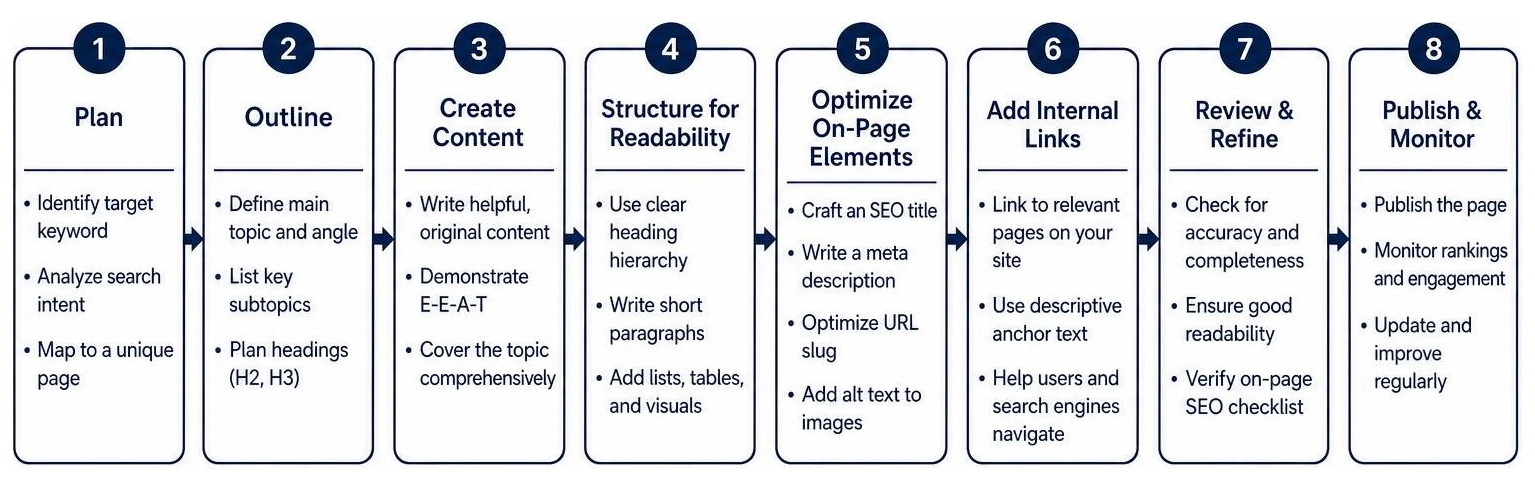
On-page optimization is the practice of refining individual elements on your website so search engines can easily categorize and rank your pages. When done correctly, these elements directly improve your click-through rates (CTR) in search results.
| On-Page Element | Recommended Specification | Direct Impact on SEO & UX |
|---|---|---|
| Title Tag | Under 60 characters, primary keyword first | Direct ranking factor; shows up as the clickable headline in search results. |
| Meta Description | 120 to 160 characters, includes CTA | Indirect impact; highly influences click-through rate (CTR) from search results. |
| Heading Hierarchy | Exactly one H1 per page, sequential H2-H3s | Helps search crawlers and screen readers understand content structure. |
| Internal Linking | At least 3-5 links per page, descriptive anchor text | Distributes link equity, helps crawlability, and keeps users on site longer. |
| Image Alt Text | Descriptive, natural, includes keyword if relevant | Crucial for accessibility (screen readers) and Google Image Search. |
Let’s look closer at these essential elements:
- Title Tags: Your title tag is the single strongest on-page signal you can send to Google. Keep it under 60 characters so it doesn’t get cut off in search results. Put your primary keyword near the beginning, and use a separator like a pipe (|) or colon (:) before your brand name.
- Meta Descriptions: While meta descriptions don’t directly affect your rankings, they act as your organic ad copy. Write a compelling summary of the page (under 160 characters) that ends with a clear call to action (CTA).
- Internal Linking: Internal linking is one of the most underutilized strategies in web development. By linking your blog posts to your core service pages, you distribute ranking power throughout your site. Always use descriptive, keyword-rich anchor text (like “our professional Local SEO services”) instead of generic phrases like “click here.”
- Keyword Placement: Place your primary keyword within the first 100 words of your page, in your H1 tag, in at least one H2 header, and naturally throughout the body copy. Aim for a natural keyword density of 1% to 1.5%—never stuff keywords, as Google’s spam algorithms will penalize your site.
If you are looking to implement a comprehensive optimization strategy across the Chicagoland area, exploring our SEO Services Packages Chicago will give you a clear roadmap of how we handle these technical details for your business.
Technical SEO, Mobile-Friendliness, and Core Web Vitals in 2026
In 2026, search engine optimization is more technical than ever. With the rise of AI-powered search engines like ChatGPT, Perplexity, and Google Gemini, your website must be built cleanly so search bots can instantly parse your data.
To ensure your site performs flawlessly, we focus heavily on the following technical elements:
- Core Web Vitals: Google measures user experience through three key metrics:
- Largest Contentful Paint (LCP): How fast the main content of your page loads. Target: under 2.5 seconds.
- Interaction to Next Paint (INP): How responsive your page is to user interactions like clicks or taps. Target: under 200 milliseconds.
- Cumulative Layout Shift (CLS): How visually stable your page is as it loads. Target: under 0.1.
- Mobile Responsiveness: Since mobile devices generate over half of all global web traffic, your site must adapt seamlessly to any screen size. We design responsive layouts that eliminate horizontal scrolling, tiny touch targets, or intrusive pop-ups that block the main content.
- Image Optimization: Large, uncompressed images are the number one cause of slow websites. We convert all images to modern formats like WebP, which are 26% smaller than PNGs while maintaining perfect visual quality. We also set explicit width and height attributes on images to prevent visual shifts.
- Schema Markup: Schema markup is code that you add to your website to help search engines understand your content. Using JSON-LD structured data allows you to display rich snippets in search results—like star ratings, business hours, and FAQ dropdowns—which can boost your click-through rate by 20% to 30%. This is especially powerful for businesses looking to dominate Ecommerce SEO.
Frequently Asked Questions about SEO-Friendly Web Development
How long does it take to see results from an SEO-friendly website?
For a brand-new website, there is always an initial indexing delay as search engine crawlers discover and evaluate your pages. Generally, you can expect to see initial ranking improvements and organic traffic growth within 2 to 8 weeks after launch. Major structural updates or title tag changes can sometimes show results in as little as a few days, while highly competitive keywords may take several months of consistent content updates and authority building to rank on the first page.
Can I optimize my website for SEO after it has already been launched?
Yes, you can conduct post-launch audits and retrofit SEO elements onto an existing website, but it is rarely as efficient as integrating it from the start. Retrofitting often requires rewriting URLs (which means setting up complex 301 redirects), restructuring page layouts, and cleaning up bloated code. Integrating SEO during the initial development phase saves you time, reduces extra costs, and ensures your site starts ranking and generating leads from day one.
Why is mobile-first indexing so important for my business website?
Mobile-first indexing means Google primarily uses the mobile version of your website’s content for indexing and ranking. If your desktop site is perfectly optimized but your mobile site is slow, hard to navigate, or missing key content, your overall search engine rankings will suffer. Since mobile users make up the vast majority of local search traffic, a responsive, mobile-optimized design is mandatory for business growth.
Conclusion
Building a website that looks beautiful is only half the battle. To turn your digital presence into a consistent source of new leads, phone calls, and revenue, your site must be built with search engine optimization at its core. From a clean, flat architecture to fast-loading WebP images and structured schema markup, every detail counts.
At Wizerunek w Sieci (WWS), we specialize in high-quality, SEO-optimized website design and development tailored for small and medium-sized businesses. Based in Des Plaines, IL, we serve clients across the Chicago metropolitan area — including Arlington Heights, Mount Prospect, Elk Grove Village, and Naperville — as well as business owners nationwide. Whether you are looking to reach local customers in Cook County or grow your brand globally, we treat your business with the personalized, meticulous attention it deserves.
Ready to see how your current website measures up? Contact us today for a free website audit.
- WWS — Web Development + SEO
- Address: 636 S River Rd #218, Des Plaines, IL 60016
- Website: wizerunekwsieci.com
Let’s work together to build a website that doesn’t just sit online, but actively grows your business. Explore our services to Boost Your Business with Expert SEO Chicago Services or learn more about our approach to professional Website SEO.