





Here are practical newsletter ideas you can copy and send this week, organized by the business goal they serve. This guide includes a categorized idea bank, subject-line templates, a send-cadence calendar, legal and accessibility checks from the FTC, and six ready-to-send micro-templates. Pick one template below and you can have a newsletter out within the hour.
TL;DR:
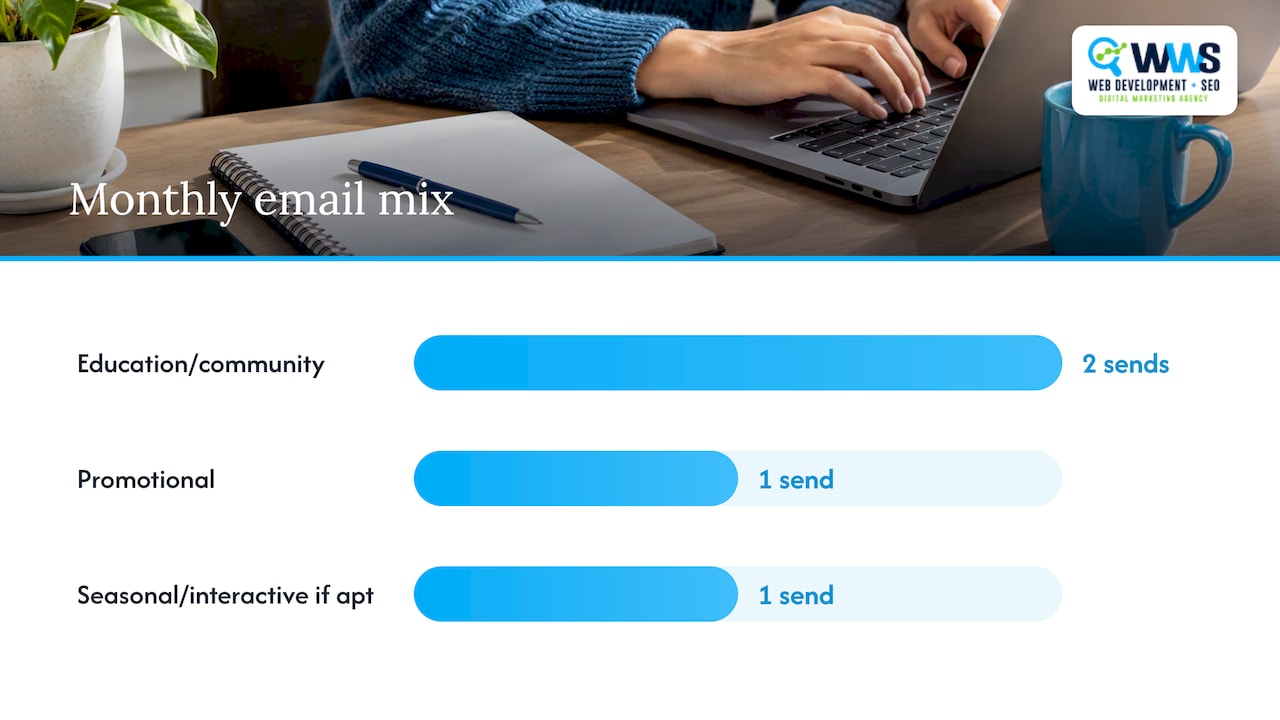
- Rotate two educational or community emails with one promotion each month, adding a seasonal or interactive send when the calendar supports it.
- Most small businesses can sustain a biweekly or monthly cadence; batch three months of subject lines and reuse proven templates to avoid last minute writing.
- Test one email variable at a time with an even list split, then compare results with your normal open rate instead of judging a single send.
- Tag subscribers by purchase history or signup source, compare targeted sends with bulk emails, and build an automated welcome flow from the strongest results.
- Every commercial email needs an unsubscribe link, valid postal address, and honest sender details; honor requests promptly, and add image descriptions and readable text with sufficient contrast.
Table of Contents
- 1. Which newsletter categories should you use?
- 2. 48 copyable newsletter ideas by category
- 3. Subject lines, preview text, and CTAs to test
- 4. How often should you send a newsletter?
- 5. What metrics should you track and improve?
- 6. Legal and accessibility basics before you hit send
- 7. Six ready-to-send newsletter templates
- 8. Why repeatable formats beat chasing new ideas every month
- 9. Get help turning these ideas into a working newsletter
- FAQ
- Sources
1. Which newsletter categories should you use?
Before picking individual topics, it helps to sort ideas into buckets tied to a business goal. Each category below pulls a different lever, so mixing them across a month keeps subscribers reading instead of tuning out.
- Educational or how-to: builds trust and positions you as the go-to expert, such as a seasonal maintenance checklist for an HVAC company.
- Promotional: drives immediate sales or bookings, like a limited-time discount on a slow service day.
- Community or customer stories: builds retention by featuring a real customer win or a local event you sponsored.
- Behind-the-scenes or team: humanizes your brand, such as introducing a new hire or showing how an order gets packed.
- Product or feature updates: keeps existing customers informed, like a new service add-on or updated hours.
- Seasonal or trend hooks: creates urgency tied to a calendar moment, such as a back-to-school prep guide.
- Interactive: boosts engagement through polls, quizzes, or simple reply prompts that invite a response.
Recent creator reporting finds that educational deep dives, personal stories, behind-the-scenes updates, and community-driven content tend to outperform generic roundups and sustain long-term engagement better than one-off announcements.
A workable monthly mix for a small team looks like two educational or community pieces, one promotional send, and one seasonal or interactive piece layered in when it fits the calendar. The goal is not to use every category every month. It is to avoid sending the same type of email four times in a row, which is often what causes subscribers to stop opening.
2. 48 copyable newsletter ideas by category
Each idea below includes a one-line angle, a suggested call to action, and an effort level so you can pick what fits your week.
Educational or how-to
- Seasonal maintenance checklist (e.g., “5 things to check before winter”); CTA: “Book a tune-up”; low effort; strong fit for local service businesses.
- Common mistake customers make with your product or service; CTA: “Read the full guide”; medium effort.
- A step-by-step explainer of your process (what happens after someone books); CTA: “See how it works”; low effort.
- Myth versus fact about your industry; CTA: “Ask us a question”; low effort.
- A tool or resource roundup your customers would find useful; CTA: “Download the checklist”; medium effort.
- Answers to your three most frequently asked questions; CTA: “Still have questions? Reply here”; low effort.
- A short glossary of terms customers often misunderstand; CTA: “Get a free consultation”; low effort.
- A before-and-after explanation of a service outcome; CTA: “Request a quote”; medium effort.
Promotional
9. Limited-time discount tied to a slow day or season; CTA: “Claim your spot”; low effort; strong fit for local businesses.
10. Bundle offer combining two services or products; CTA: “Save with the bundle”; medium effort.
11. Early access for newsletter subscribers only; CTA: “Shop early”; low effort.
12. Referral incentive (customer gets a discount for referring a friend); CTA: “Refer a friend”; low effort.
13. Flash sale with a countdown; CTA: “Shop before it’s gone”; low effort.
14. New customer welcome discount; CTA: “Redeem your offer”; low effort.
15. Loyalty milestone reward (fifth visit, one-year anniversary); CTA: “Claim your reward”; medium effort.
16. Appointment-booking reminder with a seasonal hook, like pre-holiday scheduling; CTA: “Book now”; low effort; strong fit for local service businesses.
Community or customer stories
17. Customer spotlight with a short quote and result; CTA: “Share your story”; medium effort.
18. A review roundup from recent happy customers; CTA: “Leave us a review”; low effort.
19. Local event you sponsored or attended; CTA: “See more photos”; low effort.
20. A charity or community cause your business supports; CTA: “Learn how to get involved”; medium effort.
21. A customer Q&A where you answer a submitted question; CTA: “Submit your question”; low effort.
22. Highlight a local partner business and cross-promote; CTA: “Check out [partner]”; medium effort.
Behind-the-scenes or team
23. Meet-the-team feature introducing a staff member; CTA: “Say hello next time you visit”; low effort.
24. A day-in-the-life look at how orders or jobs get done; CTA: “See the full process”; medium effort.
25. Why you started the business (founder story); CTA: “Read our story”; low effort.
26. A peek at new equipment, tools, or a renovated space; CTA: “Stop by and see it”; low effort.
27. Staff favorites (team picks their favorite product or service); CTA: “Shop their picks”; low effort.
Product or feature updates
28. New service or product launch announcement; CTA: “Explore the new offering”; medium effort.
29. Updated hours or holiday closures; CTA: “Plan your visit”; low effort; strong fit for local service businesses.
30. A feature improvement or upgrade explainer; CTA: “Try it today”; low effort.
31. Restocked or back-in-season item alert; CTA: “Shop now”; low effort.
32. A pricing or policy change explained plainly; CTA: “See the details”; low effort.
Seasonal or trend hooks
33. Holiday gift guide using your products or services; CTA: “Shop the guide”; medium effort.
34. Back-to-school or new-season prep tips; CTA: “Get ready with us”; low effort.
35. Weather-driven reminder, like pre-storm roof inspections; CTA: “Schedule an inspection”; low effort; strong fit for local service businesses.
36. End-of-year recap and thank-you note; CTA: “Thank you for a great year”; low effort.
37. A trend relevant to your industry, explained simply; CTA: “Learn more”; medium effort.
Interactive
38. A one-question poll about a future product or service; CTA: “Vote now”; low effort.
39. A quiz that recommends a product or service based on answers; CTA: “Take the quiz”; medium effort.
40. A simple reply prompt asking for feedback; CTA: “Hit reply and tell us”; low effort.
41. A caption contest or photo submission request; CTA: “Submit your photo”; low effort.
42. A survey about preferred appointment times or content topics; CTA: “Share your preference”; low effort.
Retention and reminders
43. A re-engagement note for inactive subscribers; CTA: “Come back and save”; medium effort; see our winback email sequences for a ready-made approach.
44. A maintenance or renewal reminder tied to past purchase dates; CTA: “Schedule your renewal”; low effort; strong fit for local service businesses.
45. A “we miss you” offer for lapsed customers; CTA: “Redeem your comeback offer”; low effort.
46. An appointment reminder paired with a prep tip; CTA: “Confirm your appointment”; low effort; strong fit for local service businesses, and pairs well with SMS appointment reminders for multi-channel coverage.
47. A warranty or service-plan expiration notice; CTA: “Renew before it expires”; low effort.
48. A post-service follow-up asking how things went; CTA: “Tell us how we did”; low effort.
3. Subject lines, preview text, and CTAs to test
A good subject line matches the intent of the email. Below are templates sorted by intent, each with a preview-text pairing and two CTA options.
- Promotional: “[Discount]% off [service] this week only” / preview: “Spots are limited, here’s how to grab yours.” CTAs: “Claim your spot” or “Book now.”
- Curiosity: “The one thing most [customers] get wrong about [topic]” / preview: “It’s an easy fix once you know it.” CTAs: “See the fix” or “Read more.”
- Urgency: “Last call: [offer] ends Friday” / preview: “Don’t miss your chance to save.” CTAs: “Shop before it ends” or “Reserve your time.”
- Educational: “Your [season] checklist for [service area]” / preview: “Five steps to get ahead of the rush.” CTAs: “Get the checklist” or “Book a tune-up.”
- Community: “Meet the [customer] behind this month’s favorite project” / preview: “Here’s how we helped them get there.” CTAs: “Read their story” or “See the results.”
Pro Tip: Test one variable at a time, like subject line length, and split your list in half so each version reaches a similar audience size; consider a version meaningfully stronger only once it clears your usual open-rate range by a noticeable margin.
4. How often should you send a newsletter?
Cadence depends on how much time your team can realistically give it, not on what feels impressive. All three options below work when matched to your capacity.
- Weekly: best for high-touch businesses with frequent news, like restaurants with rotating menus; requires the most content but builds the strongest habit with readers.
- Biweekly: a balanced option for most small service businesses, pairing one educational send with one promotional or community send each month.
- Monthly: lower effort, higher value per email, often a single roundup covering updates, a tip, and a customer story in one send.
A simple three-format rotation keeps this sustainable: one value or educational email, one short promotional or transactional email, and one roundup or community piece. Over 90 days, that looks like month one covering a how-to guide, a seasonal promotion, and a customer spotlight; month two repeating the pattern with new topics; and month three closing with a recap, a loyalty offer, and a behind-the-scenes feature.
Batch writing saves the most time. Draft three months of subject lines in one sitting, then fill in body copy a week before each send. Reuse strong-performing templates instead of starting from a blank page every time, and schedule sends in advance so cadence does not depend on finding a free afternoon.
5. What metrics should you track and improve?
A handful of numbers tell you whether a newsletter is working. Track these consistently so you can compare month to month instead of judging a single send in isolation.
- Open rate: the share of recipients who open the email, a signal of subject-line strength.
- Click-through rate (CTR): the share who click a link, a signal of content and CTA relevance.
- Conversion rate: the share who complete the action you wanted, like booking or buying.
- Unsubscribe rate: how many opt out per send, worth watching for sudden spikes.
- Revenue per recipient: total revenue from the send divided by the number of recipients, useful for comparing promotional emails over time.
Segmented campaigns can drive meaningfully more clicks than sending the same email to an entire list, and automated flows can produce substantially higher open and click rates than one-off bulk sends. Mailchimp’s data on segmented and automated campaigns makes a strong case for starting with simple tags, like recent purchasers or signup source, rather than sending every email to your whole list.
A 30/60/90-day checklist keeps improvement simple: in the first 30 days, tag your list by at least one attribute and test a single targeted offer against your baseline; at 60 days, compare open and click rates between the segmented and unsegmented sends; by 90 days, set up one automated flow, such as a welcome series, based on what performed best with this marketing automation checklist.
6. Legal and accessibility basics before you hit send
Every commercial email you send needs to meet a few baseline requirements, and getting them right protects your sender reputation as much as it keeps you compliant.
The CAN-SPAM Act requires a clear opt-out mechanism in every commercial email, a valid physical postal address, and honest subject lines and header information that don’t mislead recipients about who the email is from. Opt-out requests need to be honored promptly, not buried in a multi-step process.
Accessibility matters just as much for engagement as it does for inclusion. Recommended practices include descriptive alt text for images, font sizes large enough to read on mobile screens, sufficient color contrast between text and background, and left-aligned body copy for multi-line paragraphs, since centered text is harder to scan. Litmus notes that these choices improve usability and engagement across a wider range of subscribers, including those using screen readers or assistive tools.
Pro Tip: Before every send, run through five checks: opt-out link present, physical address listed, alt text added to images, contrast checked between text and background, and a test send reviewed in at least two popular email clients.
7. Six ready-to-send newsletter templates
Each template below includes a subject line, preview text, a short body starter, a CTA, and a suggested segment. Swap in your own details and personalization tokens like first name or last purchase to make each one feel direct.
- Welcome or onboarding: Subject: “Welcome to [business name], here’s what to expect.” Preview: “A quick look at what we’ll send and how to reach us.” Body: “Thanks for joining us, [first name]. Here’s a quick look at what to expect in your inbox and how to get in touch if you ever need us.” CTA: “Explore our services.” Segment: new subscribers.
- Product announcement: Subject: “Something new just launched.” Preview: “Here’s what’s new and why it matters.” Body: “We just added [new offering] based on requests from customers like you. Here’s what it does and how to try it.” CTA: “See what’s new.” Segment: full active list.
- How-to or value: Subject: “Your [season] checklist is here.” Preview: “Five simple steps before [season or event].” Body: “Here’s a quick checklist to help you get ahead of [seasonal issue] before it becomes a bigger problem.” CTA: “Get the checklist.” Segment: full list or local segment.
- Customer success story: Subject: “How we helped [customer] solve [problem].” Preview: “A real story from one of our customers.” Body: “[Customer name] came to us with [challenge]. Here’s what we did and how it turned out.” CTA: “Read the full story.” Segment: prospects or full list.
- Monthly roundup: Subject: “Your [month] update from [business name].” Preview: “News, a tip, and a customer favorite, all in one place.” Body: “Here’s what happened this month, one quick tip, and a customer story worth sharing.” CTA: “Catch up on everything.” Segment: full list.
- Event invite: Subject: “You’re invited: [event name].” Preview: “Join us on [date] for [short description].” Body: “We’re hosting [event] on [date] at [location]. Here’s what to expect and how to reserve your spot.” CTA: “Save your spot.” Segment: local or geographically close subscribers.
8. Why repeatable formats beat chasing new ideas every month
The biggest mistake we see in newsletter strategy is trying to invent a brand-new concept every single send. That approach burns out small teams fast and produces inconsistent quality. A better path is choosing three or four repeatable formats, like a how-to, a customer story, and a promotional send, and rotating them with fresh specifics each month.
For local service businesses, this consistency translates directly into more booked calls, more repeat appointments, and stronger word-of-mouth referrals, since customers start to recognize and expect your format. As an official Google and Meta Partner with an in-house team and more than 200 client partnerships, we’ve seen that specificity and repetition, not constant novelty, is what keeps small business newsletters sustainable.
— Online Marketing Experts
9. Get help turning these ideas into a working newsletter
Picking ideas from a list is the easy part. Building the strategy, templates, automation, and list segmentation behind a newsletter that actually drives calls and repeat business takes ongoing attention most small teams don’t have time for.

WWS – Web Development + SEO is your premier local business marketing expert solution serving Des Plaines, IL, and the greater Chicago Area. As an official Google and Meta Partner, our team consists exclusively of Google and Facebook certified experts dedicated to growing local service businesses. From contractors to restaurants, we combine custom web development with aggressive SEO and GEO strategies to turn your online presence into a lead-generating engine. With over 200 successful client partnerships, we don’t just build websites, we drive real calls, consistent leads, and year-round revenue for Chicago-area businesses.
Our in-house team handles email strategy, template creation, automation setup, list growth, and local audience targeting under one roof, so your newsletter works alongside your website and local search presence instead of existing in isolation. If you want a second opinion on your current newsletter approach or help setting up automation from scratch, our marketing campaigns team can map out a plan built around your business goals.
FAQ
What are 5 tech related newsletters?
This article focuses on small business newsletter strategy rather than ranking specific tech publications, since recommending named third-party newsletters falls outside what we can verify here. The idea categories and templates above, especially the educational and product-update formats, apply directly to a tech-focused audience.
How do I build a newsletter into a business?
Building a newsletter-based business generally starts with consistent, specific content in a repeatable format, then layers in monetization like sponsorships, paid tiers, or product sales once an engaged audience forms. Recent creator reporting points to specificity and repeatable formats, such as educational deep dives and community-driven content, as what sustains growth over time.
What are the essential parts of a newsletter?
A well-built newsletter typically includes a clear subject line, preview text, a header with your business name, a short lead-in, the main content block, a clear call to action, social links, and a footer with your physical address and opt-out link as required by law. Accessible design elements like alt text and sufficient contrast round out a complete, usable email.
Are newsletters still relevant in 2026?
Yes, newsletters remain a direct, owned channel that doesn’t depend on social media algorithms, and recent industry reporting continues to show strong engagement around specific, repeatable content formats like educational posts and community stories. Segmented and automated email programs also continue to outperform generic bulk sends, which keeps newsletters a practical tool for small businesses.
How often should a small business send a newsletter?
Most small businesses do well sending biweekly or monthly, since that cadence balances consistency with the time it takes to produce quality content. A three-format rotation, alternating a value or educational email, a promotional send, and a roundup or community piece, makes any of these cadences easier to sustain.
Sources
- Mailchimp video on segmented campaigns (hosted on Facebook)
- CAN-SPAM Act: A compliance guide for business | Federal Trade Commission
- Litmus — The ultimate guide to accessible emails
- Monthly newsletter ideas: What’s actually working for creators in 2026 | beehiiv Blog