


Call Tracking Setup for Marketers: Track Calls, Not Clicks
Set up call tracking across site tags, Google Ads conversions, dynamic number insertion, and CRM imports, then test real calls to confirm attribution works.
 By WWS Team
Updated
9 min read
In this article12 sections
- What call tracking does and what you need before you start
- How to get a tracking number: Google forwarding or vendor numbers
- Install the tracking code: global site tag and phone snippet, or Tag Manager
- Set up Google Ads conversion actions and call reporting
- Dynamic number insertion and installation troubleshooting
- Verify and test: confirm calls and conversions are recorded
- Best practices, privacy and recordkeeping
- Why we handle tags, ads and CRM under one roof
- How we implement and verify your call tracking
- FAQ
- Sources
- Recommended
To set up call tracking, get a tracking number, add the Google Ads global site tag plus the phone snippet (or configure Google Tag Manager), create call conversion actions with call reporting enabled, map each number to its source, and test with real calls. Google requires both snippets for website call conversions. We implement all of these steps end to end.
TL;DR:
- Website call conversions require both the global site tag and phone snippet; Google Tag Manager can replace manual installation, but needs the same conversion ID and label.
- Google forwarding numbers suit Ads only, may be reassigned, and should not appear in print; vendor pools also track organic, email, and social calls.
- Choose call conversion actions for calls from ads, your website, or later CRM uploads; where lawful, recording can supply lead quality signals for bidding.
- Dynamic number insertion can briefly show the wrong number if its script loads late, so load it early and test every page where numbers appear.
- After tag changes, call a number shown after an ad click beyond the threshold, then verify the result in Google Ads and your CRM.
What call tracking does and what you need before you start
Call tracking attributes inbound phone calls to the marketing source that produced them, so you can see which ads, pages and campaigns generate real conversations instead of only clicks. Before you touch any code, gather these items:
- Access to your website’s code or Google Tag Manager (GTM)
- A Google Ads account with permission to create conversion actions
- Tracking numbers, either Google forwarding numbers or numbers from a call tracking vendor
- A CRM or spreadsheet where call outcomes are recorded
- Developer access if you plan to run advanced dynamic number insertion
You will also choose among measurement options: calls from ads, calls from your website, and calls imported later as offline conversions.
How to get a tracking number: Google forwarding or vendor numbers
Your first decision is the number type. Google forwarding numbers work when call reporting is enabled: Google assigns the numbers to your ads and returns call metadata such as duration and start time. Those numbers belong to Google and can change or be reassigned, so never print them on signs or business cards. Eligibility depends on your country, so confirm it in the Google Ads documentation.
Vendor numbers suit sites that need attribution beyond Google Ads. You provision a pool of numbers, often through an API, and swap them in across many pages and channels. Pick this route when organic search, email and social calls all matter. For a plain Ads-only setup, Google’s numbers are usually enough.
Whichever you choose:
- Pick local or toll-free numbers that match how your customers expect to reach you.
- Provision or reserve the numbers before you touch the site.
- Start a mapping log that ties every number to a campaign, page or source.
Install the tracking code: global site tag and phone snippet, or Tag Manager
Website call conversions need two pieces of code. The global site tag identifies the visit, and the phone snippet replaces your on-page number with a Google forwarding number. Both are required, according to Google’s setup guide. Here is the checklist:
- Create the call conversion action in Google Ads and copy the conversion ID and label.
- Place the global site tag in the head of every page that shows your number.
- Add the phone snippet, setting the phone_conversion_number parameter to the number exactly as it appears on the page.
- Alternatively, build a Google Ads Calls from Website tag in GTM and enter the same ID and label.
- Wrap the number in a tel: link so mobile visitors can tap to call, and check the timeout and cache options.
You can also email the tag instructions to a developer. For mobile click tracking, see Google’s guide to measuring phone number clicks, keeping in mind that a click is not the same as a completed call.
Pro Tip: If you track several numbers per site or per page, use a dynamic number insertion setup instead of the single-number default snippet, and test every page where a number appears.
Set up Google Ads conversion actions and call reporting
Inside Google Ads, create a phone call conversion action and choose how calls will be counted: calls from ads, calls from your website, or calls via uploads. Each option feeds a different part of your reporting, so choose the options that fit your measurement needs.
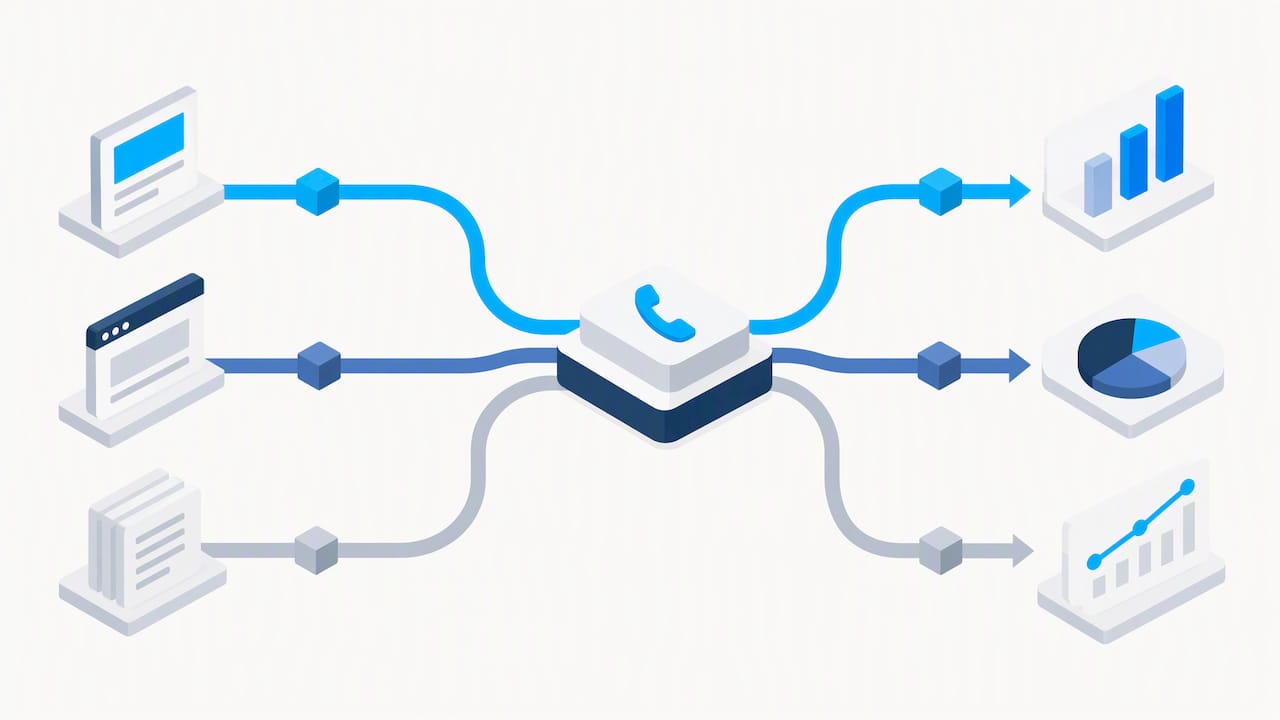
Once call reporting is on, Google assigns forwarding numbers to your ads. When recording is available, Google can use AI to judge lead quality. Otherwise it counts calls above a minimum duration, as described in Google’s call measurement guide. Turn on recording if your business and local rules allow it, because quality signals improve bidding.
To set this up in Tag Manager:
- Enable call reporting at the account level first.
- Create the Google Ads Calls from Website tag.
- Enter the conversion ID and label from your conversion action.
- Add a trigger that fires after an ad click and page load.
- Preview the setup before publishing, and note that dynamic insertion or third-party trackers may need their own configuration.
Dynamic number insertion and installation troubleshooting
Dynamic number insertion (DNI) swaps the number a visitor sees based on where they came from, which lets one page serve many sources. The most common failure is timing. When the script fires late, visitors see your default number flash and then change, which looks broken and can confuse attribution.
- Load the snippet as early as possible in the head.
- Check the GTM firing order in preview mode.
- Inspect the browser console and network timing for slow requests.
- Adjust timeout and cache options in the snippet.
- Test on a staging site before touching production.
Pro Tip: If flicker persists after tuning, render the correct number on the server instead of swapping it in the browser.
Verify and test: confirm calls and conversions are recorded
Do not trust a setup you have not called. Run these checks after every change:
- Click one of your ads and confirm the page shows a forwarding number.
- On a phone, tap the number and stay on the line longer than the conversion duration threshold.
- Confirm the call appears in the Google Ads calls report, and in your CRM if you import outcomes.
- If a conversion is missing, confirm both snippets are on the page, run GTM preview, and check that the conversion ID and label match your Ads account.
- Review network requests for timeouts, then log the test date, result and fix.
Repeat the full sequence whenever you edit the site, switch themes or change tags. Our GA4 setup guide shows how to catch tracking errors early in analytics too.
Best practices, privacy and recordkeeping
Good habits keep the data trustworthy:
- Format numbers the same way everywhere so replacements match.
- Avoid replacing a number twice on the same page.
- Document the mapping and name one system of record for call outcomes.
- If you collect call analytics or record calls, update your privacy policy, following Google’s phone analytics policy.
Telemarketing contexts carry a legal duty as well. The FTC’s Telemarketing Sales Rule requires sellers and telemarketers to keep call detail records, and ask your attorney whether it applies to you.
Records must be kept for five years, and without a contract between seller and telemarketer, both parties share responsibility for them. That includes caller identities, date, time, duration and call disposition.
For a business case behind all this measurement, see this partner analysis of analytics and ROI.
Why we handle tags, ads and CRM under one roof
Call tracking breaks at the seams between website, tags, ad account and CRM. That is why we run all of it in-house. As a Google and Meta Partner with a certified team, we have worked with more than 200 clients, mostly local service businesses around Chicago. A typical engagement starts with a tag audit, then moves to a clean snippet or DNI install, number mapping, CRM import and a full round of test calls. One team means no finger-pointing between a web developer, an ad agency and a software vendor. If your numbers do not match your ad reports, ask us for an audit or a setup consultation.
— Online Marketing Experts
How we implement and verify your call tracking
We deliver the work this guide describes: tag implementation, Google Tag Manager configuration, DNI support, Google Ads conversion setup, CRM imports and end-to-end testing. We provide implementation support, not just instructions.
WWS – Web Development + SEO is your premier local business marketing expert solution serving Des Plaines, IL, and the greater Chicago Area. As an official Google and Meta Partner, our team consists exclusively of Google and Facebook certified experts dedicated to growing local service businesses. From contractors to restaurants, we combine custom web development with aggressive SEO and GEO strategies to turn your online presence into a lead-generating engine. With over 200 successful client partnerships, we don’t just build websites—we drive real calls, consistent leads, and year-round revenue for Chicago-area businesses.
Tracking works best when the site underneath it is sound, so we pair it with our Website SEO work and build campaigns through our Marketing Campaigns service. Request an audit or a setup estimate today and we will tell you exactly what your current tracking is missing.
FAQ
How do I set up call tracking?
Get a tracking number, add the global site tag and phone snippet or a GTM tag, and create a call conversion action in Google Ads. Then enable call reporting and test with real calls. Google lists both snippets as required for website call conversions.
How much does call tracking cost?
Google’s forwarding numbers for call reporting are part of Google Ads, while vendors price their own plans, usually by numbers and call volume. Check each vendor’s current price list before you commit. We can scope the work for you and quote it on request.
What are the best call tracking platforms?
The best choice depends on where your calls come from. If you only advertise on Google, its forwarding numbers may be enough. If organic search, email and social also drive calls, a vendor with number pools and CRM integration gives you fuller attribution, as one practical guide explains.
How do I track another phone call?
Give that source its own tracking number and record it in your mapping log. Add the number to the matching page, ad or listing, then place a test call and confirm it appears in your reports.
Sources
Attribution only stays accurate if you document it. Keep a simple table that links each number to the ad, campaign, landing page or offline source it represents, and update it whenever numbers change. Google’s own numbers can be reassigned, so a stale log creates bad data fast.
When your CRM records which calls became customers, send those outcomes back to Google Ads.
- Set up Tracking calls to a phone number on a website – Google Ads Help
- Mark your calendars, telemarketers and sellers! October 15 is the Telemarketing Sales Rule’s Record Store Day. | Federal Trade Commission
Our walkthrough of offline conversion imports covers the CRM handoff in more detail, and our guide to Google Business Profile call tracking covers calls from your listing.
Recommended
A Des Plaines, IL team helping local service businesses get found, get called and get booked since 2005: local SEO, Google Ads, conversion-focused websites and AI search optimization.
Meet the teamKeep reading
All articles
UTM Tagging Guide: Build, Name and Track Campaign Links
Learn how to build UTM tags, name them consistently and read the results in GA4, with examples for local ads, email, social and Google Business Profile links.
How to Track Phone Call Conversions for Local Businesses
Learn how to track phone call conversions from ads, your website and your CRM, set a sensible call length, and stay within Illinois recording rules.
GA4 Setup: Small Businesses Can Catch Tracking Errors Early
Set up GA4 for a small business with gtag.js, Google Tag Manager, or a CMS plugin. Track starter conversions, validate events, or ask WWS for local help.