


Site Speed for SEO: What Matters and How to Fix It
How site speed affects SEO and local rankings, which Core Web Vitals targets to hit, and the image and hosting fixes that move the numbers for Chicago-area businesses.
 By WWS Team
12 min read

In this article14 sections
- Key takeaways
- Site speed vs. page speed
- Does site speed affect Google rankings?
- The three Core Web Vitals targets
- Why speed matters more for local searches
- How to test your site speed
- Image optimization: the first fix to make
- Other fixes that usually matter
- A simple order of work
- Our perspective
- Get a faster site that is built to rank
- FAQ
- Sources
- Recommended
Site speed affects SEO in two ways. Google’s ranking systems use Core Web Vitals, and slow pages lose visitors before they call, book or fill out a form. Speed will not outrank relevance, but a slow site gives away leads that your content and Google Business Profile already earned. For a local service business, the practical target is simple: load the main content in 2.5 seconds or less on a phone, respond to taps in under 200 milliseconds, and keep the layout from jumping.
This guide explains the difference between site speed and page speed, the targets Google publishes, how to test your own pages, and the fixes that usually matter most, starting with images.
Key takeaways
- Page speed is how fast one URL loads. Site speed is how your pages perform as a group, so test your homepage, your service pages and your contact page, not only one.
- Google’s targets are Largest Contentful Paint (LCP) within 2.5 seconds, Interaction to Next Paint (INP) under 200 milliseconds and Cumulative Layout Shift (CLS) under 0.1.
- Good scores do not guarantee top rankings, but poor ones cost you visitors, and for local searches on phones that matters.
- Images are the most common cause of slow loading. Resize, compress, use modern formats and never lazy-load the main image at the top of the page.
- Test with PageSpeed Insights, fix the biggest problem first, then retest.
Site speed vs. page speed
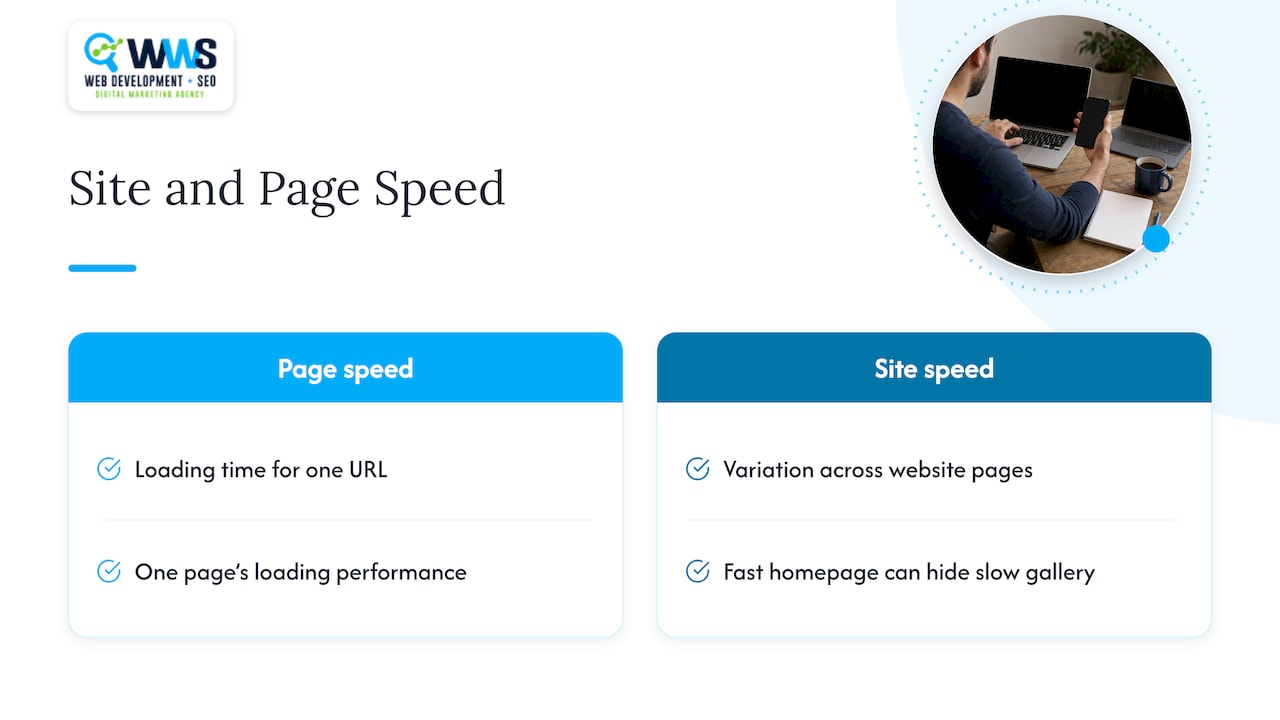
The two terms are often used as if they were the same. They are not. Page speed describes how quickly the content on one URL loads. Site speed describes how loading performance varies across the pages of your website, as Shopify’s performance guide puts it.
This matters because a fast homepage does not prove the whole site is fast. A roofing company might have a lean homepage and a gallery page loaded with 40 uncompressed photos. A visitor who lands on the gallery from a search result has a different experience than the one your homepage test suggests. Google also evaluates pages individually, so the pages that bring in search traffic are the ones to measure first.
In practice, treat site speed as a set of page tests: your homepage, your top three service pages, your location pages and your contact page.
Does site speed affect Google rankings?
Yes, with limits you should understand before spending money.
Google announced in January 2018 that page speed would become a ranking factor for mobile searches, and said it affects only the slowest pages and a small percentage of queries. Since then, Core Web Vitals have become the way Google describes loading, interactivity and visual stability. Google’s documentation says that Core Web Vitals are used by its ranking systems, and that strong results align with what those systems seek to reward. The same page says good scores do not guarantee top rankings, and that chasing a perfect score purely for SEO may not be the best use of your time.
Search Engine Journal’s overview of page speed as a ranking factor makes the same point from the outside: relevance remains the top factor, so better but slower content can still outrank worse, faster content.
What this means for your business:
- Speed works as a tiebreaker and a floor. Clearing Google’s thresholds keeps you out of trouble when you compete with similar contractors or clinics.
- The bigger payoff is behavioral. Cloudflare cites Google research showing that 53% of mobile sites are abandoned when they take longer than 3 seconds to load. A visitor who leaves is a lost call, whatever your rank.
- Speed supports everything else you do in SEO. Content, links and local signals work harder on a site that loads cleanly.
The three Core Web Vitals targets
Google Search Central lists the targets for Core Web Vitals:
| Metric | What it measures | Good target |
|---|---|---|
| Largest Contentful Paint (LCP) | How long the biggest visible element, often a hero image or headline, takes to appear | 2.5 seconds or less |
| Interaction to Next Paint (INP) | How quickly the page responds when someone taps, clicks or types | Under 200 milliseconds |
| Cumulative Layout Shift (CLS) | How much the layout moves around while loading | Under 0.1 |
Two details trip people up. First, Google judges real visitors, not a single test. According to web.dev’s measurement guide, a page meets the thresholds when 75% of visits are “good” for each metric. Second, phone and desktop are assessed separately, so a site that feels fast on your office computer can still fail on a mid-range phone with a cellular connection.
For a deeper walkthrough built for service businesses, see our Core Web Vitals guide for local business sites and our six-step developer audit.
Why speed matters more for local searches
Local searchers are usually close to a decision. A homeowner with water on the basement floor, or a patient with a toothache, is on a phone and wants a number to call. Google’s research, compiled in a mobile SEO statistics roundup, reports that 76% of people who search for something “near me” visit a related business within a day. The same roundup cites Think with Google data showing that the chance of a visitor bouncing rises 123% as mobile load time goes from one second to ten.
Put those together and the stakes are clear. Your Google Business Profile can earn the click, and then your website has seconds to deliver the phone number, the service area and a reason to call. If you are working on map visibility, speed is one part of the picture, and our guide to Google Maps ranking factors covers the rest.
The pages that matter most for local lead generation are:
- The homepage, which often receives branded searches and map profile clicks.
- Service pages such as roof replacement, kitchen remodeling or dental implants.
- City or neighborhood pages, for example a page for Naperville or Schaumburg customers.
- The contact or booking page, where a slow form costs you the lead.
How to test your site speed
Start with free tools and test the pages above, not just the homepage.
- Run PageSpeed Insights. It combines two kinds of data. DebugBear’s explanation of how PageSpeed Insights works notes that it shows real-user measurements from the Chrome User Experience Report covering the last 28 days, plus a Lighthouse test run in a controlled lab setting.
- Read the real-user data first. If your site has enough traffic, this is the closest view of what Google sees. Lab data is useful for diagnosing causes, but it is a simulation.
- Use Lighthouse for the to-do list. web.dev recommends starting with Lighthouse on your homepage, then moving to Chrome DevTools, WebPageTest and PageSpeed Insights for deeper analysis. It also suggests testing in an Incognito window to simulate a first-time visitor.
- Check Search Console. The Core Web Vitals report groups URLs that share the same problem, which helps you fix a template once instead of fixing 30 pages individually.
- Test on a phone. Load your own site on cellular data, away from your office Wi-Fi.
Do not obsess over the single 0 to 100 score. It is a summary of lab results. The three vitals and the specific recommendations tell you what to change.
Image optimization: the first fix to make
Images are the most common reason a local business site is slow, and the reason is structural. Contractor, restaurant and salon sites depend on photos, and photos are heavy. Google Search Central notes that images are often the largest contributor to page size, and advises using up-to-date image optimization and responsive image techniques.
The effect on Core Web Vitals is direct. According to web.dev’s analysis of the 2024 Web Almanac, 73% of mobile pages have an image as their LCP element. So your hero photo is usually the thing Google times.
Practical image steps
- Resize to the display size. A 4,000-pixel photo from a phone camera should not be served in a 600-pixel-wide slot. Yoast’s image guide also advises resizing images to their display size instead of uploading full-resolution files.
- Pick the right format. Google Search supports BMP, GIF, JPEG, PNG, WebP, SVG and AVIF. In general, use JPEG or WebP for photos, PNG where you need transparency and SVG for logos and icons.
- Compress before uploading. Compression tools such as ImageOptim or Kraken.io, both named in the Yoast guide, cut file size with little visible loss. Compare before and after at full screen to be sure the quality still looks right.
- Serve responsive versions. Modern sites offer several image sizes and let the browser choose, so a phone does not download the desktop file.
- Do not lazy-load the hero image. Lazy loading helps with images far down the page. Applied to the top image, it delays LCP. web.dev found that only 15% of eligible pages used the fetchpriority attribute to tell the browser which resources matter most, and that 35% of LCP images were not discoverable in the initial HTML. Make the main image easy for the browser to find and load it first.
- Name and describe images for search. Google recommends descriptive filenames, titles and alt text so it can understand what an image shows. A file named kitchen-remodel-evanston-after.jpg tells search engines more than IMG_4821.jpg.
For most local sites, these steps alone move LCP from the red or amber range toward green.
Other fixes that usually matter
After images, work through these in order of impact.
Hosting and server response
Every other fix starts after the server answers. Shared hosting crowded with hundreds of sites can respond slowly at busy times. A well-configured host with caching and a content delivery network (CDN) shortens the wait for visitors across Illinois, Indiana and Wisconsin alike.
Heavy scripts and plugins
Chat widgets, review pop-ups, tracking pixels and page-builder add-ons all run JavaScript, and too much of it hurts INP. Audit what you actually use. Remove anything that does not generate calls, bookings or useful data, and load the rest after the main content.
Layout stability
CLS problems come from images without set dimensions, banners that appear late and fonts that swap abruptly. Give every image and video a fixed width and height, and reserve space for anything that loads after the page.
Caching, minification and code
Browser caching lets returning visitors skip downloads. Minifying CSS, JavaScript and HTML trims file size. Both are standard parts of a technical SEO pass, and Semrush lists them among its ways to improve page speed.
Templates built for speed
Some sites are slow by design: bloated themes, stacked page-builder layers, autoplay video in the header. Patching those costs more over time than rebuilding on a lean foundation. Our guide to SEO web design explains how layout and build choices affect both rankings and conversions.
A simple order of work
| Step | Action | What it usually improves |
|---|---|---|
| 1 | Test top landing pages in PageSpeed Insights | Shows where to start |
| 2 | Resize and compress images, fix the hero image | LCP |
| 3 | Review hosting, caching and CDN | Server response, LCP |
| 4 | Remove or defer unneeded scripts | INP |
| 5 | Set image dimensions, reserve space for late content | CLS |
| 6 | Retest, then check Search Console after the data updates | Confirms results |
Because Google’s field data covers a rolling 28-day window, expect the Core Web Vitals report to take several weeks to reflect your changes. Lab tests update right away, so use them to confirm each fix.
Our perspective
We see the same pattern on local service sites across the Chicago area: the business has strong work, good reviews and a solid Google Business Profile, and the website quietly loses callers because the first screen takes too long to appear.
We treat speed as part of the build, not a patch applied later. Because design, programming and SEO all happen in-house at WWS, the person choosing the hero image and the person responsible for how fast it loads are on the same team. That removes the usual handoff problem, where a designer delivers heavy files and a developer is left to compensate.
Our approach is to set a speed target for each key page, build to it, and measure against real-user data, not just a single lab score. For a roofer, dentist or restaurant, the goal is the same: a fast page that gets the visitor to the phone number or booking form.
Online Marketing Experts
Get a faster site that is built to rank
If your pages are slow and you would rather have a team handle the fixes, WWS can help. We are a Google and Meta Partner in Des Plaines, IL, and our in-house team covers website design and hosting, website SEO and local SEO for service businesses across the Chicago area. We can review your key pages, identify what is holding back your Core Web Vitals and build the fixes into your SEO plan.

To talk through your site, start at wizerunekwsieci.com.
FAQ
What is a good site speed for SEO?
Aim for the Core Web Vitals targets: LCP within 2.5 seconds, INP under 200 milliseconds and CLS under 0.1. Google assesses these at the 75th percentile of real visits, with mobile and desktop measured separately. Meeting all three means your pages sit in Google’s “good” range.
Is page speed a ranking factor for local SEO?
Google uses Core Web Vitals in its ranking systems, but relevance still comes first. Speed will not replace strong local signals such as a complete Business Profile, reviews and consistent citations. It does protect the visits those signals produce, since slow mobile pages lose visitors quickly.
How do I check my site speed for free?
Enter a URL into PageSpeed Insights, which shows both real-user data and a Lighthouse lab test. Then check the Core Web Vitals report in Google Search Console to see which groups of pages need work. Test your service pages and contact page as well as your homepage.
Do large images really slow down my site?
Yes. Images are often the largest part of a page’s size, and on most mobile pages an image is the element Google times for LCP. Resizing, compressing and using modern formats such as WebP usually brings the biggest gain for the least effort.
How long until speed improvements show in Google?
Lab tools reflect changes immediately. Google’s Core Web Vitals field data uses a rolling 28-day window, so the Search Console report updates gradually over several weeks. Ranking changes depend on many other factors and are not guaranteed.
Sources
- Using page speed in mobile search ranking, Google Search Central Blog
- Understanding Google Page Experience, Google Search Central
- Understanding Core Web Vitals and Google search results, Google Search Central
- Image SEO Best Practices, Google Search Central
- Getting started with measuring Web Vitals, web.dev
- Audit performance, web.dev
- The most effective ways to improve Core Web Vitals, web.dev
- Page Speed As A Google Ranking Factor, Search Engine Journal
- How does website speed boost SEO?, Cloudflare Learning Center
- Website Speed Optimization, Shopify
- How To Use PageSpeed Insights, DebugBear
- Mobile SEO Statistics, SEO Rocket
- Optimizing images for SEO, Yoast Academy
- What Is Page Speed & How to Improve It, Semrush
Recommended
A Des Plaines, IL team helping local service businesses get found, get called and get booked since 2005: local SEO, Google Ads, conversion-focused websites and AI search optimization.
Meet the teamKeep reading
All articles
Local On Page SEO Demystified: The Formula for Service and Location Pages
Master local on page SEO for service and location pages with WWS's formula to boost rankings, drive conversions, and dominate local search results.
Marketing Attribution for SMBs: A Practical Guide
Learn which attribution model fits a small business, what to track from calls, forms and Google Maps, and how to tie marketing spend to booked revenue.

Master Organic Traffic Growth Strategy for Long-Term Website Authority
Master your organic traffic growth strategy with proven SEO tactics for long-term authority. Learn to build sustainable visibility and leads.