





What Are Facebook Lead Generation Ads and How Do They Work?
Facebook lead generation ads present an interactive, native contact form directly within Facebook and Instagram feeds, Stories, and Reels. When a prospective client taps your call-to-action button—such as “Get Quote,” “Book Now,” or “Apply Now”—an Instant Form opens immediately inside the app.
Instead of waiting for an external website to load, the user sees a clean form pre-populated with contact details pulled directly from their Meta account profile, such as their name, email address, and phone number. With just two quick taps, the user confirms their details and submits the inquiry.
This native mechanism eliminates the friction common to mobile browsing, making capturing high-intent prospects seamless.
| Feature | Instant Lead Forms (Meta) | External Landing Pages |
|---|---|---|
| Loading Speed | Instant (Native in-app delivery) | Dependent on mobile network & hosting |
| User Data Entry | Auto-filled from user profile | Manual typing on mobile keyboards |
| Drop-Off Friction | Minimal (1–2 taps to complete) | High (Bounce risks during page transitions) |
| Tracking Resilience | High (1st-party native app tracking) | Moderate (Vulnerable to browser ad blockers) |
| Design Control | Standardized Meta framework | Fully custom layout & interactive elements |
Instant Forms vs. Traditional Landing Pages
When a prospect clicks an ad directed to an external landing page, mobile latency, slow scripts, or clunky field inputs often cause abandonment before the page even finishes loading.
Native Instant Forms solve this drop-off issue entirely. According to Meta’s technical standards for Lead Forms for Ads, these forms load without network lag, keeping users focused on the value proposition rather than waiting on a browser redirect.
Key Benefits of Facebook Lead Generation Ads for Small Businesses
Small and mid-sized enterprises benefit from Meta lead ads across three core areas:
- Higher Mobile Completion Rates: Over 90% of social media interactions happen on mobile devices. Pre-filled inputs eliminate typos and reduce typing friction.
- Predictable Acquisition Costs: By keeping prospects inside the platform ecosystem, businesses capture qualified inquiries at sustainable acquisition rates within targeted paid campaigns.
- Accelerated Sales Velocity: Integrating native forms with sales pipelines allows business owners to contact inquiries within minutes, dramatically raising close rates.
Step-by-Step Setup Guide in Meta Ads Manager
Setting up a high-performing lead generation campaign requires a structured approach in Meta Ads Manager.
Step 1: Create a New Campaign
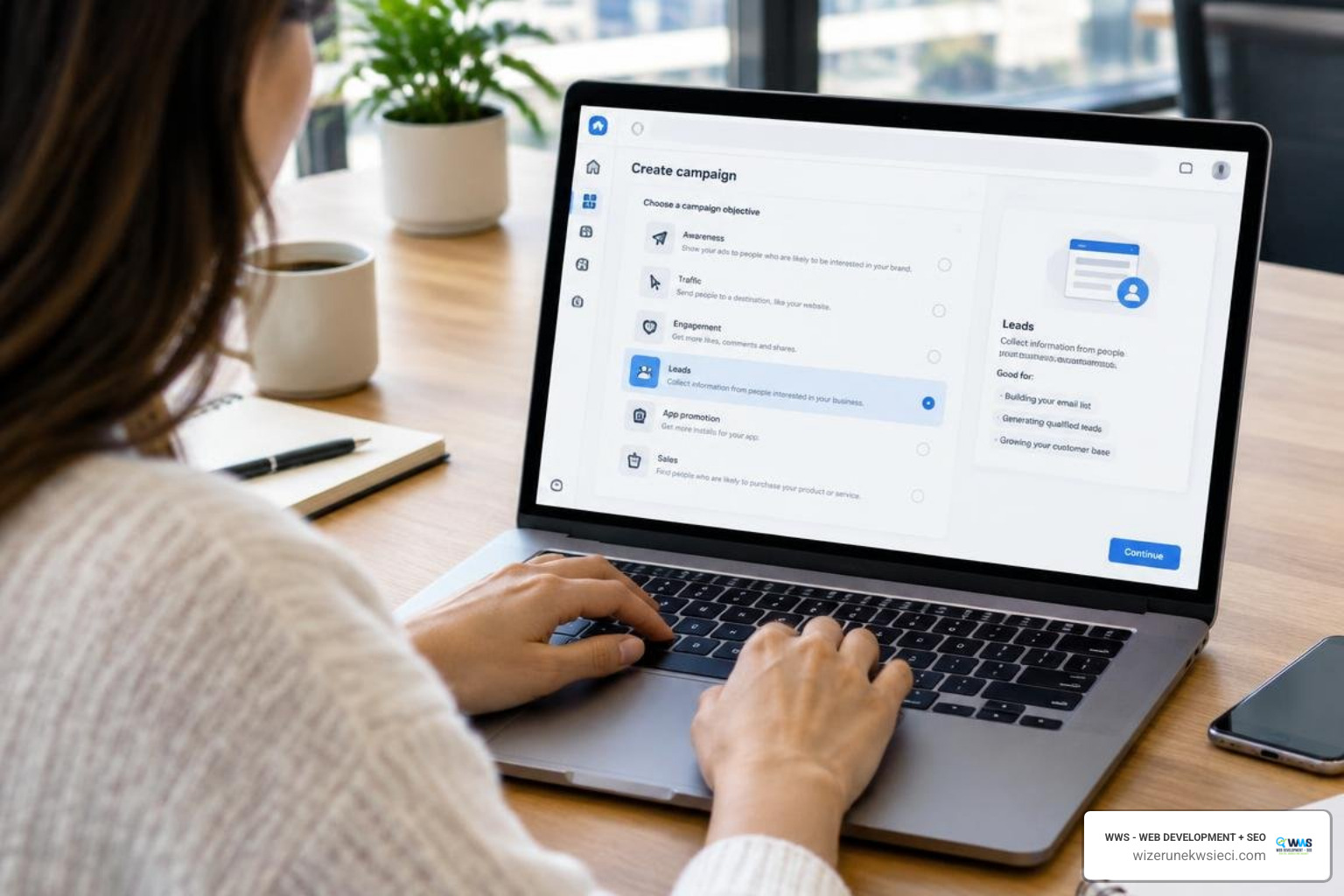
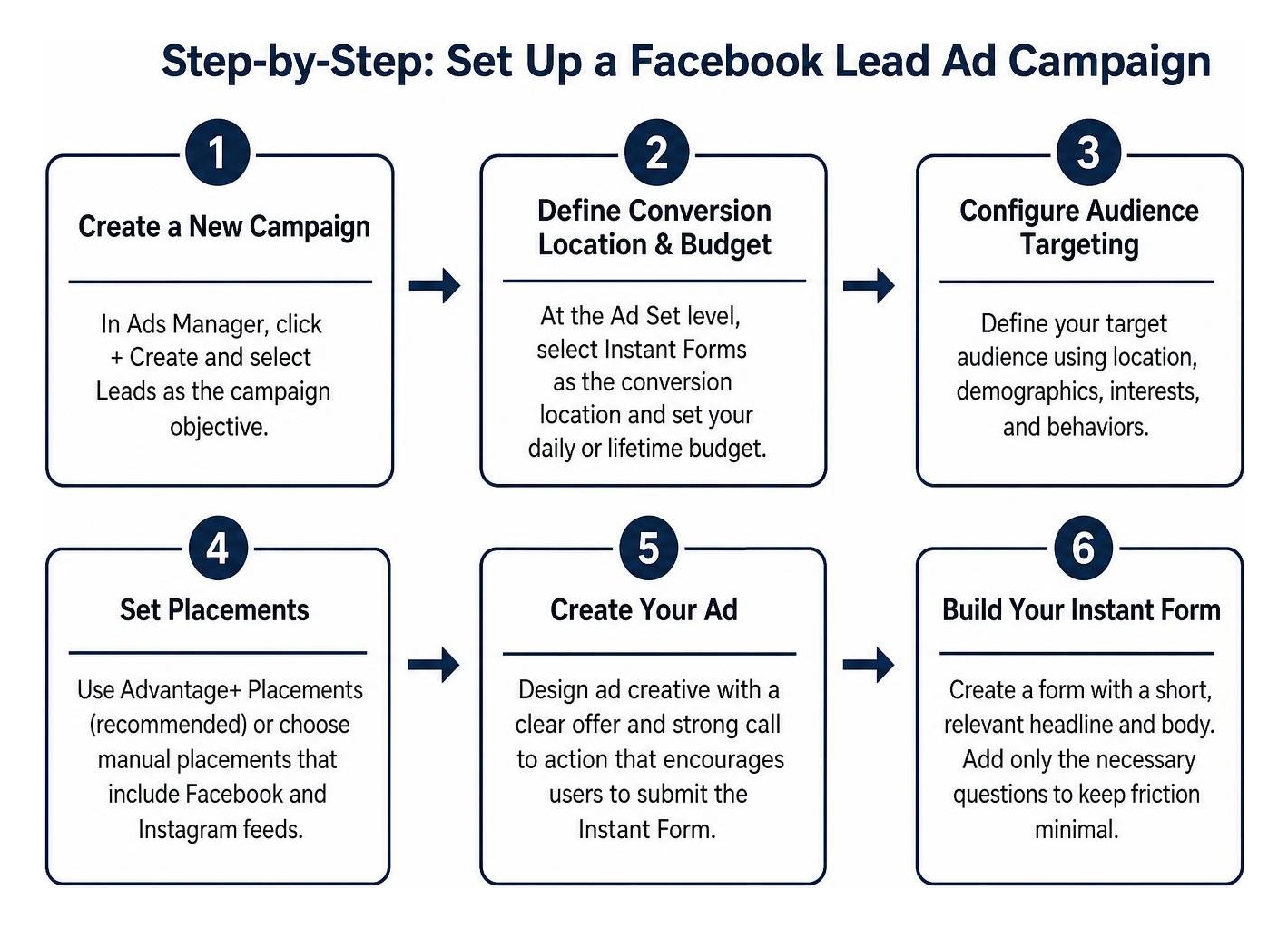
Log in to Meta Ads Manager. Click the green + Create button and select Leads as the campaign objective (Outcome Leads). This signals the algorithm to optimize ad delivery specifically for form submissions.
Step 2: Define Conversion Location & Budget
At the Ad Set level, select Instant Forms as your conversion location. Set your daily or lifetime budget. For local service businesses in areas like Chicagoland, starting with a steady daily test budget over 5–7 days allows Meta’s delivery engine to exit the initial learning phase smoothly.
Step 3: Audience Targeting & Geographic Segmentation
Configure your target audience parameters. Meta offers Advantage+ Audience by default, using machine learning to find prospects likely to convert. However, local service businesses should apply precise geographic boundaries—such as Cook County, Lake County, or specific suburbs like Des Plaines, Schaumburg, or Naperville—to ensure inquiries come strictly from your serviceable area.
Step 4: Ad Creative and Copywriting
Select your Facebook Page and Instagram Account. Upload your visual asset (single image, carousel, or short video). Write direct, value-focused ad copy addressing a core pain point, and choose an action-oriented call-to-action button (e.g., “Get Quote”).
Step 5: Build Your Instant Form
Navigate to the Lead Form section at the ad level. Click Create Form, assign an internal name, and select your form type based on your lead quality goals.
Step 6: Add Form Fields and Custom Screening Questions
Add standard profile fields (Full Name, Phone Number, Email). Include 1–2 multiple-choice or short-answer qualifying questions to filter out casual clicks.
Step 7: Privacy Policy & Custom Disclaimer
Enter the URL of your website’s Privacy Policy page. Meta requires an active privacy policy link on all lead generation ads to maintain consumer data privacy compliance.
Step 8: Completion Screen & Publishing
Configure your custom “Thank You” screen. Add a direct link to your website or a “Call Business” click-to-call button for immediate customer action. Click Publish to submit your campaign for review.
Configuring Campaign Objectives and Audience Targeting
Navigating Meta’s targeting tools requires balancing automated delivery with business parameters. Review our guide on managing paid social media ads for deeper platform insights.
- Advantage+ Audiences: Meta’s AI-driven targeting automatically expands past tight interest boxes to identify active searchers.
- Custom Audiences: Retarget past website visitors, customer email lists, or users who engaged with your social channels over the past 90 days.
- Lookalike Audiences: Build 1% to 3% Lookalike Audiences derived from your highest-value closed customers.
Building High-Converting Instant Forms
When designing your form, structure each step intentionally:
- Introductory Context: Use a brief headline and 2–3 bullet points explaining the exact benefit of submitting the form.
- Essential Data Only: Limit requested fields to the absolute essentials needed to qualify and contact the prospect.
- Multiple-Choice Selectors: Use dropdown menus rather than open-ended text fields where possible to speed up form completion on mobile.
Optimizing Lead Quality, Tracking, and Conversions API in 2026
Capturing a high volume of leads is only profitable if those leads convert into paying clients. Filtering mechanisms and server-side tracking protect your sales team’s time and train Meta’s algorithms to prioritize serious prospects.

Implementing Higher Intent and SMS Verification for Facebook Lead Generation Ads
To prevent accidental submissions, Meta provides the Higher Intent form format. This adds an extra review step where users must swipe a confirmation slider to verify their information before final submission.
For industries requiring verified phone numbers, enabling one-time SMS passcodes ensures that every captured number is valid. To explore the technical setup of these verification parameters, consult the official Lead Ads Developer Documentation.
Leveraging Conversions API and CRM Integrations
Browser-based tracking pixels face increasing limitations from privacy updates and ad-blocking software. The Meta Conversions API (CAPI) creates a direct, server-to-server connection between your marketing systems and Meta’s servers.
Implementing CAPI allows you to send downstream sales milestones (such as “Qualified Lead,” “Estimate Sent,” or “Deal Closed”) back into Meta Ads Manager. This trains the optimization algorithm to bid on prospects matching your paying clients rather than casual clickers.
For technical CRM synchronization details, review the Meta Webhooks for Lead Ads documentation and our strategic blueprint on building a robust lead gen architecture.
Real-Time Lead Retrieval and Post-Submission Workflows
Speed-to-lead dictates inbound conversion rates. Research consistently demonstrates that contacting a digital inquiry within five minutes increases qualification rates up to 9x compared to waiting 30 minutes.
Setting Up Instant Follow-Up Systems
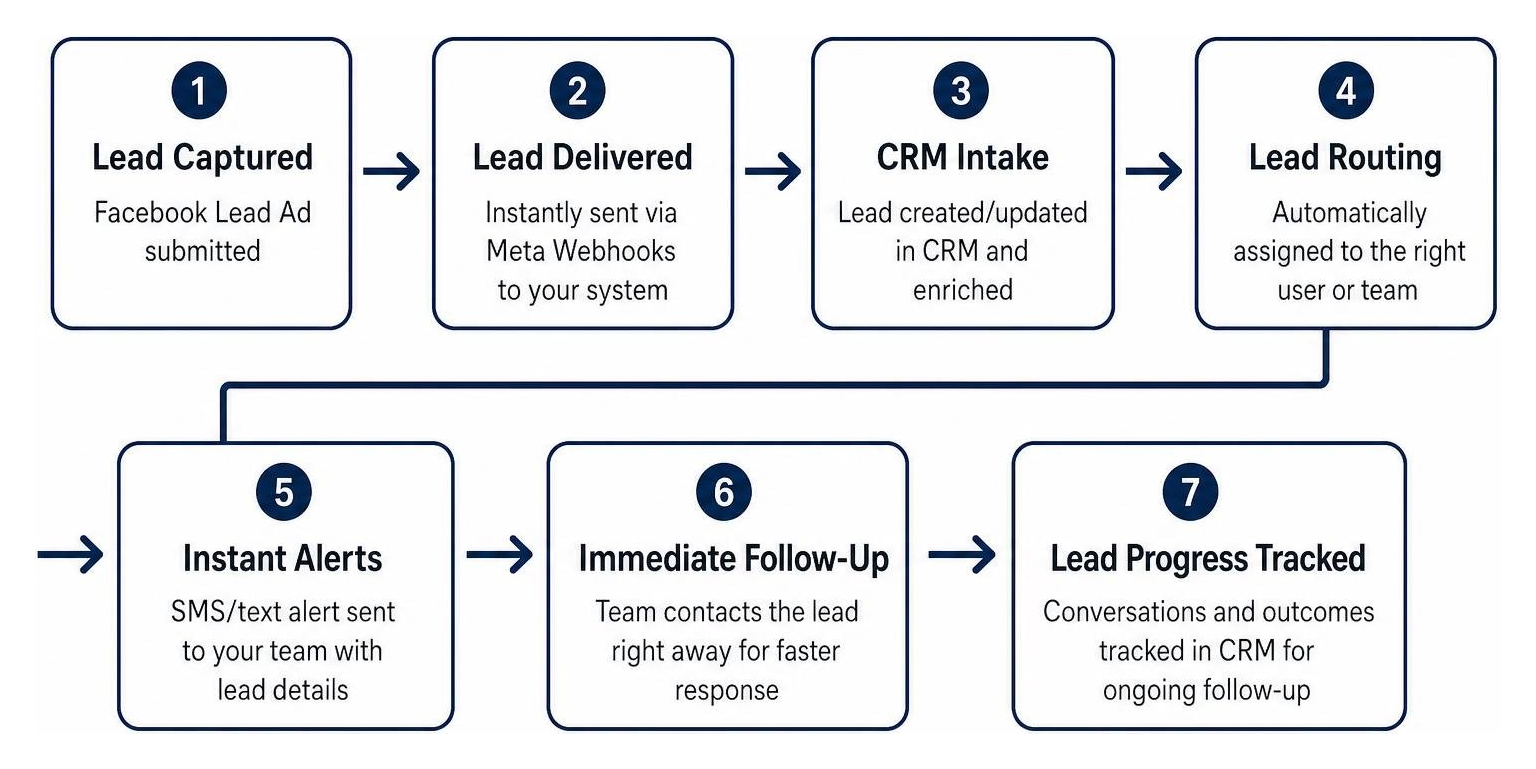
Never leave submitted inquiries sitting in Meta Ads Manager for manual end-of-day CSV downloads. Implement automated pipelines using modern lead generation tools to route leads instantly:
- Instant SMS Alerts: Trigger an immediate text message directly to your field team or sales manager containing the lead’s name, requested service, and phone number.
- Automated Confirmation Emails: Send the prospect an immediate confirmation branded with your contact information, credentials, and estimated response timeframe.
- Dynamic CRM Insertion: Automatically insert the contact into your centralized CRM with appropriate lead source tags for lifecycle tracking.
Programmatic Lead Retrieval and Meta Webhooks
For companies managing high inquiry volumes across custom applications, Meta offers programmatic data extraction via Graph API webhooks.
By subscribing your application endpoint to the leadgen event topic on your Facebook Page, your server receives real-time payload notifications the second an ad form is submitted. Detailed API call structures, user token permissions, and rate-limiting thresholds can be reviewed in the official Retrieving Leads Developer Documentation.
Frequently Asked Questions About Facebook Lead Generation Ads
How much do Facebook lead ads typically cost in 2026?
Average cost per lead currently hovers around $27.66 across all industries, though real-world figures vary based on market competition, target geography, and offer appeal. Local home services and trade contractors often see costs between $20 and $45 per inquiry, whereas specialized professional or B2B services may range between $35 and $75.
How do I prevent fake or low-intent leads from submitting forms?
To filter out low-intent entries, switch your form setting from “More Volume” to “Higher Intent,” add 1–2 custom qualification questions that require active selection, and use work-email or phone validation settings.
Can I integrate Facebook lead forms directly into my CRM?
Yes. Meta natively connects with major CRM platforms through the Meta Business Suite Leads Center. Alternatively, you can use automated webhook middleware to map submitted fields into custom sales databases in real time.
Conclusion: Accelerate Your Business Growth with Meta Lead Ads
Facebook lead generation ads provide small and mid-sized businesses with a direct channel to turn mobile social media engagement into qualified sales conversations. By pairing frictionless Instant Forms with custom qualification questions, server-side Conversions API tracking, and sub-five-minute follow-up workflows, you can build a predictable, scalable inbound pipeline.
At Wizerunek w Sieci (WWS — Web Development + SEO), we bridge the gap between large corporate agencies and solo freelancers. Based in Des Plaines, IL, we deliver hands-on, enterprise-grade digital marketing paired with personal dedication. We help American businesses, local service providers across Chicagoland, and the Polish-American community (Polonia) expand their online reach through tailored campaigns.
Ready to transform your customer acquisition? Pair high-converting paid campaigns with our strategic SEO and website development solutions.
Contact WWS today for a comprehensive marketing consultation:
- Location: 636 S River Rd #218, Des Plaines, IL 60016
- Website: wizerunekwsieci.com