





Understanding Meta Lead Ads and Gated Incentives
Traditional lead generation relies heavily on driving paid traffic to external websites. However, when users click an ad and wait for a third-party landing page to load, conversion drop-offs spike. Meta Lead Ads solve this issue by keeping the entire interaction within the Facebook platform.
When a target prospect clicks your ad, an “Instant Form” opens natively. Instead of forcing prospects to type their contact details on a small phone screen, Meta pre-populates form fields using information from their Facebook profile.
By combining Meta Instant Forms with a high-value gated incentive—commonly known as a facebook ads lead magnet—you lower conversion friction dramatically.
According to Lead Ads: Generate Leads for Your Business | Meta for Business, native lead generation campaign structures allow businesses to establish direct touchpoints with potential customers quickly. Pairing native lead forms with effective lead generation websites gives local service providers and SMBs a reliable strategy to capture high-intent contact details.
Selecting the Right Facebook Ads Lead Magnet Assets
Not all downloadable assets yield the same results. A compelling lead magnet must offer immediate utility, solve a specific pain point, and align directly with your core paid offer.
- Checklists & Cheat Sheets: Quick, actionable tools that deliver immediate value. Highly effective for mobile users seeking quick answers.
- Actionable eBooks & Smart PDFs: Short, structured guides that solve an explicit problem. Smart PDFs can be viewed instantly on mobile devices right after submission.
- Templates & Swipes: Pre-built spreadsheets, email templates, or workflow documents that save your prospective client time and effort.
- Webinars & Training Videos: Excellent mid-funnel assets for high-ticket service businesses, allowing you to showcase authority and build trust.
- Discount Codes & Free Consultations: Direct commercial incentives that appeal directly to lower-funnel prospects ready to purchase or book a service call.
Mobile Optimization and Instant Pre-Filled Forms
With 96% of Facebook users accessing the site from mobile devices, optimizing for mobile isn’t optional—it’s essential.
Traditional external landing pages frequently suffer from slow server response, heavy scripts, and awkward form layouts on smartphones. Instant Forms load immediately inside the Facebook mobile app. Because user profile details like full name, primary email, and phone number populate automatically, users can submit their contact info with just two quick taps.
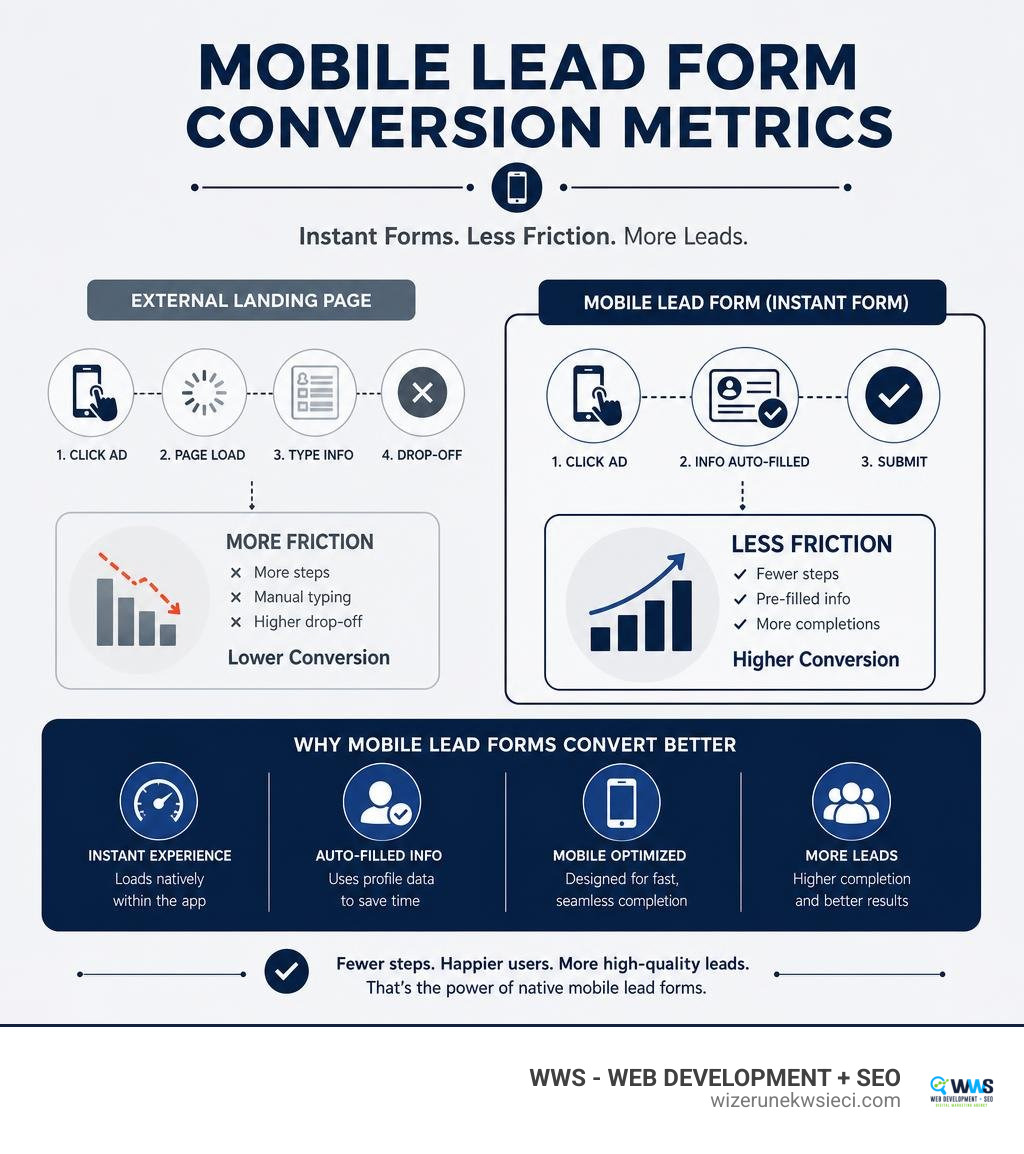
This friction removal significantly cuts form abandonments, making native lead forms a reliable channel for high-volume lead capture.
Building a High-Converting Facebook Ads Lead Magnet Funnel
Setting up a profitable funnel requires matching your creative offer with precise audience parameters. At WWS (Wizerunek w Sieci), when we build custom paid campaigns for Chicago-area clients, we structure ad sets around user intent and demographic precision.

Precise Demographic and Interest Targeting
Meta’s detailed targeting engine allows you to reach narrow client segments based on user activity, industry interests, and geographic footprints.
For local service businesses in Des Plaines, Cook County, or across the broader Chicagoland area, geo-fencing campaign parameters ensures ad spend isn’t wasted on users outside your service region.
In addition to geo-targeting, you can leverage:
- Detailed Interest Targeting: Pinpoint specific software tools, platforms, or industry associations your ideal buyers interact with (for example, targeting business users interested in specialized software or platforms).
- Custom Audiences: Target past website visitors or upload existing customer contact lists to re-engage warm leads.
- Lookalike Audiences: Instruct Meta to locate new users who share behavioural profile characteristics with your existing best-paying clients.
Ad Creative and Copywriting Best Practices
Your creative elements must immediately grab attention in a fast-moving newsfeed. To craft ads that stop the scroll:
- Lead with Direct Benefits: State the exact transformation or benefit provided by your downloadable incentive within the first line of primary text.
- Use Clear Visual Hierarchy: Show an appealing mockup image or short video demonstration of the lead magnet asset.
- Establish Immediate Social Proof: Highlight online ratings, client reviews, or local authority signals directly within the ad text.
- Use Explicit Calls-to-Action: Set headline CTA text and ad action buttons explicitly to “Download” or “Learn More.”
For an in-depth breakdown on scaling social creatives without overcomplicating campaign structures, read our guide on how to master paid social media ads without losing your mind.
Technical Setup and Instant Form Customization
Launching a native lead capture campaign requires setting up Meta Ads Manager correctly and building a customized Instant Form.
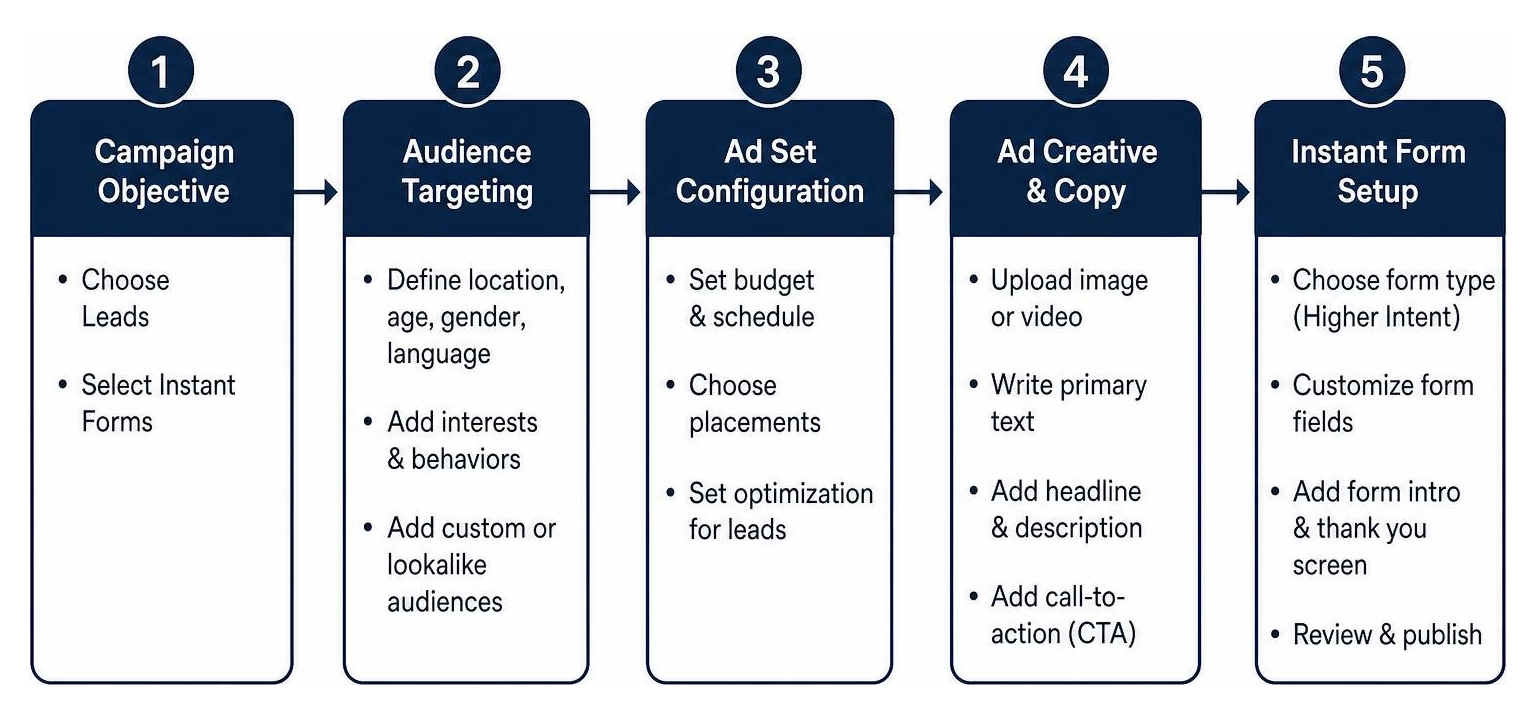
Configuring Your First Facebook Ads Lead Magnet Ad Set
To initiate your campaign step-by-step:
- Open Meta Ads Manager and click + Create.
- Select Leads as your campaign objective (which utilizes the underlying
OUTCOME_LEADSplatform parameter). - At the Ad Set level, set your conversion location to Instant Forms.
- Choose your target Facebook Page and accept Meta’s Lead Ads Terms of Service.
- Set daily budget pacing and schedule your start dates.
- Define audience parameters using geographic, demographic, and detailed interest filters. Keep targeting expansion toggled off initially to maintain strict audience precision.
- Select Placements (Advantage+ Placements work best for native form assets).
As detailed in the official Lead Forms for Ads | Developer Documentation, ad sets can also optimize for higher conversion intent depending on whether volume or quality is your primary goal.
Designing and Customizing the Instant Form
When creating your Instant Form inside Meta Ads Manager, choose between two primary form types:
- More Volume: Fast, short form submission designed for maximum lead volume on mobile screens.
- Higher Intent: Adds an explicit review step that allows prospects to review and confirm their details before submitting, filtering out accidental clicks.
To build out the form:
- Intro Section: Add a short headline and bullet points detailing what the downloadable guide includes.
- Form Questions: Keep standard fields minimal—requesting just a first name and email address yields the highest completion rates. You can add one or two targeted multiple-choice questions to qualify leads without introducing unnecessary friction.
- Privacy Policy Link: Meta requires a direct link to a published privacy policy on your website (e.g.,
wizerunekwsieci.com/privacy-policy). - Thank-You / Confirmation Screen: Add a prominent call-to-action button set to “View Website” or “Download” with a direct link to your PDF asset or host destination, delivering the content instantly.
CRM Integration and Real-Time Lead Management
Capturing a lead is only half the battle—following up quickly is what drives revenue. If you allow lead notifications to sit unattended in ad account download queues for days, prospective clients cool off fast.

Automated Lead Syncing via Webhooks and APIs
To achieve immediate speed-to-lead follow-up, connect your Meta Lead Ads account directly to your CRM, email autoresponder, or sales management system.
According to Meta’s developer specs on Meta Webhooks for Lead Ads for Customer Relationship Management | Developer Documentation, using real-time Webhooks sends an immediate JSON notification to your backend endpoint whenever a user submits an ad form.
This enables automated actions like:
- Sending an automated welcome email containing the promised facebook ads lead magnet download link within 60 seconds.
- Triggering immediate SMS notification alerts to your internal sales representatives.
- Enrolling leads in targeted email follow-up sequences.
Setting up automated systems prevents leads from slipping through the cracks. Learn more about capturing and converting web visitors in our practical walkthrough on how to stop bouncing and start buying: how to capture leads from your website.
Manual Lead Retrieval and Access Management
If your direct CRM API integration is ever interrupted, you can retrieve lead data manually through Meta business tools.
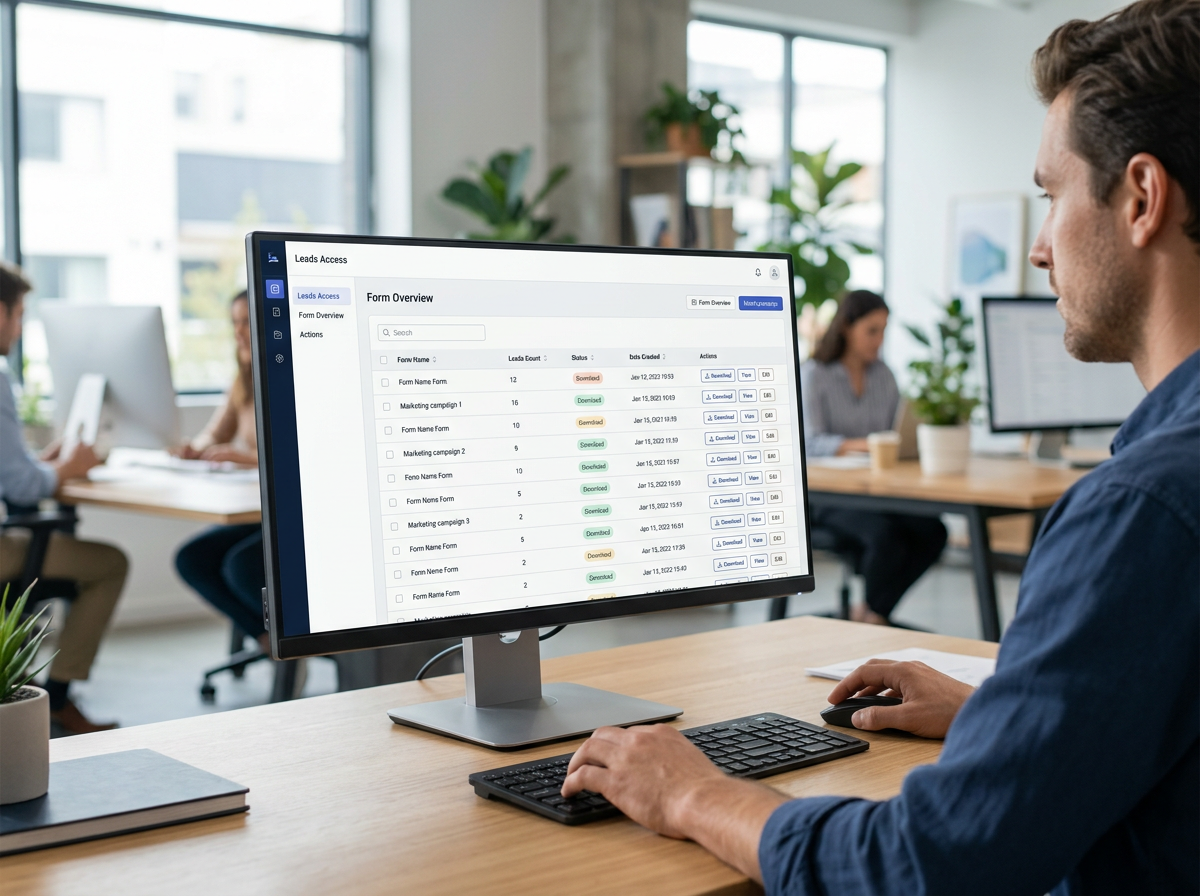
To download leads manually:
- Go to Meta Business Suite and select All Tools > Instant Forms.
- Locate your active form and click Download under the Leads column.
- Export the records in CSV or XLSX format.
If you have technical developers building custom data pipelines, they can use Meta’s Graph API to bulk-read entries by querying endpoint parameters, as documented in Retrieving Leads | Developer Documentation. Always verify administrative permissions in Meta Leads Access Manager so authorized team members maintain uninterrupted data access.
Campaign Optimization and Pitfalls to Avoid
To maintain profitable acquisition costs over time, track your key campaign metrics closely and continuously optimize your form performance.
Key Performance Indicators to Track
- Click-Through Rate (CTR): Measures ad visual appeal and copy effectiveness. Aim for a CTR above 1.5% – 2.0%.
- Form Completion Rate: The percentage of users who open the Instant Form and actually click submit. Higher rates indicate low field friction.
- Cost Per Lead (CPL): Total ad spend divided by submitted form entries.
- Lead-to-Customer Conversion Rate: The percentage of captured leads that ultimately convert into paying sales or signed service contracts.
Common Mistakes in Meta Lead Campaigns
- Asking for Excessive Data: Requiring phone numbers, physical addresses, and job titles upfront causes high abandonments. Collect only essential details initially.
- Delayed Follow-Up: Waiting days to reach out to captured leads destroys conversion rates. Reach out while brand interest is fresh.
- Vague Visuals and CTAs: Using generic stock images or weak button labels lowers engagement. Clearly showcase the specific lead magnet asset being offered.
- Missing or Invalid Privacy Policy Links: Meta automatically rejects forms that lack valid privacy policy URLs.
Frequently Asked Questions About Meta Lead Generation
How do Facebook Lead Ads deliver lead magnets instantly?
Lead magnets can be delivered instantly in two ways: by placing a direct download link on the Instant Form’s thank-you confirmation screen, or by using automated webhooks/CRM integrations that send a welcome email with the download link immediately upon form submission.
Why are instant forms converting better than external landing pages on mobile?
Instant forms load natively inside the Facebook app with zero loading delays. Furthermore, they reduce typing effort by pre-populating contact information directly from the user’s Facebook profile.
What permissions are required to sync Facebook leads with a CRM?
To sync lead data via APIs or third-party CRM connectors, the connecting account needs leads_retrieval, pages_manage_ads, and pages_show_list permissions granted in Meta Business Manager along with an active Page Access Token.
Scale Your Local Lead Generation with WWS
Mastering the facebook ads lead magnet strategy gives your small business a predictable, scalable way to generate high-intent leads and grow customer acquisition pipelines.
By removing conversion friction with native Instant Forms, offering targeted resources, and automating your follow-up workflows, you can lower customer acquisition costs significantly.
At WWS (Wizerunek w Sieci), based in Des Plaines, IL, we help small and medium-sized businesses across Chicagoland and the United States build custom digital marketing engines. From high-converting website design and local SEO to precision Google Ads and Meta paid social campaigns, we treat your business with the care and attention it deserves.
Ready to fill your sales pipeline with qualified local leads? Explore our full suite of professional services on our SEO and Web Solutions page to request your free website and marketing audit!