


How to Track Phone Call Conversions for Local Businesses
Learn how to track phone call conversions from ads, your website and your CRM, set a sensible call length, and stay within Illinois recording rules.
 By WWS Team
12 min read
In this article17 sections
- TL;DR
- Why a raw call count misleads
- The main ways to track phone call conversions
- Tracking calls from your ads
- Tracking calls from your website
- Set a minimum call duration that fits your business
- Separate taps from connected calls
- Connect calls to revenue with offline imports
- Do not forget Google Business Profile calls
- Test before you trust the data
- Privacy and recording rules in Illinois
- Our perspective: measure the job, not the ring
- Getting this set up for your business
- Common mistakes to avoid
- FAQ
- Sources
- Recommended
To track phone call conversions, set up a separate conversion action for each kind of call (calls from your ads, calls from your website, and calls that become booked jobs). Then choose a minimum call length that fits your intake process, and test the setup with a real ad click before you trust the numbers. For a roofer, dentist, HVAC company or restaurant, the phone is often the main place revenue starts, so a call count that is wrong leads to wrong budget decisions.
This guide walks through the methods Google Ads supports, the setup mistakes we see most often, and the privacy rules that matter if you operate in Illinois.
TL;DR
- There are three different events: a tap on a phone number, a connected call, and a qualified lead. Track them as separate things.
- Website call tracking needs the Google tag and the phone snippet. Installing only one is the most common reason calls never show up.
- Set the minimum call duration around your real intake process, then review actual call lengths and adjust.
- Counting calls is one thing. Recording or transcribing them is another, and in Illinois recording needs a consent process.
- Import closed jobs from your CRM so you optimize for revenue, not just ringing phones.
Why a raw call count misleads
A phone that rings is not the same as a customer you can serve. Your call log will include misdials, vendors, job applicants, existing customers asking about an invoice, and callers outside your service area. If all of them count as “conversions,” ad platforms learn to find more of the same.
Google’s own design reflects this. Google Ads describes several ways to track calls, each answering a different question: did the ad produce a call, did the website produce a call, and did the call lead to a sale. Blending them into one “phone leads” figure hides which campaign, keyword or page is doing the work.
So before touching any settings, write down three definitions for your business:
- Interaction: someone tapped a number or call button.
- Connected call: the call reached your team and lasted long enough to be a real conversation.
- Qualified lead or booked job: the caller needed what you sell, in your service area, and moved forward.
Every tracking decision below maps to one of these.
The main ways to track phone call conversions
| Method | What it measures | Best for | Main limitation |
|---|---|---|---|
| Calls from ads (call assets, call-only ads) | Calls made directly from your ad | Mobile-heavy searches like emergency repair | Does not see calls made after a visit to your site |
| Calls to a number on your website | Calls from visitors who arrived through an ad click | Businesses whose site converts by phone | Needs correct tag and snippet installation |
| Clicks on a phone number (tap events) | A tap, not a connected call | Early signal, cross-channel reporting | A tap does not prove a call connected |
| Offline import from your CRM | Calls that became qualified leads or jobs | Any business with a long or high-value sales cycle | Needs a process to record outcomes |
| Third-party call analytics | Source, keyword, recordings and scoring | Teams that need call-level detail across channels | Adds cost and privacy obligations |
Google lists five ways to track phone call conversions in its documentation. For most local service businesses, the first three, plus an offline import, cover what is needed.
Tracking calls from your ads
When someone taps a call button on your ad, Google can count the call using a Google forwarding number. A forwarding number is an intermediary: the call goes through Google’s number and is routed to your real one. Reporting starts after call reporting is turned on in your account settings, and it records details such as call time, duration, campaign and ad group.
One rule matters here. Google states that forwarding numbers are Google’s property and can change or be reassigned. Do not print a forwarding number on a business card, a truck wrap or a Google Business Profile post. Keep your permanent business number as the underlying number and let Google handle the swap only where it supports it.
If you run campaigns for emergency or high-urgency services, our guide to Google Ads for contractors covers how call-focused campaigns fit into a lead plan.
Tracking calls from your website
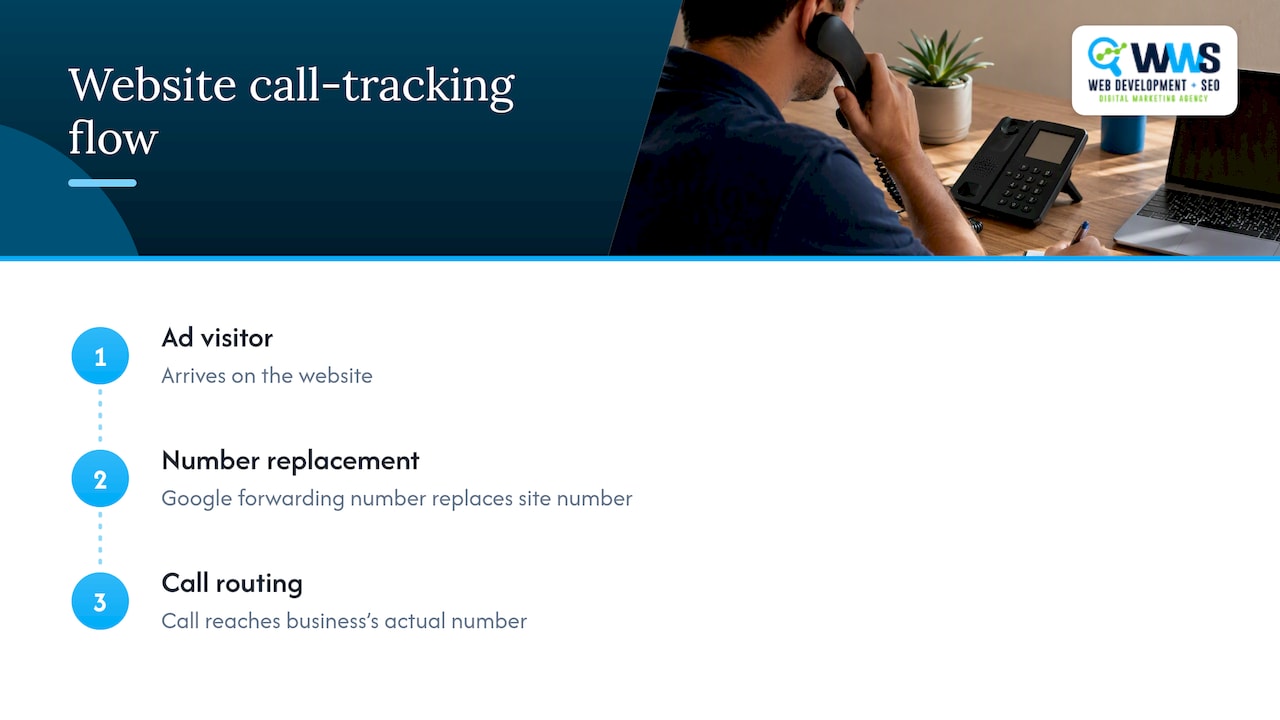
This is where most of the setup errors happen. Website call conversion tracking works by swapping the number shown on your site with a Google forwarding number for visitors who arrived from an ad, then routing the call to your actual number. You need a Google Ads account, an eligible US business, a website you can edit, the Google tag and a phone snippet.
The two pieces of code
Google explains that the Google tag works together with an event snippet or a phone snippet. The tag is generally installed sitewide. The phone snippet belongs on the pages where your tracked number appears. Missing either one means no data, and a dashboard label such as “Conversion action created” does not tell you the tracking works.
Setup checklist
- Confirm your Google Ads account is active and your business is eligible.
- Create the website call conversion action in Google Ads.
- Install the Google tag sitewide, through your site’s header or Google Tag Manager.
- Add the phone snippet to every page that shows the number, including the header, footer, contact page and landing pages.
- Make sure the number on the page exactly matches the number you entered in the conversion setup, formatting included.
- Publish, then test (see below).
If your site is built from a template where the phone number is typed in several places, a mismatch is common. A well-built site uses one consistent number format sitewide, which is one reason we build tracking considerations into website design from the start rather than bolting them on later.
Set a minimum call duration that fits your business
Google counts a call as a conversion only when it meets the minimum duration you select for that conversion action. Shorter calls are excluded, and actual durations can be reviewed in the Call details report.
The threshold should reflect how your office actually works, not an industry average. A few examples of how to think about it:
- A roofing or restoration company whose dispatcher spends a couple of minutes collecting an address and describing damage needs a longer threshold than a business that answers “yes, we’re open.”
- A dental practice where front-desk calls include appointment changes from existing patients should consider whether those calls belong in an ad-driven conversion at all.
- A restaurant may find that most useful calls are short reservation requests, so a long threshold would throw away good calls.
A practical process: pick a starting threshold, run for a few weeks, then open the Call details report and listen for patterns. If many calls just under the cutoff were real jobs, lower it. If many calls above it were irrelevant, raise it or move to offline import so only qualified calls count.
Separate taps from connected calls
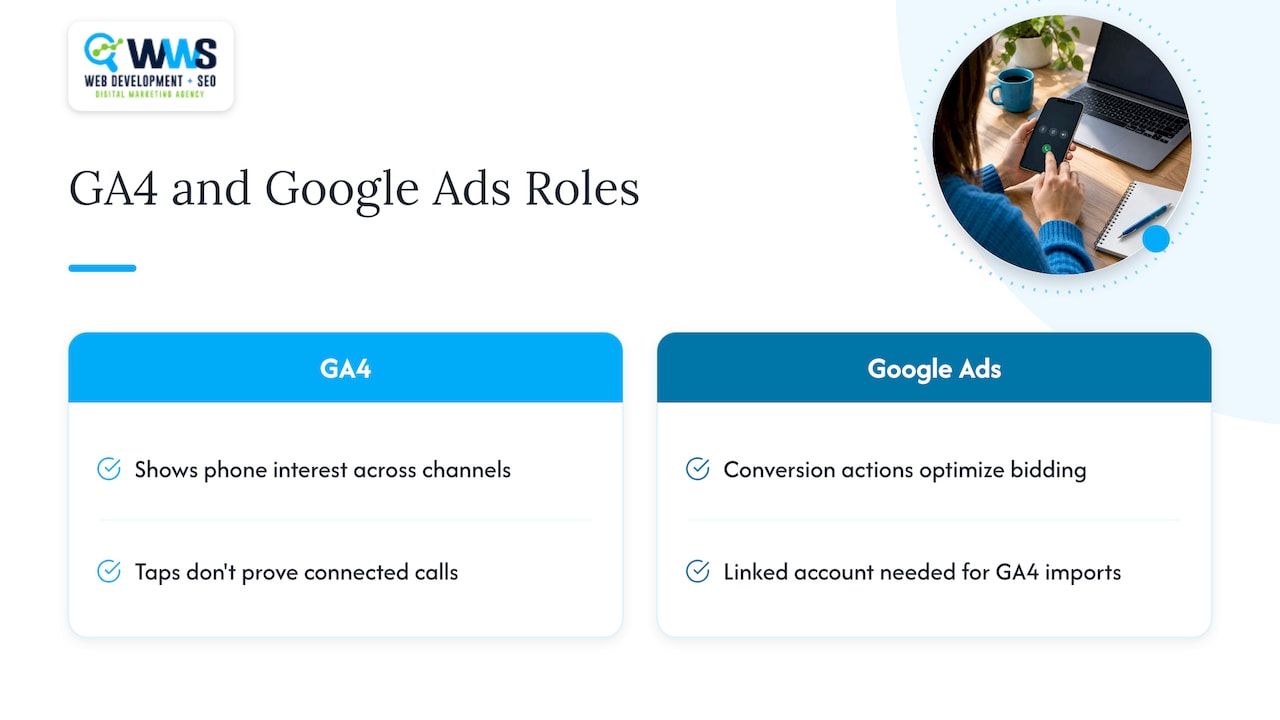
GA4 can also measure phone activity. Call conversions can be created from GA4 key events and shared with Google Ads, which is useful for cross-channel reporting across organic search, email and social. Creating a Google Ads conversion from an Analytics key event requires a linked Google Ads account.
But a click on a tel: link only shows someone tapped. It does not prove the call connected, lasted, or produced a lead. A desktop user may tap and nothing happens. A mobile user may tap, then hang up before dialing.
Treat GA4 and Google Ads as complementary. GA4 is good for seeing which channels bring phone interest. Google Ads conversion actions are what you use to optimize bidding. Decide which one is your authoritative reporting layer before comparing totals, or the numbers will never match and nobody will trust either. If you are still setting up analytics, our piece on GA4 setup for small businesses covers catching tracking errors early.
Connect calls to revenue with offline imports
A 90-second call and a booked $12,000 job are not the same result. If you have a CRM or even a simple spreadsheet of outcomes, Google supports uploading call outcomes so offline results line up with campaign reporting. The workflow connects your website and lead-tracking system, then has you download an import template and format your data to Google’s required columns.
In practice, this means:
- Your front desk or dispatcher marks each call as qualified, booked, won or lost in the CRM.
- Those statuses are uploaded to Google Ads on a regular schedule.
- You can see which campaigns and keywords produced revenue, not just ringing.
This is the layer that stops you from cutting a keyword that brings fewer calls but better jobs. We cover the handoff details in our guide to offline conversion handling.
Do not forget Google Business Profile calls
Many local calls never touch your website. They come from the map pack, where a searcher taps the call button on your Google Business Profile. Those calls are a different channel from paid ads and need their own attention, so do not assume your ad conversion data covers them. We explain how to approach it in our article on GBP call tracking for local businesses. Strong local SEO is what increases those calls in the first place.
Test before you trust the data
Tracking that has never been tested is a guess. Tag Assistant and a controlled test from an ad click are practical verification steps. Here is a simple routine:
- Use Tag Assistant to confirm the Google tag fires on the pages that show your number.
- Click one of your own live ads from a phone (understand that this may cost you a click).
- Confirm the number on the landing page changes to the forwarding number.
- Place a call that lasts longer than your minimum duration.
- Check that the call appears in Call details and, after processing time, as a conversion.
Validation should come before any budget or keyword decision. A tag that never fires or a missing snippet will quietly make a campaign look like a failure.
Privacy and recording rules in Illinois
Counting calls and recording calls are different activities, and the legal weight differs.
If you use phone analytics through Google Analytics, Google requires clear notice that information about calls may be collected, for example in a privacy policy.
Recording is stricter. Illinois’s eavesdropping statute has historically been described as an all-party consent law, and a Justia 50-state survey of recording laws is a useful starting point for comparing states if your callers are elsewhere. Because callers can be in Indiana, Wisconsin or anywhere else, rules can vary by caller location.
AI call analysis adds more questions. A recent write-up on an Illinois federal court decision about AI call centers shows that plaintiffs are testing wiretap laws against these tools. Notification, consent, retention and vendor access need to be designed before you deploy recordings, transcripts or AI summaries.
If you plan to record or transcribe calls, play a clear recording announcement at the start of the call and have an Illinois attorney review your process. This article is not legal advice.
Our perspective: measure the job, not the ring
We work with Chicago-area contractors, restaurants and medical providers, and the same pattern shows up often: a business has a website, runs some ads, and cannot say which calls turned into revenue. The fix is rarely more traffic. It is cleaner measurement.
Our view is that call tracking is part of the website, not an add-on to the ads. When the same in-house team builds the site, sets up local SEO and manages campaigns, the number on the page, the tag, the snippet and the reporting all agree. That is a large part of why we keep every service in-house. Our rule of thumb: define what a qualified call is first, track the easiest events second, and import real outcomes as soon as you can.
— Online Marketing Experts
Getting this set up for your business
If you would rather have this handled than wired together on your own, WWS builds the website, installs the tracking and manages the campaigns from our Des Plaines, IL office, serving businesses across the Chicago area. See our paid campaigns service for ad management with call measurement built in, or start from our home page to contact us.
Common mistakes to avoid
- Installing only the Google tag. Without the phone snippet, website calls are not tracked.
- Publishing a forwarding number everywhere. It is Google’s number and may change.
- Counting every call equally. Short misdials and sales calls from vendors distort bidding.
- Mixing taps and calls in one number. Keep separate conversion actions for separate events.
- Recording without consent. Build the announcement and policy before turning recording on.
- Never reviewing Call details. The report is where you find out whether your threshold fits.
FAQ
How can I track a phone call conversion?
Create a call conversion action in Google Ads for the type of call you want to measure: from an ad, from your website, or imported from your CRM. For website calls, add the Google tag and the phone snippet, then verify with a test call. Set a minimum call duration so very short calls are not counted.
How does Google Ads track phone call conversions?
For website calls, Google replaces the number shown to ad visitors with a forwarding number and routes the call to your real line. It records details such as call time, duration, campaign and ad group. A call is counted only if it meets the minimum duration you chose.
Can someone track my phone calls without me knowing?
A business can measure which ad or page produced a call without recording it, but Google requires clear notice when phone analytics collects call information. If you are worried about your own phone, that is a device and carrier security question, and a carrier or a cybersecurity professional is the right person to ask.
Can call history be tracked?
Yes. In Google Ads, the Call details report shows call time and duration for tracked calls, and a CRM can store outcomes against each call. Keep in mind that storing recordings or transcripts brings consent and retention obligations in Illinois.
Sources
- Set up tracking calls to a phone number on a website, Google Ads Help
- About phone call conversion tracking, Google Ads Help
- Google forwarding number, Google Ads Help
- Use the Google tag for Google Ads conversion tracking, Google Ads Help
- Set up your phone call conversions, Google Ads Help
- Conversion, Analytics Help
- Policy Requirements for Phone Analytics, Analytics Help
- Illinois wiretapping law, Wikipedia
- Recording Phone Calls and Conversations, 50-State Survey, Justia
- Use of AI Call Center Without Consent Not a Federal Wiretap Violation, Inside Class Actions
Recommended
A Des Plaines, IL team helping local service businesses get found, get called and get booked since 2005: local SEO, Google Ads, conversion-focused websites and AI search optimization.
Meet the teamKeep reading
All articles
UTM Tagging Guide: Build, Name and Track Campaign Links
Learn how to build UTM tags, name them consistently and read the results in GA4, with examples for local ads, email, social and Google Business Profile links.
Call Tracking Setup for Marketers: Track Calls, Not Clicks
Set up call tracking across site tags, Google Ads conversions, dynamic number insertion, and CRM imports, then test real calls to confirm attribution works.
GA4 Setup: Small Businesses Can Catch Tracking Errors Early
Set up GA4 for a small business with gtag.js, Google Tag Manager, or a CMS plugin. Track starter conversions, validate events, or ask WWS for local help.