


Small Business App Cost: What to Budget in 2026
What a small business should budget for an app: build, store fees, maintenance at 15-20% a year, and how features change the price, plus how to scope it.
 By WWS Team
10 min read
In this article13 sections
The cost of a small business app depends on what the app has to do, not on the word “app.” A simple tool with a few screens costs a fraction of one with logins, payments and integrations. Whatever you build, plan for two budgets: the build, and the yearly cost of keeping it running, which is commonly estimated at 15% to 20% of the original development cost. This guide shows what drives the price, what to include in your budget, and how to scope a project so the quote you receive is one you can compare.
TL;DR
- Price follows features. Logins with roles, payments, third-party integrations and real-time notifications each add a measurable share to the build.
- Budget for the first year and every year after: store fees, hosting, security, bug fixes and updates.
- Annual maintenance is commonly estimated at 15% to 20% of the original development cost.
- Start with a small first release and expand once real customers use it. The U.S. Small Business Administration gives similar advice for business software.
- A fixed quote is only useful if it comes from a written scope. Ask for one before you compare prices.
Why there is no single price
Search for the cost of an app and you will see figures that run from a few thousand dollars to several hundred thousand. Both ends can be true. A basic app that displays services and takes a booking request is a different product from a marketplace with payments, user accounts and live tracking. The label is the same, but the work is not.
A local business owner should therefore stop asking “what does an app cost?” and start asking “what does the first useful version of my app cost?” The second question has an answer, once you list what a customer or your crew must be able to do in it.
We do not publish a fixed price list for app development, because the scope sets the price. What we can do is show you the cost drivers so you arrive at any agency conversation, ours or someone else’s, with a clear brief.
What pushes the price up
Five things decide most of the budget.
Features
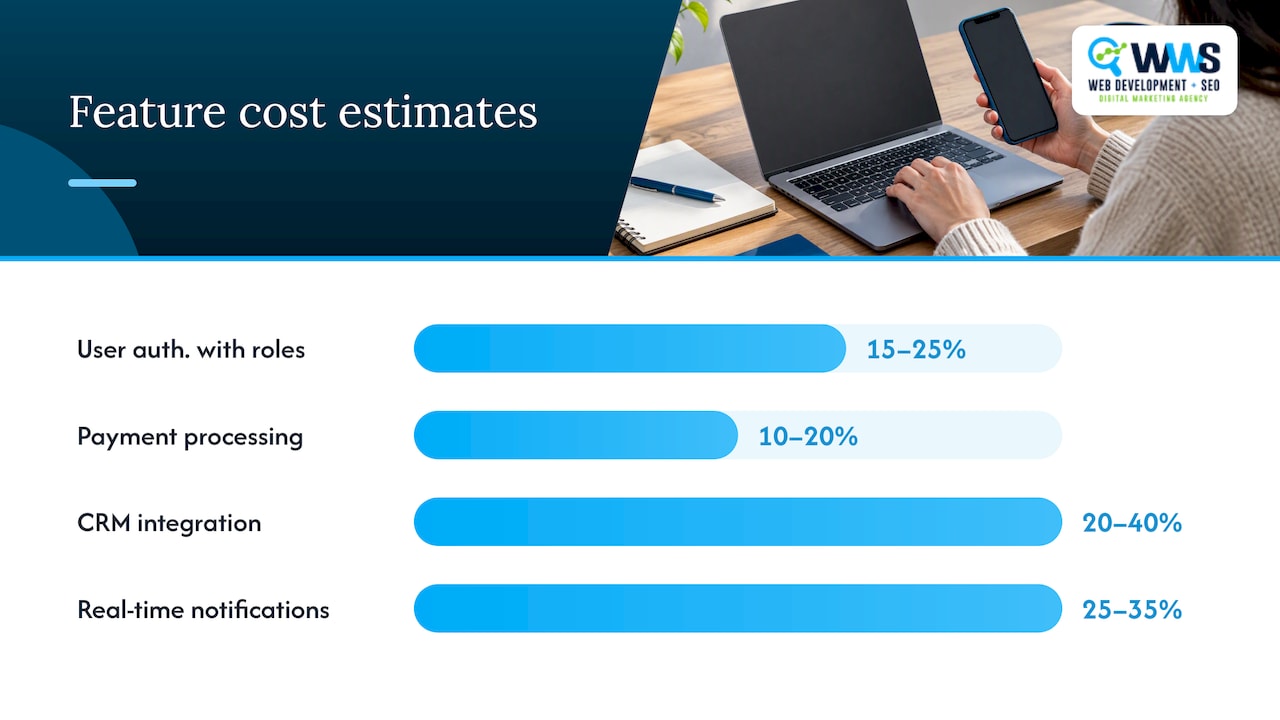
Features are the largest lever. One published breakdown estimates that user authentication with roles adds 15% to 25%, payment processing 10% to 20%, each third-party integration such as a CRM 20% to 40%, and real-time notifications 25% to 35%. Treat those percentages as directional, since every project differs, but the pattern is dependable: each feature adds design, build and testing work, and features interact with each other.
That compounding is why a long wish list gets expensive fast. Every addition creates more cases to test and more places for something to break.
Platforms
Building for iPhone and Android separately roughly means two builds. Cross-platform approaches share much of the code, and a mobile-friendly web app can avoid the app stores entirely. For many local service businesses, the right first step is whichever option your customers will actually use.
Design
A clean, standard interface costs less than custom animations and a bespoke visual system. A service business usually wins with speed and clarity: a customer finds the service, requests a quote or books, and gets confirmation.
Integrations
Connecting the app to your scheduling tool, accounting software, CRM or payment processor is often where budgets drift. Each outside system has its own rules, and each needs testing. List the systems you already use before you ask for a quote.
The team
Who builds it matters as much as what is built. Handoffs between a designer at one company, a developer at another and a marketer at a third create delays and rework. That is one reason we keep design, programming and marketing under one roof.
A budget checklist for the first year
A realistic budget has more lines than the build quote. Use this list.
| Budget line | What it covers | Notes |
|---|---|---|
| Discovery and scoping | Writing down who uses the app and what they do | Cheapest place to find expensive mistakes |
| Design | Screens, flows, branding | Keep the first version simple |
| Development | Front end, back end, integrations | Largest line; driven by features |
| Testing | Devices, bugs, security checks | Never skip; see below |
| Store accounts | Apple and Google developer fees | Fixed, small, recurring for Apple |
| Hosting and services | Servers, database, email or SMS, maps | Often usage-based |
| Launch | Store listings, a customer announcement, staff training | Plan this before release day |
| Maintenance | Fixes, updates, security, support | Ongoing, every year |
Store fees
The store fees are small but certain. Google Play’s help page says a developer account has a US$25 one-time registration fee. Apple’s program page states that the Apple Developer Program is 99 USD per membership year. Both numbers are fixed, so put them in the budget and move on to the lines that vary.
Testing and security
Testing is not a final polish. Security guidance such as the NIST DevSecOps reference model describes security considerations across planning, development, testing, release, deployment and operations, not only at the end. For a small business that handles customer names, phone numbers or payments, that means asking any developer how they test, how they store data and who fixes problems after launch.
What maintenance really costs
This is the part many first-time buyers miss, and it is a common reason people search for app maintenance costs after the build is done.
A widely used rule of thumb puts annual maintenance at 15% to 20% of the original development cost. That range can cover bug fixes, security, server and software updates, customer support, hosting and app updates. Where your app falls depends on its complexity, platform, features, integrations, user base and the size of the team supporting it.
Here is a worked example using only the rule of thumb, with a made-up build cost purely for arithmetic:
| If the build costs | 15% a year | 20% a year |
|---|---|---|
| $20,000 | $3,000 | $4,000 |
| $40,000 | $6,000 | $8,000 |
| $60,000 | $9,000 | $12,000 |
These are not quotes. They show how the yearly cost scales with the build and why a cheap build with a poor foundation can cost more over three years than a sound one.
Maintenance is also the point where an app starts to look like other ongoing technology spending. If you are comparing it against the cost of support for your existing systems, ongoing IT support costs are a useful benchmark for what recurring technical help looks like in a budget.
Why it matters beyond money: the SBA warns that software from vendors that stop supporting it can leave security vulnerabilities. Choose a builder who will still answer the phone in two years.
How to set a budget you can control
The SBA’s checklist for choosing business software suggests starting with a simple, affordable package and moving to higher capacity or features as you grow. That approach applies to custom apps too. Follow these steps.
- Name the one job. Write one sentence: “Customers can request a quote in under a minute,” or “Crews can see today’s jobs and close them out.” If you cannot write it, you are not ready to request a price.
- Split features into must-have and later. Logins, payments and integrations are the items that move the price most, so be honest about whether version one needs them.
- Check what you already own. Your website, booking tool or Google Business Profile may cover part of the need. Our guide to website booking integration shows when a booking flow on your site does the job without a separate app.
- Ask for a written scope. Quotes are only comparable when they describe the same deliverables, platforms and integrations.
- Budget the second year at the same time. Add the maintenance percentage and the store fees to your plan before you sign.
- Plan how the app gets used. An app nobody downloads is the most expensive kind. Decide how you will tell customers about it, through your website, email, text messages and your local search presence.
When an app is the wrong first purchase
A business with no website, or a site that does not rank for local searches, usually gets more from fixing that first. Most customers still find a plumber, roofer or dentist through Google before they would install anything. If calls are your goal, our pages on local SEO and website design are usually where we start, and an app comes later, when you have repeat customers or a workflow to streamline.
If your need is internal, such as scheduling and job tracking for a small crew, a purpose-built tool may be the answer. We explain the options in our guide to building or buying a field service app.
Questions to ask any developer
Before signing, get answers in writing.
- What exactly is included in the quoted price, and what counts as a change request?
- Who owns the code, the design files and the store accounts?
- What does support cost after launch, and what response time do you commit to?
- How do you test, and on which devices?
- Which outside services will the app depend on, and what do they charge as usage grows?
- What happens if we want to move to another team later?
A team that answers these clearly is easier to work with than one that only offers a low number.
Our perspective
We build apps for local service businesses alongside their websites and local search, and the pattern is consistent: the apps that pay off start small and solve one problem for one group of people. A contractor does not need every feature on day one. They need a fast way for customers to ask for work, or for a crew to see its day.
Because design, programming and marketing are handled in-house by our own team, scope decisions stay in one conversation. The person who plans the features also understands how customers will find the app and what it needs to do to produce calls and leads. That keeps surprise costs lower and keeps the budget tied to a business result.
We also tell owners to plan for the long run. A well-built app is designed to be maintained, and we scope support with the build so there are no unpleasant surprises in year two.
Online Marketing Experts
Get a scoped estimate
We are a Des Plaines, IL agency serving the Chicago area, and we are an official Google and Meta Partner. If you are weighing an app, bring your one-sentence goal and your must-have list, and we will help you turn them into a written scope you can price. See our App Development page for how we work, or contact us through our site to start a conversation.
If you also need customers to find your business, our Local SEO team can work on your map pack visibility at the same time, so the app launches with people ready to use it.
FAQ
How much should a small business budget for an app?
Budget by scope, not by a headline number. List your must-have features, because logins, payments and integrations raise the price most, then ask for a written estimate for the first version only. Add the yearly store fees and a maintenance line of 15% to 20% of the build, and you have a first-year and ongoing budget.
What are the ongoing costs after the app launches?
Expect developer account fees (US$25 once for Google Play, 99 USD per year for Apple), hosting and services, security updates, bug fixes and support. Maintenance overall is commonly estimated at 15% to 20% of the original build cost per year, so ask your developer to include it in the proposal.
Is a free app enough for a small business?
For testing a simple workflow, an off-the-shelf tool can be a reasonable start. When you need your own branding, customer accounts, or connections to the systems you already use, a custom app begins to make sense. Compare the monthly subscription over several years with the one-time build plus maintenance.
Do I need both an iPhone and an Android app?
Not always. Look at which devices your customers use and whether a mobile-friendly web version covers the first release. Building for one platform, or sharing code across both, can keep the first budget smaller. Your developer should explain the trade-offs in your scope.
Sources
- Small Business App Development Cost in 2026: Full Guide
- App Development Costs (A Breakdown)
- Get started with Play Console, Play Console Help
- Apple Developer Program enrollment
- NIST Notional Reference Model for DevSecOps
- Checklist for Choosing Business Software, U.S. Small Business Administration
Recommended
A Des Plaines, IL team helping local service businesses get found, get called and get booked since 2005: local SEO, Google Ads, conversion-focused websites and AI search optimization.
Meet the teamKeep reading
All articles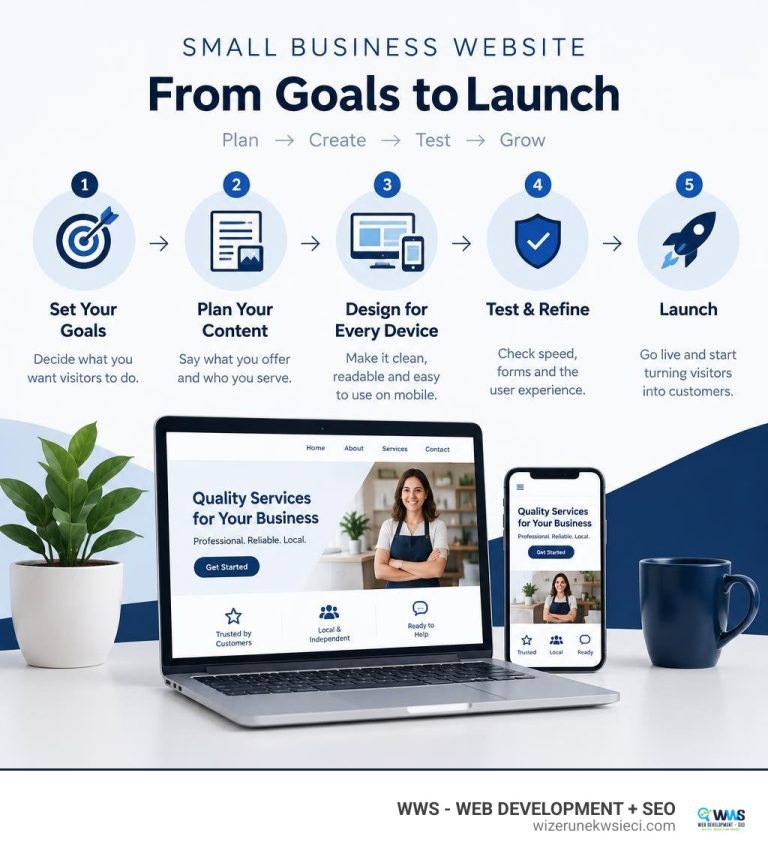
Small Business Web Page Design 101: From Blank Screen to Beautiful Site
Learn small business web page design from blank screen to launch: mobile-first layouts, conversion tips, SEO, costs, and timelines for 2026.
Mobile Friendly Dental Website Design for Modern Practices
Discover how a mobile friendly dental website boosts patient bookings, local SEO, and trust—expert design tips from WWS Chicago.

Homepage Design Best Practices for Local Businesses
Homepage design best practices for local service businesses: what to put above the fold, how it differs from a landing page, speed targets and a checklist.