





Why Local Business Ads on Google Are a Game-Changer for Small Shops
If you’ve been trying to figure out local business ads Google offers to small shops, here’s the short answer:
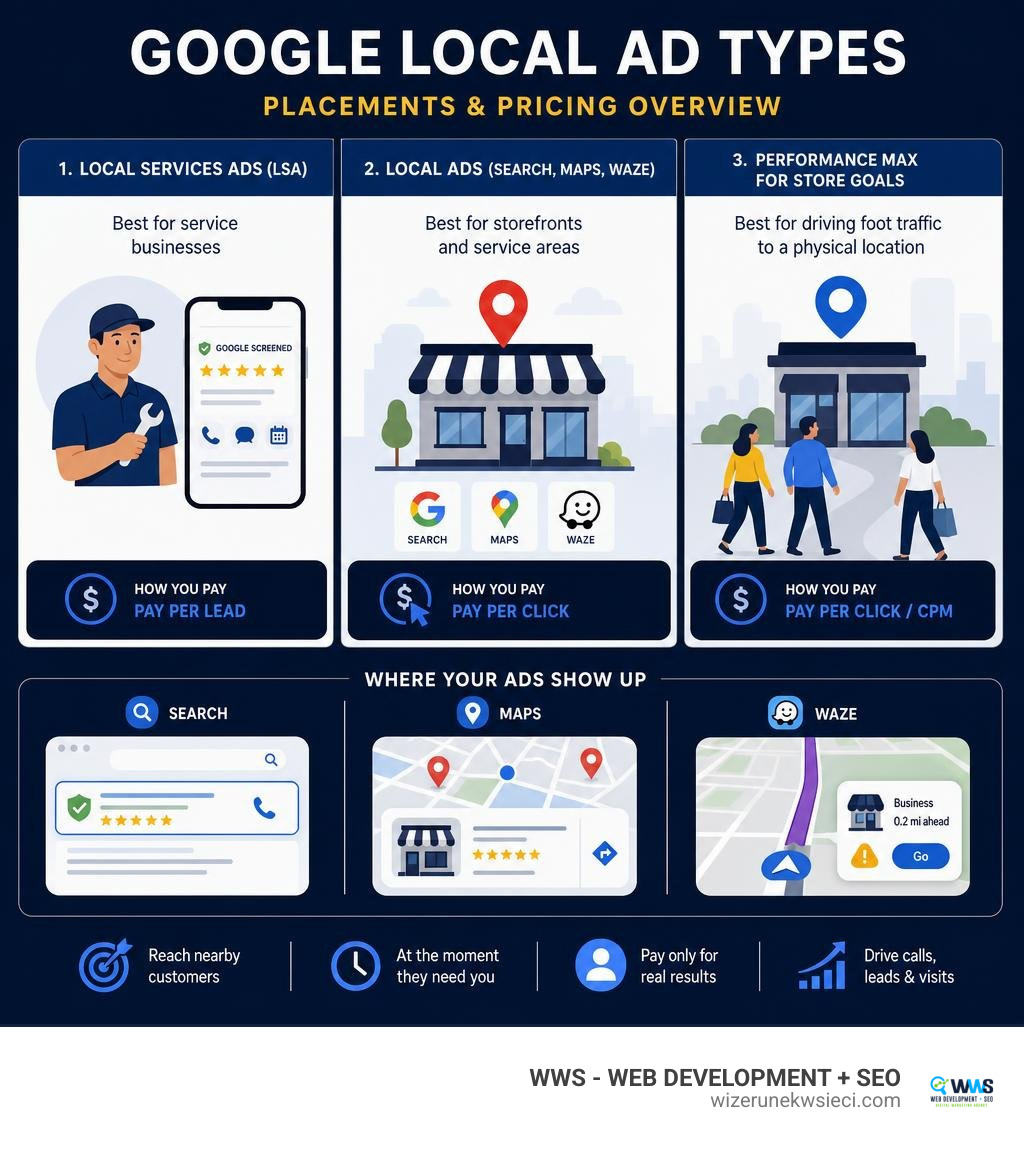
Google gives local businesses three main ways to advertise:
| Ad Type | Best For | How You Pay |
|---|---|---|
| Local Services Ads (LSA) | Service businesses (plumbers, lawyers, dentists) | Pay per lead |
| Local Ads (Search, Maps, Waze) | Physical storefronts and service areas | Pay per click |
| Performance Max for Store Goals | Driving foot traffic to a physical location | Pay per click / CPM |
The fastest way to get started:
- Check if your business category qualifies for Local Services Ads
- Create or verify your Google Business Profile
- Choose between Local Services Ads (leads) or Local Ads (traffic)
- Set your budget and complete any required verification
- Launch and monitor your results
Every day, people in your neighborhood open Google and search for exactly what you sell — a plumber, a dentist, a hair salon, a family lawyer. The question is: does your business show up when they do? For most small shop owners, the honest answer is not consistently — and that’s costing real revenue. Local business ads on Google are designed specifically to solve that problem, putting your business in front of nearby customers at the exact moment they’re ready to act. Unlike traditional advertising, where you pay to reach a broad audience and hope someone bites, Google’s local ad products let you pay only when a real customer makes contact — whether that’s a phone call, a booking, or a visit to your store.
I’m Tomasz Lasota, founder of WWS — Web Development + SEO in Des Plaines, IL, and over more than 22 years of helping small and medium-sized businesses across the Chicago area grow through digital marketing, local business ads on Google have consistently been one of the fastest paths to measurable results for our clients. In this guide, I’ll walk you through everything you need to know — from choosing the right ad type to navigating the major changes Google is rolling out through 2026 and 2027.
Quick look at local business ads google:
Google Local Services Ads vs. Standard Ads: What Business Owners Must Know
When business owners ask us about setting up local business ads Google solutions, they often assume all Google Ads are fundamentally the same. In reality, standard Search ads and Google Local Services Ads (LSAs) serve completely different roles in your customer acquisition strategy.
Standard Google Search Ads work on a traditional Pay-Per-Click (PPC) keyword model. You bid on specific search terms, write text ads, and pay every time a user clicks your link to visit your website or landing page. These ads sit right near the top of the search engine results page (SERP), but driving conversions depends heavily on the quality of your website and landing pages. To learn more about navigating standard campaigns, check out our A Quick Start Guide to Google Ads for Local Businesses.
By contrast, Google Local Services Ads sit at the very top of Google Search — above standard PPC ads, above organic listings, and even above the standard Google Maps Local Pack. Instead of sending users to your website, LSAs give prospective customers direct ways to reach you instantly via phone calls, direct messaging, or online appointment scheduling.
Key Benefits of Pay-Per-Lead Local Business Ads Google Features
The absolute single biggest advantage of Local Services Ads for local service providers is the risk-free pricing structure. With standard PPC ads, a casual browser or competitor can click your ad, drain your daily budget, and leave without contacting you. LSAs eliminate that risk entirely because you only pay for actual direct contact from potential clients. To explore how Google structures these services, review official documentation on how to Reach Local Customers with Local Service Ads – Google Ads.
When you run Local Services Ads, you gain several unique operational advantages:
- Prime Placement: Your listing appears at the absolute top of the screen on both mobile devices and desktop computers.
- Pay-Per-Lead Model: You incur no ad costs for casual clicks, website visits, or impressions — you pay strictly for qualified incoming phone calls or direct bookings.
- Trust Badges: Google awards qualifying companies a “Google Guaranteed” or “Google Screened” badge, which builds instant trust with first-time prospective clients.
- Simplified Setup: You do not need complex keyword lists or ad copy variations; Google automatically matches your business profile to local search intent.
Pay-Per-Lead Pricing vs. Standard Pay-Per-Click Advertising
Understanding how you are billed is essential for managing your digital marketing budget effectively. With standard Google Ads, cost-per-click (CPC) rates vary based on competitive bidding dynamics across Chicago and its surrounding suburbs. You pay for the click regardless of whether that visitor fills out a contact form or immediately bounces off your site.
With Local Services Ads, billing operates on a true pay-per-lead system:

- Lead Generation: A local customer searches for a service (e.g., “emergency electrician in Des Plaines”) and taps your ad call button.
- Direct Connection: The customer initiates a live call, submits a message, or books a service directly through the ad interface.
- Lead Validation: Google charges your account only if the lead is valid and directly related to your selected service categories and geographical service areas.
- Dispute Resolution: If you receive spam, a automated telemarketing call, or a job request outside your geographic territory or core service offerings, you can flag and dispute the charge directly through your lead dashboard to request a financial credit back.
Eligibility and Google Verification for Local Business Ads Google
Google takes trust very seriously when presenting local service providers to searchers. To protect users from fraudulent contractors and low-quality providers, Google imposes a strict screening process before granting access to Local Services Ads and awarding its coveted verification badges. Passing this verification is essential for establishing strong online trust, which works hand-in-hand with comprehensive Google Business Profile Optimization.
Eligible Categories and Earning the Google Verified Badge
Local Services Ads are available across dozens of key business categories, organized broadly into these primary verticals:
- Home Services: HVAC, plumbing, electrical, roofing, lawn care, pest control, locksmithing, house cleaning, and general contracting.
- Business & Legal Services: Personal injury attorneys, estate planning lawyers, family law, immigration law, accountants, and tax specialists.
- Healthcare & Wellness: Dentists, chiropractors, physical therapists, primary care doctors, and optometrists.
- Care & Learning Services: Child care centers, pet groomers, tutors, and private driving instructors.
- Automotive Services: Auto repair shops, body shops, towing services, and mobile detailing.
- Beauty Services: Hair salons, barbershops, and medical spas.
When your business passes Google’s qualification criteria, you receive a verification badge directly on your ad:
- Google Guaranteed: Typically issued to home service contractors, carrying a money-back guarantee supported by Google (up to $2,000 in lifetime coverage for job performance disputes).
- Google Screened: Granted to professional service providers (like lawyers, accountants, and financial advisors) to prove background checks and professional licensing have been vetted.
Navigating Screening, Background Checks, and Licenses
To earn your Google Verified badge, you must submit documentation and pass multi-step screening procedures. Google outlines these strict requirements in their guide on How providers qualify for Local Services Ads – Local Services Help.
The screening process consists of several mandatory checks:
- License Verification: You must upload valid state and local professional licenses proving you are legally registered to operate in your jurisdiction (e.g., Cook County or Lake County, IL).
- Insurance Verification: Google requires proof of general liability insurance meeting minimum dollar thresholds designated for your specific industry.
- Background Checks: Business owners, and in many home service categories, field technicians who perform work at customer residences, must complete background checks conducted by Google’s independent vetting partners.
- Background Check Equivalency: If your business already performs internal background checks that meet or exceed Google’s strict corporate standards, you can apply for an equivalency waiver.
- Google Business Profile Linking: The individual setting up the LSA account must be a verified owner or manager on the connected Google Business Profile. Access sync requests can take up to 24 hours to update on your verification dashboard.
Driving Foot Traffic with Physical Location Ads on Search, Maps, and Waze
While Local Services Ads cater heavily to service providers visiting customer sites or taking client calls, brick-and-mortar storefronts — such as retail shops, restaurants, auto repair bays, and medical clinics — need to drive physical foot traffic. Google Local Ads serve this exact purpose across Google Search, Google Maps, and Waze. Integrating physical location ads into your strategy is closely connected to mastering Get on the Map with This Easy Google My Business SEO Guide.
Multi-Surface Placement Rules for Local Business Ads Google
Local Ads showcase your physical location across multiple Google properties by linking your Google Business Profile location assets at either the campaign or account level. Technical rules and display rules are outlined in detail in About Local Ads – Google Ads Help.
These ads deliver visual geographic intent across three distinct digital surfaces:
- Google Search: Local ads appear co-mingled with organic local listings or as independent location extensions featuring address information, operating hours, phone numbers, and native “Book” or “Schedule” CTA buttons.
- Google Maps: Your store is highlighted with custom square promoted pins on map views, appearing right at the top of local map search results when drivers search for nearby businesses.
- Waze (US Only): Promoted place pins display your brand logo along a driver’s navigation route as they travel through local Chicago suburbs like Rosemont, Park Ridge, or Niles.
Billing mechanics depend on the placement and campaign type:
- Standard Local Ads (CPC): You are billed on a standard cost-per-click basis when a user taps your ad to get driving directions, make a phone call, or click a sitelink. Google enforces a strict single-click charge rule: even if a user taps your directions, call button, and website link within a single interaction session, you are only charged for one single click. Tapping image carousels or swiping media assets incurs zero charge.
- Promoted Logo Pins (CPM): Under Performance Max for store goals campaigns, displaying branded logo pins on Google Maps is billed on a Cost-Per-Thousand Impressions (CPM) model rather than CPC.
Setting Up Performance Max Campaigns for Local Store Goals
To automate ad delivery across Search, Maps, YouTube, Gmail, and Waze simultaneously, Google utilizes Performance Max campaigns built specifically around store goals. For a full walkthrough, refer to Step 1: Create a campaign and choose a goal – Google Ads Help.
To launch a store goal campaign effectively:
- Connect Location Assets: Link your Google Business Profile account directly to Google Ads to feed location data into your campaign.
- Select Campaign Objective: Choose “Local store visits and promotions” as your primary marketing objective when launching your campaign.
- Define Conversion Goals: Set your conversion targets to track Store Visits, Store Sales, direction clicks, or call clicks. Assigning realistic conversion values to actions (e.g., valuing a direction request at $15) allows Google AI to optimize your bidding strategy.
- Automated Geo-Targeting: You do not need to manually draw complex geographic radius circles. Google AI automatically infers your targeting radius around your physical address to optimize store visit delivery.
The 2026-2027 Migration of Local Services Ads into Google Ads
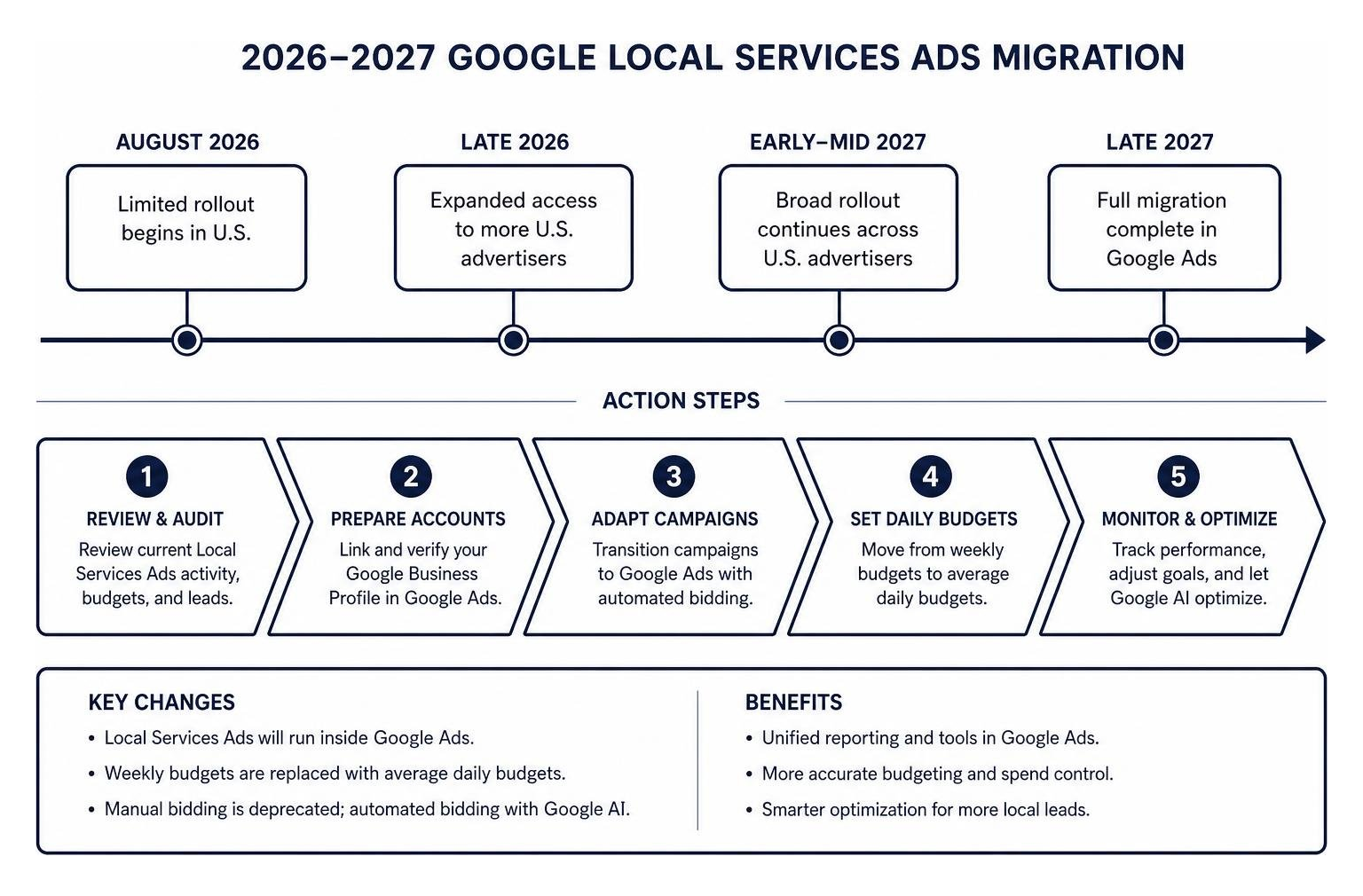
If you currently use or plan to deploy Local Services Ads, you must prepare for a major ecosystem shift. Google is actively migrating standalone Local Services Ads into the primary Google Ads interface. Rollout begins with a limited group of U.S. advertisers in August 2026, with full account migration continuing through 2027. To stay ahead of these structural updates, explore our expertise in managing advanced Paid Campaigns.
What Changes for Daily Budgets, Bidding, and Target CPA
This platform unification changes how local service businesses manage ad spend, bidding rules, and campaign organization:
- Daily Budgets Replace Weekly Budgets: The legacy LSA portal managed ad spend using weekly targets. In Google Ads, campaign spending is governed strictly by an average daily budget (calculated as your monthly budget divided by 30.4 days).
- Manual Bidding Deprecation: Manual bid adjustments are fully eliminated. LSA campaigns inside Google Ads rely on automated bidding powered by Google AI.
- Unified Campaign Target CPA: Previously, multi-service contractors could set different target acquisition costs for individual services (e.g., bidding different targets for drain cleaning versus whole-home pipe lining). Post-migration, Google Ads calculates a single campaign-level Target CPA across all service categories within that campaign.
- Pay-Per-Lead Continuity: Rest assured, the core pay-per-lead billing model remains intact. You will still pay only for valid incoming calls, messages, and direct bookings rather than pay-per-click website visits.
Critical Action Steps Before Your Account Migrates
Because Google will decommission the legacy Local Services Ads standalone dashboard, local advertisers must complete several preparation steps. Aligning these changes with a broader strategy for your overall Marketing Campaigns ensures uninterrupted lead flow.
Before migration hits your account:
- Download Historical Reports: Historical performance data, conversion metrics, and financial reporting will not transfer to the main Google Ads interface and will be permanently lost once the legacy dashboard closes. Export all reporting history to spreadsheet files immediately.
- Audit Google Business Profile Data: Ensure your business name, street address, operating hours, and phone numbers match across Google Ads and your Google Business Profile. Making drastic updates immediately around migration can trigger security reviews lasting 24 to 48 hours, temporarily pausing your ad delivery.
- Review Service Category Splits: If your business offers multiple distinct service lines with vastly different price points and profit margins (such as routine lawn mowing versus high-ticket landscape construction), split them into separate campaigns before migration so each operates under its own Target CPA.
- Update Ad Extensions & Callouts: Replace older callout references (such as Better Business Bureau badges) with at least six fresh alternative callouts highlighting your warranties, emergency availability, or local family ownership.
Real-World Results and Success Strategies for Small Businesses
When properly executed, combining organic local optimization with targeted paid ads creates an unstoppable local acquisition system. You can explore how organic strategies support paid ads by reading our guide to comprehensive Local SEO.
Measuring Local ROI and Scaling Campaign Performance
To maximize campaign efficiency and boost your Return on Ad Spend (ROAS), track key performance indicators closely:
- Cost Per Qualified Lead (CPL): Measure total monthly spend divided by verified, valid customer leads received.
- Call Lead Conversion Rate: Track how many incoming phone leads turn into booked home appointments or scheduled consultations.
- Store Visit Conversion Value: Assign accurate monetary values to direction clicks and call button taps so Google AI optimizes bids for high-value searchers.
- Lead Dispute Recovery: Audit your lead log weekly to flag invalid lead calls (such as wrong numbers, sales calls, or out-of-area inquiries) to receive full account ad credits.
Frequently Asked Questions About Local Business Google Advertising
What do Local Services Ads cost compared to standard Google Ads?
Local Services Ads operate on a pay-per-lead model, meaning you pay only when a potential client calls, messages, or books with you directly through the ad. Lead costs vary based on industry and location, ranging from $15 to $45 per lead for trade services like plumbing or HVAC, up to $100+ per lead for high-value legal or medical categories. Standard Google Ads operate on a Pay-Per-Click (CPC) model where you pay every time someone clicks your ad link (typically $2 to $12+ per click in competitive Chicago suburban markets), regardless of whether they end up contacting your business.
What happens to my historical reporting data during the 2026 migration?
Historical reporting metrics stored within the legacy Local Services Ads dashboard will not transfer over into the Google Ads dashboard when your account migrates between August 2026 and 2027. While your lead contact history will transfer into the Lead Manager inbox, all performance charts, historical cost metrics, and analytical reports will be lost once access to the legacy dashboard ends. We strongly recommend downloading all historical reporting data into CSV or PDF format before your scheduled migration date.
How long does the screening and background check verification take?
The verification timeline for Local Services Ads typically takes anywhere from 1 to 3 weeks depending on your industry and how quickly you upload required documents. License and general liability insurance documentation reviews are usually completed within a few business days. Background checks for business owners and field employees (conducted by Google’s independent vetting partners) can take up to two weeks. Ensuring your Google Business Profile details match your legal business registration documents will prevent unnecessary verification delays.
Conclusion
Navigating local business ads on Google doesn’t have to be overwhelming or stressful. Whether you are running a local service company aiming for top placement with Google Guaranteed Local Services Ads, or managing a retail shop looking to drive nearby drivers through Google Maps and Waze, leveraging Google’s targeted local ad platform is one of the most effective ways to generate consistent leads and grow your bottom line.
As Google rolls out its major interface migration through 2026 and 2027, staying ahead of budget changes, bidding automation, and campaign structures will be key to maintaining your competitive edge.
At WWS (Wizerunek w Sieci), based in Des Plaines, IL, we take pride in acting as a dedicated, hands-on digital partner for small and medium-sized business owners across the entire Chicago metropolitan area. From website design and local SEO to fully managed Google Ads and Meta Ads campaigns, we treat your business with the same care and attention as if it were our own.
Ready to dominate local search and turn nearby searchers into loyal customers? Explore our professional management of Paid Campaigns or connect with us today to claim your free website audit and local advertising review!