





Set Google Ads Budgets Around Leads, Not Clicks
Start with the cost of a lead your business can afford. Set a daily limit for each campaign, then check conversion tracking to see which campaigns bring in calls or inquiries. Move more of your ad spend toward campaigns that produce valuable leads. Check your monthly spending forecast before raising any limits.
A campaign marked “Limited by Budget” may have room to grow, but more traffic is only useful if it brings the right customers.
I’m Tomasz Lasota, founder of Wizerunek w Sieci / WWS – Web Development + SEO. I use my experience helping Chicago-area and US small businesses with paid ads to make google ads budget management a practical decision about leads and revenue, not just clicks.
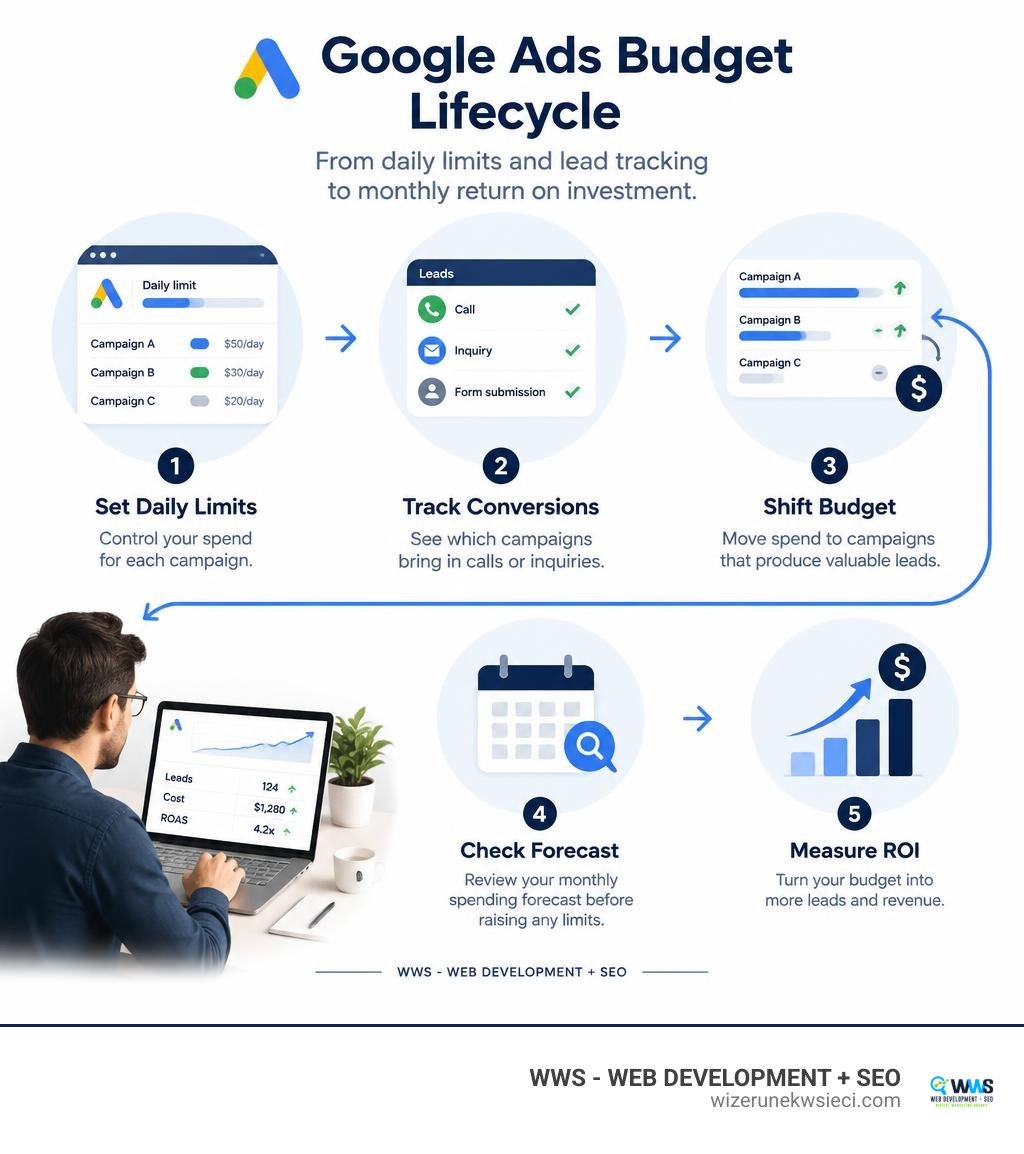
Simple google ads budget management word guide:
Account Budgets vs. Campaign Budgets: Core Mechanics
Managing your advertising investment begins with understanding the distinct structural layers within your account. Many small business owners confuse account budgets with campaign budgets, which can lead to unexpected campaign pauses or misallocated spend across service lines.
An account budget acts as an overarching spend cap for an entire Google Ads account over a set date range. Campaign budgets, by contrast, control how much individual campaigns can spend daily or over a set timeframe. Structuring these layers properly ensures that your paid campaigns deliver consistent lead flow without exceeding your monthly marketing allocations.
| Feature | Account Budget | Campaign Budget |
|---|---|---|
| Scope | Entire Google Ads account across all active campaigns | Single campaign or a specified group of campaigns |
| Primary Function | Hard financial ceiling and billing limit | Daily pacing and tactical traffic acquisition |
| Billing Type | Essential for monthly invoicing accounts | Applies to all billing setups (automatic, manual, invoice) |
| Behavior When Reached | All ads across the entire account immediately stop serving | Only that specific campaign stops serving for the day |
| Time Horizon | Specific date range (e.g., monthly, quarterly, annual) | Daily average or fixed campaign duration |
As outlined in Google’s official documentation on about account budgets, balancing both levels provides full visibility into total costs while giving high-performing campaigns room to compete.
Understanding Account-Level Spend Caps
For businesses using consolidated monthly invoicing, account-level spend caps provide vital protection. When you set an account budget, you define an absolute spending ceiling for a specific billing profile. If total campaign spend reaches that cap before your specified end date, Google instantly pauses all active campaigns in the account.
Account budgets also reflect financial adjustments directly in your reporting:
- Credit Adjustments (Green Plus Sign): When Google detects invalid clicks or applies promotional service credits, these funds are credited back to your account budget balance.
- Pending Budget Increases (Red Minus Sign): When you request a spending limit increase, this indicator notes that your change is currently in processing before the higher ceiling takes effect.
Other advertising services, such as specialized merchant listings or third-party fees, are billed separately on distinct invoice lines and do not consume your primary account budget.
How Campaign Daily and Shared Budgets Function
While an account budget defines your global ceiling, campaign budgets control day-to-day execution. When launching local search ads, our quick start guide to Google Ads for local businesses emphasizes setting clear average daily budgets tailored to your target service radius.
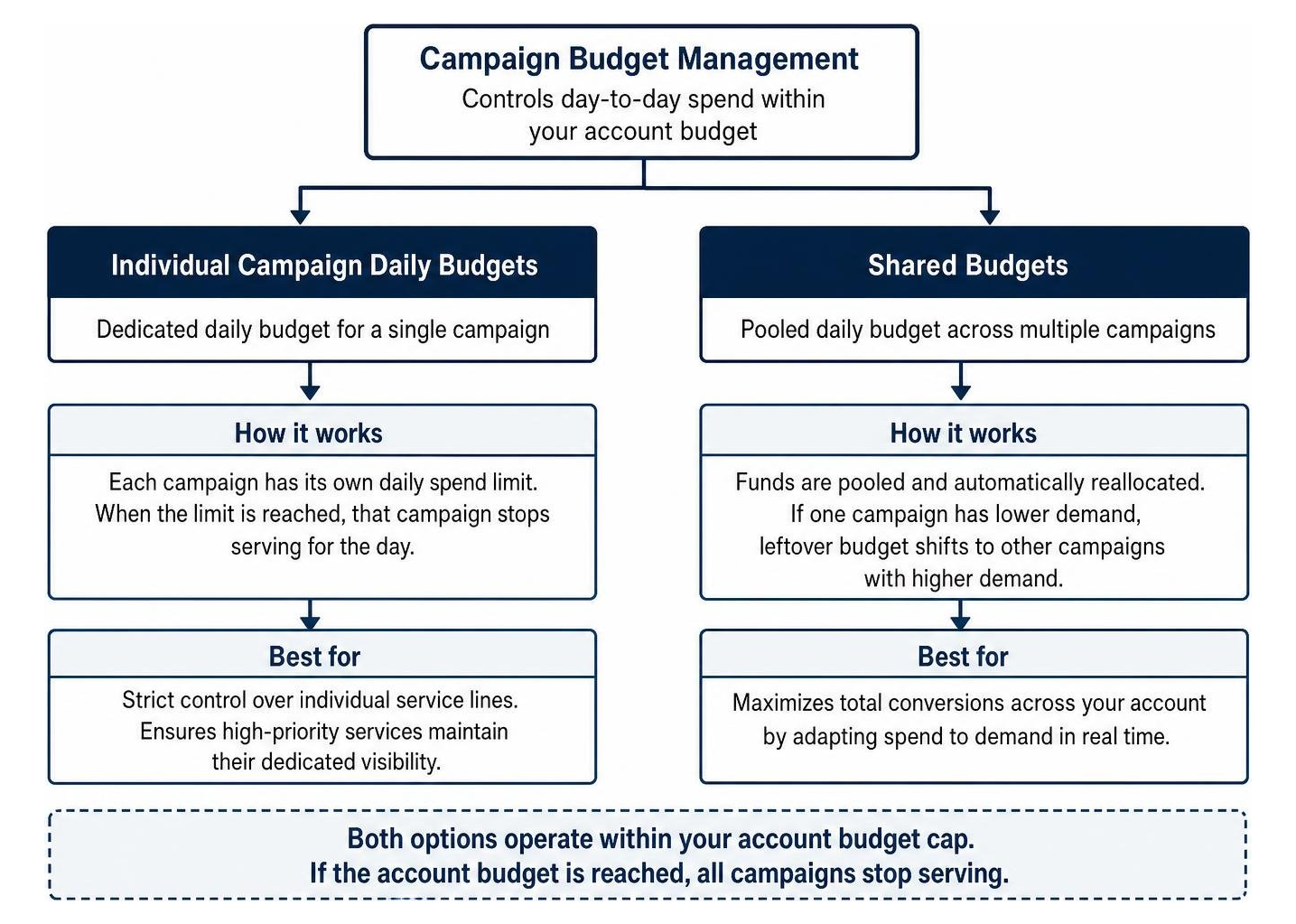
Google Ads provides two primary ways to manage daily campaign spend:
- Individual Campaign Daily Budgets: You assign a dedicated daily spend limit to a single campaign. This setup offers strict control over individual service lines, ensuring high-priority services maintain their dedicated visibility.
- Shared Budgets: Stored in the Shared Library, a shared budget pools daily funding across multiple campaigns. If Campaign A experiences lower search volume on a rainy Tuesday while Campaign B experiences a surge in demand, Google automatically reallocates leftover funds from Campaign A to Campaign B, maximizing total conversions across your account.
Strategic Google Ads Budget Management for Small Business Campaigns
Effective budget control requires balancing traffic fluctuations with financial discipline. Search demand changes based on consumer habits, weather, and day of the week. Knowing how Google evaluates these fluctuations helps you maintain steady visibility while protecting your target acquisition costs.

Understanding the mechanics behind daily multipliers and forecasting allows you to plan your ad spend effectively, especially when using an essential guide to the Google Ads cost calculator to project monthly lead volume.
Core Rules for Google Ads Budget Management and Spending Limits
Google uses mathematical rules to balance search volume spikes with long-term cost controls:
- Daily Spending Limit: On days with high commercial search intent, a campaign can spend up to 2 times your average daily budget. This overdelivery allows your ads to capture valuable traffic surges without losing qualified leads to competitors.
- Monthly Spending Limit: Over a standard billing cycle, you are never charged more than 30.4 times your average daily budget (30.4 represents the average number of days in a calendar month). For example, if your average daily budget is $10 USD, your monthly spending cap is locked at $304 USD ($10 × 30.4).
To maintain financial accuracy, review the official guidelines on Google Ads spending limits. A key operational distinction to track is served cost versus billed cost:
- Served Cost: The total value of all ad impressions or clicks your campaign delivered.
- Billed Cost: The actual amount you are responsible for paying after Google filters invalid activity and deducts overdelivery beyond your monthly cap. If served costs exceed your monthly limit, Google covers the excess cost entirely.
Deciphering the ‘Limited by Budget’ Status and Scaling Spend
When managing high-intent campaigns, seeing a red “Limited by Budget” status in your dashboard is not an error message. It is a clear confirmation of strong market demand.
This status indicates that your campaign settings, keyword targeting, and ad copy are resonating with prospective buyers, but your daily budget runs out before search volume ends for the day. While local service companies can learn practical scaling methods from the complete guide to Google Ads for contractors to get leads, increasing spend requires a disciplined approach.
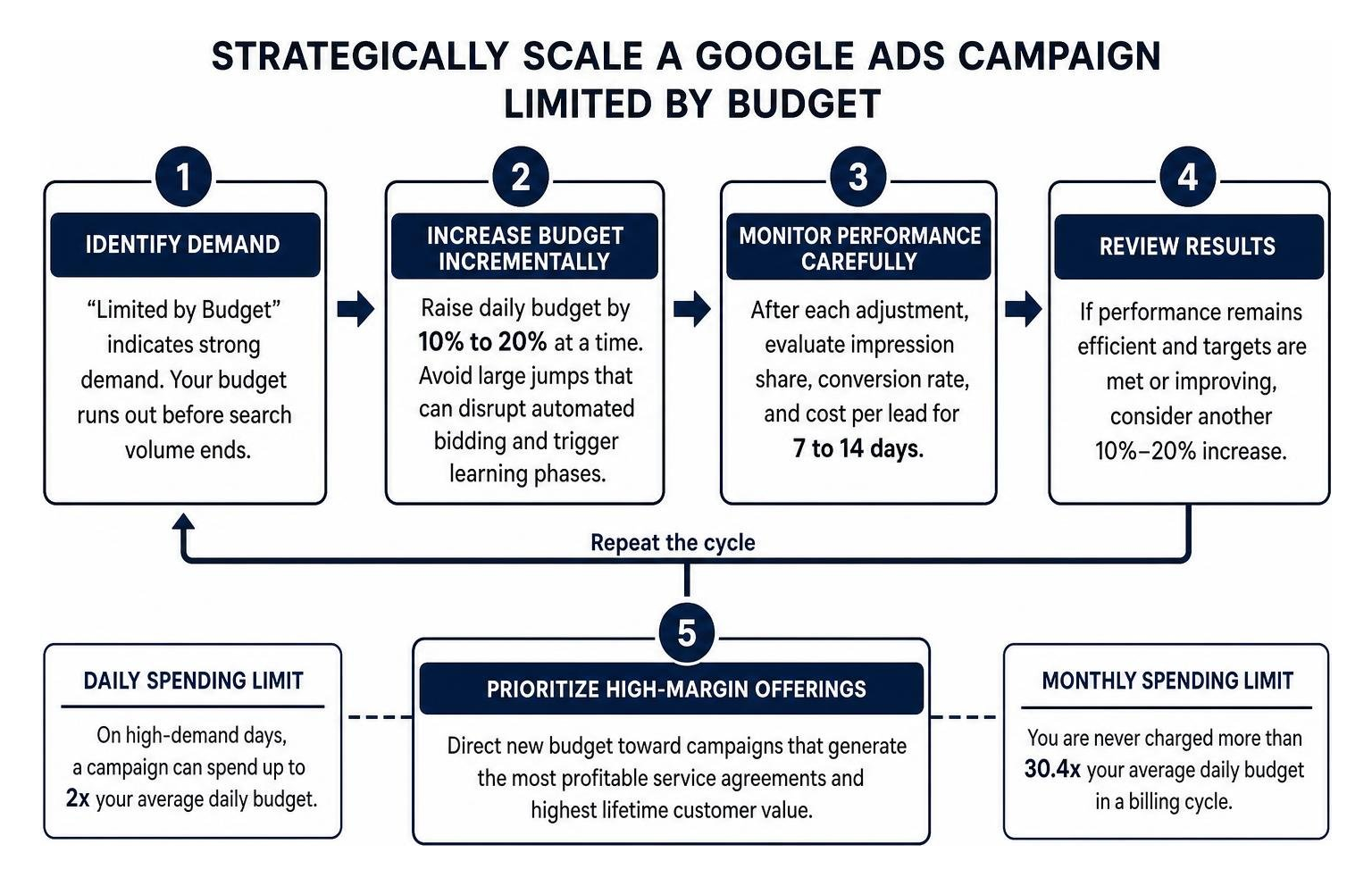
Follow these best practices when expanding budget limits:
- Scale Incrementally: Increase budgets by 10% to 20% at a time rather than doubling your spend overnight. Large budget jumps can disrupt automated bidding algorithms and trigger temporary learning phases.
- Monitor Conversion Efficiency: Following an adjustment, evaluate impression share, conversion rate, and cost per lead for 7 to 14 days before applying another increase.
- Prioritize High-Margin Offerings: Direct new budget allocations toward campaigns that generate your most profitable service agreements and highest lifetime customer values.
Tracking Performance with the Google Ads Budget Report
The Google Ads Budget Report helps forecast future spend based on current pacing. Available at the campaign, ad group, and shared library levels, this tool provides clear visibility into your financial trajectory:
- Monthly Forecast with Confidence Intervals: Displays projected end-of-month spend based on historical performance, keyword search volume trends, and seasonality.
- Cumulative Monthly Spend Visualizations: A dynamic chart comparing cumulative spend against your monthly spending limit.
- Budget Explorer Simulation: Allows you to test hypothetical daily budget adjustments and instantly preview their projected impact on monthly spend and traffic volume before saving changes.
Advanced Implementation: API Operations and Budget Chaining
For growing enterprises, multi-location franchises, and businesses managing programmatic ad accounts, the Google Ads API provides direct, code-level control over billing operations.
Automating budget allocations through the API eliminates manual data entry errors and ensures accounts scale in direct alignment with internal inventory and lead booking systems. Additional technical specifications are detailed in the Campaign Budgets Overview via Google Ads API.
Programmatic Google Ads Budget Management via the Google Ads API
Programmatic account budget adjustments rely on the AccountBudgetProposalService. Budget amounts are handled in currency micros (where 1,000,000 micros equals $1.00 USD), allowing precise financial control.
The API manages budget changes through four proposal operations:
- CREATE: Submits a new account budget proposal requiring a valid
billing_setup, proposed spending limit in micros, and specified start and end timestamps. Google reviews and approves most proposals offline within one hour. - UPDATE: Modifies the spending limit or end date of an existing budget. Updates require an explicit
UpdateMaskto confirm that only target fields are modified. - END: Closes an active account budget early, capping final spend at the exact moment of execution.
- REMOVE: Cancels a pending budget proposal before it gets approved or goes live.
Advertisers can query live budget statuses, approved spending caps, and adjusted limits using Google Ads Query Language (GAQL) across the account_budget resource.
Account Budget Chaining and Sequential Budgeting
Google Ads allows only one active account budget at a time per customer account. To manage sequential quarterly initiatives or shifting monthly limits without service interruptions, advertisers use account budget chaining.
Budget chaining involves submitting successive CREATE proposals with scheduled date ranges. The system queues the upcoming budget proposal so that when the current budget reaches its designated end date (or its spending limit is reached), the next budget activates automatically.
Additionally, Google Ads supports campaign total budgets for fixed-duration initiatives across Search, Performance Max, Demand Gen, Standard Shopping, and YouTube campaigns. Setting a fixed total budget ensures that a time-sensitive promotional push runs within a defined budget from start to finish.
Frequently Asked Questions About Google Ads Budget Allocation
What happens if my daily Google Ads spend exceeds my daily budget?
Google Ads allows daily spend to reach up to 2 times your average daily budget on high-traffic days. However, your total charges will never exceed your monthly spending limit, which is calculated as your daily budget multiplied by 30.4. Any traffic delivered beyond this monthly threshold is classified as overdelivery, and Google covers the served cost difference automatically.
Why is the ‘Limited by Budget’ notification considered a positive indicator?
The “Limited by Budget” status confirms that your targeting, ad copy, and keyword strategy are successfully driving qualified user interest. It indicates that high-intent market demand exists beyond your current daily limit. By scaling your budget incrementally by 10% to 20%, you can capture additional market share and conversion volume without disrupting bidding performance.
Which campaign types support total budgets instead of daily budgets?
Campaign total budgets can be assigned to Search, Performance Max, Demand Gen, Standard Shopping, and YouTube campaigns, provided they have designated start and end dates. Total budgets are well-suited for seasonal promotions, product launches, and fixed-term marketing initiatives.
Conclusion
Managing a Google Ads budget requires strategic alignment between daily spend limits, overarching account caps, and clear cost-per-lead targets. By understanding how daily multipliers, overdelivery protection, and shared budgets work together, small business owners can scale their advertising profitably while maintaining complete control over cash flow.
At WWS (Wizerunek w Sieci / WWS — Web Development + SEO), we help small businesses across the Chicago metropolitan area—including Des Plaines, Schaumburg, Arlington Heights, Naperville, and the wider Polish-American community (Polonia Chicago)—turn their marketing budgets into sustainable customer acquisition channels. We combine the technical expertise of a full-service agency with the personal attention, local market knowledge, and bilingual communication your business deserves.
Ready to optimize your paid advertising and capture higher-quality leads? Explore our tailored website SEO and digital marketing solutions or contact WWS today to schedule your comprehensive marketing audit.