





LocalBusiness schema is structured data that tells search engines the name, address, hours, and other facts about a physical or service area business in a machine-readable format. The single highest leverage action is to add a JSON-LD LocalBusiness block, using the most specific subtype available, to your homepage with name and PostalAddress filled in correctly, then validate it against Google Search Central and Schema guidance or have a partner like WWS – Web Development + SEO set it up for you.
TL;DR:
- Google requires only the business name and a PostalAddress for eligibility; match both exactly to your Google Business Profile and add optional details accurately.
- Choose the most specific accurate subtype, such as Restaurant or Dentist, to unlock relevant properties; use generic LocalBusiness when no subtype fits.
- Give each location page its own address block; interior pages need only name, URL, and telephone, and one entity must not combine locations.
- Omitting a street address protects private locations but generally rules out fixed point map results; use areaServed for actual coverage areas.
- Use full day names and 24 hour times for opening hours, match details to your profile, and validate live pages after updates.
Table of Contents
- What local business schema does for your search visibility
- Required and recommended properties checklist
- Picking the right LocalBusiness subtype
- Where to place LocalBusiness schema across your site
- Service area businesses: handling schema without a storefront
- Fixing the most common validation errors
- Copyable JSON-LD templates for every page type
- Deploying and maintaining your schema over time
- Why we treat schema as a core part of local campaigns
- How we implement and maintain local business schema for you
- FAQ
- Sources
What local business schema does for your search visibility
Structured data gives Google a clean, unambiguous data packet instead of asking its crawlers to guess your business details from paragraphs and footer text. When you mark up your name, address, phone number, and hours with LocalBusiness schema, you remove the interpretation step and hand search engines exact values they can trust.
That clarity feeds several visible search features. Your opening hours can trigger an “Open now” or closing-time label directly in search results. Your geo coordinates help anchor your listing correctly on map based results. If you run a restaurant and add servesCuisine or menu properties, you become eligible for richer restaurant specific result formats. None of these features are guaranteed, but none of them are possible without the underlying data being present and correctly typed.
A few outcomes schema can influence when implemented well:
- Open now indicators: openingHoursSpecification data can surface real time hours status in search results.
- Map pack anchoring: accurate geo coordinates help tie your business entity to the correct physical location.
- Rich snippet eligibility: subtype specific properties like servesCuisine or medicalSpecialty unlock category specific result formats.
- Entity consistency: matching schema, Google Business Profile, and on page data reduce the chance Google displays conflicting information.
It helps to be clear about what schema is not. It does not replace your Google Business Profile listing or your local citation profile, and it will not independently move your map pack ranking. Structured data works alongside those signals, confirming what your profile and citations already say rather than substituting for them. A business with perfect schema and an abandoned Google Business Profile will still struggle in local search, while a business with a strong profile and no schema may simply be leaving incremental visibility on the table. Schema is a supporting signal, not the whole strategy, and that distinction matters when you prioritize where to spend implementation time. For a wider view of how schema fits into a complete local program, our local SEO ranking guide walks through the other signals that work alongside it.
Required and recommended properties checklist
Google Search Central states that the minimum fields for LocalBusiness eligibility are the business name and a PostalAddress object. Everything past that point is optional but meaningfully improves how much Google can do with your listing, so treat the recommended fields as a working checklist rather than an afterthought.
Required properties:
- name: the exact legal or trading name of the business, matched to your Google Business Profile.
- address: a PostalAddress object containing streetAddress, addressLocality, addressRegion, postalCode, and addressCountry.
Recommended properties:
- telephone: include the country code and area code so the number resolves correctly regardless of where a search originates.
- url: the canonical URL of the page the schema describes.
- image: a representative photo of the storefront, team, or primary service.
- openingHoursSpecification: structured hours using full day names and 24-hour time values.
- geo: latitude and longitude, specified with enough precision to identify the location.
- priceRange: a short indicator such as “$$” or a numeric range, kept under 100 characters.
- sameAs: links to verified social profiles and third party listings that confirm the entity.
- aggregateRating: review summary data, where you have genuine review counts to report.
Google officially recommends JSON-LD as the preferred format for all schema implementation, over Microdata or RDFa, because it sits in a self-contained script block and does not require weaving attributes through your visible HTML.
Formatting discipline matters as much as field selection. Your telephone number should read as a full international format, not a bare local number a visitor would need to add an area code to mentally. Your openingHoursSpecification should use complete English day names rather than abbreviations, and times should be written in 24-hour format. When your hours differ across days, for example shorter Saturday hours or a midweek closure, create a separate OpeningHoursSpecification object for each distinct pattern instead of trying to force every day into one block.
A handful of smaller rules trip up otherwise solid implementations. Google notes that priceRange needs to use a normalized currency sign set or a simple numeric range, and it must stay under 100 characters for Google to display it at all, so a long descriptive sentence in that field will simply get ignored. Your address fields should match your Google Business Profile exactly, down to whether you write “St” or “Street,” because mismatches between these two sources are one of the most common reasons schema fails to reinforce your listing. Geo coordinates should carry enough decimal precision to distinguish your building from the one next door. None of these details are dramatic individually, but together they decide whether your markup reads as trustworthy data or as noise Google chooses to ignore.
Picking the right LocalBusiness subtype
Schema.org’s hierarchy means every subtype inherits the base LocalBusiness properties, then adds its own on top, which is why picking the most specific type available gives search engines more to work with than generic LocalBusiness ever can. Schema.org documents a long list of LocalBusiness subtypes, including categories like Plumber, Restaurant, Dentist, AutoRepair, and LegalService, each tied to properties that only make sense for that kind of business.
Some commonly useful subtypes:
- Restaurant: unlocks servesCuisine, menu, and acceptsReservations properties.
- Plumber: inherits from LocalBusiness and HomeAndConstructionBusiness, signaling a home services category.
- Dentist: falls under MedicalBusiness, pairing naturally with medicalSpecialty.
- AutoRepair: signals an automotive service category distinct from retail.
- LegalService: a ProfessionalService subtype suited to law firms and consultants.
The practical payoff of choosing correctly shows up in the extra properties you unlock. A Restaurant type lets you declare servesCuisine so Google understands you serve Thai food rather than guessing from your page copy, and a full menu property can feed richer food related result formats. A MedicalClinic or Dentist type lets you declare medicalSpecialty, which has no equivalent field under generic LocalBusiness. ProfessionalService, a sibling type used by consultants and service firms, documents properties like openingHours and priceRange with formatting examples such as 24-hour time values, reinforcing that the formatting rules carry across subtypes consistently.
Fall back to the generic LocalBusiness type only when no accurate subtype exists for what you do. Forcing your business into a subtype that does not quite fit, just to access its properties, creates a mismatch between how you describe yourself and what you actually are, which works against the clarity schema is supposed to provide in the first place.
Where to place LocalBusiness schema across your site
Search engines need to associate the right attributes with the right physical location, and that becomes especially important once you operate more than one storefront or service address. Page level placement rules keep that association clean.
- Homepage: place a full LocalBusiness JSON-LD block here as your site’s primary entity declaration, with every required and recommended property filled in for your main or flagship location.
- Location pages: for each additional physical address, build a distinct JSON-LD block unique to that page rather than combining multiple addresses inside a single schema object, since Google reads one address per LocalBusiness entity.
- Interior pages: on service pages, blog posts, and other content that is not a location page, use a lighter anchor block containing just name, url, and telephone to maintain consistency signals without duplicating the full address and hours data everywhere.
This structure avoids two failure modes at once. Jamming multiple locations into a single schema block confuses which address belongs to which page, and Google has no reliable way to disentangle that after the fact. On the other end, copying your full homepage block onto every interior page creates redundant, sometimes conflicting signals if one copy gets updated and the others do not. A lightweight interior anchor block solves both problems: it confirms you are the same entity across the site without asking Google to reconcile five full copies of your address and hours.
If you run multiple locations, the page architecture question becomes just as important as the schema itself. Our JSON-LD and validation reference has copy-ready snippets if you want to see the location page pattern in full before building it out.
Service area businesses: handling schema without a storefront
Not every business operates from a location customers visit, and schema has a specific path for that. When you run a mobile or service area business, such as a plumber who drives to clients rather than hosting them at an office, you generally should not publish a full street address in your schema at all.
- Omit streetAddress: keep addressLocality, addressRegion, and postalCode so Google understands your general base of operations without exposing a private or residential address.
- Use areaServed: list the cities, counties, or regions you actually work in, or define a GeoShape for a more precise coverage area.
- Match your on-page content: the areas you claim in schema should mirror what your website’s copy actually says you serve, since a mismatch here reads as inconsistent to search engines.
- Expect a map effect: omitting streetAddress generally keeps you out of map pin style results tied to a fixed point, trading that for broader area relevance instead.
Pro Tip: List only the service areas you can realistically respond to within your normal service window, since overclaiming territory dilutes relevance for the areas that matter most.
Service area businesses that get this wrong tend to either publish a home address they never meant to make public, or leave areaServed blank and lose the regional relevance schema could have given them. Our guide to service area pages for non-storefront businesses covers the page level strategy that pairs with this schema approach.
Fixing the most common validation errors
Most LocalBusiness schema failures trace back to a short list of repeat offenders, and catching them before publishing saves a round trip through Google’s indexing cycle.
Invalid JSON syntax tops the list. A missing comma, an unclosed bracket, or a stray quotation mark anywhere in the script tag breaks the entire block, not just the one property near the error. Run your markup through a JSON linter before it goes live, check that every property name is wrapped in double quotes, confirm brackets and braces are balanced, and verify the file has no trailing commas after the last property in an object.
Mismatched business data between your website and your Google Business Profile causes quieter but equally damaging problems. If your site and profile list the address differently, Google may treat them as signals that do not reinforce each other rather than confirming the same entity. The fix is a direct side by side comparison of every field: name, address format, phone number, and hours, checked against your live Google Business Profile until they match exactly.
openingHoursSpecification errors show up when hours are written as abbreviated day names, 12-hour time formats, or a single block trying to cover days with different schedules. Practitioners report this is one of the most commonly misconfigured properties: the fix is full day names, 24-hour time values, and a separate OpeningHoursSpecification object for each distinct schedule pattern.
priceRange formatting causes silent failures rather than loud errors. A priceRange value needs to stay under 100 characters and use a normalized format, so a sentence like “prices vary depending on project scope” will not render, while a normalized currency sign set or simple numeric range can be used.
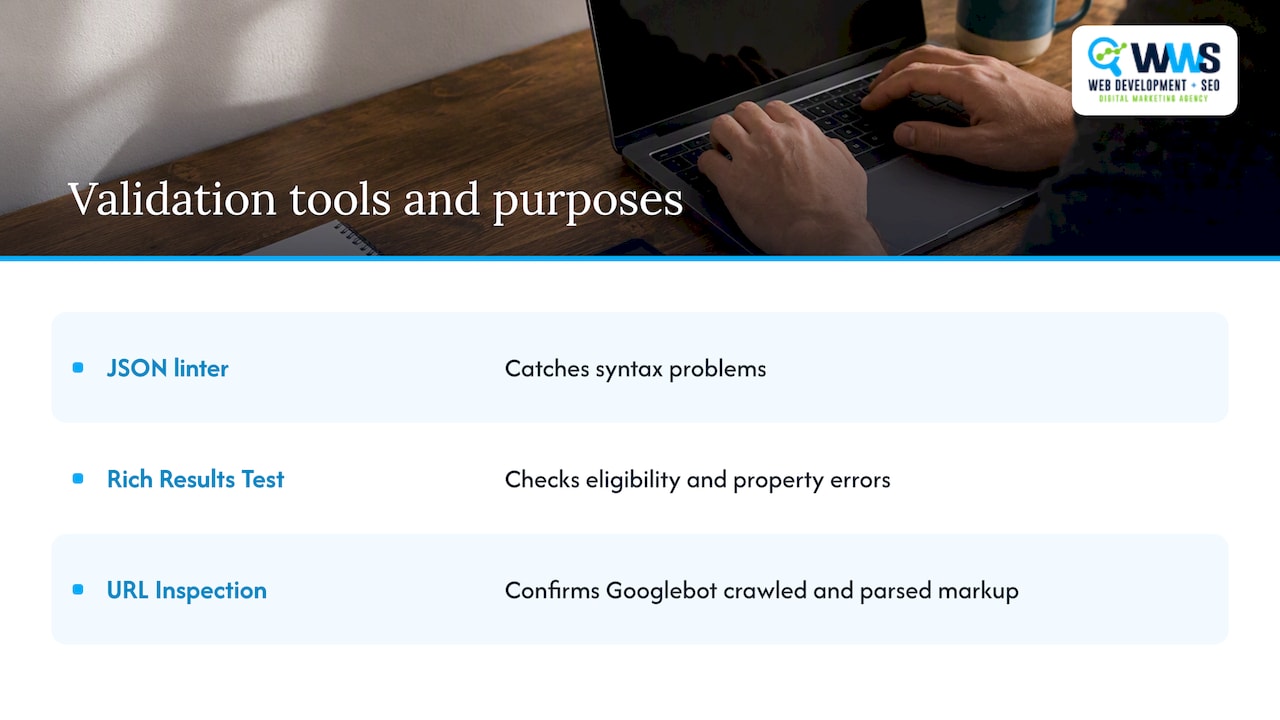
Three tools cover nearly every validation need. Google’s Rich Results Test confirms whether your markup is eligible for enhanced search features and flags specific property errors. A general structured data linter catches syntax problems before you even attempt validation. URL Inspection inside Google Search Console confirms whether Googlebot has actually crawled and parsed the live version of your markup, which matters because a fix that looks correct in a testing tool still needs to be confirmed against the indexed page.
Copyable JSON-LD templates for every page type
The templates below cover common page placements. Each should sit inside a script tag with type “application/ld+json,” placed in the document head, and validated through Google’s Rich Results Test immediately after you publish.
A homepage or primary subtype block should declare your most specific @type, your name, your full PostalAddress, and every recommended property your business can support: telephone, url, image, openingHoursSpecification, geo, priceRange, and sameAs links to your verified profiles.
A single location page block mirrors that structure but swaps in the attributes unique to that address: its own PostalAddress, its own telephone number, its own hours if they differ from your flagship location, and a canonical url pointing to that specific page rather than your homepage.
A service area business block replaces the full PostalAddress with addressLocality, addressRegion, and postalCode only, omitting streetAddress, and adds an areaServed array or GeoShape listing the regions you cover instead of a single fixed point.
An interior page anchor block stays minimal: just @type, name, url, and telephone, enough to confirm entity consistency without duplicating your full location data across the site.
| Page type | Address handling | Key properties included |
|---|---|---|
| Homepage | Full PostalAddress | name, address, telephone, url, image, hours, geo, priceRange, sameAs |
| Location page | Full PostalAddress, unique per page | name, address, telephone, url, hours specific to that site |
| Service area page | Locality, region, postal code only | name, areaServed, telephone, url |
| Interior page | None | name, url, telephone |
Once any of these blocks is live, run the page through Rich Results Test again. A template that validates in isolation can still fail once it is populated with your real data, so treat the test as the final step for every page, not a one time check during setup. Our JSON-LD snippet and validation library has ready to copy versions of each pattern above if you want a starting point closer to production code. Readers who prefer automated structured data tooling can also review this organization schema implementation guide for a complementary technical walkthrough.
Deploying and maintaining your schema over time
Getting LocalBusiness schema live correctly is only half the job. Business details change, and schema that drifts out of sync with reality quietly stops helping you.
- Pre-deploy checks: run your JSON-LD through a linter, confirm it passes Rich Results Test, and cross-check every field against your current Google Business Profile before anything goes live.
- Choose a deployment method: insert the script directly into your CMS theme’s head block, inject it through a tag manager if your platform supports that, or build it server-side if your site renders pages dynamically, since client-side-only injection can sometimes be missed by crawlers.
- Verify after deployment: use URL Inspection in Search Console to confirm Googlebot sees the markup as intended, and check back periodically rather than assuming a one time validation holds forever.
- Maintain on a change-driven cadence: update your schema any time your hours, address, pricing, or primary images change, and revalidate immediately after each update rather than batching changes for later.
Search Console will also surface structured data error notifications on its own, and treating those alerts as a prompt to recheck your markup, rather than letting them accumulate, keeps small mismatches from turning into a listing that quietly stops qualifying for rich results. A quarterly review of your schema against your live Google Business Profile is a reasonable minimum cadence even if nothing has obviously changed, since profile edits made through Google’s own interface do not automatically propagate back into your site’s code.
Why we treat schema as a core part of local campaigns
We build LocalBusiness schema into local campaigns, and the reasoning is straightforward: a Knowledge Panel or local listing built on consistent, well-typed data causes far fewer of the address and hours mismatches that quietly undercut a business’s visibility. As an official Google and Meta Partner with an in-house, certified team, we treat structured data as a baseline requirement rather than an optional add-on, the same way we treat a clean sitemap or a fast-loading homepage.
The pattern we see most often is simple: a business with one location and stable hours can often manage schema with a single well-built template and occasional review. A business running multiple locations, each with its own hours, phone number, and service area, faces a coordination problem that scales with every new address added. As the number of locations grows, hand-maintaining separate JSON-LD blocks and keeping each in sync with its Google Business Profile can start costing more owner time than it saves. Multi-location complexity and frequent operational changes are exactly the conditions where handing the maintenance cadence to a team that does this daily becomes the efficient choice rather than a luxury.
— Online Marketing Experts
How we implement and maintain local business schema for you
We handle LocalBusiness schema implementation as part of a broader technical SEO engagement, not as an isolated code snippet dropped into your site and forgotten. That means building the correct subtype markup for your homepage, architecting distinct schema blocks across your location pages if you operate more than one site, and syncing every field against your Google Business Profile so the two sources never contradict each other.

Because our entire team works in-house as certified Google and Meta partners, the same people writing your schema are the ones managing your broader search strategy, which means no handoffs between your web developer and your SEO team and no mismatched data because two different vendors touched your listing. If your schema needs ongoing maintenance as your hours, pricing, or locations evolve, our Local SEO service covers that upkeep directly, and our Website SEO service folds schema into a wider technical foundation if you are rebuilding more than just your structured data. Reach out and we will audit what you currently have live and tell you exactly what is missing.
FAQ
What is a local business schema?
LocalBusiness schema is structured data, usually written in JSON-LD, that describes a business’s name, address, phone number, and related details in a format search engines can read directly. Google Search Central lists name and address as the minimum required fields, with properties like hours and pricing as recommended additions.
Can you give me an example of a local business schema?
A basic example declares a @type of LocalBusiness or a more specific subtype like Restaurant, followed by a name property and an address object containing streetAddress, addressLocality, addressRegion, postalCode, and addressCountry. Schema.org’s LocalBusiness documentation provides full property tables and sample markup for the base type and its many subtypes.
How do I add a local business schema to my website?
Write your markup as JSON-LD inside a script tag with type “application/ld+json,” place it in your page’s head section, and fill in your required and recommended properties following the formatting rules for hours, phone numbers, and price range. After publishing, validate the page using Google’s Rich Results Test to confirm it parses correctly and qualifies for any applicable rich result features.
What is a business schema?
Business schema broadly refers to structured data types used to describe organizations and companies, with LocalBusiness being the subtype built specifically for businesses with a physical presence or defined service area. The distinction matters because LocalBusiness and its subtypes carry location, hours, and service specific properties that a generic Organization type does not.
Why does schema matter for local search click-through rates?
Properly implemented schema can make a listing eligible for enhanced details like live open or closed status, which gives searchers more confidence before they click. While schema does not guarantee a ranking boost on its own, it removes ambiguity that might otherwise cause Google to display incomplete or inconsistent business information.
Sources
- Local Business (LocalBusiness) Structured Data | Google Search Central | Documentation | Google for Developers
- Schema